效果图
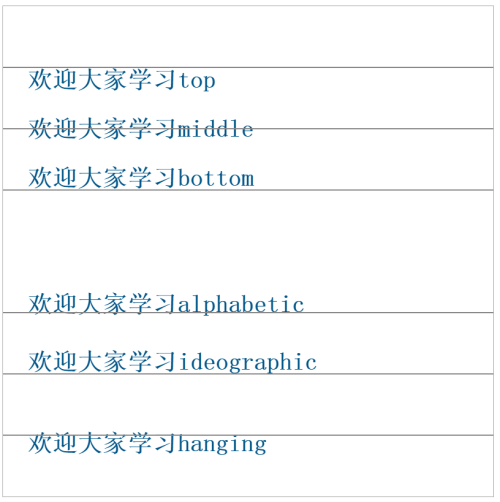
html结构
canvas31
<!DOCTYPE html>
<html>
<head>
<meta charset="utf-8">
<meta http-equiv="X-UA-Compatible" content="IE=edge">
<title>canvas31</title>
<link rel="stylesheet" href="">
</head>
<body>
<canvas id="canvas" style ="border:1px solid #aaa;diplay:block;margin:50px auto;">
当前浏览器不支持canvas,请更换浏览器后再试
</canvas>
</body>
</html>
js脚本
<script>
window.onload = function(){
var canvas = document.getElementById("canvas");
canvas.width = 800;
canvas.height = 800;
context = canvas.getContext("2d");
context.fillStyle = "#058";
context.font = "bold 40px sans-serif";
context.textBaseline = "top";
context.fillText("欢迎大家学习top",40,100);
drawBaseline(context,100);
context.textBaseline = "middle";
context.fillText("欢迎大家学习middle",40,200);
drawBaseline(context,200);
context.textBaseline = "bottom";
context.fillText("欢迎大家学习bottom",40,300);
drawBaseline(context,300);
context.textBaseline = "alphabetic";
context.fillText("欢迎大家学习alphabetic",40,500);
drawBaseline(context,500);
context.textBaseline = "ideographic";
context.fillText("欢迎大家学习ideographic",40,600);
drawBaseline(context,600);
context.textBaseline = "hanging";
context.fillText("欢迎大家学习hanging",40,700);
drawBaseline(context,700);
}
function drawBaseline(context,h){
var width = context.canvas.width;
context.save();
context.strokeStyle = "#888";
context.lineWidth = 2;
context.moveTo(0,h);
context.lineTo(width,h);
context.stroke();
context.restore();
}
</script>
本文转自 素颜猪 51CTO博客,原文链接:http://blog.51cto.com/suyanzhu/1892963