Action 对象就像它看起来的一样, 让 Node 执行一个对属性的变化. Action 对象允许及时地转化Node 属性。继承自 Node 的对都可以在上面执行 Action对象。 举个例子, 你可以移动在一个段时间内把Sprite一个从一个坐标移动到另一个坐标。
MoveTo 和 MoveBy 动作的例子:
|
1
2
3
4
5
6
7
|
// 在2秒内移动精灵到坐标50,10var moveTo = cc.moveTo(2,cc.p(50, 10));
mySprite1.runAction(moveTo);// 在2秒内向右移动20个点var moveBy = cc.moveBy(2, cc.p(20,0));
mySprite2.runAction(moveBy); |
By和To有什么区别呢?
你将会注意到每一个 Action 都有一个 By 和 To 版本.。为什么呢?他们有不同的实现方式。 By是相对于 Node的当前状态。 To action 是绝对的, 这意味着不用考虑 Node的当前状态。让我们看一个具体的例子:
|
1
2
3
4
5
6
7
8
9
10
11
12
13
14
15
16
17
18
|
var mySprite = new cc.Sprite(res.node_png);
mySprite.setPosition(cc.p(200, 256));this.addChild(mySprite);
var showPosition = cc.callFunc(function () {
cc.log("("+ this.getPositionX()+ "," + this.getPositionY()+")");
}, mySprite);cc.log("(" + mySprite.getPositionX() + "," + mySprite.getPositionY() + ")");
// MoveBy - 让我们2秒内在x坐标上移动精灵200像素// MoveBy 是相对的 - x = 200 + 200 ,在移动后是400var moveBy = cc.moveBy(2, cc.p(200, 0));
// MoveTo - 让我们2秒内移动精灵到(300,256)// MoveTo 是绝对 - 不管现在在什么位置,精灵都将移动到(200,256)var moveTo = cc.moveTo(2, cc.p(300, mySprite.getPositionY()));
var seq = cc.sequence(moveBy,showPosition, moveTo, showPosition);
mySprite.runAction(seq); |

基本动作以及如何让它们执行起来
基本动作通常是完成一个目标的单一动作。 让我们看看几个例子:
Move
在一段时间内移动Node 的坐标。
var mySprite1 = new cc.Sprite(res.node_png);
mySprite1.setPosition(cc.p(winSize.width / 4 , winSize.height / 4));
this.addChild(mySprite1);

var mySprite2 = new cc.Sprite(res.node_png);
mySprite2.setPosition(cc.p(winSize.width / 4 , winSize.height / 4 * 3));
this.addChild(mySprite2);
// 在2秒内移动精灵到指定位置
var moveTo = cc.moveTo(2, cc.p(50, 0));
mySprite1.runAction(moveTo);

// 在2秒内向右移动精灵50像素
var moveBy = cc.moveBy(2, cc.p(50, 0));

mySprite2.runAction(moveBy);

Rotate
在2秒内顺时针旋转一个 Node 。
|
1
2
3
4
5
6
7
8
9
10
11
12
13
14
15
|
var mySprite1 = new cc.Sprite(res.node_png);
mySprite1.setPosition(cc.p(winSize.width / 4 , winSize.height / 4));this.addChild(mySprite1);
var mySprite2 = new cc.Sprite(res.node_png);
mySprite2.setPosition(cc.p(winSize.width / 4 , winSize.height / 4 * 3));this.addChild(mySprite2);
// Rotates a Node to the specific angle over 2 secondsvar rotateTo = cc.rotateTo(2.0 , 40.0);
mySprite1.runAction(rotateTo);// Rotates a Node clockwise by 40 degree over 2 secondsvar rotateBy = cc.rotateBy(2.0, 40.0);
mySprite2.runAction(rotateBy); |

Scale
在2秒内放大3倍 Node 然后再在2秒内x轴缩小为0.5,y轴缩小为0.3。
|
1
2
3
4
5
6
7
8
9
10
11
12
13
14
15
16
17
18
19
20
21
22
23
24
25
|
var mySprite1 = new cc.Sprite(res.node_png);
mySprite1.setPosition(cc.p(winSize.width / 4 , winSize.height / 4));this.addChild(mySprite1);
var mySprite2 = new cc.Sprite(res.node_png);
mySprite2.setPosition(cc.p(winSize.width / 4 , winSize.height / 4 * 3));this.addChild(mySprite2);
// Scale uniformly by 3x over 2 secondsvar scaleBy1 = cc.scaleBy(2.0, 3.0);
// Scale X by 0.5 and Y by 0.3 over 2 secondsvar scaleBy2 = cc.scaleBy(2.0, 0.5, 0.3);
var scaleBySeq1 = cc.sequence(scaleBy1, scaleBy2);
mySprite1.runAction(scaleBySeq1);// Scale to uniformly to 3x over 2 secondsvar scaleTo1 = cc.scaleTo(2.0, 3.0);
// Scale X to 0.5 and Y to 0.3 over 2 secondsvar scaleTo2 = cc.scaleTo(2.0, 0.5, 0.3);
var scaleBySeq2 = cc.sequence(scaleTo1, scaleTo2);
mySprite2.runAction(scaleBySeq2); |

Fade In/Out
淡入一个 Node.
它从0到255修改透明度. 这一动作的反向是淡出。
|
1
2
3
4
5
6
7
8
9
10
11
12
13
|
var mySprite = new cc.Sprite(res.node_png);
mySprite.setPosition(winSize.width / 2 , winSize.height / 2 );this.addChild(mySprite);
// fades in the sprite in 1 secondsvar fadeIn = cc.fadeIn(1);
// fades out the sprite in 2 secondsvar fadeOut = cc.fadeOut(2);
//连续动作var seq = cc.sequence(fadeOut, fadeIn);
mySprite.runAction(seq); |
Tint
改变一个Node的RGB从当前颜色到一个自定义的着色。
|
1
2
3
4
5
6
7
8
9
10
11
12
13
14
15
16
17
18
19
20
21
22
|
var mySprite = new cc.Sprite(res.node_png);
mySprite.setPosition(winSize.width / 2 , winSize.height / 2 );this.addChild(mySprite);
//等待两秒var sleep = cc.delayTime(2);
var showlog1 = cc.callFunc(function(){
cc.log("tintTo end");
});var showlog2 = cc.callFunc(function(){
cc.log("tintBy start");
},mySprite);// Tints a node to the specified RGB valuesvar tintTo = cc.tintTo(2.0, 120.0, 232.0, 254.0);
// Tints a node BY the delta of the specified RGB values.var tintBy = cc.tintBy(2, 120, 232, 254);
//连续动作var seq = cc.sequence(tintTo, showlog1, sleep, showlog2, tintBy);
mySprite.runAction(seq); |

Animate
使用Animate 可以让你的 Sprite 对象做简单的原始动画。这只是在动画期间每隔一段时间替换显示帧。让我们细想下这个例子吧。
|
1
2
3
4
5
6
7
8
9
10
11
12
13
14
15
16
17
18
|
cc.spriteFrameCache.addSpriteFrames(res.running_plist);var mySprite = new cc.Sprite(res.runner_png);
mySprite.setPosition(winSize.width / 2 , winSize.height / 2 );this.addChild(mySprite);
// now lets animate the sprite we movedvar SpriteFrame = [];
for (var i = 0; i < 8 ; i++ ){
var str = "runner" + i + ".png";
var frame = cc.spriteFrameCache.getSpriteFrame(str);
SpriteFrame.push(frame);
}// create the animation out of the framesvar animation = new cc.Animation(SpriteFrame, 0.1);
var animate = cc.animate(animation);
// run it and repeat it forevermySprite.runAction(cc.repeatForever(animate)); |
很难在文本描述动画,所以请运行这个动作的示例代码来查看效果。
Easing
Easing是指定加速度的动画,以使动画平滑。 请记住无论是何种速度,ease动作总是在相同的时间开始和结束。Ease 动作是一个在你的游戏里伪造一个物理现象的好方法。或许你需要一些模拟的物理但是又不想增加开锁并增加几个非常基本的动力。 另一个很好的例子是动画菜单和按钮。
下面画片展示了常见的Easing函数:

Cocos2d-js支持Easing比上图提供的更多。它们也很容易实现。让我们来看看一个特定的用例吧。我们让一个Sprite对象从屏幕的顶端掉下来并反弹。
|
1
2
3
4
5
6
7
8
9
10
11
12
13
14
15
16
17
18
19
20
|
// create a spritevar mySprite = new cc.Sprite(res.node_png);
mySprite.setPosition(winSize.width / 2, winSize.height - mySprite.getContentSize().height / 2);this.addChild(mySprite);
// create a MoveBy Action to where we want the sprite to drop from.var move = cc.moveBy(2, cc.p(0, - mySprite.getPositionY() + mySprite.getContentSize().height / 2 ));
var move_back = move.reverse();
// create a BounceIn Ease Actionvar move_ease_in = move.easing(cc.easeIn(2));
var move_ease_in_back = move_back.easing(cc.easeOut(2));
// create a delay that is run in between sequence eventsvar delay =cc.delayTime(0.25);
// create the sequence of actions, in the order we want to run themvar seq1 = cc.sequence(move_ease_in, delay, move_ease_in_back, delay);
// run the sequence and repeat forever.mySprite.runAction(cc.repeatForever(seq1)); |
请运行这个动作的示例代码来查看效果。
Sequences以及如何来运行他们
Sequences是按顺序来执行一系列 Action 对象。这可以是任意数量的 Action 对象、 Functions 甚至是其他的 Sequence。函数?是的! Cocos2d-js有一个 CallFunc 对象, 它允许你创建一个 function() 并传递给你正要执行的Sequence。除了Cocos2d-js规定的stock Action对象,这允许你增加自己的功能到你的Sequence对象中。下面就是当Sequence执行时的样子:

一个 sequence的例子
|
1
2
3
4
5
6
7
8
9
10
11
12
13
14
15
16
17
18
19
20
21
22
23
|
var mySprite = new cc.Sprite(res.node_png);
mySprite.setPosition(winSize.width / 2, winSize.height / 2);this.addChild(mySprite);
// create a few actions.var jump = cc.jumpBy(0.5, cc.p(0, 0), 100, 1);
var rotate = cc.rotateTo(2, 10);
// create a few callbacksvar callbackJump = cc.callFunc(function(){
cc.log("Jumped!");
});var callbackRotate = cc.callFunc(function(){
cc.log("Rotated!");
});// create a sequence with the actions and callbacksvar seq = cc.sequence(jump, callbackJump, rotate, callbackRotate);
// run itmySprite.runAction(seq); |
所以这个 Sequence 动作做了什么?
它将按顺序执行以下操作:
Jump -> callbackJump -> Rotate -> callbackRotate
请运行这个动作的示例代码来查看效果。
Spawn
Spawn 除了所有动作都在同一时间执行外和 Sequence非常类似。你可以使用任意数量的Action对象甚至是其他的Spawn对象!
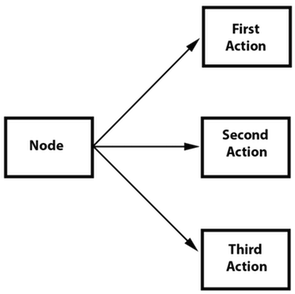
Spawn 产生的结果和连续执行多个runAction()语句是相同的。但是,Spawn的好处是可以把它放进一个Sequence里来帮助实现用其他方式不能实现的特定效果。结合Spawn和Sequence是一个非常强大的特性。
给出的例子:
|
1
2
3
4
5
6
7
8
9
10
11
12
13
14
|
// create 2 actions and run a Spawn on a Spritevar mySprite1 = new cc.Sprite(res.node_png);
mySprite1.setPosition(winSize.width / 4, winSize.height * 3 / 4);this.addChild(mySprite1);
var moveBy1 = cc.moveBy(10, cc.p(400,100));
var fadeTo1 = cc.fadeTo(2, 120);
var mySprite2 = new cc.Sprite(res.node_png);
mySprite2.setPosition(winSize.width / 4, winSize.height * 2 / 4);this.addChild(mySprite2);
var moveBy2 = cc.moveBy(10, cc.p(400,100));
var fadeTo2 = cc.fadeTo(2, 120);
|
使用一个Spawn:
|
1
2
3
|
// running the above Actions with Spawn.var mySpawn = cc.spawn(moveBy1, fadeTo1);
mySprite1.runAction(mySpawn); |
以及连续的 runAction() 语句:
|
1
2
3
|
// running the above Actions with consecutive runAction() statements.mySprite2.runAction(moveBy2);mySprite2.runAction(fadeTo2); |
两个将会产生相同的结果。 然而,你可以在Sequence使用Spawn 。这个流程图展示它看起来的样子:

|
1
2
3
4
5
6
7
8
9
10
11
12
13
14
15
16
17
18
|
// create a Spritevar mySprite3 = new cc.Sprite(res.node_png);
mySprite3.setPosition(winSize.width / 4, winSize.height * 1 / 4);this.addChild(mySprite3);
// create a few Actionsvar moveBy3 = cc.moveBy(10, cc.p(200,30));
var fadeTo3 = cc.fadeTo(2., 120);
var scaleBy3 = cc.scaleBy(2, 3);
// create a Spawn to usevar mySpawn3 = cc.spawn(scaleBy3, fadeTo3);
// tie everything together in a sequencevar seq3 = cc.sequence(moveBy3, mySpawn3, moveBy3);
// run itmySprite3.runAction(seq3); |
请运行这个动作的示例代码来查看效果。
Reverse
Reverse就像它看起来那样执行。如果你运行一系列动作,你可以调用reverse()来用相反的方向来执行它。然而不仅仅是简单地在相反运行。它实际上也操作在reverse中原始Sequence或Spawn的内容。使用上面的Spawn例子来产生反向动作是很简单的。
|
1
2
|
// reverse a sequence, spawn or action
mySprite.runAction(mySpawn.reverse()); |
大多数 Action 和 Sequence 对象都是可逆的。
它使用起来很简单,但是让我们来确认下我们看见发生了什么。给出的例子:
|
1
2
3
4
5
6
7
8
9
10
11
12
13
14
15
16
17
18
19
20
|
// create a Spritevar mySprite = new cc.Sprite(res.node_png);
mySprite.setPosition(50, 56);this.addChild(mySprite);
// create a few Actionsvar moveBy = cc.moveBy(2, cc.p(500,0));
var scaleBy = cc.scaleBy(2, 2);
var delay = cc.delayTime(2);
// create a sequencevar delaySequence = cc.sequence(delay, delay.clone(), delay.clone(), delay.clone());
var sequence = cc.sequence(moveBy, delay, scaleBy, delaySequence);
// run itmySprite.runAction(sequence.repeatForever());// reverse itmySprite.runAction(sequence.reverse().repeatForever()); |
什么正在发生 ?我们列出的步骤的列表可能是有益于理解的:
mySprite被创建mySprite的坐标设置成 (50, 56)sequence开始执行sequence移动mySprite向右 500, 用时2秒,mySprite的新坐标是 (550, 56)sequence等待2秒sequence在2秒内放大mySprite2倍sequence等待另外6秒 (注意我们运行另一个序列来完成这一任务)我们在sequence上执行
reverse, 所以我们运行了每个动作的倒退sequence等待6秒sequence在2秒内放大mySprite-2xsequence等待2秒sequence向右移动mySprite-500, 在2秒内,mySprite的新坐标是 (50, 56)
你可以看到reverse()使用起来很简单,但它的内在逻辑没那么简单。 Cocos2d-js 做了大部分艰巨的任务!