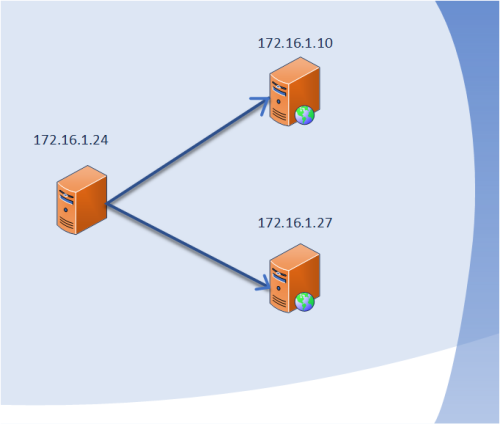
1.建立ssh无秘钥认证的关系
|
1
|
yum -y install expect
|
1.1cat auto_deploy.sh
|
1
2
3
4
5
6
7
8
9
10
11
12
13
14
15
16
17
18
19
20
|
#!/bin/sh. /etc/init.d/functions
#1.product key pairssh-****** -t dsa -P '' -f ~/.ssh/id_dsa >/dev/null 2>&1
if [ $? -eq 0 ];then
action "create dsa success" /bin/true
else
action "create dsa failed" /bin/false
exit 1
fi#2.dis pub keyfor ip in `cat ip.txt`
do expect expect_fenfagongyao.exp ~/.ssh/id_dsa.pub $ip >/dev/null 2>&1
if [ $? -eq 0 ];then
action "$ip" /bin/true
else
action "$ip" /bin/false
fi
done |
1.2cat expect_fenfagongyao.exp
|
1
2
3
4
5
6
7
8
9
10
11
12
13
14
15
16
17
18
|
#!/usr/bin/expect if { $argc != 2 } {
send_user "usege: expect expect_fenfagongyao.exp file host\n"
exit
}
##define varset file [lindex $argv 0]
set host [lindex $argv 1]
set password "123456"
expect {
"yes/no" {send "yes\r";exp_continue}
"*password" {send "$password\r"}
}
expect eof exit -onexit {
send_user "say good bye to you!\n"
} |
1.3 cat ip.txt
|
1
2
|
172.16.1.10172.16.1.27 |
2.安装ansible
说明:采用yum安装,源码包安装特别麻烦
2.1.基本的设置
|
1
2
3
4
5
6
7
8
9
|
yum -y install ansible
cd /etc/ansible
llansible.cfg #ansible的系统配置文件
hosts #客户端的主机的配置文件
在/etc/ansible/hosts文件的最后添加:
[webservers]172.16.1.10172.16.1.27 |
2.2查看常用的模块
|
1
2
3
4
5
6
7
8
9
10
|
[[email protected] ansible]# ansible-doc -l
a10_server Manage A10 Networks AX/SoftAX/Thunder/vThunder devices
a10_service_group Manage A10 Networks devices' service groups a10_virtual_server Manage A10 Networks devices' virtual servers acl Sets and retrieves file ACL information.
add_host add a host (and alternatively a group) to the ansible-playbook in-memory inventor...
airbrake_deployment Notify airbrake about app deployments alternatives Manages alternative programs for common commands
apache2_module enables/disables a module of the Apache2 webserver
apk Manages apk packages |
2.2ansible常用的命令总结
|
1
2
3
4
5
6
7
8
9
10
11
12
13
14
15
|
ansible webservers #webservers模块
ansible all #所有的模块
ansible webservers -m ping #查看主机存活状态
ansible webservers -m shell -a "bash /tmp/test.sh" #远程执行shell脚本,执行客户端的/tmp/test.sh 脚本
ansible webservers -m script -a '/root/run.sh' #执行脚本/root/run.sh 为本地的脚本
ansible webservers -m command -a 'uptime' #远程执行命令
ansible webservers -m command -a 'yum -y install httpd' #远程安装apache
ansible webservers -m service -a 'name=httpd state=started'
name:软件的名字stated:有started stoped restarted reloaded ansible webservers -m copy -a 'dest=/tmp src=/root/run.sh' #本机的/root/run.sh 拷贝到客户机/tmp下
ansible all -m cron -a 'name="cron job" minute=*/5 hour=* day=* month=* weekday=* job="/usr/sbin/ntpdate time.nist.gov"' #定时任务
ansible webservers -m file -a "dest=/tmp/test.sh mode=777 owner=sanlang group=sanlang" #修改客户端文件权限
ansible -i /etc/ansible/hosts webservers -m setup #查看客户端主机的详细信息
ansible webservers -m file -a "src=/etc/fstab dest=/tmp/fstab state=link" #创建软连接
|
本文转自 小小三郎1 51CTO博客,原文链接:http://blog.51cto.com/wsxxsl/1837689,如需转载请自行联系原作者