因为网上的教程nginx的版本比较old,所以用新版本的nginx配置教程多数有错误,下面整理,希望能帮到你
LNMP环境已经搭建好,nginx版本是1.4.7,php版本是5.3.17,
|
1
2
|
cat /etc/redhat-releaseCentOS release 6.4 (Final)
|
|
1
2
|
/usr/local/nginx/sbin/nginx -vnginx version: nginx/1.4.7
|
|
1
2
|
/usr/local/php/bin/php -vPHP 5.3.17 (cli) (built: Jan 23 2014 09:47:42)
|
安装配置nagios见 http://bbotte.blog.51cto.com/6205307/1403997
yum install perl perl-devel fcgi-devel
在服务端进行配置
为nginx添加fcgi支持,下载并安装 http://pan.baidu.com/s/1sXpGj
IO-1.25.tar.gz
IO-All-0.41.tar.gz
FCGI-ProcManager-0.18.tar.gz
FCGI-0.70.tar.gz
安装时候都一样,参考下面
tar -xzf IO-1.25.tar.gz
cd IO-1.25
perl Makefile.PL
make && make install
vim /usr/local/nginx/start_perl_cgi.sh
|
1
2
3
4
5
6
7
8
9
10
11
12
13
14
15
16
17
18
19
20
21
22
23
24
25
26
27
28
29
30
31
32
33
|
#!/bin/bash#set -x
dir=/usr/local/nginxstop (){#pkill -f $dir/perl-fcgi.plkill $(cat $dir/logs/perl-fcgi.pid)rm $dir/logs/perl-fcgi.pid 2>/dev/null
rm $dir/logs/perl-fcgi.sock 2>/dev/null
echo "stop perl-fcgi done"
}start (){rm $dir/now_start_perl_fcgi.sh 2>/dev/null
chown nagios.root $dir/logsecho "$dir/perl-fcgi.pl -l $dir/logs/perl-fcgi.log -pid $dir/logs/perl-fcgi.pid -S $dir/logs/perl-fcgi.sock" >>$dir/now_start_perl_fcgi.sh
chown nagios.nagcmd $dir/now_start_perl_fcgi.shchmod u+x $dir/now_start_perl_fcgi.shsudo -u nagios $dir/now_start_perl_fcgi.shecho "start perl-fcgi done"
}case $1 in
stop)stop;;start)start;;restart)stopstart;;esac |
nginx.conf
|
1
2
3
4
5
6
7
8
9
10
11
12
13
14
15
16
17
18
19
20
21
22
23
24
25
26
27
28
29
30
31
32
33
34
35
36
37
38
39
40
41
42
43
44
45
46
47
48
49
50
51
52
53
54
55
56
57
|
server { listen 80;
server_name 192.168.22.240;
root /usr/local/nagios/share;
index index.html index.php;
auth_basic "nagiosadmin";
auth_basic_user_file /usr/local/nagios/etc/htpasswd.users;
location ~ .*\.php?$ {
fastcgi_pass unix:/tmp/php-cgi.sock;
fastcgi_index index.php;
include fastcgi_params;
fastcgi_param SCRIPT_FILENAME /usr/local/nagios/share$fastcgi_script_name;
}
location /nagios/
{
gzip off;
alias /usr/local/nagios/share/;
index index.html index.htm index.php;
}
location ~ \.cgi$ {
rewrite ^/nagios/cgi-bin/(.*)\.cgi /$1.cgi break;
fastcgi_pass unix:/usr/local/nginx/logs/perl-fcgi.sock;
fastcgi_index index.cgi;
fastcgi_param SCRIPT_FILENAME /usr/local/nagios/sbin$fastcgi_script_name;
fastcgi_param HTTP_ACCEPT_LANGUAGE en_US;
include fastcgi_params;
}
}##下面是其他的web服务器server {
listen 80;
server_name abc.com;
index index.html index.htm index.php;
root /data;
location ~ .*\.(php|php5)?$
{
try_files $uri =404;
fastcgi_pass unix:/tmp/php-cgi.sock;
fastcgi_index index.php;
include fcgi.conf;
}
location /status {
stub_status on;
access_log off;
}
location ~ .*\.(gif|jpg|jpeg|png|bmp|swf)$
{
expires 30d;
}
location ~ .*\.(js|css)?$
{
expires 12h;
}
access_log /home/wwwlogs/access.log access;
}
|
nginx里面/usr/local/nagios/etc/htpasswd.users 的密码生成,yum安装一个httpd,生成一个密码,或者写 nagiosadmin:50QHC5y6Y1r7k 用户名是nagiosadmin 密码是123456
执行start_perl_cgi.sh,生成perl-fcgi.sock
|
1
|
/usr/local/nginx # ./start_perl_cgi.sh start |
这个脚本会生成一个now_start_perl_fcgi.sh
ps aux|grep fcgi
nagios 17577 0.0 0.4 138952 5000 pts/3 S 17:49 0:00 /usr/bin/perl /usr/local/nginx/perl-fcgi.pl -l /usr/local/nginx/logs/perl-fcgi.log -pid /usr/local/nginx/logs/perl-fcgi.pid -S /usr/local/nginx/logs/perl-fcgi.sock
下面是php-fpm的配置文件
|
1
2
3
4
5
6
7
8
9
10
11
12
13
14
15
16
|
[global]pid = /usr/local/php/var/run/php-fpm.pid
error_log = /usr/local/php/var/log/php-fpm.log
log_level = notice[www]listen = /tmp/php-cgi.sockuser = wwwgroup = www#listen = 127.0.0.1:9000
#pm = dynamic
pm = static
pm.max_children = 10
pm.start_servers = 2
pm.min_spare_servers = 1
pm.max_spare_servers = 6
request_terminate_timeout = 60
|
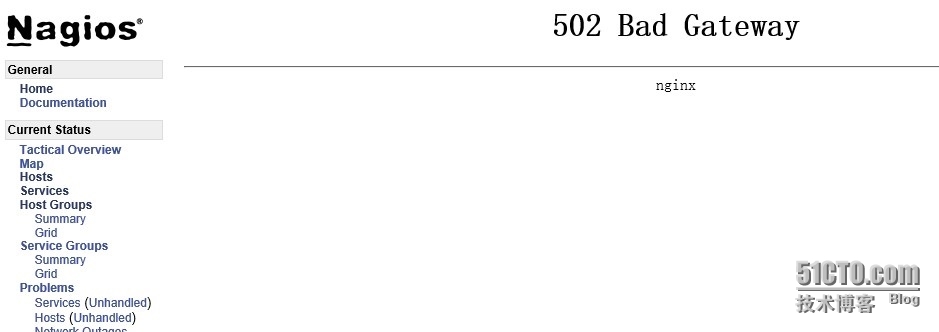
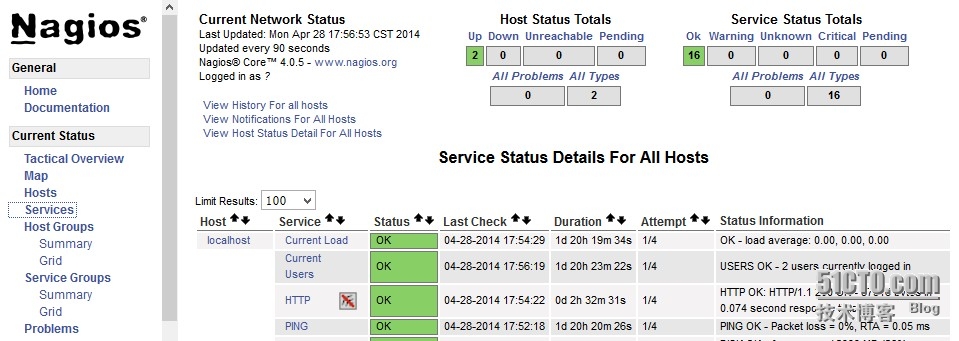
如果在nagios页面出现502错误,则修改权限 /usr/local/nginx # chmod 777 logs/perl-fcgi.sock
总结:
php-fpm会生成/tmp/php-cgi.sock (参考上面配置),start_perl_cgi.sh 这个脚本会生成 /usr/local/nginx/logs/perl-fcgi.sock
nginx处理php页面用php-cgi.sock,nagios/sbin/下面的cgi用perl-fcgi.sock解析,(有些文章添加了.pl支持,也是perl-fcgi.sock解析)
所以只需要安装FCGI支持就可以的
如果出现下面问题
It appears as though you do not have permission to view information for any of the services you requested...
and check the authorization options in your CGI configuration file
请把/nagios/etc/cgi.cfg 里面use_authentication=1 改为use_authentication=0,因为nginx里面已经包含认证的文件和密码,