一、前端页面
1.下载jquery.uploadify
去uploadify官网(http://www.uploadify.com/download/ )下载压缩包,解压后放在如下路径:
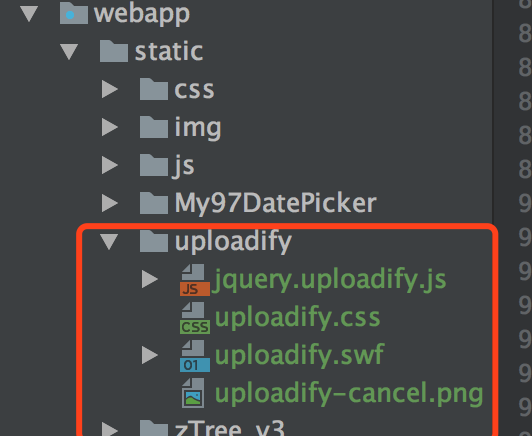
2.html结构
form表单的上传控件部分:
|
1
2
3
4
5
6
7
8
|
<div class="control-group">
<label class="control-label" for="coverImage">代表图</label>
<div class="controls">
<input type="hidden" th:field="*{coverImage}">
<input class="input-file" id="fileInput" type="file">
<img id="previewCoverImage" src="#">
</div>
</div>
|
3.页面引入uploadify
|
1
2
|
<link rel="stylesheet" th:href="@{/static/uploadify/uploadify.css}”>
<script type="text/javascript" th:src="@{/static/uploadify/jquery.uploadify.js}"></script>
|
4.自定义上传代码
|
1
2
3
4
5
6
7
8
9
10
11
12
13
14
15
16
17
18
19
20
21
22
23
24
25
|
<script th:inline="javascript">
/*<![CDATA[*/
$(document).ready(function () {
$("#fileInput").uploadify(
{
'swf': /*[[@{/static/uploadify/uploadify.swf}]]*/,
'uploader': /*[[@{/upload/uploadCoverImage}]]*/, //后台action地址
'queueID': 'fileQueue',
'auto': true,
'multi': false,
'buttonText': '上传图片',
'fileObjName': 'pic', //对应action中的参数字段名称
'width': 70,
'height': 20,
'onUploadSuccess': function (file, data, response) {
if (data != null) {
$("#coverImage").val(data); //赋值给hidden控件,便于提交form表单
$("#previewCoverImage").attr("src",data); //复制给img控件用来预览
}
}
});
});
/*]]>*/
</script>
|
二、站点配置
1.调整springmvc-servlet.xml文件,添加配置支持文件上传
|
1
2
|
<!-- 支持上传文件 --><bean id="multipartResolver" class="org.springframework.web.multipart.commons.CommonsMultipartResolver"/>
|
2.添加maven依赖
|
1
2
3
4
5
|
<dependency> <groupId>commons-fileupload</groupId>
<artifactId>commons-fileupload</artifactId>
<version>1.3.1</version>
</dependency> |
三、后台代码
1.controller
|
1
2
3
4
5
6
7
8
9
10
11
12
13
14
15
16
17
18
19
20
21
22
23
|
@Controller@RequestMapping("/upload")
public class UploadController {
@RequestMapping(value = "/uploadCoverImage", method = RequestMethod.POST)
@ResponseBody
public String uploadCoverImage(@RequestParam("pic") CommonsMultipartFile pic, HttpServletRequest req, HttpServletResponse response) throws IOException {
//上传文件信息
String fileName = pic.getOriginalFilename();
String fileType = fileName.split("[.]")[1];
//生成文件信息
String filePath = req.getSession().getServletContext().getRealPath(FilePathConst.COVER_IMAGE_UPLOAD);
String uuid = UUID.randomUUID().toString().replace("-", "");
String uuidFileName = uuid + fileName;
//保存文件
File f = new File(filePath + "/" + uuid + "." + fileType);
FileUtils.uploadFile(pic.getInputStream(), uuidFileName, filePath);
return SiteConst.SITE_DOMAIN + FilePathConst.COVER_IMAGE_UPLOAD + uuidFileName;
}
} |
2.FileUtils工具类
|
1
2
3
4
5
6
7
8
9
10
11
12
13
14
15
16
17
18
19
20
21
22
23
24
25
26
27
28
29
30
31
32
33
34
35
36
37
38
39
40
41
42
43
44
45
46
47
48
49
50
|
public class FileUtils {
public static void uploadFile(InputStream is, String fileName, String filePath) {
FileOutputStream fos = null;
BufferedOutputStream bos = null;
BufferedInputStream bis = null;
File file = new File(filePath);
if (!file.exists()) {
file.mkdirs();
}
File f = new File(filePath + "/" + fileName);
try {
bis = new BufferedInputStream(is);
fos = new FileOutputStream(f);
bos = new BufferedOutputStream(fos);
byte[] bt = new byte[4096];
int len;
while ((len = bis.read(bt)) > 0) {
bos.write(bt, 0, len);
}
} catch (Exception e) {
e.printStackTrace();
} finally {
try {
if (null != bos) {
bos.close();
bos = null;
}
if (null != fos) {
fos.close();
fos = null;
}
if (null != is) {
is.close();
is = null;
}
if (null != bis) {
bis.close();
bis = null;
}
} catch (Exception e) {
e.printStackTrace();
}
}
}
} |
本文转自 陈敬(Cathy) 博客园博客,原文链接:http://www.cnblogs.com/janes/p/7611980.html,如需转载请自行联系原作者