1)实验拓扑信息
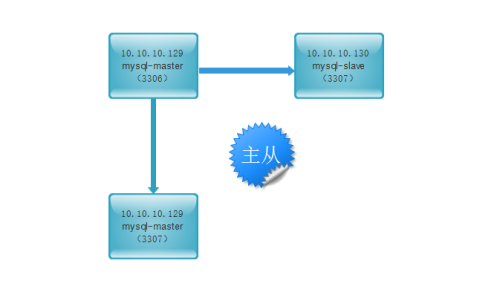
mysql版本:5.5.32(基于源代码安装)
系统版本:CentOS6.7
10.10.10.129: mysql的主服务器
10.10.10.130: mysql的从服务器
目的:
本地主从:
10.10.10.129 3306 --> 10.10.10.10.129 3307
异地主从:
10.10.10.129 3306 --> 10.10.10.10.130 3306
2)主库上的配置
a、准备mysql的测试环境
先准备好mysql多实例环境,之前我已经写过博客,这里就不重复了,可以参考http://molewan.blog.51cto.com/287340/1860198
b、在主库(10.10.10.129)上开启binlog记录功能
|
1
2
3
4
5
6
|
# grep server-id /data/3306/my.cnf server-id = 1
# grep server-id /data/3307/my.cnf server-id = 3
# grep log-bin /data/3306/my.cnf log-bin = /data/3306/mysql-bin
|
登陆数据库进行查看:
|
1
2
3
4
5
6
7
8
|
# mysql -u root -S /data/3306/mysql.sock -predhat12345mysql> show variables like 'log_bin';
+---------------+-------+| Variable_name | Value |+---------------+-------+| log_bin | ON |+---------------+-------+1 row in set (0.01 sec)
|
c、建立用于主从复制的账号
|
1
2
3
4
5
6
7
8
9
10
11
12
13
14
15
16
17
18
19
20
21
22
23
24
25
26
27
|
# mysql -u root -S /data/3306/mysql.sock -predhat12345mysql> grant replication slave on *.* to 'rep'@'10.10.10.%' identified by 'redhat12345';
Query OK, 0 rows affected (0.01 sec)mysql> flush privileges;Query OK, 0 rows affected (0.00 sec)mysql> select user,host from mysql.user;
+------+------------+| user | host |+------+------------+| wan | % || rep | 10.10.10.% || wan | 10.10.10.% || root | 127.0.0.1 || root | ::1 || | C67-X64-A8 || root | C67-X64-A8 || | localhost || root | localhost |+------+------------+9 rows in set (0.00 sec)
mysql> select user,host from mysql.user where user='rep';
+------+------------+| user | host |+------+------------+| rep | 10.10.10.% |+------+------------+1 row in set (0.00 sec)
|
d、实现对主数据库锁表只读(当前窗口不要关闭)
|
1
2
3
4
5
6
7
8
9
10
11
|
mysql> flush table with read lock;
Query OK, 0 rows affected (0.00 sec)重新打开一个窗口,锁表后查看主库状态:# mysql -uroot -S /data/3306/mysql.sock -predhat12345mysql> show master status;+------------------+----------+--------------+------------------+| File | Position | Binlog_Do_DB | Binlog_Ignore_DB |+------------------+----------+--------------+------------------+| mysql-bin.000004 | 337 | | |+------------------+----------+--------------+------------------+1 row in set (0.00 sec)
|
e、使用mysqldump进行数据库备份:
|
1
2
3
4
5
6
7
8
9
10
11
12
13
14
15
|
# mysqldump -uroot -p'redhat12345' -S /data/3306/mysql.sock --events -A -B |gzip >/mysqlback/mysql_bak.$(date +%F).sql.gz# echo $?0# ls -l /mysqlback/总用量 144-rw-r--r-- 1 root root 144402 10月 9 02:54 mysql_bak.2016-10-09.sql.gz# du -sh /mysqlback/mysql_bak.2016-10-09.sql.gz 144K/mysqlback/mysql_bak.2016-10-09.sql.gz
为了确保导出数据期间,数据库没有数据插入,导库完毕可以再次检查主库状态信息# mysql -uroot -S /data/3306/mysql.sock -predhat12345 -e "show master status"+------------------+----------+--------------+------------------+| File | Position | Binlog_Do_DB | Binlog_Ignore_DB |+------------------+----------+--------------+------------------+| mysql-bin.000004 | 337 | | |+------------------+----------+--------------+------------------+ |
f、导出数据完毕后,解锁主库,恢复可写
|
1
2
|
mysql> unlock tables;Query OK, 0 rows affected (0.01 sec) |
3)从库上的配置
a、10.10.10.129 3307数据库上的配置
|
1
2
3
4
5
6
7
8
9
10
11
12
13
14
15
16
17
18
19
20
21
22
23
24
25
26
27
28
29
30
31
32
33
34
35
36
37
38
39
40
41
42
43
44
45
46
47
48
49
50
51
52
53
54
55
56
57
58
59
60
61
62
63
64
65
|
# cd /mysqlback/# lsmysql_bak.2016-10-09.sql.gz# gzip -d mysql_bak.2016-10-09.sql.gz # lsmysql_bak.2016-10-09.sql# mysql -uroot -p'redhat12345' -S /data/3307/mysql.sock </mysqlback/mysql_bak.2016-10-09.sql # echo $?0# mysql -uroot -S /data/3307/mysql.sock -p'redhat12345'<<EOFchange master tomaster_host='10.10.10.129',
master_port=3306,master_user='rep',
master_password='redhat12345',
master_log_file='mysql-bin.000004',
master_log_pos=337;EOFmysql> start slave;Query OK, 0 rows affected (0.01 sec)mysql> show slave status\G;*************************** 1. row *************************** Slave_IO_State: Waiting for master to send event
Master_Host: 10.10.10.129
Master_User: rep
Master_Port: 3306
Connect_Retry: 60
Master_Log_File: mysql-bin.000004
Read_Master_Log_Pos: 337
Relay_Log_File: relay-bin.000002
Relay_Log_Pos: 253
Relay_Master_Log_File: mysql-bin.000004
Slave_IO_Running: Yes
Slave_SQL_Running: Yes
Replicate_Do_DB:
Replicate_Ignore_DB: mysql
Replicate_Do_Table:
Replicate_Ignore_Table:
Replicate_Wild_Do_Table:
Replicate_Wild_Ignore_Table:
Last_Errno: 0
Last_Error:
Skip_Counter: 0
Exec_Master_Log_Pos: 337
Relay_Log_Space: 403
Until_Condition: None
Until_Log_File:
Until_Log_Pos: 0
Master_SSL_Allowed: No
Master_SSL_CA_File:
Master_SSL_CA_Path:
Master_SSL_Cert:
Master_SSL_Cipher:
Master_SSL_Key:
Seconds_Behind_Master: 0
Master_SSL_Verify_Server_Cert: No Last_IO_Errno: 0
Last_IO_Error:
Last_SQL_Errno: 0
Last_SQL_Error:
Replicate_Ignore_Server_Ids:
Master_Server_Id: 1
1 row in set (0.00 sec)
ERROR: No query specified |
主从复制是否成功,最关键的为下面的3项状态参数:
|
1
2
3
4
|
# mysql -uroot -predhat12345 -S /data/3307/mysql.sock -e "show slave status\G"|egrep "IO_Running|SQL_Running|_Behind_Master" Slave_IO_Running: Yes
Slave_SQL_Running: Yes
Seconds_Behind_Master: 0
|
b、10.10.10.130 3306数据库上的配置
|
1
2
3
4
5
6
7
8
9
10
11
12
13
14
15
16
17
18
19
20
21
22
23
24
25
26
27
28
29
30
31
32
33
34
35
36
37
38
39
40
41
42
43
44
45
46
47
48
49
50
51
52
53
54
55
56
57
58
59
60
61
62
63
64
|
# mkdir -p /mysqlback/# scp /mysqlbackup/mysql_bak.2016-10-09.sql.gz 10.10.10.130:/mysqlback# gzip -d mysql_bak.2016-10-09.sql.gz # lsmysql_bak.2016-10-09.sql# mysql -uroot -p'redhat12345' -S /data/3306/mysql.sock </mysqlback/mysql_bak.2016-10-09.sql # echo $?0# mysql -uroot -S /data/3306/mysql.sock -p'redhat12345'<<EOFchange master tomaster_host='10.10.10.129',
master_port=3306,master_user='rep',
master_password='redhat12345',
master_log_file='mysql-bin.000004',
master_log_pos=337;EOFmysql> start slave;Query OK, 0 rows affected (0.01 sec)mysql> show slave status\G;*************************** 1. row *************************** Slave_IO_State: Waiting for master to send event
Master_Host: 10.10.10.129
Master_User: rep
Master_Port: 3306
Connect_Retry: 60
Master_Log_File: mysql-bin.000004
Read_Master_Log_Pos: 337
Relay_Log_File: relay-bin.000002
Relay_Log_Pos: 253
Relay_Master_Log_File: mysql-bin.000004
Slave_IO_Running: Yes
Slave_SQL_Running: Yes
Replicate_Do_DB:
Replicate_Ignore_DB: mysql
Replicate_Do_Table:
Replicate_Ignore_Table:
Replicate_Wild_Do_Table:
Replicate_Wild_Ignore_Table:
Last_Errno: 0
Last_Error:
Skip_Counter: 0
Exec_Master_Log_Pos: 337
Relay_Log_Space: 403
Until_Condition: None
Until_Log_File:
Until_Log_Pos: 0
Master_SSL_Allowed: No
Master_SSL_CA_File:
Master_SSL_CA_Path:
Master_SSL_Cert:
Master_SSL_Cipher:
Master_SSL_Key:
Seconds_Behind_Master: 0
Master_SSL_Verify_Server_Cert: No
Last_IO_Errno: 0
Last_IO_Error:
Last_SQL_Errno: 0
Last_SQL_Error:
Replicate_Ignore_Server_Ids:
Master_Server_Id: 1
1 row in set (0.00 sec)
ERROR: No query specified |
在10.10.10.130服务器上检查
主从复制是否成功,最关键的为下面的3项状态参数:
|
1
2
3
4
|
# mysql -uroot -predhat12345 -S /data/3306/mysql.sock -e "show slave status\G"|egrep "IO_Running|SQL_Running|_Behind_Master" Slave_IO_Running: Yes
Slave_SQL_Running: Yes
Seconds_Behind_Master: 0
|
4)mysql主从同步测试
在10.10.10.129上查看数据库:
|
1
2
3
4
5
6
7
8
9
10
11
12
13
14
15
16
17
18
19
20
21
22
23
24
25
26
|
[[email protected] ~]# mysql -uroot -predhat12345 -S /data/3306/mysql.sock -e "show databases;"
+--------------------+| Database |+--------------------+| information_schema || dawnpro || eip || ems || hangzhou_dawnpro || mysql || performance_schema || wh410 |+--------------------+[[email protected] ~]# mysql -uroot -predhat12345 -S /data/3307/mysql.sock -e "show databases;"
+--------------------+| Database |+--------------------+| information_schema || dawnpro || eip || ems || hangzhou_dawnpro || mysql || performance_schema || wh410 |+--------------------+ |
在10.10.10.130上查看数据库:
|
1
2
3
4
5
6
7
8
9
10
11
12
13
|
[[email protected] mysqlbackup]# mysql -uroot -predhat12345 -S /data/3306/mysql.sock -e "show databases;"
+--------------------+| Database |+--------------------+| information_schema || dawnpro || eip || ems || hangzhou_dawnpro || mysql || performance_schema || wh410 |+--------------------+ |
通过对比,可以发现,数据库完全一致,然后我们在主库上新建一个blog的数据库
|
1
2
3
4
5
6
7
8
9
10
11
12
13
14
15
16
17
18
19
20
21
22
23
24
25
26
27
28
29
|
[[email protected] mysqlback]# mysql -uroot -predhat12345 -S /data/3307/mysql.sock -e "show databases;"
+--------------------+| Database |+--------------------+| information_schema || blog || dawnpro || eip || ems || hangzhou_dawnpro || mysql || performance_schema || wh410 |+--------------------+[[email protected] mysqlbackup]# mysql -uroot -predhat12345 -S /data/3306/mysql.sock -e "show databases;"
+--------------------+| Database |+--------------------+| information_schema || blog || dawnpro || eip || ems || hangzhou_dawnpro || mysql || performance_schema || wh410 |+--------------------+主从同步到此完成 |
5)注意事项
|
1
2
3
4
|
1)master与slave中的server-id要保持唯一
2)备份导出前要使用“flush table with read lock;”让数据库锁表只读,并且这个窗口不要关闭
3)slave上要start slave;接收信息4)master与slave时间要保持一致 |
本文转自 冰冻vs西瓜 51CTO博客,原文链接:http://blog.51cto.com/molewan/1860649,如需转载请自行联系原作者