场景:Web站点部分是IIS下的站点,IIS不像apache,nginx提供了status模块,可以直接通过web或nagios监控到站点的当前连接数等情况。
监控服务器是CentOS 6.3+Cacti+Nagios+check_mk 。以下简称监控服务器
所有的Windows服务器用check_mk-agent监控。以下简称监控客户端
任务:打算利用check_mk-agent的插件来监控IIS的性能数据
Windows 客户端监控插件:
由于check_mk_agent支持bat.vbs,exe的客户端插件,
最初打算用wmic实现。
C:\Program Files\check_mk\plugins\下创建w3svc_perf.bat 内容为:
|
1
2
3
|
@echo off
echo ^<^<^<w3svc_perf^>^>^>
wmic path Win32_PerfRawData_W3SVC_WebService get Name,currentanonymoususers,currentconnections,currentISAPIExtensionrequests /format:csv
|
这里只取当前连接数,当前匿名用户数,当前ISAPI请求数。
保存后重启check_mk_agent服务。
在监控服务器上执行cmk -d 监控客户端IP
得到如下内容
|
1
2
3
4
5
6
7
8
9
10
11
12
13
14
15
|
.................................[`System`][`Windows PowerShell`]<<<w3svc_perf>>>_Total,16,605,16xxx.xxx.com,0,10,0xxx.xxx.com,4,88,4xxx.xxx.com,12,507,12awstats,0,0,0<<<local>>>
<<<mrpe>>><<<systemtime>>>1388575521 |
但是执行多次发现 有的时候 <<<w3svc_perf>>>下有一个空行,有的时候没有。不知道问题在哪里
不晓得哪个给解释一下。逐放弃wmic bat插件 改用wmi
C:\Program Files\check_mk\plugins\下创建w3svc_perf.vbs内容如下:
|
1
2
3
4
5
6
7
8
9
10
11
12
13
|
' w3svc_perf.vbsOn Error Resume Next
Dim objWMIService, objItem, colItems, strComputer
Dim WshNetwork : Set WshNetwork = CreateObject("WScript.Network")
Dim Hostname : HostName = WshNetwork.ComputerName
strComputer = "."
Wscript.Echo "<<<w3svc_perf>>>"
Set objWMIService = GetObject("winmgmts:\\" & strComputer & "\root\CIMV2")
Set colItems = objWMIService.ExecQuery("select name,CurrentAnonymousUsers,CurrentConnections,CurrentISAPIExtensionRequests from Win32_PerfRawData_W3SVC_WebService",,48)
For Each objItem in colItems
Wscript.Echo objItem.Name & "," & objItem.CurrentAnonymousUsers & "," & objItem.CurrentConnections & "," & objItem.CurrentISAPIExtensionRequests
NextWSCript.Quit |
在监控服务器上执行cmk -d 监控客户端IP
得到正常结果,反复执行后<<<w3svc_perf>>>下无空行
在监控服务器/usr/share/check_mk/checks下创建w3svc_perf,内容为:
|
1
2
3
4
5
6
7
8
9
10
11
12
|
#!/usr/bin/python# -*- encoding: utf-8; py-indent-offset: 4 -*-#创建库存函数def inventory_w3svc_perf(checkname,info):
inventory = []
print info:
return inventory
#创建监控check函数def check_w3svc_perf(item, params, info):
return (0,"test ok")
#创建check类型(在check_info字典中添加新的check库存,check函数以及是否出性能图)check_info['w3svc_perf'] = (check_w3svc_perf, "w3svc%s", 1, inventory_w3svc_perf)
|
cmk -L |grep w3svc_perf
|
1
|
w3svc_perf tcp yes yes w3svc%s |
可以看到已经添加新的check类型了。
根据print info断代码的返回,可以看出,客户端插件返回的
|
1
2
3
4
5
6
|
<<<w3svc_perf>>>_Total,16,605,16xxx.xxx.com,0,10,0xxx.xxx.com,4,88,4xxx.xxx.com,12,507,12awstats,0,0,0 |
部分内容 被作为参数info传递到服务端的监控插件的库存以及check函数中。且为一个列表返回。用cmk --checks=w3svc_perf -I 监控客户端 可以看到上述的print info的返回值
|
1
2
3
4
5
|
[['_Total,12,667,12'],
['xxx.xxx.com,1,21,1'],
['xxx.xxx.com,0,112,0'],
['xxx.xxx.com,11,534,11'],
['awstats,0,0,0']]
|
有了这个print的调试结果,既可对返回值进行解析处理了,修改后的监控/usr/share/check_mk/checks/w3svc_perf,内容为:
|
1
2
3
4
5
6
7
8
9
10
11
12
13
14
15
16
17
18
19
20
21
22
23
24
25
26
27
28
29
30
31
32
33
34
35
36
37
38
39
40
41
42
43
44
45
46
47
48
49
50
51
52
53
54
|
#!/usr/bin/python# -*- encoding: utf-8; py-indent-offset: 4 -*-w3svc_perf_default_values=(2048,1024,2048,2014,1024,512)
def inventory_w3svc_perf(checkname,info):
inventory = []
#测试输出# for line in info:# temperfdata = " ".join(line).split(",")# webname= tempperfdata[0]# curuser = int(tempperfdata[1])# curconn = int(tempperfdata[2])# curisapi = int(tempperfdata[3])# print "webname ,%s,curuser,%d,curconn,%d,curisapi,%d"%(webname,curuser,curconn,curisapi) inventory.append('sessions',w3svc_perf_default_values)
return inventory
def check_w3svc_perf(item, params, info):
curusercri,curuserwrn,curconncri,curconnwrn,curisapicri,curisapiwrn = params
for line in info:
tempperfdata = " ".join(line).split(",")
webname= tempperfdata[0]
curuser = tempperfdata[1]
curconn = tempperfdata[2]
curisapi = tempperfdata[3]
if int(curuser) > int(curusercri):
infos[0]="Critical -%s:curuser=%d,(Crit) > %d."\
%(webname,int(curuser),int(curusercri))
state=1
elif int(curuser) > int(curuserwrn):
state=2
infos[0]="Warning -%s:curuser=%d,(Warn > %d)."%\
(webname,int(curuser),int(curuserwrn))
elif int(curconn) > int(curconncri):
state=1
infos[1]="Critical -%s:curconn=%d,(Crit > %d)."%\
(webname,int(curconn),int(curconncri))
elif int(curconn) > int(curconnwrn):
state=2
infos[1]="Warning -%s:curconn=%d,(Warn > %d)."%\
(webname,int(curconn),int(curconnwrn))
elif int(curisapi) > int(curisapicri):
state=1
infos[2]="Critical -%s:curisapi=%d,(Crit > %d)."%\
(webname,int(curisapi),int(curisapicri))
elif int(curisapi) > int(curisapiwrn):
state=2
infos[2]="Warning -%s:curisapi=%d,(Warn > %d)."%\
(webname,int(curisapi),int(curisapiwrn))
else:
state=0
infos[0]="OK,webname:%s,curuser:%d,curconn:%d,curisapi:%d"%\
(webname,int(curuser),int(curconn),int(curisapi))
infotext="".join(infos)
return (state,infotext)
check_info['w3svc_perf'] = (check_w3svc_perf, "w3svc%s", 1, inventory_w3svc_perf)
|
最后执行cmk-I && cmk -U && cmk -O
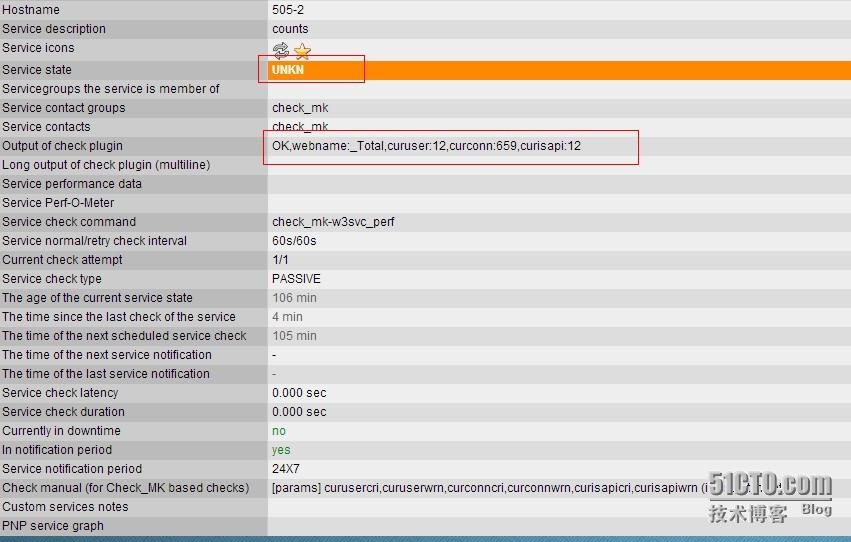
竟然看到的状态是unkow 返回值也不是预想的那种循环遍历所有站点的性能值返回,而是把info列表的第一个值取出返回了。继续调试。。。。。
烦请写过check_mk插件的兄弟伙给指条明路
checks 做了修改
—————————————20140108————————————————————————-
|
1
2
3
4
5
6
7
8
9
10
11
12
13
14
15
16
17
18
19
20
21
22
23
24
25
26
27
28
29
30
31
32
33
34
35
36
37
38
39
40
41
42
43
44
45
46
47
48
49
50
51
52
53
54
55
56
57
58
59
60
61
62
63
64
65
66
67
68
69
70
71
|
#!/usr/bin/python# -*- encoding: utf-8; py-indent-offset: 4 -*-
# the agent info#<<<w3svc_perf>>>#_Total,8,586,8
#xxxx.xxx.com,0,11,0
#yyyy.xxx.com,0,48,0
#zzzz.xxx.com,8,527,8
#this line not agent return
#webname,curuser,curconn,curisapiw3svc_perf_default_values=(2048,1024) #警告,严重阙值的默认值,可在main.mk中
#用w3svc_perf_default_values = (1500, 1600)
#修改
def inventory_w3svc_perf(info): inventory = []
for line in info:
tempperfdata = " ".join(line).split(",")
webname= tempperfdata[0]
curuser = int(tempperfdata[1])
curconn = int(tempperfdata[2])
curisapi = int(tempperfdata[3])
inventory.append(('w3svc:'+webname,w3svc_perf_default_values)) \
#检查入库,用元组入库,直接'w3svc:'+webname,w3svc_perf_default_values\
#入库不得遍历
return inventory #返回库
def check_w3svc_perf(item,params,info): cri,wrn = params #定义警告和严重的阙值
for line in info:
tempperfdata = " ".join(line).split(",")
webname = tempperfdata[0]
curuser = tempperfdata[1]
curconn = tempperfdata[2]
curisapi = tempperfdata[3]
infos=[] #定义输出内容的空数组
state=0
if int(curuser) > int(wrn) :
if int(curuser) > int(cri):
state=2
infos.append("Crit!,%s_Curuser=%d >cri[%d]"\
%(webname,int(curuser),cri))
else :
state=1
infos.append("Warn!,%s_Curuser=%d >wrn[%d]"\
%(webname,int(curuser),wrn))
elif int(curconn) > int(wrn) :
if int(curconn) > int(cri):
state=2
infos.append("Crit!,%s_Curconn=%d >cri[%d]"\
%(webname,int(curconn),cri))
else :
state=1
infos.append("Warn!,%s_Curconn=%d >wrn[%d]"\
%(webname,int(curconn),wrn))
elif int(curisapi) > int(wrn) :
if int(curisapi) > int(cri):
state=2
infos.append("Crit!,%s_Curisapi=%d >cri[%d]"\
%(webname,int(curisapi),cri))
else :
state=1
infos.append("Warn!,%s_Curisapi=%d >wrn[%d]"\
%(webname,int(curisapi),wrn))
else:
state=0
infos.append("OK!!webname=%s,curuser=%d,curconn=%d,curisapi=%d"\
%(webname,int(curuser),int(curconn),int(curisapi)))
infotext="".join(infos)
if infotext.find(item.split(':')[1]) > -1:#判断item是否在输出内容,并切分\
#后输出。
return (state, infotext)
check_info['w3svc_perf'] = (check_w3svc_perf, "%s", 1, inventory_w3svc_perf)
|
效果图

cmk -P create w3svc_perf
cmk -P pack w3svc_perf
打包为mkp文件 可直接cmk -P install 安装
附件:http://down.51cto.com/data/2363964
本文转自天山三害 51CTO博客,原文链接:http://blog.51cto.com/skybug/1347452,如需转载请自行联系原作者