原文在:https://phauer.com/2018/best-practices-unit-testing-kotlin/
Best Practices for Unit Testing in Kotlin
POSTED ON FEB 12, 2018
- TL;DR
- Recording of the KotlinConf Talk
- Recap: What is Idiomatic Kotlin Code?
- Avoid Static and Reuse the Test Class Instance
- Change the Lifecycle Default for Every Test Class
- Use Backticks and
@NestedInner Classes - Kotlin Test Libraries
- Mock Handling
- Handle Classes with State
- Utilize Data Classes
- Testcontainers: Reuse a Single Container
- Source
- Further Reading
Unit Testing in Kotlin is fun and tricky at the same time. We can benefit a lot from Kotlin’s powerful language features to write readable and concise unit tests. But in order to write idiomatic Kotlin test code in the first place, there is a certain test setup required. This post contains best practices and guidelines to write unit test code in Kotlin that is idiomatic, readable, concise and produces reasonable failure messages.
TL;DR
- Use JUnit5
- Test Class Lifecycle
- Use
@TestInstance(Lifecycle.PER_CLASS)to avoid the need for static members, which are non-idiomatic and cumbersome in Kotlin. - Instead of annotating every class with
@TestInstance()you can change the default lifecycle with thejunit-platform.propertiesfile.
- Use
- Test Fixtures
- Reuse one instance of the test class for every test methods (by using
@TestInstance()) - Initialize the required objects in the constructor (
init) or in a field declaration (apply()is helpful). This way, the fields can be immutable (val) and non-nullable. - Don’t use
@BeforeAll. It forces us to uselateinitor nullable types.
- Reuse one instance of the test class for every test methods (by using
- Put the test method names in backticks and use spaces.
- Use
@Nestedinner classes to group the test methods. - Mocks
- Use MockK to create mocks in a convenient and idiomatic way. It can also mock final classes by default.
- Create mocks only once and reset them in a
@BeforeEach. This way, you can usevalfields and achieve a better performance.
- Test Libraries
- There are so many test libraries. Check them out and make up your own mind.
- For me, AssertJ is still the most powerful assertion library.
- Take advantage of data classes
- Create a reference object and compare it directly with the actual object using an equality assertion.
- Write helper methods with default arguments to easily create instances with a complex structure. Avoid using
copy()for this purpose. - Use data classes to carry the test data (input and expected output) in a
@ParameterizedTest.
Recording of the KotlinConf Talk
At the KotlinConf 2018, I held a talk about this topic. You can watch the video here.
Recap: What is Idiomatic Kotlin Code?
Let’s recap a few points about idiomatic Kotlin code:
- Immutability. We should use immutable references with
valinstead ofvar. - Non-Nullability. We should favor non-nullable types (
String) over nullable types (String?). - No
staticaccess. It impedes proper object-oriented design, because static access harms testability (can’t exchange objects easily) and obfuscates dependencies and side-effects. Kotlin strongly encourages us to avoidstaticaccess by simply not providing an easy way to createstaticmembers.
But how can we transfer these best practices to our test code?
Avoid Static and Reuse the Test Class Instance
In JUnit4, a new instance of the test class is created for every test method. So the initial setup code (that is used by all test methods) must be static. Otherwise, the setup code would be re-executed again and again for each test method. In JUnit4, the solution is to make those members static. That’s ok for Java as it has a static keyword. Kotlin doesn’t have this direct mean - for good reasons because static access is an anti-pattern in general.
//JUnit4. Don't:
class MongoDAOTestJUnit4 {

    companion object {
        @JvmStatic
        private lateinit var mongo: GenericContainer
        @JvmStatic
        private lateinit var mongoDAO: MongoDAO

        @BeforeClass
        @JvmStatic
        fun initialize() {
            mongo = startMongoContainer()
            mongo.configure()
            mongoDAO = MongoDAO(mongo.host, mongo.port)
        }
    }

    @Test
    fun foo() {
        // test mongoDAO
    }
}
Fortunately, JUnit5 provides the @TestInstance(Lifecycle.PER_CLASS) annotation. This way, a single instance of the test class is used for every method. Consequently, we can initialize the required objects once and assign them to normal fields of the test class. This happens only once because there is only one instance of the test class.
//Do:
@TestInstance(TestInstance.Lifecycle.PER_CLASS)
class MongoDAOTestJUnit5 {
    private val mongo = startMongoContainer().apply {
        configure()
    }
    private val mongoDAO = MongoDAO(mongo.host, mongo.port)

    @Test
    fun foo() {
        // test mongoDAO
    }
}
First, this approach is more concise, because we don’t have to wrap everything into a companion objectcontaining @JvmStatic annotated fields. Second, it’s idiomatic Kotlin code as we are using immutable non-nullable val references and can get rid of the nasty lateinit. Please note, that Kotlin’s apply() is really handy here. It allows object initialization and configuration without a constructor. But using a constructor or a initializer block (init { }) is sometimes more appropriate if the initialization code is getting more complex.
@TestInstance(TestInstance.Lifecycle.PER_CLASS)
class MongoDAOTestJUnit5Constructor {
    private val mongo: KGenericContainer
    private val mongoDAO: MongoDAO

    init {
        mongo = startMongoContainer().apply {
            configure()
        }
        mongoDAO = MongoDAO(mongo.host, mongo.port)
    }
}
In fact, we don’t need JUnit5’s @BeforeAll (the equivalent of JUnit4’s @BeforeClass) anymore because we can utilize the means of object-oriented programming to initialize the test fixtures.
Side note: For me, the re-creation of a test class for each test method was a questionable approach anyway. It should avoid dependencies and side-effects between test methods. But it’s not a big deal to ensure independent test methods if the developer pays attention. For instance, we should not forget to reset or reinitialize fields in a @BeforeEach block and don’t (re-)assigned fields in general - which is not possible when we use val fields. ;-)
Change the Lifecycle Default for Every Test Class
Writing @TestInstance(TestInstance.Lifecycle.PER_CLASS) on every test class explicitly is cumbersome and easy to forget. Fortunately, we can set the default lifecycle for the whole project by creating the file src/test/resources/junit-platform.properties with the content:
junit.jupiter.testinstance.lifecycle.default = per_class
Use Backticks and @Nested Inner Classes
- Put the test method name in backticks. This allows spaces in the method name which highly improves the readability. This way, we don’t need an additional
@DisplayNameannotation. - JUnit5’s
@Nestedis useful to group the tests methods. Reasonable groups can be certain types of tests (likeInputIsXY,ErrorCases) or one group for each method under test (GetDesignandUpdateDesign).
@TestInstance(TestInstance.Lifecycle.PER_CLASS)
class DesignControllerTest {
    @Nested
    inner class GetDesigns {
        @Test
        fun `all fields are included`() {}
        @Test
        fun `limit parameter`() {}
        @Test
        fun `filter parameter`() {}
    }
    @Nested
    inner class DeleteDesign {
        @Test
        fun `design is removed from db`() {}
        @Test
        fun `return 404 on invalid id parameter`() {}
        @Test
        fun `return 401 if not authorized`() {}
    }
}
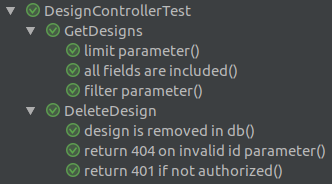
Readable and Grouped Tests Results in IntelliJ IDEA
Kotlin Test Libraries
Due to the variety of available Kotlin test libraries we are spoilt for choice. Here is an incomplete overview of some Kotlin-native and Java libraries for testing, mocking and assertions (note that some libraries fit into multiple categories):
| Test Frameworks | Mocking | Assertions | |
|---|---|---|---|
| Kotlin | Spek, KotlinTest | Mockito-Kotlin, MockK | Kluent, Strikt, Atrium, HamKrest, Expekt, AssertK |
| Java | JUnit5 | AssertJ |
For me, it’s a matter of taste. Check them out and make up your own mind. We ended up using plain JUnit5, MockK and AssertJ (for now).
AssertJ for Assertions
Even in times of dedicated Kotlin libraries I still stick to the powerful AssertJ for assertions. It provides a really huge amount of assertions and a nice fluent and type-safe API. There is an assertion for everything. It impresses me every day and I highly recommend it. I don’t see a serious reason to switch to a (potentially less mature and complete) Kotlin-native API just to safe some dots and parenthesis.
Mock Handling
Final By Default
Classes and therefore methods are final by default in Kotlin. Unfortunately, some libraries like Mockito are relying on subclassing which fails in this cases. What are the solutions for this?
- Use interfaces
-
openthe class and methods explicitly for subclassing - Enable the incubating feature of Mockito to mock final classes. For this, create a file with the name
org.mockito.plugins.MockMakerintest/resources/mockito-extensionswith the contentmock-maker-inline. - Use MockK instead of Mockito/Mockito-Kotlin. It supports mocking final classes by default.
Use MockK
I highly recommend using MockK. First, you don’t have to worry any longer about final classes or additional interfaces. Second, MockK provides a convenient and idiomatic API for writing mocks and verifications.
val clientMock: UserClient = mockk()
val user = User(id = 1, name = "Ben")
every { clientMock.getUser(any()) } returns user
val daoMock: UserDAO = mockk(relaxed = true)

val scheduler = UserScheduler(clientMock, daoMock)
scheduler.start(1)

verifySequence {
    clientMock.getUser(1)
    daoMock.saveUser(user)
}
Note the usage of lambdas in verifySequence { } to nicely group verifications. Moreover, MockK provides reasonable error messages containing all tracked calls if a verification fails. I also like that MockK fails with an exception if an unspecified method is called on a mock (strict mocking by default). So you don’t run into mysterious NullPointerExceptions known from Mockito.
Besides, MockK’s relaxed mocks are useful if the class under test uses a certain object, but you don’t want to define the behavior of this mock because it’s not relevant for the test. A relaxed mock returns dummy objects containing empty values.
val clientMock: UserClient = mockk(relaxed = true)
// we don't have to mock clientMock.getUser()
println(clientMock.getUser(1).age) // 0
But mind, that relaxed mocks can also lead to tricky errors, when you forget to mock a required method. I recommend to use strict mocks by default and relaxed ones only if you really need it.
Create Mocks Once
Recreating mocks before every test is slow and requires the usage of lateinit var. So the variable can be reassigned which can harm the independence of each test.
//Don't
@TestInstance(TestInstance.Lifecycle.PER_CLASS)
class DesignControllerTest_RecreatingMocks {

    private lateinit var dao: DesignDAO
    private lateinit var mapper: DesignMapper
    private lateinit var controller: DesignController

    @BeforeEach
    fun init() {
        dao = mockk()
        mapper = mockk()
        controller = DesignController(dao, mapper)
    }

    // takes 2 s!
    @RepeatedTest(300)
    fun foo() {
        controller.doSomething()
    }
}
Instead, create the mock instance once and reset them before or after each test. It’s significantly faster (2 s vs 250 ms in the example) and allows using immutable fields with val.
// Do:
@TestInstance(TestInstance.Lifecycle.PER_CLASS)
class DesignControllerTest {

    private val dao: DesignDAO = mockk()
    private val mapper: DesignMapper = mockk()
    private val controller = DesignController(dao, mapper)

    @BeforeEach
    fun init() {
        clearMocks(dao, mapper)
    }

    // takes 250 ms
    @RepeatedTest(300)
    fun foo() {
        controller.doSomething()
    }
}
Handle Classes with State
The presented create-once-approach for the test fixture and the classes under test only works if they don’t have any state or can be reset easily (like mocks). In other cases, re-creation before each test is inevitable.
@TestInstance(TestInstance.Lifecycle.PER_CLASS)
class DesignViewTest {

    private val dao: DesignDAO = mockk()
    private lateinit var view: DesignView // the class under test has state

    @BeforeEach
    fun init() {
        clearMocks(dao)
        view = DesignView(dao) // re-creation is required
    }

    @Test
    fun changeButton() {
        assertThat(view.button.caption).isEqualTo("Hi")
        view.changeButton()
        assertThat(view.button.caption).isEqualTo("Guten Tag")
    }
}
Utilize Data Classes
Data Classes for Assertions
Single Objects
If possible don’t compare each property for your object with a dedicated assertion. This bloats your code and - even more important - leads to an unclear failure message.
// Don't
val actualDesign = client.requestDesign(id = 1)

assertThat(actualDesign.id).isEqualTo(2) // ComparisonFailure
assertThat(actualDesign.userId).isEqualTo(9)
assertThat(actualDesign.name).isEqualTo("Cat")
assertThat(actualDesign.dateCreated).isEqualTo(Instant.ofEpochSecond(1518278198))
This leads to poor failure messages:
org.junit.ComparisonFailure: expected:<[2]> but was:<[1]>
Expected :2
Actual   :1
Expected: 2. Actual: 1? What is the semantics of the numbers? Design id or User id? What is the context/the containing class? Hard to say.
Instead, create an instance of the data classes with the expected values and use it directly in a single equality assertion.
// Do
val actualDesign = client.requestDesign(id = 1)

val expectedDesign = Design(id = 2, userId = 9, name = "Cat", dateCreated = Instant.ofEpochSecond(1518278198))
assertThat(actualDesign).isEqualTo(expectedDesign)
This way, we get a nice and descriptive failure message:
org.junit.ComparisonFailure: expected:<Design(id=[2], userId=9, name=Cat...> but was:<Design(id=[1], userId=9, name=Cat...>
Expected :Design(id=2, userId=9, name=Cat, dateCreated=2018-02-10T15:56:38Z)
Actual   :Design(id=1, userId=9, name=Cat, dateCreated=2018-02-10T15:56:38Z)
We take advantage of Kotlin’s data classes. They implement equals() and toString() out of the box. So the equals check works and we get a really nice failure message. Moreover, by using named arguments, the code for creating the expected object becomes very readable.
Lists
We can take this approach even further and apply it to lists. Here, AssertJ’s powerful list assertions are shining.
// Do
val actualDesigns = client.getAllDesigns()

assertThat(actualDesigns).containsExactly(
    Design(id = 1, userId = 9, name = "Cat", dateCreated = Instant.ofEpochSecond(1518278198)),
    Design(id = 2, userId = 4, name = "Dog", dateCreated = Instant.ofEpochSecond(1518279000))
)
java.lang.AssertionError:
Expecting:
  <[Design(id=1, userId=9, name=Cat, dateCreated=2018-02-10T15:56:38Z),
    Design(id=2, userId=4, name=Dogggg, dateCreated=2018-02-10T16:10:00Z)]>
to contain exactly (and in same order):
  <[Design(id=1, userId=9, name=Cat, dateCreated=2018-02-10T15:56:38Z),
    Design(id=2, userId=4, name=Dog, dateCreated=2018-02-10T16:10:00Z)]>
but some elements were not found:
  <[Design(id=2, userId=4, name=Dog, dateCreated=2018-02-10T16:10:00Z)]>
and others were not expected:
  <[Design(id=2, userId=4, name=Dogggg, dateCreated=2018-02-10T16:10:00Z)]>
How cool is that?
Other Useful AssertJ Assertions
Usually, comparing all properties of a data class is what you need in the test. But from time to time, it’s useful to ignore some properties or to compare only some properties.
// Single Element
assertThat(actualDesign)
    .isEqualToIgnoringGivenFields(expectedDesign, "id")
assertThat(actualDesign)
    .isEqualToComparingOnlyGivenFields(expectedDesign, "name", "userId")

// Lists
assertThat(actualDesigns)
    .usingElementComparatorIgnoringFields("id")
    .containsExactly(expectedDesign1, expectedDesign2)
assertThat(actualDesigns)
    .usingElementComparatorOnFields("name", "userId")
    .containsExactly(expectedDesign1, expectedDesign2)
Use Helper Functions with Default Arguments to Ease Object Creation
In reality, data structures are complex and nested. Creating those objects again and again in the tests can be cumbersome. In those cases, it’s handy to write a utility function that simplifies the creation of the data objects. Kotlin’s default arguments are really nice here as they allow every test to set only the relevant properties and don’t have to care about the remaining ones.
fun createDesign(
    id: Int = 1,
    name: String = "Cat",
    date: Instant = Instant.ofEpochSecond(1518278198),
    tags: Map<Locale, List<Tag>> = mapOf(
        Locale.US to listOf(Tag(value = "$name in English")),
        Locale.GERMANY to listOf(Tag(value = "$name in German"))
    )
) = Design(
    id = id,
    userId = 9,
    name = name,
    fileName = name,
    dateCreated = date,
    dateModified = date,
    tags = tags
)

// Usage
// only set the properties that are relevant for the current test
val testDesign = createDesign()
val testDesign2 = createDesign(id = 1, name = "Fox")
val testDesign3 = createDesign(id = 1, name = "Fox", tags = mapOf())
This leads to concise and readable object creation code.
- Don’t add default arguments to the data classes in the production code just to make your tests easier. If they are used only for the tests, they should be located in the test folder. So use helper functions like the one above and set the default arguments there.
- Don’t use
copy()just to ease object creation. Extensivecopy()usage is hard to read; especially with nested structures. Prefer the helper functions. - Locate all helper functions in a single file like
CreationUtils.kt. This way, we can reuse the functions like lego bricks for each test.
Data Classes for Parameterized Tests
Data classes can also be used for parameterized tests. Due to the automatic toString() implementation, we get a readable test result output in IDEA and the build.
@ParameterizedTest
@MethodSource("validTokenProvider")
fun `parse valid tokens`(data: TestData) {
    assertThat(parse(data.input)).isEqualTo(data.expected)
}

private fun validTokenProvider() = Stream.of(
    TestData(input = "1511443755_2", expected = Token(1511443755, "2")),
    TestData(input = "151175_13521", expected = Token(151175, "13521")),
    TestData(input = "151144375_id", expected = Token(151144375, "id")),
    TestData(input = "15114437599_1", expected = Token(15114437599, "1")),
    TestData(input = null, expected = null)
)


data class TestData(
    val value: String?,
    val expectedToken: Token?
)

If we use data classes as test parameters we get readable test results
Testcontainers: Reuse a Single Container
Testcontainers is a Java API to control containers within your test code. That’s great for executing your tests against a real database instead of an in-memory database. I highly recommend this approach. However, starting a new container for each test is usually a big waste of time. It’s better to create the container once and reuse it for every test. Kotlin’s object singletons and lazy initialized properties (by lazy { }) are very helpful here.
object MongoContainer {
    val instance by lazy { startMongoContainer() }

    private fun startMongoContainer() = KGenericContainer("mongo:4.0.2").apply {
        withExposedPorts(27017)
        setWaitStrategy(Wait.forListeningPort())
        start()
    }
}

// Usage:
class DesignDAOTest {
    private val container = MongoContainer.instance
    private val dao = DesignDAO(container.host, container.port) // pseudo-code
    @Test
    fun foo() { }
}
- This way, we don’t need any test framework integration (like a JUnit5 extension for Testcontainers).
- Don’t forget to clean up the database before each test method using a
@BeforeEachmethod. - Be careful when you are running the tests in parallel. Consider using different “database names” (or “schema” in case of RDBs) for each test class to avoid side-effects.
Source
The source code can be found at GitHub.
Further Reading
- I highly recommend the book Kotlin in Action
by Dmitry Jemerov and Svetlana Isakova