简介
puppet是一种Linux、Unix、windows平台的集中配置管理系统;
使用自有的puppet描述语言,可管理配置文件、用户、cron任务、软件包、系统服务等,puppet把这些系统实体称之为资源;
puppet的设计目标是简化对这些资源的管理以及妥善处理资源间的依赖关系
puppet的基础架构
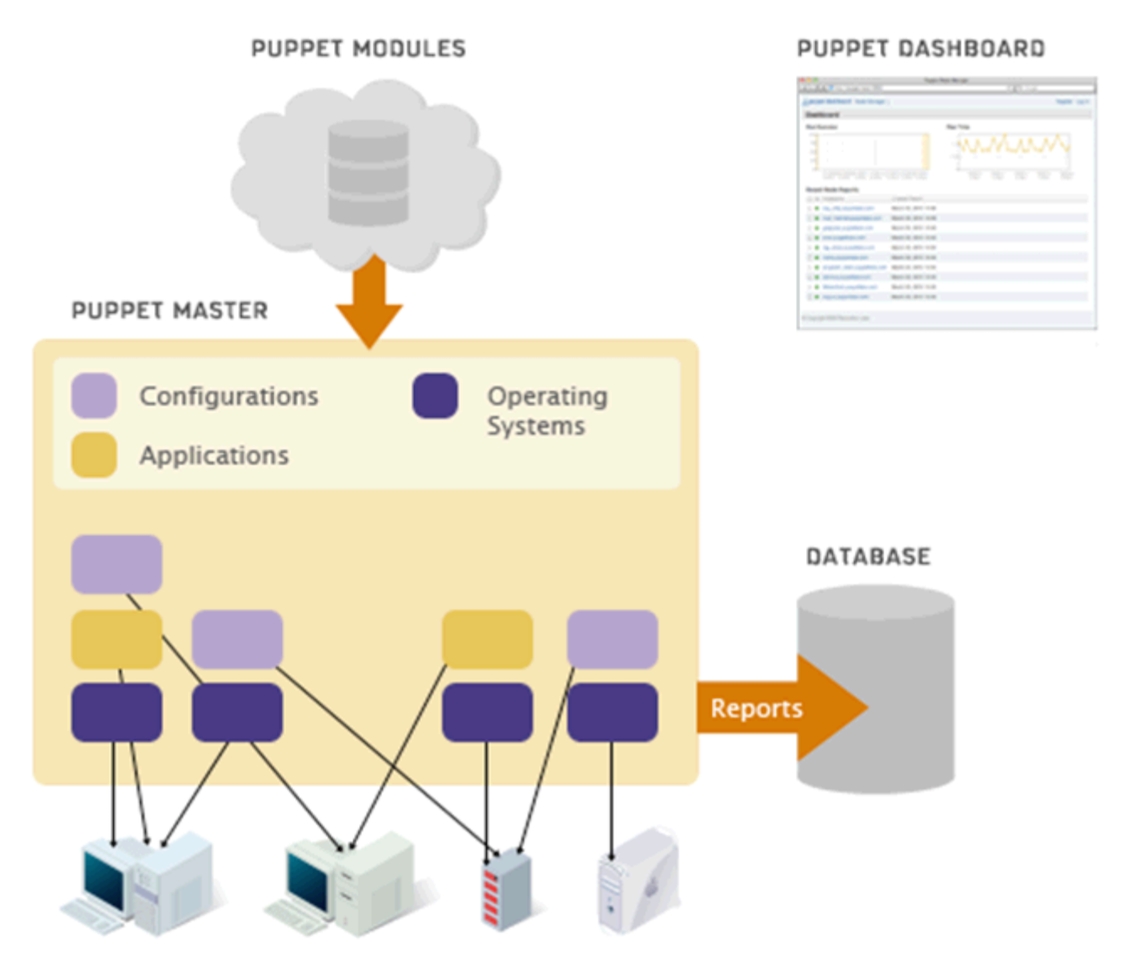
puppet是集中式的配置管理工具,通过自有配置语言对节点进行目标状态定义,并能够基于网络实现目标状态的维护;
puppet的工作模型
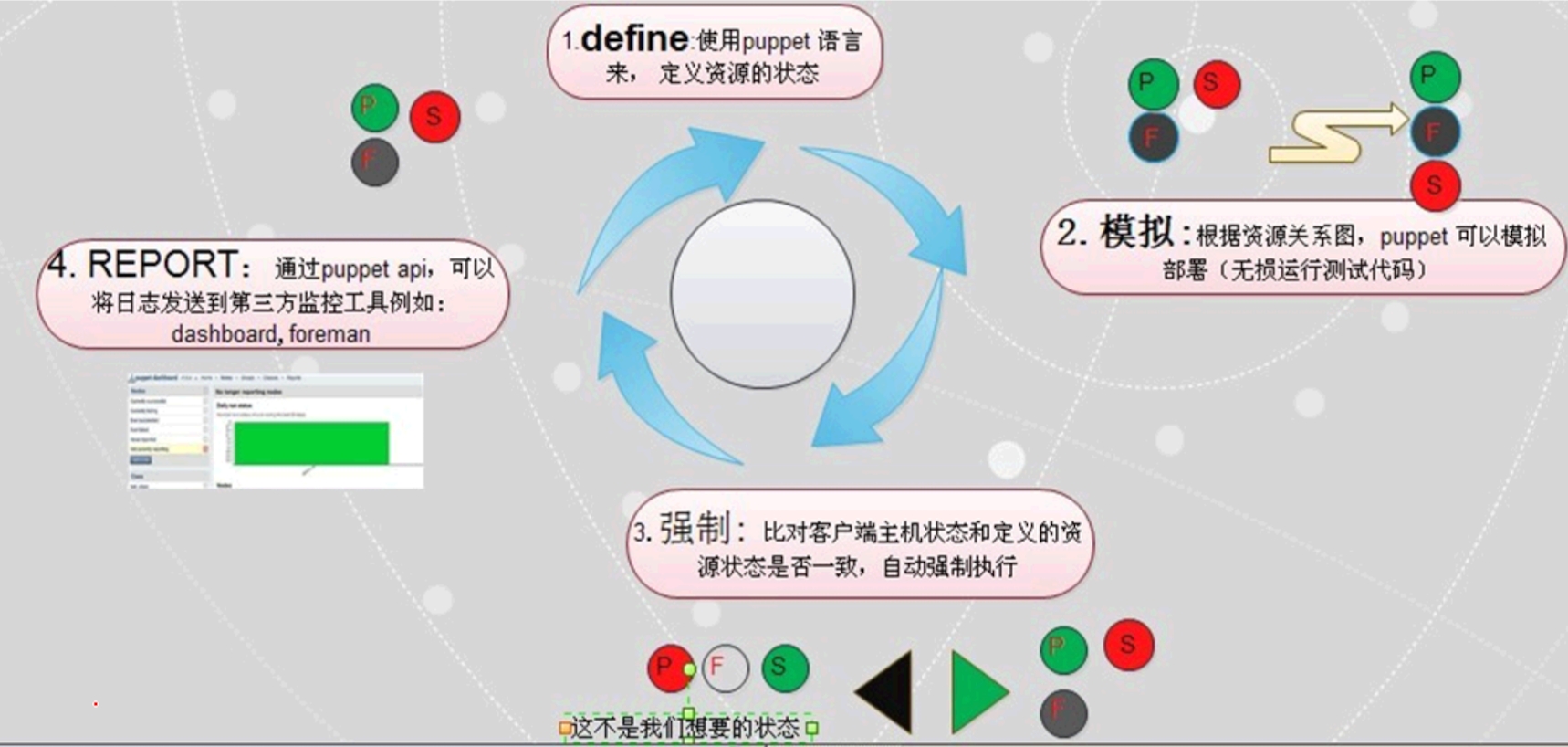
puppet通过声明性、基于模块的方法进行IT自动化管理;
puppet的基本工作流程
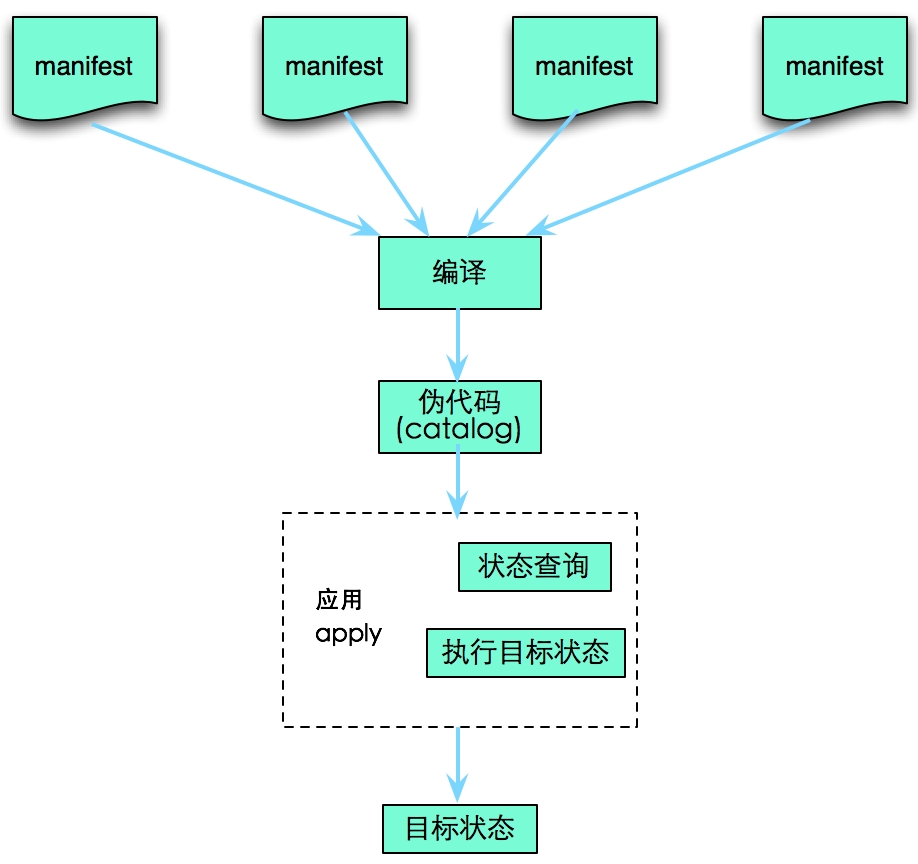
重要概念
资源:定义目标状态的核心组件;
核心资源包括:notify、package、group、user、file、exec、cron、service等;
模块:以资源为核心,是类的集合,如mod1,mod2
节点:以被管理主机为为核心,如node1,node2
puppet利用模块+节点的方式,实现目标状态的定义
manifest:清单,用于定义并保存资源,是一个资源组织工具;
facter:获取各被管理节点资源使用情况的方式;
单机模式下的安装使用
|
1
2
3
4
5
6
7
|
yum -y install ruby # 安装ruby环境
yum -y localinstall facter-1.7.3-1.el6.x86_64.rpm # puppet 2.7版本依赖facter 2.0以下的版本
yum -y localinstall puppet-2.7.25-1.el6.noarch.rpm# 列出资源类型puppet describe -l# 显示资源notify的使用帮助puppet describe notify |
实例解析
核心资源1--notify
|
1
2
3
4
5
6
7
|
# vi /tmp/test.ppnotify {'notice':
message => 'welcome to puppet world', # notify的输出的消息
}# puppet apply test.pp# puppet apply test.pp -v # 显示详细信息,包括配置应用版本号# puppet apply test.pp -v -d # 开启debug功能 |
核心资源2--package
|
1
2
3
4
5
6
|
# vi nginx.pppackage {'nginx':
ensure => present, # 程序包已安装状态
name => nginx, # 安装的程序包名
}# puppet apply nginx.pp -v |
核心资源3--file
|
1
2
3
4
5
6
7
8
9
10
11
12
|
# vi file.ppfile {'abc.txt':
ensure => present, # 文件存在
content => 'hello puppet', # 文件内容
path => "/tmp/abc2.txt", # 生成的文件
}file {'fstab.symbolic':
ensure => present,
target => "/etc/fstab", # 链接的源文件
path => "/tmp/fstab.symbolic", # 生成的文件
links => follow, # 表示为软链接
} |
核心资源4--exec
|
1
2
3
4
5
|
# vi command.ppexec {'echo command':
command => 'mktemp /tmp/tmp.XXXXX', # 执行的命令
path => '/bin:/sbin:/usr/bin:/usr/sbin', # 命令搜索的路径
} |
核心资源5--user/group
|
1
2
3
4
5
6
7
8
9
10
11
12
13
14
|
# vi group_user.ppgroup {'testgrp':
ensure => present, # 保证用户组存在
gid => 1001, # 用户组GID
} ->user {'testuser':
ensure => present, # 保证用户存在
gid => 1001,
uid => 1001,
home => '/home/test', # 用户家目录
shell => '/bin/tcsh', # 用户的shell
password => '$1$7990650b$sAvnSF1/5e4aIWdBMrH7U/', # 用户密码
managehome => true, # 指定创建用户家目录
} |
核心资源6--cron
|
1
2
3
4
5
6
|
# vi cron.ppcron {'ntpdate':
ensure => present,
command => '/usr/sbin/ntpdate 172.16.0.1 &> /dev/null', #执行的命令
minute => '*/5', # 指定cron运行的时间间隔,其它时间段默认都为*
} |
核心资源7--资源次序require/before
|
1
2
3
4
5
6
7
8
9
10
11
12
|
# vi nginx.pppackage {'nginx':
ensure => present,
name => nginx,
# before => Service['nginx'], # 也可在此指定程序包安装的后续操作
}service {'nginx':
enable => true, # 保证服务开机启动
ensure => true,
name => nginx,
require => Package['nginx'], # 指定服务安装的前提条件
} |
核心资源8--资源次序notify/subsribe
|
1
2
3
4
5
6
7
8
9
10
11
12
|
# vi order.ppfile {'/tmp/test4.txt':
ensure => file,
content => "hello puppet",
# notify => Exec['monitor'], # 也可在此指定文件创建后,主动通知下一步的命令执行
}exec {'monitor':
command => 'echo "/tmp/test4.txt changed." >> /tmp/monitor.txt',
refreshonly => true, # 指定只在文件内容发生改变时,才重新执行此处命令
subscribe => File['/tmp/test4.txt'], # 追踪上一步创建的文件资源改变情况
path => '/bin:/sbin:/usr/bin:/usr/sbin',
} |
核心资源9--资源次序 ->(次序链)/~>(通知链)
|
1
2
3
4
5
6
7
8
9
10
|
# vi order2.ppfile {'/tmp/test4.txt':
ensure => file,
content => "hello puppet",
} ~> # 在此为通知链,作用类似notify
exec {'monitor':
command => 'echo "/tmp/test4.txt changed." >> /tmp/monitor.txt',
refreshonly => true,
path => '/bin:/sbin:/usr/bin:/usr/sbin',
} |
变量定义及引用
|
1
2
3
4
5
6
7
8
9
|
# vi var.pp$pkgname='haproxy'
package {$pkgname: # 引用用户自定义变量
ensure => present,
}file {'/tmp/nginx.conf':
ensure => file,
content => "worker_processes : $processorcount", # 引用facters变量
} |
if语句的使用
|
1
2
3
4
5
6
7
8
9
10
11
|
# vi if.ppif $operatingsystem =~ /^(?i-mx:(centos|redhat|fedora))/ { # 正则表达式作为if语句的判断条件
notice("Welome to $1 linux world.")
}if $operatingsystem == 'CentOS' { # 等值比较运算作为if语句的判断条件
notify {'centos': message => "Welcome to CentOS linux world.",}
} elsif $operatingsystem == 'Fedora' {
notify {'fedora': message => "Welcome to Fedora linux world.",}
} else {
notify {'unkown': message => "Unkown Operating System",}
} |
case语句的使用
|
1
2
3
4
5
6
|
# vi case.ppcase $operatingsystem { # case语句进行多值比较,并执行匹配的响应代码块
/^(?i-mx:centos|fedora|redhat)/ : {package{"httpd":ensure => present,provider => yum,}}
/^(?i-mx:ubuntu|debian)/ :{package{"apache2":ensure => present,provider => apt,}}
default: {notify {"notice":message => "unknown system",}}
} |
seletor语句的使用,语法与case类似
|
1
2
3
4
5
6
7
8
9
10
11
12
13
|
# vi selector.pp$webserver = $operatingsystem ? { # seletor类似三目运算符,直接返回匹配项的value值
/^(?i-mx:centos|fedora|redhat)/ => 'httpd',
/^(?i-mx:ubuntu|debian)/ => 'apache2',
}$webprovider = $operatingsystem ? { /^(?i-mx:centos|fedora|redhat)/ => 'yum',
/^(?i-mx:ubuntu|debian)/ => 'apt',
}package {$webserver: ensure => present,
provider => $webprovider,
} |
puppet的类使用
|
1
2
3
4
5
6
7
8
9
10
11
12
|
# vi class.ppclass nginx { package {'nginx':
ensure => present,
}
service {'nginx':
ensure => true,
require => Package['nginx'],
}
}include nginx # 声明类
# class {nginx:} # 声明类的另一种方式 |
puppet的带参数的类使用
|
1
2
3
4
5
6
7
8
9
10
11
12
13
14
15
16
17
|
# vi class2.pp$webserver = $operatingsystem ? { /^(?i-mx:centos|fedora|redhat)/ => 'httpd',
/^(?i-mx:ubuntu|debian)/ => 'apache2',
}class httpd ($pkgname='apache2') {
package {"$pkgname":
ensure => present,
}
service {"$pkgname":
ensure => true,
require => Package["$pkgname"],
}
}class {'httpd': # 声明类,并将pkgname变量的值带入
pkgname => $webserver,
} |
puppet模块的使用--实例1
|
1
2
3
4
5
6
7
8
9
10
11
12
13
14
15
16
17
18
19
20
21
22
23
24
25
26
27
28
29
30
31
|
# vi class3.ppclass nginx { package {'nginx':
ensure => present,
}
}class nginx::rproxy inherits nginx { # 定义nginx的子类rproxy,继承nginx类的相关属性
file {'/etc/nginx/nginx.conf':
ensure => file,
source => "/tmp/nginx/nginx.reverse_proxy.conf",
force => true,
notify => Service['nginx'],
} ->
service {'nginx':
ensure => true,
}
}class nginx::web inherits nginx { # 定义nginx的子类web,继承nginx类的相关属性
file {'/etc/nginx/nginx.conf':
ensure => file,
source => "/tmp/nginx/nginx.web.conf",
notify => Service['nginx'],
} ->
service {'nginx':
ensure => true,
}
}# vi node.ppimport "/tmp/class3.pp"
include nginx::web # 声明子类
# puppet applay -v node.pp |
puppet模块的使用--构建模块nginx
|
1
2
3
4
5
6
7
8
9
10
11
12
13
14
15
16
17
18
19
20
21
22
23
24
25
26
27
28
29
30
31
32
33
34
35
36
37
38
39
40
41
|
cd /etc/puppet/modules
mkdir -pv nginx/{files,lib,manifests,templates} # 创建模块nginx所需的目录结构
./nginx/files: # 编辑类中所需的静态文件
total 8-rw-r--r-- 1 root root 1062 May 15 18:15 nginx.reverse_proxy.conf-rw-r--r-- 1 root root 1059 May 15 18:15 nginx.web.conf./nginx/manifests: # 定义模块所需的清单文件,init.pp文件是必须的
total 12-rw-r--r-- 1 root root 131 May 15 18:33 init.pp-rw-r--r-- 1 root root 246 May 15 18:15 rproxy.pp-rw-r--r-- 1 root root 213 May 15 18:34 web.pp# vi init.pp # 定义nginx主类class nginx { package {'nginx':
ensure => present,
}
}# vi rproxy.pp # 定义nginx的子类之一class nginx::rproxy inherits nginx { file {'/etc/nginx/nginx.conf':
ensure => file,
source => 'puppet:///modules/nginx/nginx.reverse_proxy.conf',
force => true,
notify => Service['nginx'],
} ->
service {'nginx':
ensure => true,
}
}# vi web.pp # 定义nginx的子类之一class nginx::web inherits nginx { file {'/etc/nginx/nginx.conf':
ensure => file,
source => 'puppet:///modules/nginx/nginx.web.conf',
notify => Service['nginx'],
}
service {'nginx':
ensure => true,
}
}puppet apply -v -e 'include nginx' # 调用模块,执行nginx服务安装配置
|
总结
通过以上实例的理解和学习,可以对puppet中主要的资源类型和用法加深了理解,最后2个实例已经开始尝试已模块化的结构去运行puppet了,下一篇将会介绍puppet更多用法,敬请期待!