1. 概述
3D降噪算法是将前后两帧的图像进行对比处理,找出噪点位置,然后对其增益控制。3D数字降噪功能能够降低弱信号图像的噪波干扰。
2. 函数接口
HI_S32 HI_MPI_VPSS_SetGrpParam(VPSS_GRP VpssGrp, VPSS_GRP_PARAM_S*pstVpssParam);
| 参数名称 | 描述 | 输入/输出 |
| VpssGrp | VPSS GROUP号 | 输入 |
| pstVpssParam | 高级属性设置 | 输入 |
VPSS_GRP_PARAM_S结构体:
|
1
2
3
4
5
6
7
8
9
10
11
|
typedef struct hiVPSS_GRP_PARAM_S
{HI_U32 u32Contrast; //保留
HI_S32 s32GlobalStrength; //3DNR降噪强度,[0.1408]
HI_S32 s32IeStrength; //图像纹理增强,[-1,100]
HI_S32 s32YSFStrength; //亮度空域去噪强度,[-1,100]
HI_S32 s32YTFStrength; //亮度时域去噪强度,[-1,15]
HI_S32 s32CSFStrength; //色度空域去噪强度,[-1,255]
HI_S32 s32CTFStrength; //色域时域去噪强度,[-1,32]
HI_S32 s32MotionLimen; //运动阈值,表示NR强度,[-1,32]
}VPSS_GRP_PARAM_S; |
空域降噪是对单帧进行采样,降噪会牺牲更多的细节;时域降噪是对前后帧进行分析,尽量保留画面细节,但是拍摄剧烈运动可能会有拖影。在实际应用中可根据不同的侧重点(细节、运动、亮度、色度)来调整VPSS_GRP_PARAM_S结构体的成员变量。
3. PQTools设置界面

4. 代码设计
在SDK包的mpp/tools目录下编写应用程序代码,具体代码如下:
|
1
2
3
4
5
6
7
8
9
10
11
12
13
14
15
16
17
18
19
20
21
22
23
24
25
26
27
28
29
30
31
32
33
34
35
36
37
38
39
40
41
42
43
44
45
46
47
48
49
50
51
52
53
54
55
56
57
58
59
60
61
62
63
64
65
66
67
68
69
70
71
72
|
/* File Name: vpss_attr_3dnr.c Author: shugen.yin
Date: 2017.2.10
Function: 3DNR setting
log:
*/#include <stdio.h>#include <stdlib.h>#include <string.h>#include "hi_common.h"#include "hi_comm_video.h"#include "hi_comm_sys.h"#include "hi_comm_vo.h"#include "hi_comm_vi.h"#include "hi_comm_vpss.h"#include "hi_type.h"#include "mpi_vb.h"#include "mpi_sys.h"#include "mpi_vi.h"#include "mpi_vo.h"#include "mpi_vpss.h"#define CHECK_RET(express,name)\ do{\
if (HI_SUCCESS != express)\
{\
printf("%s failed at %s: LINE: %d ! errno:%#x \n", \
name, __FUNCTION__, __LINE__, express);\
return HI_FAILURE;\
}\
}while(0)
HI_S32 main(){ HI_S32 s32Ret=0;
HI_U8 u8Index = 0;
VPSS_GRP VpssGrp = 0;
VPSS_GRP_ATTR_S stVpssGrpAttr = {0};
VPSS_GRP_PARAM_S stVpssGrpParam = {0};
HI_S32 s32NrParam[4][8] = {
{0x0, 0x2f8, 0x0, 0x20, 0xc, 0x8, 0x6, 0x0},
{0x0, 0x330, 0x0, 0x20, 0xc, 0x8, 0x6, 0x0},
{0x0, 0x3ea, 0x0, 0x20, 0xc, 0x8, 0x6, 0x0},
{0x0, 0x458, 0x0, 0x20, 0xc, 0xe, 0xc, 0x0}
};
s32Ret = HI_MPI_VPSS_GetGrpAttr(VpssGrp, &stVpssGrpAttr);
CHECK_RET(s32Ret, "HI_MPI_VPSS_GetGrpAttr");
s32Ret = HI_MPI_VPSS_GetGrpParam(VpssGrp, &stVpssGrpParam);
CHECK_RET(s32Ret, "HI_MPI_VPSS_GetGrpParam");
stVpssGrpAttr.bNrEn = 1;
stVpssGrpParam.u32Contrast = s32NrParam[u8Index][0];
stVpssGrpParam.s32GlobalStrength = s32NrParam[u8Index][1];
stVpssGrpParam.s32IeStrength = s32NrParam[u8Index][2];
stVpssGrpParam.s32YSFStrength = s32NrParam[u8Index][3];
stVpssGrpParam.s32YTFStrength = s32NrParam[u8Index][4];
stVpssGrpParam.s32CSFStrength = s32NrParam[u8Index][5];
stVpssGrpParam.s32CTFStrength = s32NrParam[u8Index][6];
stVpssGrpParam.s32MotionLimen = s32NrParam[u8Index][7];
s32Ret = HI_MPI_VPSS_SetGrpAttr(VpssGrp, &stVpssGrpAttr);
CHECK_RET(s32Ret, "HI_MPI_VPSS_SetGrpAttr");
s32Ret = HI_MPI_VPSS_SetGrpParam(VpssGrp, &stVpssGrpParam);
CHECK_RET(s32Ret, "HI_MPI_VPSS_SetGrpParam");
return 0;
} |
5. 编译运行
在mpp/tools目录下执行make命令,生成vpss_attr_3dnr可执行程序,将此可执行程序复制到目标板卡中,执行./vpss_attr_3dnr,3DNR算法模块开始工作。

6. 最终结果
在没有运行vpss_attr_3dnr时,视频显示结果如下图所示,画面有明显的弱噪声。
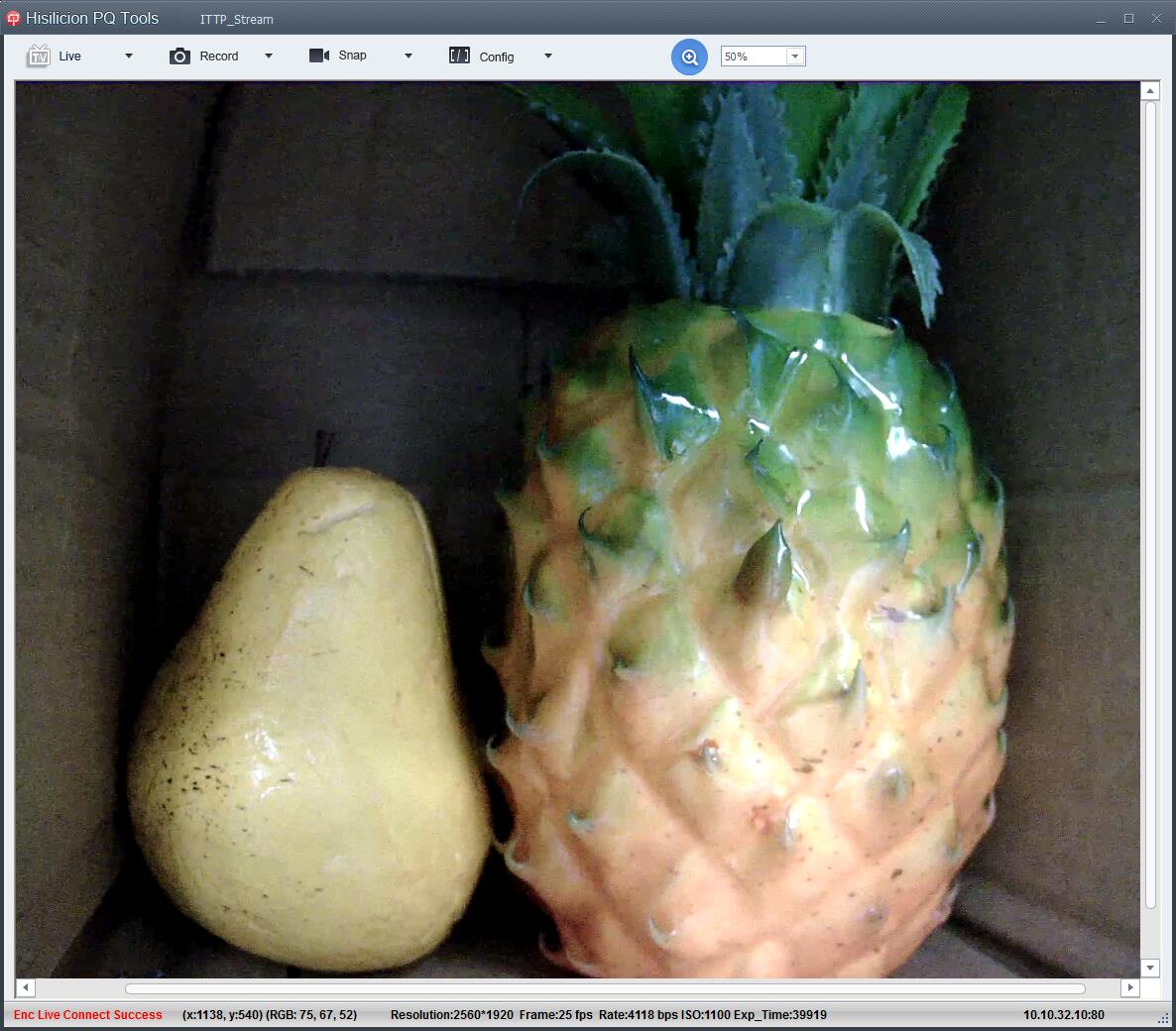
运行vpss_attr_3dnr后,视频显示结果如下图所示,弱噪声得到明显抑制。

本文转自 shugenyin 51CTO博客,原文链接:http://blog.51cto.com/shugenyin/1896821