零基础学习Puppet自动化配置管理系列文档
在大量节点加入Puppet之后,你至少会面临两个比较大的问题:
1、由于节点数的增多,site.pp文件必然会编写更多的节点条目,以及节点包含的类。假设你用Puppet管理500个节点,存在三种情况:1、所有节点有共同的类,也可以理解为模块;2、所有节点分成了50组,每组节点有不同的应用,每组应用编写一个模块;3、每个节点也应该有一个自己的模块,在这种环境下,可想而知,site.pp文件是多么的复杂,多么的难以维护。
2、在使用MCO推送更新的时候,后面可以跟上fact变量用于过滤一组节点。而官方给的facter只能满足普遍存在的fact变量,可是,你要对一组节点进行归类怎么办呢,比如有10个节点的应用是Apache,15个节点属于Nginx等,那么就要自定义fact变量。现在面临的问题是,所有节点都要自定义fact变量,又如何做到集中管理呢?
一、先来解决节点与类结合的问题
其实、节点与类之间的结合,更多时候是要借助ENC(外部节点分类器)来完成,因为puppet软件本身并不具备此类功能。Puppet-dashboard企业版和Foreman已经具备了这方面的功能,而且是图形界面操作,还是很方便的。众所周知,Puppet-dashboard社区版目前最新版本为1.2.23,到目前为止已经有一年多未更新了,可见Puppetlabs的意图很明确,逼着你用企业版。而Foreman部署和使用略复杂些,其次Foreman很重,它的内部并不仅仅是包含puppet还包含了很多其它管理工具,非常庞大,可以酌情考虑使用。接下来要介绍的是官方推荐的hiera软件,一个很强大的ENC,编写的文件只要遵循yaml格式即可,使用非常方便,可惜的是没有图形界面。但这并不代表你不会开发图形界面哦。
1、在Master端安装hiera工具
hiera工具和Puppetmaster结合需要通过hiera-puppet工具完成,在puppet-server 3.0.*版本后,这个工具已经集成到了puppet-server安装包中。而我们现在使用的环境仍然是puppet2.7版本,所以需要安装hiera-puppet工具。
|
1
2
3
4
5
6
7
8
9
10
11
12
13
14
15
16
17
|
[[email protected] RHEL6U4]# yum install hiera hiera-puppet #注意依赖关系
...Dependencies Resolved===========================================================================Package Arch Version Repository Size===========================================================================Installing:hiera noarch 1.3.2-1.el6 rhel-puppet 23 khiera-puppet noarch 1.0.0-1.el6 rhel-puppet 14 kInstalling fordependencies:ruby-irb x86_64 1.8.7.352-7.el6_2 rhel-base 311 kruby-rdoc x86_64 1.8.7.352-7.el6_2 rhel-base 375 krubygem-json x86_64 1.5.5-1.el6 rhel-puppet 763 krubygems noarch 1.3.7-1.el6 rhel-puppet 206 kTransaction Summary===========================================================================... |
2、编辑hiera主配置文件hiera.yaml
2.1、创建软连接
默认hiera.yaml主配置文件在/etc目录下,为了结合后期版本控制系统集中管理,建议将此文件copy到/etc/puppet目录下,然后创建软连接指向/etc/hiera.yaml即可。
|
1
2
3
4
|
[[email protected] ~]# mv /etc/hiera.yaml /etc/puppet/[[email protected] ~]# ln -s /etc/puppet/hiera.yaml /etc/hiera.yaml[[email protected] ~]# ll /etc/hiera.yamllrwxrwxrwx 1root root 22Apr 2020:05/etc/hiera.yaml -> /etc/puppet/hiera.yaml
|
2.2、编辑hiera.yaml
-
添加全局变量common,注释掉defaults、global和clientcert。
-
添加系统类型变量osfamily
-
添加主机名变量hostname
-
添加datadir路径位置,中间用了puppet环境变量,这里的环境变量和puppet应用的环境变量是一致的。如果你只有一种环境,只需要将其中变量去掉即可。
备注: 以上变量其实就是fact变量。
|
1
2
3
4
5
6
7
8
9
10
11
12
13
14
|
[[email protected] ~]# vim /etc/puppet/hiera.yaml---:backends:- yaml:hierarchy:# - defaults# - "%{clientcert}"
- common- "%{environment}"
- "%{osfamily}"
- "%{hostname}"
# - global:yaml::datadir:"/etc/puppet/environments/%{environment}/hiera"
|
hiera主配置文件编写完成之后,需要重启puppetmaster后方可生效。
|
1
2
3
|
[[email protected] hiera]# /etc/init.d/puppetmaster restartStopping puppetmaster: [ OK ]Starting puppetmaster: [ OK ] |
2.3、创建变量common对应的文件
|
1
2
3
4
|
通过hiera命令测试
|
1
2
3
4
|
[[email protected] ~]# hiera puppetserver environment=kissprd["puppetmaster.kisspuppet.com"]
[[email protected] ~]# hiera puppetserver environment=kissdevnil |
通过以上命令可以得知在环境为kissprd的情况下,puppetserver的变量为puppetmaster.kisspuppet.com,值为nil的意思是不存在。
2.4、创建变量osfamily对应的文件
|
1
2
3
4
5
6
7
|
[[email protected] ~]# facter osfamilyRedHat[[email protected] hiera]# vim RedHat.yaml---classes:- 'puppet'
- 'yum'
|
通过hiera命令测试
|
1
2
3
4
5
6
|
[[email protected] hiera]# hiera classes environment=kissprdnil[[email protected] hiera]# hiera classes environment=kissprd osfamily=RedHat["motd", "puppet", "yum"]
[[email protected] hiera]# hiera classes environment=kissprd osfamily=SLESnil |
通过以上命令可以得在环境为kissprd,系统为RedHat的情况下,classes的变量为三个值(puppet、yum)。
2.5、创建变量hostname对应的所有节点文件
|
1
2
3
4
5
6
7
8
9
10
11
12
13
14
15
16
17
18
|
[[email protected] ~]# facter hostnameagent1[[email protected] hiera]# vim agent1.yaml---classes:- 'motd'
certname:- 'agent1_cert.kisspuppet.com'
[[email protected] hiera]# vim agent2.yaml---classes:- 'motd'
certname:- 'agent2_cert.kisspuppet.com'
[[email protected] hiera]# vim agent3.yaml---certname:- 'agent3_cert.kisspuppet.com'
|
通过hiera命令测试
|
1
2
3
4
5
6
7
8
9
10
11
12
13
14
15
|
[[email protected] hiera]# hiera classes environment=kissprd hostname=agent1["motd"]
[[email protected] hiera]# hiera classes environment=kissprd hostname=agent2["motd"]
[[email protected] hiera]# hiera classes environment=kissprd hostname=agent3nil[[email protected] hiera]# hiera certname environment=kissprd hostname=agent1["agent1_cert.kisspuppet.com"]
[[email protected] hiera]# hiera certname environment=kissprd hostname=agent2["agent2_cert.kisspuppet.com"]
[[email protected] hiera]# hiera certname environment=kissprd hostname=agent3["agent3_cert.kisspuppet.com"]
|
通过以上命令测试可以得知,系统fact变量hostname为agent1和agent2的情况下,hiera变量classes为motd。certname变量为各自的certname变量。
3、应用hiera变量于Puppetmaster
3.1、将hiera变量应用于site.pp文件中
以前的写法:
|
1
2
3
4
5
6
7
8
9
10
11
12
13
14
15
16
17
|
[[email protected] ~]# vim /etc/puppet/environments/kissprd/manifests/site.pp$puppetserver = 'puppetmaster.kisspuppet.com'
classenvironments{includepuppet,yum}node 'puppetmaster_cert.kisspuppet.com'{
includeenvironments}node 'agent1_cert.kisspuppet.com'{
includeenvironments,motd}node 'agent2_cert.kisspuppet.com'{
includeenvironments,motd}node 'agent3_cert.kisspuppet.com'{
includeenvironments} |
应用了hiera之后的写法:
|
1
2
3
4
5
|
[[email protected] ~]# vim /etc/puppet/environments/kissprd/manifests/site.pp$puppetserver = hiera('puppetserver') #引用了hiera中common.yaml中的全局变量puppetserver
node default{
hiera_include('classes') #引用了hiera中osfamily和hostname变量
} |
备注:以后添加节点,只需要编写yaml文件即可,而site.pp文件无需在进行修改。
3.2、将hiera变量应用于模块puppet中
未使用hiera之前的编写方式
|
1
2
3
4
5
6
7
8
9
10
11
12
13
14
15
16
17
18
|
[[email protected] hiera]# vim /etc/puppet/environments/kissprd/environment/modules/puppet/manifests/params.ppclasspuppet::params {$puppetserver = 'puppetmaster.kisspuppet.com'
$certname = "${::hostname}_cert.kisspuppet.com"
case$operatingsystemmajrelease{
5: {
$puppet_release = '2.7.23-1.el5'
$facter_release = '1.7.3-1.el5'
}6: {
$puppet_release = '2.7.23-1.el6'
$facter_release = '1.7.3-1.el6'
}default: {
fail("Module puppet is not supported on ${::operatingsystem}")
}}} |
应用了hiera变量之后的编写方式
|
1
2
3
4
5
6
7
8
9
10
11
12
13
14
15
16
17
18
|
[[email protected] hiera]# vim /etc/puppet/environments/kissprd/environment/modules/puppet/manifests/params.ppclasspuppet::params {$puppetserver = hiera('puppetserver') #应用了hiera全局文件common.yaml中的puppetserver变量
$certname = hiera('certname') #应用了hiera中变量hostname对应的节点文件$hostname.yaml中的certname变量
case$operatingsystemmajrelease{
5: {
$puppet_release = '2.7.23-1.el5'
$facter_release = '1.7.3-1.el5'
}6: {
$puppet_release = '2.7.23-1.el6'
$facter_release = '1.7.3-1.el6'
}default: {
fail("Module puppet is not supported on ${::operatingsystem}")
}}} |
4、测试
4.1、测试classes
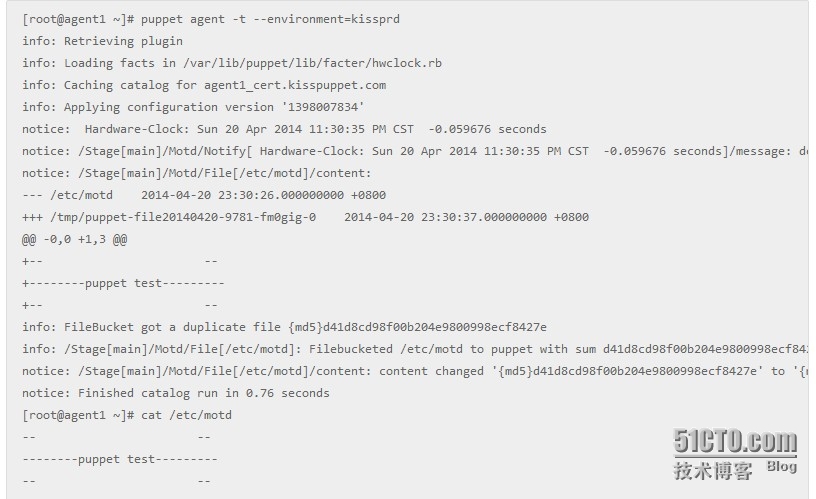
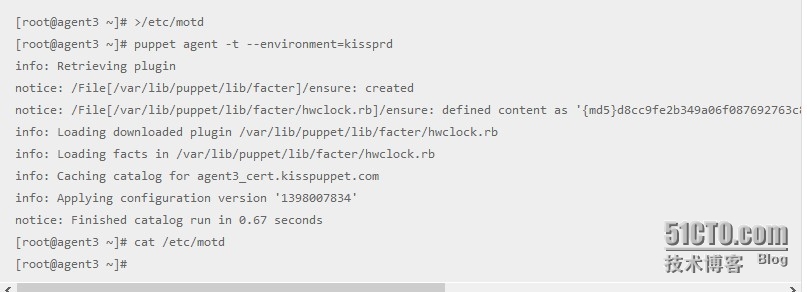
4.2、测试hiera变量certname和puppetserver
|
1
2
3
4
5
6
7
8
9
10
11
12
13
14
15
16
17
18
19
20
21
22
23
24
25
26
27
28
29
30
31
32
33
34
35
36
37
38
39
40
41
42
43
44
45
46
47
48
49
50
|
[[email protected] ~]# vim /etc/puppet/puppet.conf### config by puppet ###[main]logdir = /var/log/puppet
rundir = /var/run/puppet
ssldir = $vardir/ssl
pluginsync = true
[agent]classfile = $vardir/classes.txt
localconfig = $vardir/localconfig
# server = puppetmaster.kisspuppet.com #注释掉进行测试# certname = agent3_cert.kisspuppet.comruninterval = 10
[[email protected] ~]# puppet agent -t --environment=kissprd --server=puppetmaster.kisspuppet.com --certname=agent3_cert.kisspuppet.cominfo: Retrieving plugininfo: Loading facts in/var/lib/puppet/lib/facter/hwclock.rb
info: Caching catalog foragent3_cert.kisspuppet.cominfo: Applying configuration version '1398008880'
notice: /Stage[main]/Puppet::Config/File[/etc/puppet/puppet.conf]/content:--- /etc/puppet/puppet.conf 2014-04-2023:46:05.839948111+0800
+++ /tmp/puppet-file20140420-5618-45rytg-02014-04-2023:48:01.653944253+0800
@@ -7,6+7,6@@
[agent]classfile = $vardir/classes.txt
localconfig = $vardir/localconfig
-# server = puppetmaster.kisspuppet.com-# certname = agent3_cert.kisspuppet.com+ server = puppetmaster.kisspuppet.com+ certname = agent3_cert.kisspuppet.comruninterval = 10
info: FileBucket adding {md5}13430e5962e7584c9422e5adc1f3ba43info: /Stage[main]/Puppet::Config/File[/etc/puppet/puppet.conf]: Filebucketed /etc/puppet/puppet.conf to puppet withsum 13430e5962e7584c9422e5adc1f3ba43notice: /Stage[main]/Puppet::Config/File[/etc/puppet/puppet.conf]/content: content changed '{md5}13430e5962e7584c9422e5adc1f3ba43'to '{md5}23545b7afd09af671920f122a20db952'
info: /Stage[main]/Puppet::Config/File[/etc/puppet/puppet.conf]: Scheduling refresh of Class[Puppet::Service]info: Class[Puppet::Service]: Scheduling refresh of Service[puppet]notice: /Service[puppet]: Triggered 'refresh'from 1events
notice: Finished catalog run in0.54seconds[[email protected] ~]# cat /etc/puppet/puppet.conf### config by puppet ###[main]logdir = /var/log/puppet
rundir = /var/run/puppet
ssldir = $vardir/ssl
pluginsync = true
[agent]classfile = $vardir/classes.txt
localconfig = $vardir/localconfig
server = puppetmaster.kisspuppet.comcertname = agent3_cert.kisspuppet.comruninterval = 10
|
通过以上测试可以得知hiera变量certname和puppetserver传输正常。
特别说明: 由于hiera定义的变量需要通过转换才能变为puppet能够使用的变量,而这个转换是需要耗费CPU资源的,笔者曾经测试过一组节点(50个)同时传输hiera的变量数超过2000个,出现CPU负载过高的性能瓶颈问题需要特别注意。其次hiera数据除了用yaml格式保存外还可以存放在redis数据库中,这样查询起来性能会高很多,具体可参考官网,《pro puppet 》第二版也有这方面的介绍,可参阅。
通过以上测试至少解决了两个问题:
-
site.pp编写繁琐复杂的问题。
-
certname名定义问题(可以不适用其他fact变量进行定义,比如不再使用hostname变量,这样做的好处是即使节点hostname名变化也不会影响puppet通信)
二、集中管理自定义fact变量
思路: 参考Puppet基础篇10-自定义fact实现的四种方式介绍 在puppetmaster端编写一个facts模块,传输一个变量文件至节点对应的目录里面,变量文件名可以通过主机名进行定义。
1、在现有facts模块中直接添加
之前facts模块中的结构
|
1
2
3
4
5
6
7
8
9
|
[[email protected] modules]# tree facts/facts/├── files├── lib│ └── facter│ └── hwclock.rb #通过pluginsync模式发布的自定义fact变量,无需修改├── manifests└── templates5directories, 1file |
2、添加管理file资源的pp文件
|
1
2
3
4
5
6
7
8
9
10
11
12
13
14
15
16
17
18
19
20
21
22
|
[[email protected] manifests]# vim config.pp #定义file资源classfacts::config{file{ "/etc/facter/facts.d/$hostname.txt": #文件名称通过变量hostname获取
owner => "root",
group => "root",
mode => 0400,
source => "puppet:///modules/facts/facts.d/$hostname.txt", #文件名称通过节点变量hostname获取
require => Class['facts::exec'],
}}[[email protected] manifests]# vim exec.pp #定义可执行资源保证目录 /etc/facter/facts.d 存在classfacts::exec{exec {"create fact external":
command => "mkdir -p /etc/facter/facts.d ",
path => ["/usr/bin","/usr/sbin","/bin","/sbin"],
creates => "/etc/facter/facts.d",
}}[[email protected] manifests]# vim init.ppclassfacts{includefacts::config,facts::exec} |
3、创建file资源对应的下载文件
|
1
2
3
4
5
6
7
8
9
10
11
|
[[email protected] facts.d]# pwd/etc/puppet/environments/kissprd/environment/modules/facts/files/facts.d[[email protected] facts.d]# vim agent1.txtenv=prdapp=weblogic[[email protected] facts.d]# vim agent2.txtenv=qaapp=db2[[email protected] facts.d]# vim agent3.txtenv=prdapp=nginx |
4、应用模块facts至hiera中
由于模块facts属于全局的,应用于common.ymal或者RedHat.ymal中即可。
|
1
2
3
4
5
6
|
5、节点测试
|
1
2
3
4
5
6
7
8
9
10
11
12
13
14
15
16
17
|
[[email protected] ~]# ll /etc/facter/facts.dls: cannot access /etc/facter/facts.d: No such file or directory[[email protected] ~]# puppet agent -t --environment=kissprdinfo: Retrieving plugininfo: Loading facts in/var/lib/puppet/lib/facter/hwclock.rb
info: Caching catalog foragent3_cert.kisspuppet.cominfo: Applying configuration version '1398010573'
notice: /Stage[main]/Facts::Exec/Exec[create fact external]/returns: executed successfullynotice: /Stage[main]/Facts::Config/File[/etc/facter/facts.d/agent3.txt]/ensure: defined content as'{md5}3330b8efe95f6747de47a9eca3a5411e'
notice: Finished catalog run in0.66seconds[[email protected] ~]# cat /etc/facter/facts.d/agent3.txtenv=prdapp=nginx[[email protected] ~]# facter envprd[[email protected] ~]# facter appnginx |
其它节点测试略
注意:以上方法只是提供给你一种集中管理自定义fact的思路,并不是最好的解决方案,只不过这种方法目前笔者用于上产环境中感觉还不错,特此分享。
本文转自凌激冰51CTO博客,原文链接:http://blog.51cto.com/dreamfire/1399014,如需转载请自行联系原作者