Modify Branding of FreeCAD
This article describes the Branding of FreeCAD. Branding means to start your own application based on FreeCAD. That can be only your own executable or splash screen till a complete reworked program. Based on the flexible architecture of FreeCAD it’s easy to use it as base for your own special purpose program.
本文主要描述如何修改FreeCAD的Branding,从而使自己能基于FreeCAD灵活的架构快速开发出自己的应用程序。通过修改FreeCAD的Branding甚至启动画面,从而使程序看上去更像是自己开发的。
Branding信息主要在文件MainCmd.cpp和MainGrui.cpp中,这两个工程生成了FreeCAD可执行文件。
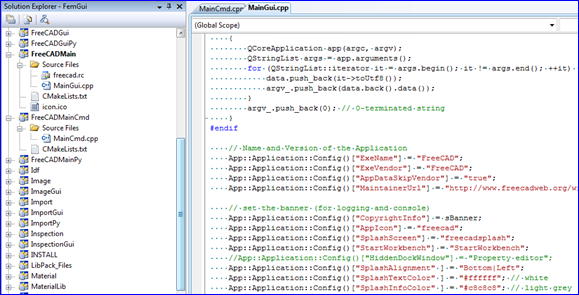
可以通过修改相关字符串,可以给可执行程序一个自己的名字,或者版本信息等的自定义,还有启动画面的自定义。
int main( int argc, char ** argv )
{
// Name and Version of the Application
App::Application::Config()["ExeName"] = "FooApp";
App::Application::Config()["ExeVersion"] = "0.7";
// set the banner (for loging and console)
App::Application::Config()["CopyrightInfo"] = sBanner;
App::Application::Config()["AppIcon"] = "FooAppIcon";
App::Application::Config()["SplashScreen"] = "FooAppSplasher";
App::Application::Config()["StartWorkbench"] = "Part design";
App::Application::Config()["HiddenDockWindow"] = "Property editor";
App::Application::Config()["SplashAlignment" ] = "Bottom|Left";
App::Application::Config()["SplashTextColor" ] = "#000000"; // black
// Inits the Application
App::Application::Config()["RunMode"] = "Gui";
App::Application::init(argc,argv);
Gui::BitmapFactory().addXPM("FooAppSplasher", ( const char** ) splash_screen);
Gui::Application::initApplication();
Gui::Application::runApplication();
App::Application::destruct();
return 0;
}
{
// Name and Version of the Application
App::Application::Config()["ExeName"] = "FooApp";
App::Application::Config()["ExeVersion"] = "0.7";
// set the banner (for loging and console)
App::Application::Config()["CopyrightInfo"] = sBanner;
App::Application::Config()["AppIcon"] = "FooAppIcon";
App::Application::Config()["SplashScreen"] = "FooAppSplasher";
App::Application::Config()["StartWorkbench"] = "Part design";
App::Application::Config()["HiddenDockWindow"] = "Property editor";
App::Application::Config()["SplashAlignment" ] = "Bottom|Left";
App::Application::Config()["SplashTextColor" ] = "#000000"; // black
// Inits the Application
App::Application::Config()["RunMode"] = "Gui";
App::Application::init(argc,argv);
Gui::BitmapFactory().addXPM("FooAppSplasher", ( const char** ) splash_screen);
Gui::Application::initApplication();
Gui::Application::runApplication();
App::Application::destruct();
return 0;
}
图片数据通过使用Qt的资源系统来编译到FreeCAD中去的。所以你需要写一个.qrc文件,将资源加到这个类似XML的qrc文件中。在程序中使用资源,需要在main()中添加下面一行:
Q_INIT_RESOURCE(FooApp);
如果你有XPM格式的图片,则可以直接使用:
Gui::BitmapFactory().addXPM("FooAppSplasher", ( const char** ) splash_screen);
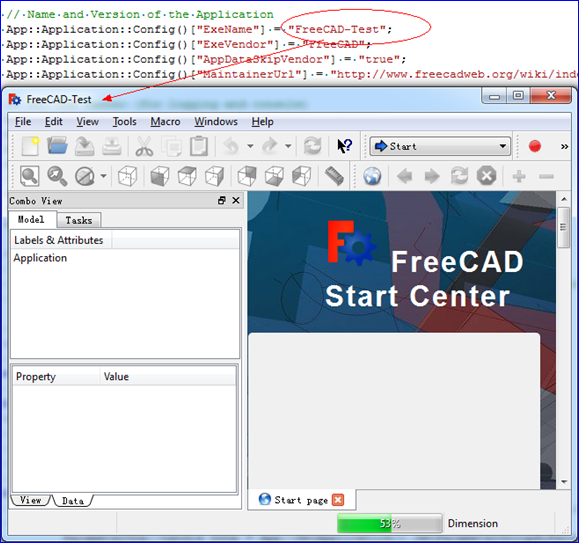
改后效果如下图所示: