前提:
docker remote api 是docker自带的一个rest api 管理。
只要在配置文件里面申明下就可以了。
下面是docker remote api的官方的功能目录:

通过接口获取所有的镜像 !
[[email protected] ~]$curl 'http://127.0.0.1:4243/images/json?all=0'| python -m json.tool
|
1
2
3
4
5
6
7
8
9
10
11
12
13
14
15
16
17
18
19
20
21
22
23
24
25
26
27
28
29
30
31
32
33
34
35
36
37
38
39
40
41
42
43
44
45
46
47
48
49
50
51
52
53
54
55
56
57
58
59
60
61
62
63
64
65
66
67
68
69
70
71
72
73
74
75
76
77
78
79
80
81
82
|
原文: [ {
"Created": 1407902496,
"Id": "57672d1b597912c7b6841c05c0e07e525890cfd64cbd37c84754e7d7e54ee766",
"ParentId": "47386e322f5deffbc04c777632e1f1ac7e6ddd6909ae6b9ce8d1d78dc2bb6d0c",
"RepoTags": [
"ubuntu_redis:latest"
],
"Size": 2675587,
"VirtualSize": 257554797
},
{
"Created": 1407684299,
"Id": "636d86f228c7c6e844d1473245a9580d9c57fd0bfd1b5b9172aa5c168581978c",
"ParentId": "e882dd610d1ca64817106dcbda29b2c78536f5fb75f780583cc9fac0efe05398",
"RepoTags": [
"rastasheep/ubuntu-sshd:14.04"
],
"Size": 0,
"VirtualSize": 254925704
},
{
"Created": 1407342004,
"Id": "1147568d245b369495b19b1943c0946a2b2d823d0a96b48bb7bee5f128090d29",
"ParentId": "12175cbcbe499c80dd71e3085467d9178a1b5cfa47ecf1463302e09fe2f09e58",
"RepoTags": [
"rastasheep/ubuntu-sshd:12.04"
],
"Size": 0,
"VirtualSize": 144645266
},
{
"Created": 1407341844,
"Id": "8a63145eed52cf9ae6bdb064f370469d6fa3653f0da5d370ece9e270baf8d9cb",
"ParentId": "ca60f67629d2c43012fb53f714e60672c4ad5b61520bb306e3a35614190dcf76",
"RepoTags": [
"rastasheep/ubuntu-sshd:13.10"
],
"Size": 0,
"VirtualSize": 231639963
},
{
"Created": 1407167259,
"Id": "47386e322f5deffbc04c777632e1f1ac7e6ddd6909ae6b9ce8d1d78dc2bb6d0c",
"ParentId": "a8bbc54283bbc341c703970ed429e4def6c034273ede59aaf451449164c95775",
"RepoTags": [
"rastasheep/ubuntu-sshd:latest"
],
"Size": 0,
"VirtualSize": 254879210
},
{
"Created": 1406884906,
"Id": "b78c71c001db87eb2da7049f5f9610039afd3484f65e22a3284098792460040d",
"ParentId": "e13b39edfcb4c5e15f876c2824fea1d738fb3825437162fad497138123f3235b",
"RepoTags": [
"lemonbar/centos6-ssh:latest"
],
"Size": 0,
"VirtualSize": 296869021
},
{
"Created": 1405333140,
"Id": "c9c48c3cb34c4b8305d7bae4f0c3c753fbca3ac96195e73e9fdab4a8fa24708a",
"ParentId": "30ffc511bbe11f6205cdc0f2749cadcc0c2eca4f7296285b1af867afcb6ef842",
"RepoTags": [
"rastasheep/ubuntu-sshd:12.10"
],
"Size": 0,
"VirtualSize": 188947523
},
{
"Created": 1405333120,
"Id": "bf49ae3d55344648b354bddf22b2f15c48e2d74e52933404757a9eb470ac35e3",
"ParentId": "561b2d67fd0a80367e9ab98f9893ce6d36006dbb452e7c8693f028fcaa5f6c7f",
"RepoTags": [
"rastasheep/ubuntu-sshd:13.04"
],
"Size": 0,
"VirtualSize": 213124480
}]
|
原文: http://rfyiamcool.blog.51cto.com/1030776/1539677
#这里是查看已经启动了的docker容器情况 !
[email protected]:~# curl http://127.0.0.1:4243/containers/json | python -m json.tool
|
1
2
3
4
5
6
7
8
9
10
11
12
13
14
15
16
17
18
19
20
|
[ {
"Command": "/usr/sbin/sshd -D",
"Created": 1407902166,
"Id": "df7b7568fa7a8c65e7ce857378a01ed127109b4de5e6508123e4797a5c54bfbe",
"Image": "rastasheep/ubuntu-sshd:latest",
"Names": [
"/test_sshd"
],
"Ports": [
{
"IP": "0.0.0.0",
"PrivatePort": 22,
"PublicPort": 49153,
"Type": "tcp"
}
],
"Status": "Up 3 hours"
}
] |
#查看某个容器的具体信息
[email protected]:~# curl -XGET 'http://127.0.0.1:4243/containers/df7b7568fa7a/json' | python -m json.tool
|
1
2
3
4
5
6
7
8
9
10
11
12
13
14
15
16
17
18
19
20
21
22
23
24
25
26
27
28
29
30
31
32
33
34
35
36
37
38
39
40
41
42
43
44
45
46
47
48
49
50
51
52
53
54
55
56
57
58
59
60
61
62
63
64
65
66
67
68
69
70
71
72
73
74
75
76
77
78
79
80
81
82
83
84
85
86
87
88
89
90
|
{ "Args": [
"-D"
],
"Config": {
"AttachStderr": false,
"AttachStdin": false,
"AttachStdout": false,
"Cmd": [
"/usr/sbin/sshd",
"-D"
],
"CpuShares": 0,
"Dns": null,
"Domainname": "",
"Entrypoint": null,
"Env": [
"HOME=/",
"PATH=/usr/local/sbin:/usr/local/bin:/usr/sbin:/usr/bin:/sbin:/bin"
],
"ExposedPorts": {
"22/tcp": {}
},
"Hostname": "df7b7568fa7a",
"Image": "rastasheep/ubuntu-sshd",
"Memory": 0,
"MemorySwap": 0,
"NetworkDisabled": false,
"OnBuild": null,
"OpenStdin": false,
"PortSpecs": null,
"StdinOnce": false,
"Tty": false,
"User": "",
"Volumes": null,
"VolumesFrom": "",
"WorkingDir": ""
},
"Created": "2014-08-13T03:56:06.602313986Z",
"Driver": "aufs",
"ExecDriver": "native-0.1",
"HostConfig": {
"Binds": null,
"ContainerIDFile": "",
"Links": null,
"LxcConf": [],
"PortBindings": {
"22/tcp": [
{
"HostIp": "0.0.0.0",
"HostPort": "49153"
}
]
},
"Privileged": false,
"PublishAllPorts": true
},
"HostnamePath": "/var/lib/docker/containers/df7b7568fa7a8c65e7ce857378a01ed127109b4de5e6508123e4797a5c54bfbe/hostname",
"HostsPath": "/var/lib/docker/containers/df7b7568fa7a8c65e7ce857378a01ed127109b4de5e6508123e4797a5c54bfbe/hosts",
"ID": "df7b7568fa7a8c65e7ce857378a01ed127109b4de5e6508123e4797a5c54bfbe",
"Image": "47386e322f5deffbc04c777632e1f1ac7e6ddd6909ae6b9ce8d1d78dc2bb6d0c",
"Name": "/test_sshd",
"NetworkSettings": {
"Bridge": "docker0",
"Gateway": "172.17.42.1",
"IPAddress": "172.17.0.3",
"IPPrefixLen": 16,
"PortMapping": null,
"Ports": {
"22/tcp": [
{
"HostIp": "0.0.0.0",
"HostPort": "49153"
}
]
}
},
"Path": "/usr/sbin/sshd",
"ResolvConfPath": "/etc/resolv.conf",
"State": {
"ExitCode": 0,
"FinishedAt": "2014-08-13T06:42:46.204526996Z",
"Ghost": false,
"Pid": 4222,
"Running": true,
"StartedAt": "2014-08-13T06:42:46.225958747Z"
},
"Volumes": {},
"VolumesRW": {}
} |
创建一个容器 !
[[email protected] ~]$curl -XPOST -H "Content-Type: application/json" http://127.0.0.1:4243/containers/create -d '{
"Hostname":"",
"User":"",
"Memory":0,
"MemorySwap":0,
"AttachStdin":false,
"AttachStdout":true,
"AttachStderr":true,
"PortSpecs":null,
"Privileged": false,
"Tty":false,
"OpenStdin":false,
"StdinOnce":false,
"Env":null,
"Dns":null,
"Image":"rastasheep/ubuntu-sshd",
"Volumes":{},
"VolumesFrom":"",
"WorkingDir":""
}'
|
1
|
{"Id":"d0274fdba510f643a0398cac36ee4caf9615b74e72452ff22951c96697f22c29","Warnings":null}
|
可能会返回的状态 !
config – the container’s configuration
Status Codes:
201 – no error
404 – no such container
406 – impossible to attach (container not running)
500 – server error
#我们查看下结果
[[email protected] ~]$docker ps -a
|
1
2
3
4
5
6
|
CONTAINER ID IMAGE COMMAND CREATED STATUS PORTS NAMESd0274fdba510 rastasheep/ubuntu-sshd:latest /usr/sbin/sshd -D About a minute ago Up 7 seconds 22/tcp silly_turing
2602cb4fb43b rastasheep/ubuntu-sshd:latest /usr/sbin/sshd -D 2 minutes ago Up 56 seconds 22/tcp angry_lovelace
1d20403be200 ubuntu_redis:latest /usr/sbin/sshd -D 3 hours ago Up 3 minutes 22/tcp, 0.0.0.0:6379->6379/tcp redis_6379
c5f6d0240531 ubuntu_redis:latest /usr/sbin/sshd -D 6 hours ago Exit 0 redis_sshd
df7b7568fa7a rastasheep/ubuntu-sshd:latest /usr/sbin/sshd -D 6 hours ago Up 3 hours 0.0.0.0:49153->22/tcp test_sshd
|
查看容器内的top信息:
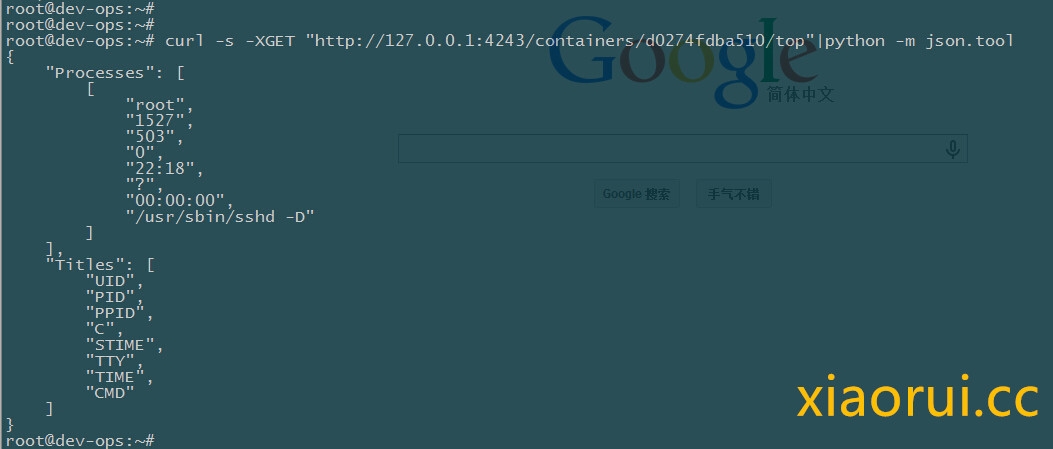
原文: http://rfyiamcool.blog.51cto.com/1030776/1539677
关闭容器,启动容器:
|
1
2
3
|
[email protected]:~# curl -s -XPOST "http://127.0.0.1:4243/containers/d0274fdba510/stop"
[email protected]:~# curl -s -XPOST "http://127.0.0.1:4243/containers/d0274fdba510/start"
|
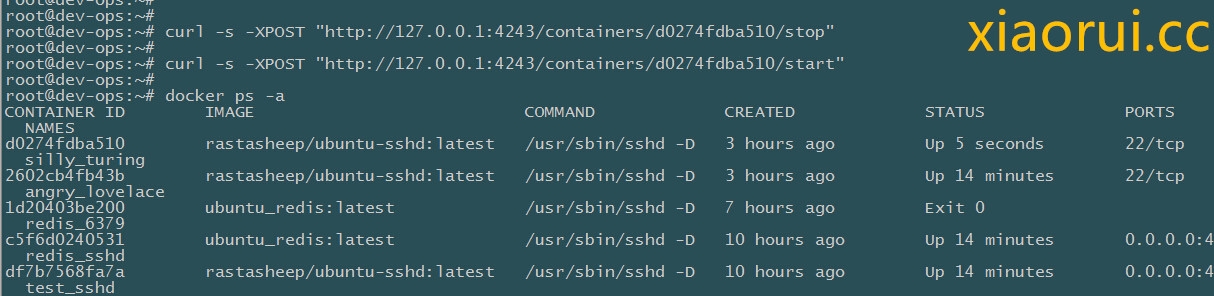
我这边就简单说下,详细的功能实现大家自己到官网look下吧。 说来也怪,docker时不时的抽风被墙 。我看了国外的论坛,貌似有些公司做了基于docker remote api实现的管理平台。
本文转自 rfyiamcool 51CTO博客,原文链接:http://blog.51cto.com/rfyiamcool/1539677,如需转载请自行联系原作者