5.1 glance的部署
|
1
2
|
[[email protected]~]# yum -y install openstack-glancepython-glance python-glanceclient
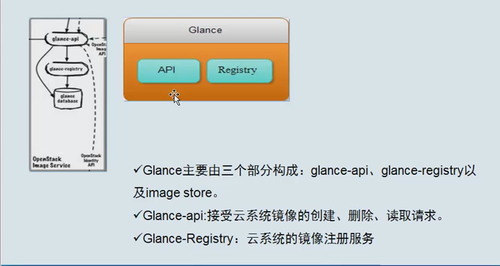
Glance一定会链接数据库,glance一定会链接keystone,存储配置,配置到哪个地方 |
5.2 glance-api的配置
|
1
2
3
4
5
6
7
8
9
10
11
12
13
14
15
16
|
[[email protected]~]# grep '^[a-z]' /etc/glance/glance-api.conf
verbose = true #开启debug日志
default_store =file #keystone_keystone_authtoken模块
filesystem_store_datadir= /var/lib/glance/images
auth_uri = http://192.168.56.11:5000
auth_url = http://192.168.56.11:35357
memcached_servers= 192.168.56.11:11211auth_type =passwordproject_domain_name= defaultuser_domain_name= defaultproject_name =serviceusername = glancepassword = glancedriver = noop #不适用消息队列
flavor = keystone #paste_deploy模块
|
5.3 glance-registry配置
|
1
2
3
4
5
6
7
8
9
10
11
12
13
|
[email protected]~]# grep '^[a-z]' /etc/glance/glance-registry.conf
auth_uri =http://192.168.56.11:5000
auth_url =http://192.168.56.11:35357
memcached_servers= 192.168.56.11:11211auth_type = passwordproject_domain_name= defaultuser_domain_name= defaultproject_name =serviceusername = glancepassword = glanceflavor = keystone |
5.4 同步glance数据库
|
1
2
3
4
5
6
7
8
9
10
11
12
13
14
15
16
17
18
19
20
21
22
23
24
25
26
27
28
|
su -s/bin/sh -c "glance-manage db_sync" glance
检查数据库同步状况[[email protected]~]# mysql -h 192.168.56.11 -uglance-pglance -e "use glance;showtables;"
+----------------------------------+|Tables_in_glance |+----------------------------------+|artifact_blob_locations ||artifact_blobs ||artifact_dependencies ||artifact_properties ||artifact_tags ||artifacts ||image_locations ||image_members ||image_properties ||image_tags ||images ||metadef_namespace_resource_types ||metadef_namespaces ||metadef_objects ||metadef_properties ||metadef_resource_types ||metadef_tags ||migrate_version ||task_info ||tasks |+----------------------------------+ |
5.5 往keystone注册
5.5.1创建glance的域
|
1
2
3
4
5
6
7
8
9
10
11
|
[[email protected]~]# openstack user create --domain default --password=glance glance
+---------------------+----------------------------------+|Field | Value |+---------------------+----------------------------------+|domain_id |d1d9728ef1d64905b1ebf54982dc7991 ||enabled | True || id |7a0adc3305d24ea4bc1d1a8abb51b410 |
|name | glance ||password_expires_at | None |+---------------------+----------------------------------+ |
5.5.2 为glance添加角色
|
1
|
openstack role add --project service --userglance admin
|
5.6 启动glance-api 和glance-registry
|
1
2
3
4
5
6
7
8
9
|
[[email protected]~]# systemctl enable openstack-glance-api
Created symlinkfrom /etc/systemd/system/multi-user.target.wants/openstack-glance-api.serviceto /usr/lib/systemd/system/openstack-glance-api.service.
[[email protected]~]# systemctl enable openstack-glance-registry
Created symlinkfrom /etc/systemd/system/multi-user.target.wants/openstack-glance-registry.serviceto /usr/lib/systemd/system/openstack-glance-registry.service.
[[email protected]~]# systemctl start openstack-glance-api
[[email protected]~]# systemctl start openstack-glance-registry
glance-registry9191端口glance-api 9292端口 |
5.7创建对内,对外还有管理节点
|
1
2
3
4
5
6
7
8
9
10
11
12
13
14
15
16
17
18
19
20
21
22
23
24
25
26
27
28
29
30
31
32
33
34
35
36
37
38
39
40
41
42
43
44
45
46
47
48
49
50
51
52
53
54
|
[[email protected]~]# openstack service create --name glance --description "OpenStack Imagesservice" image
+-------------+----------------------------------+| Field | Value |+-------------+----------------------------------+| description |OpenStack Images service || enabled | True || id | 2c60396cbd3d4421ad9d298263e0e733 |
| name | glance || type | image |
+-------------+----------------------------------+[[email protected]~]# openstack endpoint create --regionRegionOne image public http://192.168.56.11:9292
+--------------+----------------------------------+| Field | Value |+--------------+----------------------------------+| enabled | True || id | 710081d984f54eb78b9dfa704c8f104f |
| interface | public || region | RegionOne || region_id | RegionOne || service_id | 2c60396cbd3d4421ad9d298263e0e733 || service_name |glance || service_type |image || url | http://192.168.56.11:9292 |
+--------------+----------------------------------+[[email protected]~]# openstack endpoint create --regionRegionOne image internal http://192.168.56.11:9292
+--------------+----------------------------------+| Field | Value |+--------------+----------------------------------+| enabled | True || id | 9c6260f82e0b49a2a32969e7108f704b |
| interface | internal || region | RegionOne || region_id | RegionOne || service_id | 2c60396cbd3d4421ad9d298263e0e733 || service_name |glance || service_type |image || url | http://192.168.56.11:9292 |
+--------------+----------------------------------+[[email protected]~]# openstack endpoint create --regionRegionOne image admin http://192.168.56.11:9292
+--------------+----------------------------------+| Field | Value |+--------------+----------------------------------+| enabled | True || id | 470c6e79c23c4a0188ef3099b62030ab |
| interface | admin || region | RegionOne || region_id | RegionOne || service_id | 2c60396cbd3d4421ad9d298263e0e733 || service_name |glance || service_type |image || url | http://192.168.56.11:9292 |
+--------------+----------------------------------+ |
5.8 添加glance-api的调用版本号
|
1
2
|
在admin-openstack.shdemo-openstack.sh 里面要有exportOS_IMAGE_API_VERSION=2 |
5.9 测试是否成功
|
1
2
3
4
5
6
|
5.10 下载一个镜像测试
|
1
|
wgethttp://download.cirros-cloud.net/0.3.4/cirros-0.3.4-x86_64-disk.img
|
5.11 上传镜像到glance
|
1
|
openstack image create "cirros" \ --file cirros-0.3.4-x86_64-disk.img \ --disk-format qcow2 --container-format bare \ --public
|
5.12 再次查看镜像
|
1
2
3
4
5
6
7
|
[[email protected]~]# glance image-list
+--------------------------------------+--------+| ID | Name |+--------------------------------------+--------+|2a71519f-59c6-4f11-994e-7d55c3e82110 | cirros |+--------------------------------------+--------+ |
5.13说明镜像存放的目录
|
1
2
3
4
5
|
[[email protected]]# pwd
/var/lib/glance/images[[email protected]]# ls
2a71519f-59c6-4f11-994e-7d55c3e82110#id一样的
|
本文转自 小小三郎1 51CTO博客,原文链接:http://blog.51cto.com/wsxxsl/1883667,如需转载请自行联系原作者