Zabbix支持多种报警的方式,其中成本最低、最方便的就是邮件报警的方式了。但是因为它不支持邮件的用户认证,这种方式现在也非常少见,同时安全性也差,如果在本机建邮件服务器的话也容易被误入垃圾邮件。
现在我们使用163的邮箱或者自己公司内部的邮箱,利用msmtp+mutt完成邮件的报警。(当然也可以利用移动139的邮箱或者联通沃邮箱,可以达到短信通知)
1.msmtp的安装
|
1
2
3
4
5
6
|
wget http://jaist.dl.sourceforge.net/project/msmtp/msmtp/1.4.32/msmtp-1.4.32.tar.bz2
tar jxvf msmtp-1.4.32.tar.bz2
cd msmtp-1.4.32
mkdir -p /webserver/msmtp/etc
./configure --prefix=/webserver/msmtp --sysconfdir=/webserver/msmtp/etc
make && make install
|
2.配置msmtp
|
1
2
3
4
5
6
7
8
9
10
11
12
13
|
mkdir -p /var/log/zabbix
touch /var/log/zabbix/msmtp.log
chown zabbix.zabbix /var/log/zabbix
vim /webserver/msmtp/etc/msmtprc
account default
host smtp.163.com //SMTP服务器
port 25
from [email protected]
auth login
tls off
password zabbix //邮箱密码
logfile /var/log/zabbix/msmtp.log //日志路径
|
如果在上面配置的时候没有加上--sysconfdir=/webserver/msmtp/etc选项,msmtp默认读取的是当前用户的主文件夹中(例如root用户则查找/root,zabbix用户则查找/home/zabbix)的.msmtprc文件
3.测试msmtp
|
1
2
3
4
|
/webserver/msmtp/bin/msmtp test@test.com
hello worldthis is a test mail!
//按Ctrl+D结束即可发送邮件
|
查看日志是否正常
Mar 20 15:01:42 host=smtp.163.com tls=off auth=on [email protected] [email protected] [email protected] mailsize=26 smtpstatus=250 smtpmsg='250 Mail OK queued as smtp7,C8CowEB5MVOwkypTKWWWAA--.1291S2 1395299252' exitcode=EX_OK
4.安装mutt
|
1
2
3
4
5
6
|
yum -y install mutt
编辑/etc/Muttrc.local文件
set sendmail="/webserver/msmtp/bin/msmtp"
set use_from=yes
set editor="vim"
|
5.测试mutt
|
1
2
3
4
5
6
|
echo "helloworld" | mutt -s "test" test@test.com
//邮件内容为helloworld
//主题为test
//如果需要发送多人的话可以继续添加收件人
//其实这个还可以添加附件 只需要在最后添加 -a /root/test.txt
//案例:echo "helloworld" | mutt -s "test" [email protected]test.com [email protected]test.com -a /root/test.txt
|
6.创建邮件报警脚本
|
1
2
3
|
vim /webserver/zabbix/share/zabbix/alertscripts/email
#!/bin/bashecho "$3" | mutt -s "$2" $1
|
对文件进行授权
|
1
2
|
chown zabbix.zabbix /webserver/zabbix/share/zabbix/alertscripts/email
chmod 755 /webserver/zabbix/share/zabbix/alertscripts/email
|
7.配置zabbix_server.conf
报警脚本的位置是由zabbix_server.conf中的参数决定的,权限位置不正确或者权限不对将无法工作
|
1
2
3
|
vim /webserver/zabbix/etc/zabbix_server.conf
//修改报警脚本路径
AlertScriptsPath=/webserver/zabbix/share/zabbix/alertscripts
|
8.配置zabbix媒体类型
我这里是直接替换zabbix默认的邮件方式
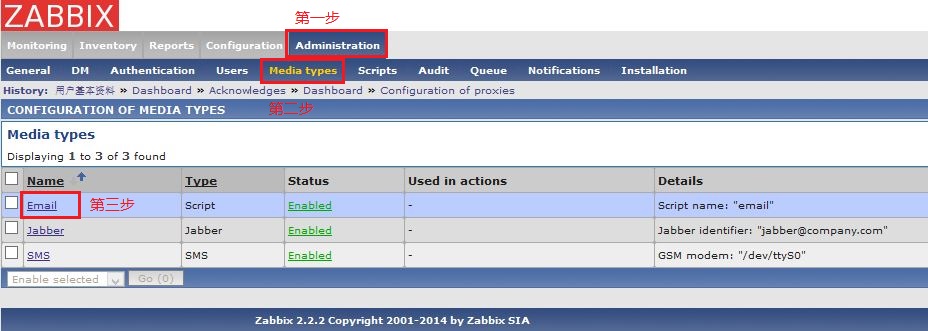
然后将Email修改成脚本方式
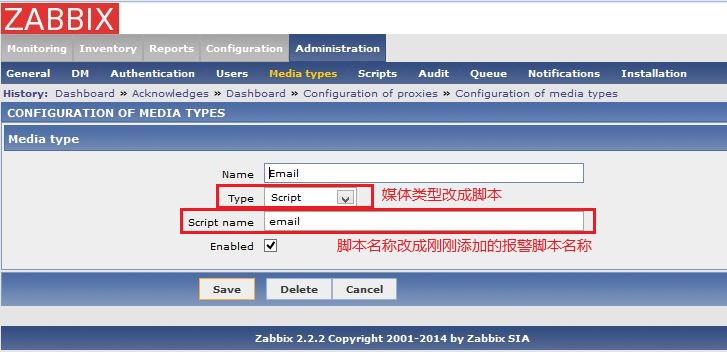
然后修改自己的邮件地址,就可以收到报警邮件了.
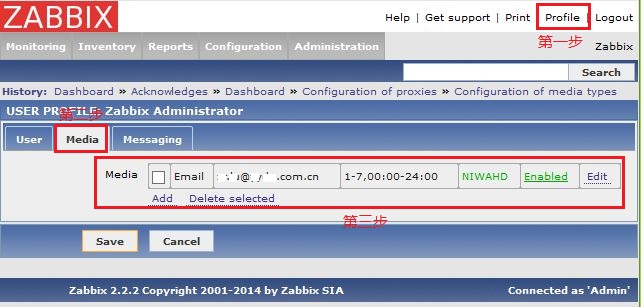
本文转自 rong341233 51CTO博客,原文链接:http://blog.51cto.com/fengwan/1380441