1. 系统与软件版本
1.1 系统版本
CentOS6.5 x86_64
1.2 ntpd软件版本
ntp-4.2.8p9.tar.gz
1.3 下载地址
官方下载地址:http://support.ntp.org/bin/view/Main/SoftwareDownloads
参考文档:http://www.linuxfromscratch.org/blfs/view/svn/basicnet/ntp.html
2. 安装前提
2.1 安装依赖包
| [[email protected] ~]# yum install gcc gcc-c++ openssl-devel libstdc++* libcap* |
2.2 备份旧版本的配置文件
|
1
2
3
4
5
|
[[email protected] ~]# cp -ar /etc/ntp /etc/ntp.bak
[[email protected] ~]# cp /etc/ntp.conf /etc/ntp.conf.bak
[[email protected] ~]# cp /etc/init.d/ntpd /etc/init.d/ntpd.bak
[[email protected] ~]# cp /etc/sysconfig/ntpd /etc/sysconfig/ntpd.bak
[[email protected] ~]# cp /etc/sysconfig/ntpdate /etc/sysconfig/ntpdate.bak
|
2.3 卸载yum安装的ntpd服务
|
1
|
[[email protected] ~]# yum erase ntp ntpdate
|
3. 编译安装ntp-4.2.8p9
3.1 创建/var/lib/ntp目录
|
1
|
[[email protected] ~]# install -v -m710 -o ntp -g ntp -d /var/lib/ntp
|
3.2 编译安装ntpd
|
1
2
3
4
5
6
7
8
9
10
11
12
|
[[email protected] ntp-4.2.8p9]# ./configure \
--prefix=/usr \
--bindir=/usr/sbin \
--sysconfdir=/etc \
--enable-linuxcaps \
--with-lineeditlibs=readline \--docdir=/usr/share/doc/ntp-4.2.8p9 \
--enable-all-clocks \
--enable-parse-clocks \
--enable-clockctl
make && make install
|
|
1
2
|
[[email protected] ~]# ntp
ntpd ntpdate ntpdc ntp-****** ntpq ntptime ntptrace ntp-wait |
4. 创建配置文件
|
1
2
3
4
5
|
[[email protected] ~]# cp /etc/init.d/ntpd.bak /etc/init.d/ntpd
[[email protected] ~]# cp /etc/sysconfig/ntpd.bak /etc/sysconfig/ntpd
[[email protected] ~]# cp /etc/sysconfig/ntpdate.bak /etc/sysconfig/ntpdate
[[email protected] ~]# mv /etc/ntp.bak /etc/ntp
[[email protected] ~]# cp /etc/ntp.conf.bak /etc/ntp.conf
|
5. 配置ntp.conf
在/etc/ntp.conf配置文件添加以下参数
server 127.127.1.0
fudge 127.127.1.0 stratum 10
启动ntpd服务
[[email protected] ~]# service ntpd start
6. 客户端配置
|
1
2
|
[[email protected] ~]# date
Sat Aug 8 08:08:13 CST 2015 |
/etc/ntp.conf添加服务端IP地址
server 10.17.83.106
|
1
2
3
4
|
[[email protected] ~]# ntpq -p
remote refid st t when poll reach delay offset jitter
============================================================================== 10.17.83.106 10.17.82.25 12 u 3 64 1 0.628 4279381 0.001
|
等待几分钟,ntpd客户端自动去同步服务端的时间
|
1
2
3
4
|
[[email protected] ~]# date
Sat Aug 8 08:11:10 CST 2015[[email protected] ~]# date
Thu Dec 15 15:28:41 CST 2016 |
Windows客户端配置

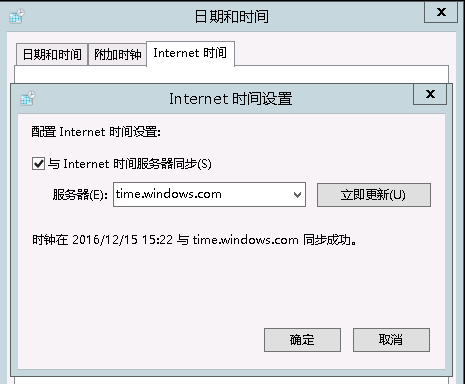
本文转自 HMLinux 51CTO博客,原文链接:http://blog.51cto.com/7424593/1883058