Nginx编译参数和进程管理介绍(二)
本文介绍两个部分:Nginx的编译参数以及nginx的进程管理。文章总体层次架构如图所示:
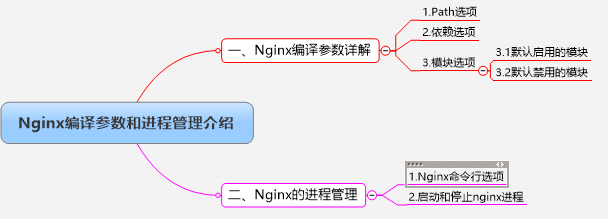
一、Nginx编译参数详解
从源代码编译应用程序时通常有三个步骤:配置,编译和安装,十分简单。其中配置步骤十分的重要,这直接决定了你的应用程序具备什么功能。所有编译安装时一定要特别重视配置的选项参数。
Nginx的配置选项有如下:
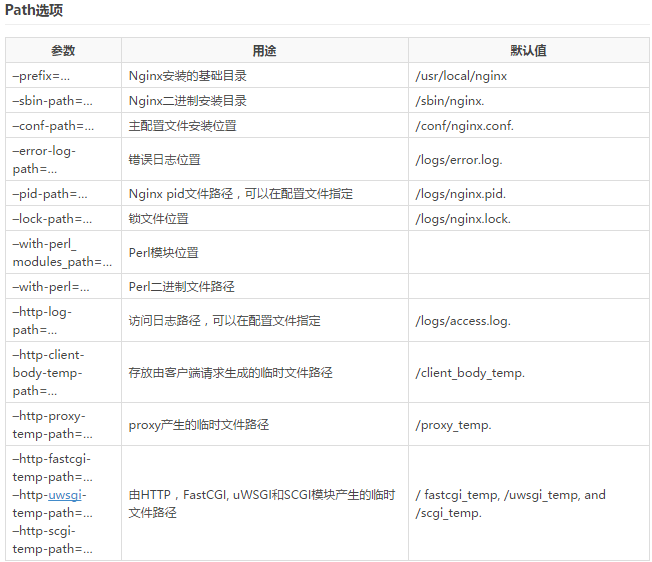
1.Path选项
指定编译安装的各种路径位置。
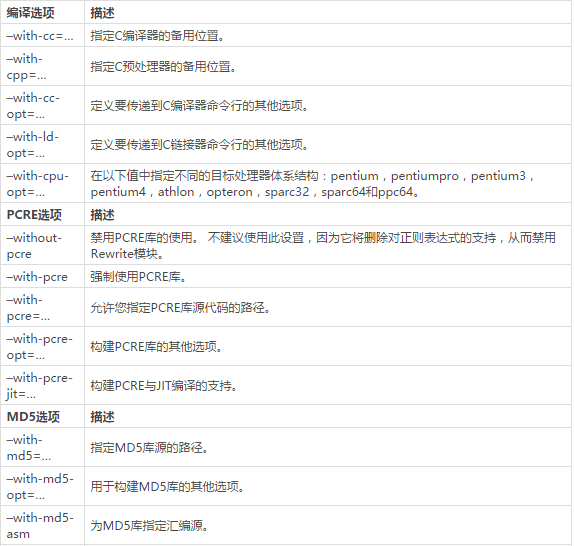
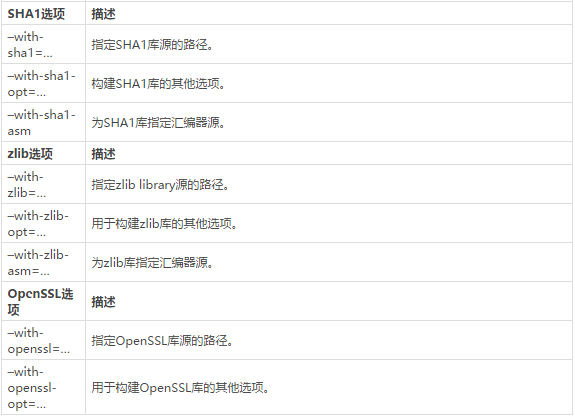
2.依赖选项
指定需要依赖的库文件。
3.模块选项
指明需要安装模块,安装的模块决定了你需要额外附加哪些功能。
3.1、默认启用的模块
|
1
2
3
4
5
6
7
8
9
10
11
12
13
14
15
16
17
18
19
20
21
22
23
24
|
以下参数允许您禁用默认情况下启用的模块:–without-http_charset_module–without-http_gzip_module–without-http_ssi_module–without-http_userid_module–without-http_access_module–without-http_access_module–without-http_autoindex_module–without-http_geo_module–without-http_map_module–without-http_referer_module–without-http_rewrite_module–without-http_proxy_module–without-http_fastcgi_module–without-http_uwsgi_module–without-http_scgi_module–without-http_memcached_module–without-http_limit_conn_module–without-http_limit_req_module–without-http_empty_gif_module–without-http_browser_module–without-http_upstream_ip_hash_module–without-http_upstream_least_conn_module–without-http_split_clients_module |
3.2、默认禁用的模块
|
1
2
3
4
5
6
7
8
9
10
11
12
13
14
15
16
17
18
19
20
21
|
以下参数允许您启用默认禁用的模块:–with-http_ssl_module–with-http_realip_module–with-http_addition_module–with-http_xslt_module–with-http_image_filter_module–with-http_geoip_module–with-http_sub_module–with-http_dav_module–with-http_flv_module–with-http_mp4_module–with-http_gzip_static_module–with-http_random_index_module–with-http_secure_link_module–with-http_stub_status_module–with-google_perftools_module–with-http_degradation_module–with-http_perl_module–with-http_spdy_module–with-http_gunzip_module–with-http_auth_request_module |
3.3、常用编译配置选项参考
|
1
|
./configure --prefix=/usr/local/nginx --conf-path=/etc/nginx/nginx.conf --error-log-path=/var/log/nginx/error.log --http-log-path=/var/log/nginx/access.log --pid-path=/var/run/nginx.pid --lock-path=/var/run/nginx.lock --user=nginx --group=nginx --with-http_ssl_module --with-http_v2_module --with-http_dav_module --with-http_stub_status_module --with-threads --with-file-aio
|
二、Nginx的进程管理
1.Nginx命令行选项
Nginx命令行选项可以用如下命令查看
|
1
2
3
4
5
6
7
8
9
10
11
12
13
14
|
[[email protected] nginx-1.12.0]# nginx -h
nginx version: nginx/1.12.0
Usage: nginx [-?hvVtTq] [-s signal] [-c filename] [-p prefix] [-g directives]Options: -?,-h : this help
-v : show version and exit
-V : show version and configure options then exit
-t : test configuration and exit
-T : test configuration, dump it and exit
-q : suppress non-error messages during configuration testing
-s signal : send signal to a master process: stop, quit, reopen, reload
-p prefix : set prefix path (default: /usr/local/nginx/)
-c filename : set configuration file (default: /etc/nginx/nginx.conf)
-g directives : set global directives out of configuration file
|
2.启动和停止Nginx进程
直接输入nginx既可以启动nginx,另外可以通过nginx -s signal发送信号来指定nginx进程的操作。
|
1
2
3
4
5
6
7
8
|
nginx #启动nginx
nginx -s stop #立即停止守护进程(使用TERM信号)
nginx -s quit #正常停止守护程序(使用QUIT信号)
nginx –s reopen #重新打开日志文件
nginx –s reload #重新加载配置
nginx -p prefix #指定安装路径
nginx -c filename #指明配置文件路径
killall nginx #杀死nginx进程
|
本文转自 PowerMichael 51CTO博客,原文链接:http://blog.51cto.com/huwho/1950733,如需转载请自行联系原作者