练习:
1、新加硬盘,提供直接单独运行bash系统
2、破坏本机grub stage1 (512MBR中的446),而后在救援模式修复之
3、为grub设备保护功能
1、新加硬盘,提供直接单独运行bash系统
1)关机
2)添加硬盘
3)给硬盘分区
|
1
|
# fdisk -l /dev/sdb |
|
1
|
# fdisk /dev/sdb |

|
1
2
3
|
boot分区 200M /dev/sdb1swap分区 1G /dev/sdb2root分区 5G /dev/sda3 |
|
1
|
partx -a /dev/sdb |
|
1
|
partx -a /dev/sdb |
|
1
|
mke2fs -t ext4 -b 2048 -i 2048 -L boot -O ^has_journal /dev/sdb1
|
|
1
2
|
mke2fs -t ext4 -b 2048 -i 2048 -L boot -O ^has_journal /dev/sdb3
tune2fs -O has_journal -o acl /dev/sdb3 |
|
1
|
mkswap /dev/sdb2 |
|
1
|
mkdir /mnt/{boot,sysroot} |
|
1
2
3
|
mount /dev/sdb1 /mnt/boot mount /dev/sdb3 /mnt/sysrootmount | fgrep sdb |
4)安装grub
|
1
|
# grub-install --root-directory=/mnt /dev/sdb |
5)准备FHS要求的根目录,及bash程序、库
|
1
|
# ldd /bin/bash | grep -o '/.*[[:space:]]' | tr -d ' ' | xargs -I {} cp --parents {} /mnt/sysroot |
|
1
|
# cp --parents /bin/bash /mnt/sysroot |
|
1
|
# install -d /mnt/sysroot/{etc,lib64,proc,sys,tmp,usr,var,home,root,boot,media,dev} |
6)准备内核及ramdisk
|
1
|
# cp /boot/vmlinuz-1.2.3-1.os.cpu /mnt/boot/vmlinuz |
|
1
|
# cp /boot/initramfs-1.2.3-1.os.cpu.img /mnt/boot/initramfs.img
|
7)准备配置文件
|
1
2
3
4
5
6
7
8
9
|
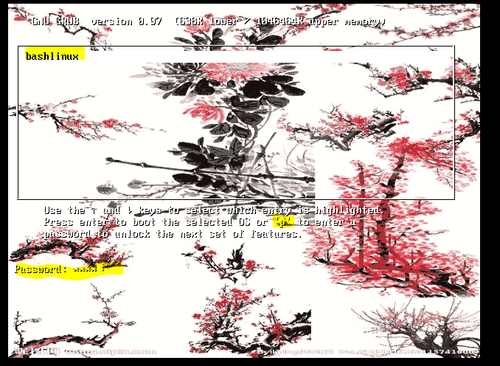
# vim /mnt/boot/grub/grub.confdefault=0timeout=5splashimage=(hd0,0)/xueling.xpm.gz
hiddenmenutitile bashlinux root (hd0,0)
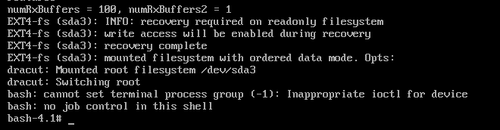
kernel /vmlinuz ro root=/dev/sda3 selinux=0 init=/bin/bash
initrd /initramfs.img
|
|
1
|
# cp /boot/xueling.xpm.gz /mnt/boot |
2、为grub设备保护功能
1)生成密码
|
1
2
3
4
5
6
|
# grub-md5-cryptxue: $1$gOWbT/$ngmGgm2riNqf9MWKL9Lvr0
# openssl passwd -1 -salt $(openssl rand -base64 4)
ling: $1$T3KoeQ==$.wB.fhpApwAoHwcphLiq0/
|
2)在hiddenmenu下添加代码,为菜单加密码
|
1
|
password --md5 $1$gOWbT/$ngmGgm2riNqf9MWKL9Lvr0 |
3)在initrd下一行添加代码,为启动内核加密
|
1
|
password --md5 $1$T3KoeQ==$.wB.fhpApwAoHwcphLiq0/ |
|
1
2
3
4
5
6
7
8
9
10
|
default=0
timeout=5
splashimage=(hd0,0)/xueling.xpm.gz
hiddenmenupassword --md5 $1$gOWbT/$ngmGgm2riNqf9MWKL9Lvr0
title bashlinux root (hd0,0)
kernel /vmlinuz ro root=/dev/sda3 selinux=0 init=/bin/bash
initrd /initramfs.img
password --md5 $1$T3KoeQ==$.wB.fhpApwAoHwcphLiq0/
|
4)同步,新建虚拟机,进入测试
|
1
2
|
# sync# for i in 1 2 3; do sync; done
|

3、破坏本机grub stage1 (512MBR中的446),而后在救援模式修复之
1)在命令行破坏grub stage1,前512字节
2)挂载光盘
3)进入resuce模式
|
1
|
boot: linux rescue |
4)切换至真正的根
|
1
|
# chroot /mnt/sysimage |
5)grub命令修复第一个阶段
|
1
2
3
|
# grubgrub> root (hd0,0)
grub> setup (hd0) |
本文转自 lccnx 51CTO博客,原文链接:http://blog.51cto.com/sonlich/1961052,如需转载请自行联系原作者