---本文大纲
简介
工作流程
VCL
安装及实例
-----------
一、简介
-
结构特点
-
系统架构
varnish主要运行两个进程:Management进程和Child进程(也叫Cache进程)。
二、工作流程
varnish 的某个负责接收新 HTTP 连接线程开始等待用户,如果有新的 HTTP 连接过来,它总负责接收,然后唤醒某个等待中的线程,并把具体的处理过程交给它。Worker 线程读入 HTTP 请求的 URI,查找已有的 object,如果命中(hit)则直接返回并回复用户。如果没有命中(miss),则需要将所请求的内容,从后端服务器中取过来(fetch),判断是否存到缓存中,如果需要存储下来(cache)然后再回复(deliver),如果不需要存储(pass),就直接由deliver响应。
-
分配缓存机制
它根据所读到 object 的大小,创建相应大小的缓存文件。为了读写方便,程序会把每个 object 的大小变为最接近其大小的内存页面倍数。然后从现有的空闲存储结构体中查找,找到最合适的大小的空闲存储块,分配给它。如果空闲块没有用完,就把多余的内存另外组成一个空闲存储块,挂到管理结构体上。如果缓存已满,就根据 LRU 机制,把最旧的 object 释放掉。
-
释放缓存机制
有一个超时线程,检测缓存中所有 object 的生存期,如果超初设定的 TTL(Time To Live)没有被访问,就删除之,并且释放相应的结构体及存储内存。注意释放时会检查该存储内存块前面或后面的空闲内存块,如果前面或后面的空闲内存和该释放内存是连续的,就将它们合并成更大一块内存。整个文件缓存的管理,没有考虑文件与内存的关系,实际上是将所有的 object 都考虑是在内存中,如果系统内存不足,系统会自动将其换到 swap 空间,而不需要 varnish 程序去控制。
-
工作流程图
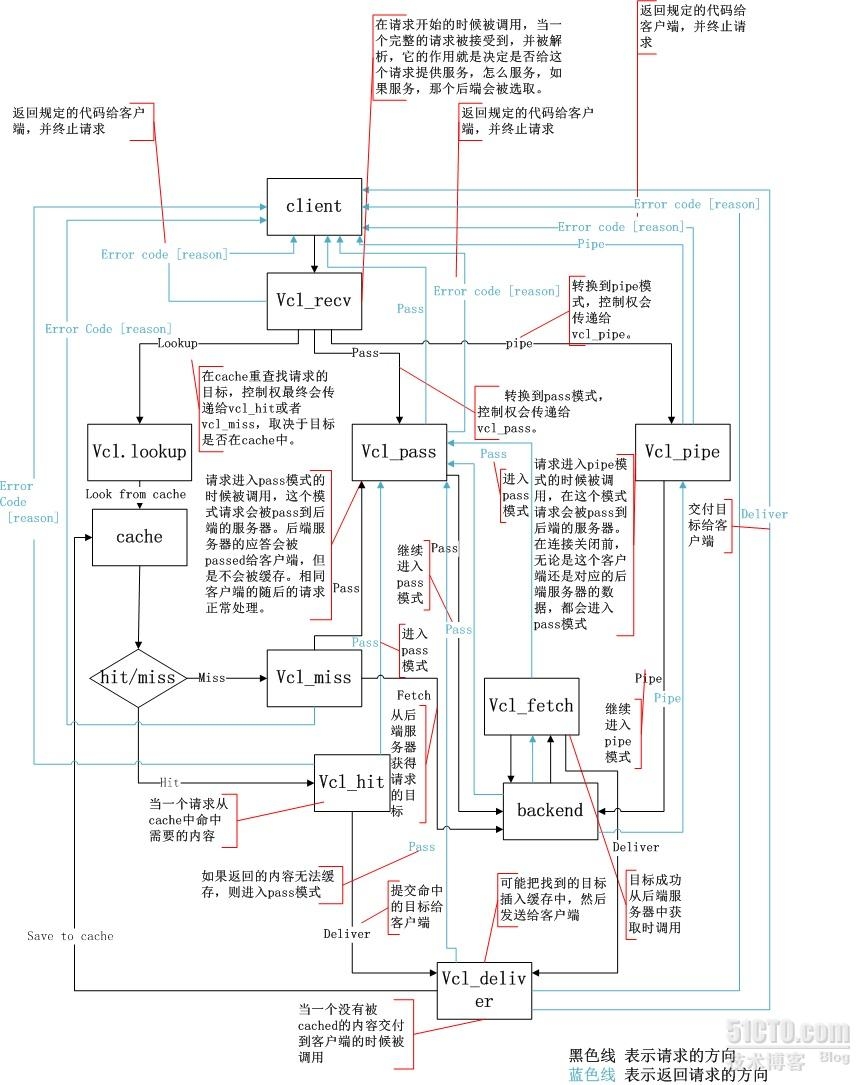
三、VCL(Varnish
Configuration Language)
Varnish有强大的配置系统。许多其他的系统使用配置指令,基本上就是开或关很多开关。Varnish使用领域专用语言(DSL)作为Varnish配置语言,简写VCL。当请求到达开始执行时,Varnish会将这些配置转换成二进制代码。
VCL文件被分成多个子程序。不同的子程序在不同时候运行。有的在获得请求时候运行,有的当文件从后端获取后运行。
Varnish将在它工作的不同场景执行这些子程序。因为是代码,所以逐行执行并不是问题。在某些情况你在这个子程序调用一个action,然后该子程序执行结束。
如果不想在你的子程序中调用一个action,并且到达了最末尾,此时varnish会执行一些VCL的内置代码。在default.vcl中的注释部分,你会看到这些VCL代码。
99%的情况,你都会要改动两个子程序,vcl_recv和vcl_fetch。
-
vcl_recv
vcl_recv是在请求开始时调用的。完成该子程序后,请求就被接收并解析了。用于确定是否需要服务请求,怎么服务,如果可用,使用哪个后端。
在vcl_recv中,你也可以修改请求。通常你可以修改cookie,或添加/移除请求头信息。
注意在vcl_recv中,只可以使用请求对象req。
-
vcl_fetch
vcl_fetch是在文档从后端被成功接收后调用的。通常用于调整响应头信息,触发ESI处理,万一请求失败就换个后端服务器。
在vcl_fecth中,你还可以使用请求对象req。还有个后端响应对象beresp。Beresp包含了后端的HTTP头信息。
-
actions
最常用的action如下:
pass:当返回pass的时候,请求和随后的响应都将被传到后端服务器,或从那里传回。不会被缓存。pass可以在vcl_recv中被返回。
hit_for_pass:类似与pass,但是只有vcl_fetch可以用。不像pass,hit_for_pass将在缓存中创建一个hitforpass对象。这有个副作用,就是缓存了不像缓存的东西。同时会将未缓存的请求传到后端。在vcl_recv中这样的逻辑不是必须的,因为它发生在任何潜在对象队列发生之前。
lookup:当在vcl_recv中返回lookup时,就等于你告诉varnish发送缓存中的内容,即使该请求应该是被pass的。在vcl_fetch中不能使用lookup。
pipe:pipe也可以在vcl_recv中返回。pipe缩短了客户和后端的环路链接,并且varnish将只是待在哪里,来回偏移字节。varnish不会在意来回发送的数据,所以你的日志是不完整的。注意一个客户会基于相同链接发送几个请求,当使用HTTP 1.1时。所以在实际返回pipe之前,你需要让varnish添加”Connection:close”的头信息。
deliver:投递缓存对象给客户。经常在vcl_fetch中使用。
-
请求,响应和对象
在VCL中,有三种重要的数据结构。请求:来自客户端;响应:来自后端服务器;对象:存储在缓存中。
在VCL中你应该知道以下结构
req
请求对象。当varnish接受了请求,req就会创建并生产。许多在vcl_recv中要做的工作都需要用到req。
beresp
后端响应对象。包含了从后端返回的对象的头信息。vcl_fetch中,你会使用beresp对象。
obj
缓存了的对象。大多数是驻留在内存中的只读对象。obj.ttl是可以写的,剩下的都是只读的。
-
操作符
VCL中可用的操作符如下
=:赋值
==:比较
~:匹配。可使用正则表达式或ACLs
!:取反
&&:逻辑与
||:逻辑或
-
VCL的内置函数
regsuball(str,regex,sub)
这两个用于基于正则表达式搜索指定的字符串并将其替换为指定的字符串;但regsuball()可以将str中能够被regex匹配到的字符串统统替换为sub,regsub()只替换一次;
ban_url(regex)
Bans所有其URL能够由regex匹配的缓存对象;
purge
从缓存中挑选出某对象以及其相关变种一并删除,这可以通过HTTP协议的PURGE方法完成;
return()
当某VCL域运行结束时将控制权返回给Varnish,并指示Varnish如何进行后续的动作;其可以返回的指令包括:lookup、pass、pipe、hit_for_pass、fetch、deliver和hash等;但某特定域可能仅能返回某些特定的指令,而非前面列出的全部指令;
return(restart)
重新运行整个VCL,即重新从vcl_recv开始进行处理;每一次重启都会增加req.restarts变量中的值,而max_restarts参数则用于限定最大重启次数.
四、安装及实例
-
安装包
|
1
|
[[email protected] download]# yum install -y varnish-3.0.4-1.el6.x86_64.rpm varnish-libs-devel-3.0.4-1.el6.x86_64.rpm varnish-libs-3.0.4-1.el6.x86_64.rpm
|
-
生成的文件
|
1
2
3
4
5
6
7
8
9
10
11
12
13
14
15
16
17
18
19
20
21
22
23
24
25
26
27
28
29
30
31
32
33
34
35
36
37
38
39
40
41
42
43
44
45
46
47
48
49
50
|
[[email protected] ~]# rpm -ql varnish
/etc/logrotate.d/varnish
#日志滚动
/etc/rc.d/init.d/varnish
#服务启动脚本
/etc/rc.d/init.d/varnishlog
/etc/rc.d/init.d/varnishncsa
/etc/sysconfig/varnish
#主配置文件
/etc/varnish/etc/varnish/default.vcl
#开机要加载的vcl
/usr/bin/varnish_reload_vcl/usr/bin/varnishadm
#命令行管理工具
/usr/bin/varnishhist/usr/bin/varnishlog/usr/bin/varnishncsa/usr/bin/varnishreplay/usr/bin/varnishsizes/usr/bin/varnishstat/usr/bin/varnishtest/usr/bin/varnishtop/usr/lib64/varnish/usr/lib64/varnish/libvarnish.so
/usr/lib64/varnish/libvarnishcompat.so
/usr/lib64/varnish/libvcl.so
/usr/lib64/varnish/libvgz.so
/usr/lib64/varnish/vmods/usr/lib64/varnish/vmods/libvmod_std.so
/usr/sbin/varnishd/usr/share/doc/varnish-3.0.4
/usr/share/doc/varnish-3.0.4/ChangeLog
/usr/share/doc/varnish-3.0.4/LICENSE
/usr/share/doc/varnish-3.0.4/README
/usr/share/doc/varnish-3.0.4/README.redhat
/usr/share/doc/varnish-3.0.4/examples
/usr/share/doc/varnish-3.0.4/examples/default.vcl
/usr/share/doc/varnish-3.0.4/examples/zope-plone.vcl
/usr/share/man/man1/varnishadm.1.gz
/usr/share/man/man1/varnishd.1.gz
/usr/share/man/man1/varnishhist.1.gz
/usr/share/man/man1/varnishlog.1.gz
/usr/share/man/man1/varnishncsa.1.gz
/usr/share/man/man1/varnishreplay.1.gz
/usr/share/man/man1/varnishsizes.1.gz
/usr/share/man/man1/varnishstat.1.gz
/usr/share/man/man1/varnishtest.1.gz
/usr/share/man/man1/varnishtop.1.gz
/usr/share/man/man3/vmod_std.3.gz
/usr/share/man/man7/varnish-cli.7.gz
/usr/share/man/man7/varnish-counters.7.gz
/usr/share/man/man7/vcl.7.gz
/var/lib/varnish/var/log/varnish |
-
主配置文件注解 (/etc/sysconfig/varnish)
|
1
2
3
4
5
6
7
8
9
10
11
12
13
14
15
16
17
18
19
20
21
22
23
24
25
|
[[email protected] sysconfig]# grep -v "#" varnish
NFILES=131072
# 打开的文件数
MEMLOCK=82000
#每一个日志的大小
NPROCS="unlimited"
# 所使用的最大进程数;unlimited表示没有上限
RELOAD_VCL=1
# 服务启动后是否要重读配置文件
VARNISH_VCL_CONF=/etc/varnish/default.vcl
#默认的配置文件存放位置
VARNISH_LISTEN_PORT=6081
#varnish监听的端口
VARNISH_ADMIN_LISTEN_ADDRESS=127.0.0.1
#指定管理主机的地址
VARNISH_ADMIN_LISTEN_PORT=6082
#管理端口
VARNISH_SECRET_FILE=/etc/varnish/secret
#对称**
VARNISH_MIN_THREADS=50
#最小线程数
VARNISH_MAX_THREADS=1000
#最大线程数
VARNISH_THREAD_TIMEOUT=120
#线程的超时时间
VARNISH_STORAGE_FILE=/var/lib/varnish/varnish_storage.bin
#日志存放位置
VARNISH_STORAGE_SIZE=1G
#存储空间大小
VARNISH_STORAGE="malloc,100M"
#存储方式
VARNISH_TTL=120
#后端无响应的超时时长
DAEMON_OPTS="-a ${VARNISH_LISTEN_ADDRESS}:${VARNISH_LISTEN_PORT} \ -f ${VARNISH_VCL_CONF} \
-T ${VARNISH_ADMIN_LISTEN_ADDRESS}:${VARNISH_ADMIN_LISTEN_PORT} \
-t ${VARNISH_TTL} \
-w ${VARNISH_MIN_THREADS},${VARNISH_MAX_THREADS},${VARNISH_THREAD_TIMEOUT} \
-u varnish -g varnish \
-S ${VARNISH_SECRET_FILE} \
-s ${VARNISH_STORAGE}"
#参数引用
|
-
启动服务
|
1
2
|
[[email protected] download]# service varnish start
Starting Varnish Cache: [ OK ] |
-
VCL接口编辑工具
|
1
2
3
4
5
6
7
8
9
10
11
12
13
14
15
16
17
18
19
20
21
22
23
24
25
26
27
28
29
30
31
32
33
34
35
|
[email protected] varnish]# varnishadm -S /etc/varnish/secret -T 127.0.0.1:6082
200 -----------------------------Varnish Cache CLI 1.0-----------------------------Linux,2.6.32-431.el6.x86_64,x86_64,-smalloc,-smalloc,-hcritbitvarnish-3.0.4 revision 9f83e8fType 'help'
for command
list.
Type 'quit'
to close CLI session.
varnish> help200 help [command]
#帮助信息,可用的子命令
ping
[timestamp]
auth responsequitbanner #欢迎信息
status #进程状态检测
startstopvcl.load <configname> <filename>
#编译配置文件(*.vcl)
vcl.inline <configname> <quoted_VCLstring>vcl.use <configname>
# 使用配置文件
vcl.discard <configname>
#清除编译生成的旧的配置文件
vcl.list
#列出可用编译生成的文件
vcl.show <configname>
#显示配置文件名所对应的配置内容
param.show [-l] [<param>]
#列出参数变量
param.set
<param> <value> #调整参数
panic.showpanic.clear
storage.list
#所使用的缓存类型及大小
backend.list
#后端服务器列表
backend.set_health matcher stateban.url <regexp>
#清除指定正则表达式的匹配的内容
ban <field> <operator> <arg> [&& <field> <oper> <arg>]...ban.list |
-
常用参数说明
|
1
2
3
4
5
6
7
8
9
10
|
[[email protected] download]# varnishadm -S /etc/varnish/secret -T 127.0.0.1:6082
200-----------------------------Varnish Cache CLI 1.0-----------------------------Linux,2.6.32-431.el6.x86_64,x86_64,-smalloc,-smalloc,-hcritbitvarnish-3.0.4 revision 9f83e8fType 'help'
for command
list.
Type 'quit'
to close CLI session.
varnish> param.show -l |
thread_pool_add_delay
创建在线程时间间隔,默认2毫秒一个
线程池个数,默认为2个(可以热设置(立即生效,但不可以减小,要想减小要重启后重新设置))
如果想参数生效要写入/etc/sysconfig/varnish
使用options引用
实例一、查询某一个页面的命中请况
|
1
2
3
4
5
6
7
8
9
10
11
12
13
|
#cd /etc/varnish/
#vim test.vclbackend web1 { #定义后端服务 .host =
"172.16.32.10"; #后端的主机
.port =
"80"; #监听的套接字
}sub vcl_deliver { #响应子函数 if
(obj.hits > 0) { #检测对象命中
set
resp.http.X-Cache = "HIT"; #如果命中,则将响应的X-Cache设置为hit
} else
{
set
resp.http.X-Cache = "Miss";
}} |
|
1
2
3
4
5
6
7
8
9
10
11
12
13
14
15
16
17
18
19
20
21
22
23
24
25
26
27
28
29
30
31
32
33
34
35
36
37
38
39
40
41
|
[[email protected] varnish]# varnishadm -S /etc/varnish/secret -T 127.0.0.1:6082
200 -----------------------------Varnish Cache CLI 1.0-----------------------------Linux,2.6.32-431.el6.x86_64,x86_64,-smalloc,-smalloc,-hcritbitvarnish-3.0.4 revision 9f83e8fType 'help'
for command
list.
Type 'quit'
to close CLI session.
varnish>vcl.load test1
test.vcl
#编译vcl文件varnish>vcl.use test1#使用vcl文件[[email protected] varnish]# curl -I http://172.16.249.91:6081
HTTP/1.1 200 OK
Server: Apache/2.2.15 (CentOS)
Last-Modified: Mon, 05 May 2014 11:43:04 GMTETag: "40101-19-4f8a5a2667e70"
Content-Type: text/html; charset=UTF-8
Content-Length: 25Accept-Ranges: bytesDate: Mon, 14 Apr 2014 00:50:29 GMTX-Varnish: 774759489Age: 0Via: 1.1 varnishConnection: keep-aliveX-Cache: Miss[[email protected] varnish]# curl -I http://172.16.249.91:6081
HTTP/1.1 200 OK
Server: Apache/2.2.15 (CentOS)
Last-Modified: Mon, 05 May 2014 11:43:04 GMTETag: "40101-19-4f8a5a2667e70"
Content-Type: text/html; charset=UTF-8
Content-Length: 25Accept-Ranges: bytesDate: Mon, 14 Apr 2014 00:50:39 GMTX-Varnish: 774759490 774759489Age: 9Via: 1.1 varnishConnection: keep-aliveX-Cache: HIT |
实例二、对不同的类型缓存与否
|
1
2
3
4
5
6
7
8
9
10
11
12
13
14
15
16
17
18
19
20
21
22
23
24
25
|
backend web1 { .host =
"172.16.32.10";
.port =
"80";
}sub vcl_deliver { if
(obj.hits > 0) {
set
resp.http.X-Cache = "HIT";
} else
{
set
resp.http.X-Cache = "Miss";
}}sub vcl_recv { if
(req.url ~ "test.html"){
return(pass);
#如果此请求以test.html结尾,则表示当前缓存不处理直接由源服务器处理
} return(lookup); 其它的类型都将查询缓存
}sub vcl_fetch { if
(req.url ~"\.(jpg|jpeg|gif|png)$"){
set
beresp.ttl=7200s; #在响应时,如果源服务器没有设定缓存时长,则由缓存服务器指定缓存时长
} if
(req.url ~ "\.(html|css|js)$"){
set
beresp.ttl =1200s;
}} |
编译vcl
|
1
2
3
4
5
|
varnish> vcl.load test2
test.vcl
200 VCL compiled.varnish> vcl.use test2200 |
请求测试
|
1
2
3
4
5
6
7
8
9
10
11
12
13
14
15
16
17
18
19
20
21
22
23
24
25
26
27
28
29
30
31
32
33
34
35
36
37
38
39
40
41
42
43
44
45
46
47
48
49
50
51
52
53
54
55
56
57
58
59
60
61
62
63
64
65
66
67
68
69
70
71
72
73
74
75
76
77
78
79
80
81
82
83
84
85
86
87
88
89
90
|
[[email protected] varnish]# curl -I http://172.16.249.91:6081/test.html
HTTP/1.1 200 OK
Server: Apache/2.2.15 (CentOS)
Last-Modified: Mon, 05 May 2014 15:20:55 GMTETag: "40102-1b-4f8a8ad815862"
Accept-Ranges: bytesContent-Length: 27Content-Type: text/html; charset=UTF-8
Accept-Ranges: bytesDate: Mon, 14 Apr 2014 01:22:06 GMTX-Varnish: 774759496Age: 0Via: 1.1 varnishConnection: keep-aliveX-Cache: Miss[[email protected] varnish]# curl -I http://172.16.249.91:6081/test.html
HTTP/1.1 200 OK
Server: Apache/2.2.15 (CentOS)
Last-Modified: Mon, 05 May 2014 15:20:55 GMTETag: "40102-1b-4f8a8ad815862"
Accept-Ranges: bytesContent-Length: 27Content-Type: text/html; charset=UTF-8
Accept-Ranges: bytesDate: Mon, 14 Apr 2014 01:22:07 GMTX-Varnish: 774759497Age: 0Via: 1.1 varnishConnection: keep-aliveX-Cache: Miss#由此可见,凡是请求test.html结尾的文件,将都不会缓存[[email protected] varnish]# curl -I http://172.16.249.91:6081/index.html
HTTP/1.1 200 OK
Server: Apache/2.2.15 (CentOS)
Last-Modified: Mon, 05 May 2014 11:43:04 GMTETag: "40101-19-4f8a5a2667e70"
Content-Type: text/html; charset=UTF-8
Content-Length: 25Accept-Ranges: bytesDate: Mon, 14 Apr 2014 01:23:57 GMTX-Varnish: 774759498Age: 0Via: 1.1 varnishConnection: keep-aliveX-Cache: Miss[[email protected] varnish]#
[[email protected] varnish]# curl -I http://172.16.249.91:6081/index.html
HTTP/1.1 200 OK
Server: Apache/2.2.15 (CentOS)
Last-Modified: Mon, 05 May 2014 11:43:04 GMTETag: "40101-19-4f8a5a2667e70"
Content-Type: text/html; charset=UTF-8
Content-Length: 25Accept-Ranges: bytesDate: Mon, 14 Apr 2014 01:23:59 GMTX-Varnish: 774759499 774759498Age: 2Via: 1.1 varnishConnection: keep-aliveX-Cache: HIT#此请求将再次命中[[email protected] varnish]# curl -I http://172.16.249.91:6081/login.jpg
HTTP/1.1 200 OK
Server: Apache/2.2.15 (CentOS)
Last-Modified: Mon, 05 May 2014 15:29:30 GMTETag: "40103-e0f8-4f8a8cc27faae"
Content-Type: image/jpeg
Content-Length: 57592Accept-Ranges: bytesDate: Mon, 14 Apr 2014 01:24:50 GMTX-Varnish: 774759500Age: 0Via: 1.1 varnishConnection: keep-aliveX-Cache: Miss[[email protected] varnish]# curl -I http://172.16.249.91:6081/login.jpg
HTTP/1.1 200 OK
Server: Apache/2.2.15 (CentOS)
Last-Modified: Mon, 05 May 2014 15:29:30 GMTETag: "40103-e0f8-4f8a8cc27faae"
Content-Type: image/jpeg
Content-Length: 57592Accept-Ranges: bytesDate: Mon, 14 Apr 2014 01:24:52 GMTX-Varnish: 774759501 774759500Age: 2Via: 1.1 varnishConnection: keep-aliveX-Cache: HIT#图片己经缓存 |
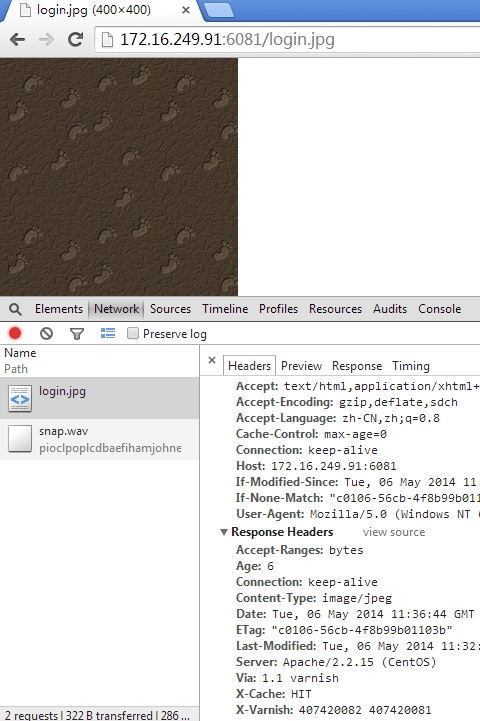
实例三、清除缓存内容
|
1
2
3
4
5
6
7
8
9
10
11
12
13
14
15
16
17
18
19
20
21
22
23
24
25
26
27
28
29
30
31
|
acl purgers { "127.0.0.1";
"172.16.249.91";
}sub vcl_recv { if
(req.request == "PURGE"
){ #请求命令
if
(!client.ip ~ purgers){ #如果不是acl列表中定义的IP地址将不允许此操作
error 405
"Method not allowed";
}
return
(lookup); #接收并解析
} }sub vcl_hit {
#varnish己缓存区域
if
(req.request == "PURGE") {
#如果此请求的内容己经缓存,并且请求方法带有PURGE,请清理缓存
purge;
error 200
"Purged";
#使用错误响应来通知执行结果
}}sub vcl_miss {
#未命中区域
if
(req.request == "PUGE"){
#
purge;
error 404
"not in cache";
#在此区域将不用清理
}}sub vcl_pass {
#直接在向后端的服务器请求,此区域将不做任何缓存。
if
(req.request == "PURGE"){
error 502
"PURGE on a passed object";
}} |
编译test.vcl
|
1
2
3
4
5
|
varnish> vcl.load test1 ./test.vcl
200 VCL compiled.varnish> vcl.use test1200 |
测试缓存
|
1
2
3
4
5
6
7
8
9
10
11
12
13
14
15
16
17
18
19
20
21
22
23
24
25
26
27
28
29
30
31
32
33
34
35
36
37
38
39
40
41
42
|
[[email protected] varnish]# curl -I http://172.16.249.91:6081/test.html
HTTP/1.1 200 OK
Server: Apache/2.2.15 (CentOS)
Last-Modified: Tue, 06 May 2014 11:13:33 GMTETag: "c0107-20-4f8b956aaf2c7"
Accept-Ranges: bytesContent-Length: 32Content-Type: text/html; charset=UTF-8
Accept-Ranges: bytesDate: Tue, 06 May 2014 11:45:50 GMTX-Varnish: 407420085Age: 0Via: 1.1 varnishConnection: keep-aliveX-Cache: Miss[[email protected] varnish]# curl -I http://172.16.249.91:6081/1.jpg
HTTP/1.1 404 Not Found
Server: Apache/2.2.15 (CentOS)
Content-Type: text/html; charset=iso-8859-1
Content-Length: 284Accept-Ranges: bytesDate: Tue, 06 May 2014 11:46:11 GMTX-Varnish: 407420087 407420086Age: 9Via: 1.1 varnishConnection: keep-aliveX-Cache: HIT[[email protected] varnish]# curl -I http://172.16.249.91:6081/test.html
HTTP/1.1 200 OK
Server: Apache/2.2.15 (CentOS)
Last-Modified: Tue, 06 May 2014 11:13:33 GMTETag: "c0107-20-4f8b956aaf2c7"
Accept-Ranges: bytesContent-Length: 32Content-Type: text/html; charset=UTF-8
Accept-Ranges: bytesDate: Tue, 06 May 2014 11:45:50 GMTX-Varnish: 407420085Age: 0Via: 1.1 varnishConnection: keep-aliveX-Cache: Miss |
清除指定的资源
|
1
2
3
4
5
6
7
8
9
10
11
12
13
14
15
16
17
18
19
20
21
22
23
24
25
26
27
28
29
|
[[email protected] varnish]# curl -X PURGE http://172.16.249.91:6081/1.jpg
<?xml version="1.0"
encoding="utf-8"?>
<!DOCTYPE html PUBLIC
"-//W3C//DTD XHTML 1.0 Strict//EN"
"http://www.w3.org/TR/xhtml1/DTD/xhtml1-strict.dtd">
<html> <head>
<title>200 Purged</title>
</head>
<body>
<h1>Error 200 Purged</h1>
<p>Purged</p>
<h3>Guru Meditation:</h3>
<p>XID: 407420088</p>
<hr>
<p>Varnish cache server</p>
</body>
</html>
[[email protected] varnish]# curl -I http://172.16.249.91:6081/1.jpg
HTTP/1.1 404 Not Found
Server: Apache/2.2.15 (CentOS)
Content-Type: text/html; charset=iso-8859-1
Content-Length: 284Accept-Ranges: bytesDate: Tue, 06 May 2014 11:54:27 GMTX-Varnish: 407420089Age: 0Via: 1.1 varnishConnection: keep-aliveX-Cache: Miss |
实例四、后端节点的状态检测
在172.16.32.10的/var/www/html/中建立一个网页,内容为
|
1
2
|
[[email protected] html]# cat index.html
<h1>current host is essun.node3.com ip 172.16.32.10 </h1>
|
在172.16.249.88的/var/www/html/中建立一个网页,内容为
|
1
2
|
[[email protected] html]# cat index.html
ok |
配置文件内容如下:
|
1
2
3
4
5
6
7
8
9
10
11
12
13
14
15
16
17
18
19
20
21
22
23
24
25
26
27
28
29
30
31
32
33
34
35
36
37
38
39
40
41
42
43
44
45
46
47
48
49
50
51
52
53
54
55
56
57
58
59
60
61
62
63
64
65
66
67
68
69
70
71
72
73
|
backend web1 { .host =
"172.16.32.10";
.port =
"80";
.probe = {
.url =
"/index.html";
#探测后端主机健康状态时请求的URL,默认为“/”;
.interval = 1s;
# 检测时间间隔
.window = 5 ;
#设定在判定后端主机健康状态时基于最近多少次的探测进行
.threshold =2;
#在.window中指定的次数中,至少有多少次是成功的才判定后端主机正健康运行;默认是3
}}backend web2 { .host =
"172.16.249.88";
.port =
"80";
.probe = {
.url =
"/index.html";
.interval = 1s;
.window = 5 ;
.threshold =2;
} }director webservice random {
#常用的调度方法有round-robin(加权轮询)和random(随机)两种
.retries = 5;
#.retires参数来设定查找一个健康后端主机时的尝试次数。
{
.backend = web1;
.weight = 2;
#权重
} {
.backend = web2;
.weight = 1;
}}acl purgers { "127.0.0.1";
"172.16.249.91";
}sub vcl_deliver { if
(obj.hits > 0) {
set
resp.http.X-Cache = "HIT";
} else
{
set
resp.http.X-Cache = "Miss";
}}sub vcl_recv { set
req.backend = webservice;
if
(req.request == "PURGE"
) {
if
(!client.ip ~ purgers){
error 405
"Method not allowd";
} return
(lookup);
} if
(req.url ~ "test.html"){
return(pass);
} return(lookup);
}sub vcl_hit { if
(req.request == "PURGE") {
purge;
error 200
"Purged";
}}sub vcl_miss { if
(req.request == "PUGE"){
purge;
error 404
"not in cache";
}}sub vcl_pass { if
(req.request == "PURGE"){
error 502
"PURGE on a passed object";
}} |
编译test.vcl配置文件
|
1
2
3
4
5
|
varnish> vcl.load test5 ./test.vcl
200 VCL compiled.varnish> vcl.use test5200 |
访问测试
|
1
2
3
4
5
6
7
8
9
10
11
12
13
14
15
16
17
18
19
20
21
22
23
24
25
26
27
28
29
30
31
32
33
34
35
36
37
38
39
40
41
42
43
44
45
46
47
48
49
50
51
52
53
54
55
56
57
58
59
60
61
62
63
64
65
66
67
68
|
[[email protected] varnish]# curl -X PURGE http://172.16.249.91:6081/index.html
<?xml version="1.0"
encoding="utf-8"?>
<!DOCTYPE html PUBLIC
"-//W3C//DTD XHTML 1.0 Strict//EN"
"http://www.w3.org/TR/xhtml1/DTD/xhtml1-strict.dtd">
<html> <head>
<title>200 Purged</title>
</head>
<body>
<h1>Error 200 Purged</h1>
<p>Purged</p>
<h3>Guru Meditation:</h3>
<p>XID: 1733804406</p>
<hr>
<p>Varnish cache server</p>
</body>
</html>
[[email protected] varnish]# curl http://172.16.249.91:6081/index.html
ok#访问的内容为249.88中的内容,现将249.88中的服务停止[[email protected] html]# service httpd stop
Stopping httpd: [ OK ]#再次请求[[email protected] varnish]# curl http://172.16.249.91:6081/index.html
<h1>current host is essun.node3.com ip 172.16.32.10 </h1>
#己经切换到了另一个节点上了#将249.88 服务重新启动[[email protected] html]# service httpd start
Starting httpd: [ OK ][[email protected] varnish]# curl -X PURGE http://172.16.249.91:6081/index.html
<?xml version="1.0"
encoding="utf-8"?>
<!DOCTYPE html PUBLIC
"-//W3C//DTD XHTML 1.0 Strict//EN"
"http://www.w3.org/TR/xhtml1/DTD/xhtml1-strict.dtd">
<html> <head>
<title>200 Purged</title>
</head>
<body>
<h1>Error 200 Purged</h1>
<p>Purged</p>
<h3>Guru Meditation:</h3>
<p>XID: 1733804420</p>
<hr>
<p>Varnish cache server</p>
</body>
</html>
[[email protected] varnish]# curl http://172.16.249.91:6081/index.html
<h1>current host is essun.node3.com ip 172.16.32.10 </h1>
[[email protected] varnish]# curl -X PURGE http://172.16.249.91:6081/index.html
<?xml version="1.0"
encoding="utf-8"?>
<!DOCTYPE html PUBLIC
"-//W3C//DTD XHTML 1.0 Strict//EN"
"http://www.w3.org/TR/xhtml1/DTD/xhtml1-strict.dtd">
<html> <head>
<title>200 Purged</title>
</head>
<body>
<h1>Error 200 Purged</h1>
<p>Purged</p>
<h3>Guru Meditation:</h3>
<p>XID: 1733804422</p>
<hr>
<p>Varnish cache server</p>
</body>
</html>
[[email protected] varnish]# curl http://172.16.249.91:6081/index.html
ok#服务重新上线后,又可以访问了 |
实例五、动静分离
|
1
2
3
4
5
6
7
8
9
10
11
12
13
14
15
16
17
18
19
20
21
22
23
24
25
26
27
28
29
30
31
32
33
34
35
36
37
38
39
40
41
42
43
44
45
46
47
48
49
50
51
52
53
54
55
56
57
58
59
60
61
62
63
64
65
66
67
68
69
70
71
72
73
74
75
76
|
backend web1 {
#定义后端服务
.host =
"172.16.32.10";
#后端的主机
.port =
"80"; #监听的端口
.probe = {
.url =
"/index.html";
.interval = 1s;
.window = 5 ;
.threshold =2;
}}backend web2 { .host =
"172.16.249.88";
.port =
"80";
.probe = {
.url =
"/index.html";
.interval = 1s;
.window = 5 ;
.threshold =2;
} }acl purgers { "127.0.0.1";
"172.16.249.91";
}sub vcl_deliver {
#响应子函数
if
(obj.hits > 0) { #检测对象命中
set
resp.http.X-Cache = "HIT";
#如果命中,则将响应的X-Cache设置为hit
} else
{
set
resp.http.X-Cache = "Miss";
}}sub vcl_recv {
#接收请求
if
(req.url ~ "\.(html|js|text|css)$") {
set
req.backend = web1;
} else
{
set
req.backend = web2;
} if
(req.url ~ "test.html"){
return(pass);
#如果此请求以test.html结尾,则表示当前缓存不处理直接由源服务器处理
} return(lookup);
# 其它的类型都将查询缓存 if
(req.request == "PURGE"
){
if
(!client.ip ~ purgers){
error 405
"Method not allowed";
}
return
(lookup);
}}sub vcl_fetch { if
(req.url ~"\.(jpg|jpeg|gif|png)$"){
set
beresp.ttl=7200s; #在响应时,如果源服务器没有设定缓存时长,则由缓存服务器指定缓存时长
} if
(req.url ~ "\.(html|css|js)$"){
set
beresp.ttl =1200s;
}}sub vcl_hit { if
(req.request == "PURGE") {
purge;
error 200
"Purged";
}}sub vcl_miss { if
(req.request == "PUGE"){
purge;
error 404
"not in cache";
}}sub vcl_pass { if
(req.request == "PURGE"){
error 502
"PURGE on a passed object";
}} |
编译vcl
|
1
2
3
4
5
|
varnish> vcl.load test8 ./test.vcl
200 VCL compiled.varnish> vcl.use test8200 |
在32.10(web1)的站点目录中放一个2.jpg文件
|
1
2
|
[[email protected] html]# ls
2.jpg index.html
test.html
|
在249.88(web2)的目录没有存放任何非文本文件
|
1
2
|
[[email protected] html]# ls
index.html |
访问测试
|
1
2
3
4
5
6
7
8
9
10
|
[email protected] varnish]# curl http://172.16.249.91:6081/2.jpg
<!DOCTYPE HTML PUBLIC
"-//IETF//DTD HTML 2.0//EN">
<html><head>
<title>404 Not Found</title>
</head><body>
<h1>Not Found</h1>
<p>The requested URL
/2.jpg was not found on this server.</p>
<hr><address>Apache/2.2.15 (CentOS) Server at 172.16.249.91 Port 6081</address>
</body></html>
|
web请求
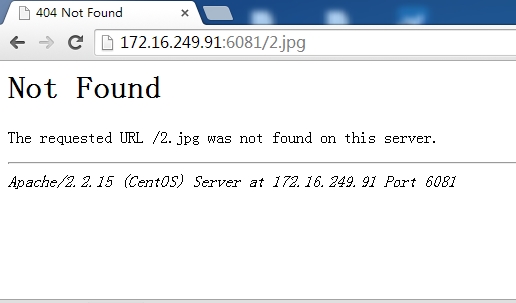
在web2的目录中上传图片再次测试
|
1
2
3
|
[[email protected] html]# cp /usr/share/backgrounds/nature/Storm.jpg .
[[email protected] html]# ls
index.html Storm.jpg |
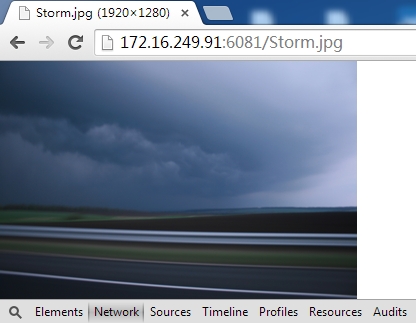
命中了,清除此缓存,再次发起请求
|
1
2
3
4
5
6
7
8
9
10
11
12
13
14
15
16
17
18
19
20
21
22
23
24
25
26
27
28
29
30
31
32
33
34
35
36
37
38
39
40
41
42
43
44
45
|
[[email protected] varnish]# curl -X PURGE http://172.16.249.91:6081/Storm.jpg
<?xml version="1.0"
encoding="utf-8"?>
<!DOCTYPE html PUBLIC
"-//W3C//DTD XHTML 1.0 Strict//EN"
"http://www.w3.org/TR/xhtml1/DTD/xhtml1-strict.dtd">
<html> <head>
<title>200 Purged</title>
</head>
<body>
<h1>Error 200 Purged</h1>
<p>Purged</p>
<h3>Guru Meditation:</h3>
<p>XID: 1733804440</p>
<hr>
<p>Varnish cache server</p>
</body>
</html>
[[email protected] varnish]# curl -I http://172.16.249.91:6081/Storm.jpg
HTTP/1.1 200 OK
Server: Apache/2.2.15 (CentOS)
Last-Modified: Sat, 10 May 2014 09:07:33 GMTETag: "40102-a9b1e-4f9080b644971"
Content-Type: image/jpeg
Content-Length: 695070Accept-Ranges: bytesDate: Sat, 10 May 2014 09:11:56 GMTX-Varnish: 1733804441Age: 0Via: 1.1 varnishConnection: keep-aliveX-Cache: Miss[[email protected] varnish]# curl -I http://172.16.249.91:6081/Storm.jpg
HTTP/1.1 200 OK
Server: Apache/2.2.15 (CentOS)
Last-Modified: Sat, 10 May 2014 09:07:33 GMTETag: "40102-a9b1e-4f9080b644971"
Content-Type: image/jpeg
Content-Length: 695070Accept-Ranges: bytesDate: Sat, 10 May 2014 09:11:58 GMTX-Varnish: 1733804442 1733804441Age: 3Via: 1.1 varnishConnection: keep-aliveX-Cache: HIT from 172.16.249.91 |
防盗链
|
1
2
3
4
5
6
7
8
9
10
11
12
13
14
15
16
|
sub vcl_recv { if
(req.http.referer) {
if
( !(req.http.referer ~ "http://.*google\.com"
|| req.http.referer ~
"http://.*sohu\.com\.cn"
|| req.http.referer ~
"http://.*google\.com"
|| req.http.referer ~
"http://.*yahoo\.cn"
|| req.http.referer ~
"http://.*google\.cn"
)) {
set
req.http.host = "172.16.32.10";
set
req.url = "/images/default.jpg";
}
}
else
{
lookup;
}
} |
将来Varnish服务器的请求进行判断,如果referer存在,且referer不匹配下面的域名列表中的任意一个,就将请求重写为img.test.com/images/default.jpg,其他情况都lookup。
完整配置文件内容
|
1
2
3
4
5
6
7
8
9
10
11
12
13
14
15
16
17
18
19
20
21
22
23
24
25
26
27
28
29
30
31
32
33
34
35
36
37
38
39
40
41
42
43
44
45
46
47
48
49
50
51
52
53
54
55
56
57
58
59
60
61
62
63
64
65
66
67
68
69
70
71
72
73
74
75
76
77
78
79
80
81
82
83
84
85
86
87
88
89
90
91
92
93
94
95
96
97
98
99
100
101
102
103
104
105
106
107
108
109
110
111
112
113
114
115
116
|
backend web1 {
#定义后端服务
.host =
"172.16.32.10";
#后端的主机
.port =
"80"; #监听的端口
.probe = {
.url =
"/index.html";
.interval = 1s;
.window = 5 ;
.threshold =2;
}}backend web2 { .host =
"172.16.249.88";
.port =
"80";
.probe = {
.url =
"/index.html";
.interval = 1s;
.window = 5 ;
.threshold =2;
} }#director webservice random {# .retries = 5;# {# .backend = web1;# .weight = 2;#}# {# .backend = web2;# .weight = 1;#}#}acl purgers { "127.0.0.1";
"172.16.249.91";
}sub vcl_deliver {
#响应子函数
if
(obj.hits > 0) { #检测对象命中
set
resp.http.X-Cache = "HIT from "
+ server.ip; #如果命中,则将响应的X-Cache设置为hit
} else
{
set
resp.http.X-Cache = "Miss";
}}sub vcl_recv { if
(req.http.referer) {
if
( !(req.http.referer ~ "http://.*google\.com"
|| req.http.referer ~
"http://.*sohu\.com\.cn"
|| req.http.referer ~
"http://.*google\.com"
|| req.http.referer ~
"http://.*yahoo\.cn"
|| req.http.referer ~
"http://.*google\.cn"
)) {
set
req.http.host = "172.16.32.10";
set
req.url = "/images/default.jpg";
}
}
else
{
lookup;
}
if
(req.url ~ "\.(html|js|text|css)$") {
set
req.backend = web1;
} else
{
set
req.backend = web2;
} if
(req.url ~ "test.html"){
return(pass);
#如果此请求以test.html结尾,则表示当前缓存不处理直接由源服务器处理
} return(lookup);
# 其它的类型都将查询缓存 if
(req.request == "PURGE"
){
if
(!client.ip ~ purgers){
error 405
"Method not allowed";
}
return
(lookup);
} if
(req.request != "GET"
&&
req.request !=
"OPTIONS" &&
req.request !=
"DELETE") {
/* Non-RFC2616 or CONNECT
which is weird. */
return
(pipe);
}
if
(req.request != "GET"
&& req.request != "HEAD") {
/* We only deal with GET and HEAD by default */
return
(pass);
}
if
(req.http.Authorization || req.http.Cookie) {
/* Not cacheable by default */
return
(pass);
}
return
(lookup);
}
sub vcl_fetch { if
(req.url ~"\.(jpg|jpeg|gif|png)$"){
set
beresp.ttl=7200s; #在响应时,如果源服务器没有设定缓存时长,则由缓存服务器指定缓存时长
} if
(req.url ~ "\.(html|css|js)$"){
set
beresp.ttl =1200s;
}}sub vcl_hit { if
(req.request == "PURGE") {
purge;
error 200
"Purged";
}}sub vcl_miss { if
(req.request == "PUGE"){
purge;
error 404
"not in cache";
}}sub vcl_pass { if
(req.request == "PURGE"){
error 502
"PURGE on a passed object";
}}本文出自 “和风细雨” 博客,请务必保留此出处http://essun.blog.51cto.com/721033/1409289 |