在我以前的文章中,我答应展示如何为智能值列表创建ADF声明性组件。 因此,我将创建一个包含三个元素的组件:标签,输入文本和值的组合框列表。 那很容易。 我在工作空间中创建了一个单独的ADF ViewController项目:


在此项目中,打开“创建JSF声明性组件”向导:

新的声明性组件smartLovDef应该至少具有三个属性:用于标签的一些字符串,用于输入文本的属性绑定和用于组合框值列表的LOV绑定:

该向导创建元数据文件declarativecomp-metadata.xml和smartLovDef.jspx文件,我们可以在其中放置组件的内容:

smartLovDef.jspx的源代码如下所示:
<?xml version='1.0' encoding='UTF-8'?>
<jsp:root xmlns:jsp="http://java.sun.com/JSP/Page" version="2.1"
          xmlns:f="http://java.sun.com/jsf/core"
          xmlns:h="http://java.sun.com/jsf/html"
          xmlns:af="http://xmlns.oracle.com/adf/faces/rich">
  <jsp:directive.page contentType="text/html;charset=UTF-8"/>
  <af:componentDef var="attrs" componentVar="component">

 <af:panelLabelAndMessage label="#{attrs.label}" id="plam1">
  <af:panelGroupLayout id="pgl1" layout="horizontal">
    <af:inputText value="#{attrs.attrBinding.inputValue}"
                  required="#{attrs.attrBinding.hints.mandatory}"
                  columns="#{attrs.attrBinding.hints.displayWidth}"
                  id="deptid" partialTriggers="departmentNameId"
                 autoSubmit="true" simple="true"/>
    <af:inputComboboxListOfValues id="departmentNameId"
                popupTitle="Search and Select: #{attrs.lovBinding.hints.label}"
                value="#{attrs.lovBinding.inputValue}"
                model="#{attrs.lovBinding.listOfValuesModel}"
                columns="#{attrs.lovBinding.hints.displayWidth}"
                shortDesc="#{attrs.lovBinding.hints.tooltip}"
                partialTriggers="deptid"
               simple="true">
    </af:inputComboboxListOfValues>
  </af:panelGroupLayout>
 </af:panelLabelAndMessage>

    <af:xmlContent>
      <component xmlns="http://xmlns.oracle.com/adf/faces/rich/component">
        <display-name>smartLovDef</display-name>
        <attribute>
          <attribute-name>label</attribute-name>
          <attribute-class>java.lang.String</attribute-class>
          <required>true</required>
        </attribute>
        <attribute>
          <attribute-name>attrBinding</attribute-name>
          <attribute-class>java.lang.Object</attribute-class>
          <required>true</required>
        </attribute>
        <attribute>
          <attribute-name>lovBinding</attribute-name>
          <attribute-class>java.lang.Object</attribute-class>
          <required>true</required>
        </attribute>
        <component-extension>
          <component-tag-namespace>cscomponent</component-tag-namespace>
          <component-taglib-uri>/componentLib</component-taglib-uri>
        </component-extension>
      </component>
    </af:xmlContent>
  </af:componentDef>
</jsp:root>
下一步是将组件部署到ADF库中。 我们必须为CSComponents项目添加新的部署配置文件:
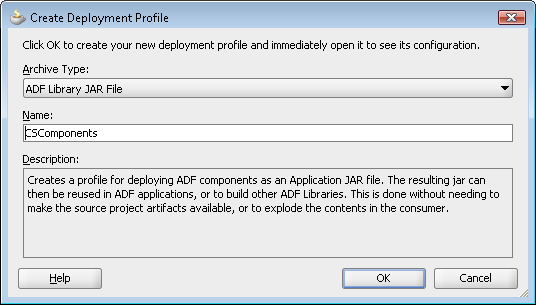

然后将项目部署到库中:


下一步是在资源面板中定义到CSComponents项目的部署路径的文件系统连接:
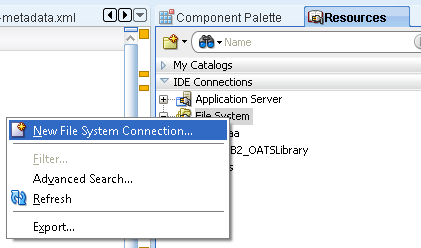

之后,我们必须选择要使用新组件的项目(在我的情况下为ViewConroller),然后向其中添加CSComponents.jar库:

现在,我们可以在页面中使用smartLovDef组件并将其从组件面板中拖动:
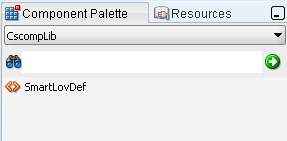
在我们的jspx页面中,源代码将如下所示:
    <cscompLib:smartLovDef label="#{bindings.DepartmentId.label}"
                        attrBinding="#{bindings.DepartmentId}"
                        lovBinding="#{bindings.DepartmentName}"
                        id="sld1"/>
参考: JCG合作伙伴提供的 ADF声明性组件示例 ADF实践博客上的Eugene Fedorenko。
翻译自: https://www.javacodegeeks.com/2012/03/adf-declarative-component-example.html