1.基础安装
|
1
2
3
4
5
6
7
8
|
yum install pcre pcre-devel openssl openssl-devel
tar xf haproxy-1.7.1.tar.gz
cd haproxy-1.7.1
make TARGET=linux2628 USE_PCRE=1 USE_OPENSSL=1 USE_ZLIB=1 PREFIX=/usr/local/haproxy
make install PREFIX=/usr/local/haproxy
cd examples/
cp haproxy.init /etc/init.d/haproxy chmod +x /etc/init.d/haproxy
|
2.本机IP:192.168.56.15
|
1
2
3
4
5
6
7
8
9
10
11
12
13
14
15
16
17
18
19
20
21
22
23
24
25
26
27
28
29
30
31
32
33
34
35
|
[[email protected] examples]# cat /etc/haproxy/haproxy.cfg
globalmaxconn 100000chroot /usr/local/haproxy
uid 99gid 99daemonnbproc 1pidfile /usr/local/haproxy/logs/haproxy.pid
log 127.0.0.1 local0 infodefaultsoption http-keep-alivemaxconn 100000mode httptimeout connect 300000mstimeout client 300000mstimeout server 300000mslisten stats mode http
bind 0.0.0.0:9999
stats enable
log global
stats uri /haproxy-status
stats auth haadmin:123456
listen web_port bind 0.0.0.0:80
mode tcp
log global
[[email protected] examples]#
[[email protected] examples]# /etc/init.d/haproxy restart
Restarting haproxy (via systemctl): [ OK ][[email protected] examples]#
|
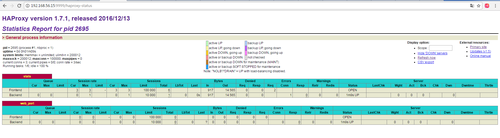
http://192.168.56.15:9999/haproxy-status
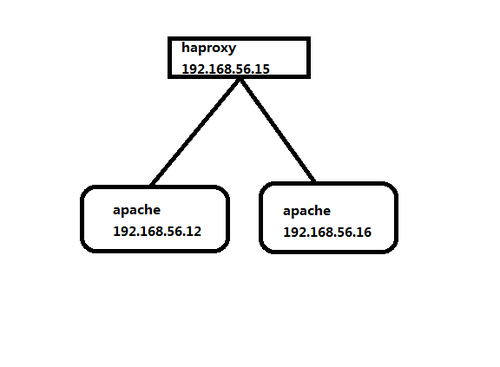
3.对后端代理

|
1
2
3
4
5
6
7
8
9
10
11
12
13
14
15
16
17
18
19
20
21
22
23
24
25
26
27
28
29
30
31
32
33
34
35
36
37
38
|
[[email protected] examples]# cat /etc/haproxy/haproxy.cfg
globalmaxconn 100000chroot /usr/local/haproxy
uid 99gid 99daemonnbproc 1pidfile /usr/local/haproxy/logs/haproxy.pid
log 127.0.0.1 local0 infodefaultsoption http-keep-alivemaxconn 100000mode httptimeout connect 300000mstimeout client 300000mstimeout server 300000mslisten stats mode http
bind 0.0.0.0:9999
stats enable
log global
stats uri /haproxy-status
stats auth haadmin:123456
listen web_port bind 0.0.0.0:80
mode tcp #tcp的方式
log global
server web1 192.168.56.12:80 check inter 2000 fall 15 rise 10
server web2 192.168.56.16:80 check inter 2000 fall 15 rise 10
[[email protected] examples]#
/etc/init.d/haproxy restart
#inter是监控检查时间间隔,即每间隔2秒进行一次检查,
rise是连续检查10次失败后将服务器从负载删除,
fall是连续15次监控检查成功后重新添加至负载,一般fall大于rise几次,
|

|
1
2
3
4
5
6
7
8
9
10
11
12
13
14
15
16
17
18
19
20
21
|
[[email protected] html]# curl 192.168.56.15
192.168.56.12 web1[[email protected] html]# curl 192.168.56.15
192.168.56.16 web2[[email protected] html]# curl 192.168.56.15
192.168.56.12 web1[[email protected] html]# curl 192.168.56.15
192.168.56.16 web2[[email protected] html]# curl 192.168.56.15
192.168.56.12 web1[[email protected] html]# curl 192.168.56.15
192.168.56.16 web2[[email protected] html]# curl 192.168.56.15
192.168.56.12 web1[[email protected] html]# curl 192.168.56.15
192.168.56.16 web2[[email protected] html]# curl 192.168.56.15
192.168.56.12 web1[[email protected] html]# curl 192.168.56.15
192.168.56.16 web2[[email protected] html]#
|
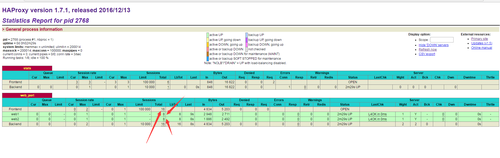
查看负载状况
################################################
haproxy调度算法
|
1
2
3
4
5
6
7
8
9
|
HAProxy的算法有如下8种:roundrobin,表示简单的轮询,static-rr,表示根据权重,建议关注;leastconn,表示最少连接者先处理,建议关注;source,表示根据请求源IP,建议关注;
uri,表示根据请求的URI;url_param,表示根据请求的URl参数'balanceurl_param' requires an URL parameter name
hdr(name),表示根据HTTP请求头来锁定每一次HTTP请求;rdp-cookie(name),表示根据据cookie(name)来锁定并哈希每一次TCP请求。 |
haproxy的摘除节点的 yum安装的
|
1
2
3
4
5
6
7
8
9
10
11
12
13
14
15
16
17
18
19
20
21
22
23
24
25
26
27
28
29
30
31
32
33
34
35
36
37
38
39
40
41
|
globalmaxconn 100000chroot /var/lib/haproxy
user haproxygroup haproxydaemonnbproc 1 pidfile /usr/local/haproxy/logs/haproxy.pid
stats socket /var/lib/haproxy.sock mode 600 level admin
log 127.0.0.1 local10 infodefaultsoption http-keep-alivemaxconn 100000mode httptimeout connect 5000mstimeout client 50000mstimeout server 50000mslisten statsmode httpbind 0.0.0.0:8888stats enable
stats uri /haproxy-status stats auth haproxy:saltstackfrontend frontend_www_example_combind 192.168.56.21:80mode httpoption httploglog global default_backend backend_www_example_com
backend backend_www_example_comoption forwardfor header X-REAL-IPoption httpchk HEAD / HTTP/1.0
balance roundrobin server web-node1 192.168.56.11:8080 check inter 2000 rise 30 fall 15server web-node2 192.168.56.12:8080 check inter 2000 rise 30 fall 15[[email protected] ~]#
|

这样就能吧haproxy的节点删除或者增加
|
1
2
|
echo "disable server backend_www_example_com/web-node1" | socat /var/lib/haproxy.sock stdio
echo "enable server backend_www_example_com/web-node1" | socat /var/lib/haproxy.sock stdio
|

haproxy增加日志的功能
|
1
2
3
4
5
6
7
8
9
10
11
12
13
14
15
16
|
mkdir /var/log/haproxy
chmod a+w /var/log/haproxy
/etc/rsyslog.conf
打开选项:$ModLoad imudp$UDPServerRun 514# Save haproxy loglocal0.* /var/log/haproxy/haproxy.log
vim /etc/sysconfig/rsyslog
[[email protected] nginx]# cat /etc/sysconfig/rsyslog
# Options for rsyslogd# Syslogd options are deprecated since rsyslog v3.# If you want to use them, switch to compatibility mode 2 by "-c 2" See rsyslogd(8) for more details
SYSLOGD_OPTIONS="-r -m 0 -c 2" #修改此处
[[email protected] nginx]#
|

haproxy日志里面的localhost 和配置文件有关 这个IP可以修改
|
1
|
log 127.0.0.1 local10 info |
3.集群配置

192.168.56.11 nginx 反向代理 keepalived haproxy
192.168.56.12 nginx 反向代理 keepalived haproxy
192.168.56.13 nginx 模拟tomcat
192.168.56.14 nginx 模拟tomcat
keepalived的VIP为192.168.56.21
问题:haproxy 不会绑定不存在的VIP 所以启动不起来 so,这样可以绑定不存在的VIP
echo 1 > /proc/sys/net/ipv4/ip_nonlocal_bind
vi /etc/sysctl.conf sysctl -p
net.ipv4.ip_nonlocal_bind = 1
开启允许绑定非本机的IP
查看keepalived的配置文件192.168.56.11(主)
|
1
2
3
4
5
6
7
8
9
10
11
12
13
14
15
16
17
18
19
20
21
22
23
24
25
26
27
28
|
[[email protected] nginx]# cat /etc/keepalived/keepalived.conf
! Configuration File for keepalived
global_defs { notification_email {
}
notification_email_from [email protected]
smtp_server 127.0.0.1
smtp_connect_timeout 30
router_id haproxy_ha
}vrrp_instance haproxy_ha {state MASTERinterface eth0 virtual_router_id 36
priority 150 advert_int 1
authentication {auth_type PASS auth_pass 1111
}
virtual_ipaddress {
192.168.56.21
}
}[[email protected] nginx]#
|
查看keepalived的配置文件192.168.56.12(备)
|
1
2
3
4
5
6
7
8
9
10
11
12
13
14
15
16
17
18
19
20
21
22
23
24
25
26
27
28
|
[[email protected] ~]# cat /etc/keepalived/keepalived.conf
! Configuration File for keepalived
global_defs { notification_email {
}
notification_email_from [email protected]
smtp_server 127.0.0.1
smtp_connect_timeout 30
router_id haproxy_ha
}vrrp_instance haproxy_ha {state BACKUPinterface eth0 virtual_router_id 36
priority 100 advert_int 1
authentication {auth_type PASS auth_pass 1111
}
virtual_ipaddress {
192.168.56.21
}
}[[email protected] ~]#
|
查看192.168.56.11 haproxy的配置文件
|
1
2
3
4
5
6
7
8
9
10
11
12
13
14
15
16
17
18
19
20
21
22
23
24
25
26
27
28
29
30
31
32
33
34
35
36
37
38
39
40
41
42
|
[[email protected] ~]# cat /etc/haproxy/haproxy.cfg
globalmaxconn 100000chroot /var/lib/haproxy
user haproxygroup haproxydaemonnbproc 1 pidfile /usr/local/haproxy/logs/haproxy.pid
stats socket /var/lib/haproxy.sock mode 600 level admin
log 127.0.0.1 local3 infodefaultsoption http-keep-alivemaxconn 100000mode httptimeout connect 5000mstimeout client 50000mstimeout server 50000mslisten statsmode httpbind 0.0.0.0:8888stats enable
stats uri /haproxy-status stats auth haproxy:saltstackfrontend frontend_www_example_combind 192.168.56.21:80mode tcpoption httploglog global default_backend backend_www_example_com
backend backend_www_example_comoption forwardfor header X-REAL-IPoption httpchk HEAD / HTTP/1.0
balance roundrobin server web-node1 192.168.56.11:8080 check inter 2000 rise 30 fall 15server web-node2 192.168.56.12:8080 check inter 2000 rise 30 fall 15[[email protected] ~]#
|
查看192.168.56.12 haproxy的配置文件
|
1
2
3
4
5
6
7
8
9
10
11
12
13
14
15
16
17
18
19
20
21
22
23
24
25
26
27
28
29
30
31
32
33
34
35
36
37
38
39
40
41
42
|
[[email protected] nginx]# cat /etc/haproxy/haproxy.cfg
globalmaxconn 100000chroot /var/lib/haproxy
user haproxygroup haproxydaemonnbproc 1 pidfile /usr/local/haproxy/logs/haproxy.pid
stats socket /var/lib/haproxy.sock mode 600 level admin
#log 127.0.0.1 local3 infolog 192.168.56.21 local0 debugdefaultsoption http-keep-alivemaxconn 100000mode httptimeout connect 5000mstimeout client 50000mstimeout server 50000mslisten statsmode httpbind 0.0.0.0:8888stats enable
stats uri /haproxy-status stats auth haproxy:saltstackfrontend frontend_www_example_combind 192.168.56.21:80mode httpoption httploglog global default_backend backend_www_example_com
backend backend_www_example_comoption forwardfor header X-REAL-IPoption httpchk HEAD / HTTP/1.0
balance roundrobin server web-node1 192.168.56.11:8080 check inter 2000 rise 30 fall 15server web-node2 192.168.56.12:8080 check inter 2000 rise 30 fall 15[r[email protected] nginx]#
|
查看192.168.56.11的nginx反向代理的配置文件(最简单的配置 demo)
|
1
2
3
4
5
6
7
8
9
10
11
12
13
14
15
16
17
18
19
20
21
22
23
24
25
26
27
|
[[email protected] nginx]# cat /etc/nginx/nginx.conf
worker_processes 1;events { worker_connections 1024;
}http { include mime.types;
default_type application/octet-stream;
sendfile on;
keepalive_timeout 65;
upstream server_pools {
server 192.168.56.13:8080 weight=1;
server 192.168.56.14:8080 weight=1;
}
server {
listen 192.168.56.11:8080;
server_name blog.liuhaixiao.com;
location / {
proxy_pass http://server_pools;
proxy_set_header Host $host;
proxy_set_header X-Forwarded-For $remote_addr;
}
}
} [[email protected] nginx]#
|
查看192.168.56.12的nginx反向代理的配置文件(最简单的配置 demo)
|
1
2
3
4
5
6
7
8
9
10
11
12
13
14
15
16
17
18
19
20
21
22
23
24
25
26
27
|
[[email protected] ~]# cat /etc/nginx/nginx.conf
worker_processes 1;events { worker_connections 1024;
}http { include mime.types;
default_type application/octet-stream;
sendfile on;
keepalive_timeout 65;
upstream server_pools {
server 192.168.56.13:8080 weight=1;
server 192.168.56.14:8080 weight=1;
}
server {
listen 192.168.56.12:8080;
server_name blog.liuhaixiao.com;
location / {
proxy_pass http://server_pools;
proxy_set_header Host $host;
proxy_set_header X-Forwarded-For $remote_addr;
}
}
}[[email protected] ~]#
|
|
1
2
3
4
5
6
|
查看192.168.56.13的nginx web容器[[email protected] html]# cat /usr/share/nginx/html/index.html
node-2查看192.168.56.14的nginx web容器[[email protected] html]# cat /usr/share/nginx/html/index.html
node-1 |
检查VIP zai 192.168.56.11上面
|
1
2
3
4
5
6
7
8
9
10
11
12
13
14
15
16
|
[[email protected] nginx]# ip addr
1: lo: <LOOPBACK,UP,LOWER_UP> mtu 65536 qdisc noqueue state UNKNOWN link/loopback 00:00:00:00:00:00 brd 00:00:00:00:00:00
inet 127.0.0.1/8 scope host lo
valid_lft forever preferred_lft forever
inet6 ::1/128 scope host
valid_lft forever preferred_lft forever
2: eth0: <BROADCAST,MULTICAST,UP,LOWER_UP> mtu 1500 qdisc pfifo_fast state UP qlen 1000 link/ether 00:0c:29:10:66:98 brd ff:ff:ff:ff:ff:ff
inet 192.168.56.11/24 brd 192.168.56.255 scope global eth0
valid_lft forever preferred_lft forever
inet 192.168.56.21/32 scope global eth0
valid_lft forever preferred_lft forever
inet6 fe80::20c:29ff:fe10:6698/64 scope link
valid_lft forever preferred_lft forever
[[email protected] nginx]#
|
现在把本地的电脑blog.liuhaixiao.com 解析到192.168.56.21上面去

####################################################
新添加:192.168.56.15 增加一个nginx 域名
haproxy 监听80端口 nginx 监听的端口千万不能和后端tomcat一样 否则回包回不来
|
1
2
3
4
5
6
7
8
9
10
11
12
13
14
15
16
17
18
19
20
21
22
23
24
25
26
27
28
29
30
31
32
33
34
35
36
37
38
39
40
41
|
[[email protected] ~]# cat /etc/nginx/nginx.conf
worker_processes 1;events { worker_connections 1024;
}http { include mime.types;
default_type application/octet-stream;
sendfile on;
keepalive_timeout 65;
upstream server_pools {
server 192.168.56.13:8080 weight=1;
server 192.168.56.14:8080 weight=1;
}
upstream server_tt {
server 192.168.56.15:8080 weight=1;
}
server {
listen 81;
server_name blog.liuhaixiao.com;
location / {
proxy_pass http://server_pools;
proxy_set_header Host $host;
proxy_set_header X-Forwarded-For $remote_addr;
}
}
server {
listen 81;
server_name blog.sanlang.com;
location / {
proxy_pass http://server_tt;
proxy_set_header Host $host;
proxy_set_header X-Forwarded-For $remote_addr;
}
}
} [[email protected] ~]#
|

3是 另外一台服务器的192.168.56.15 tomcat/nginx 的页面


haproxy具体参数请参考:
http://www.cnblogs.com/zhang789/p/6057402.html
haproxy:多域名参考