数组
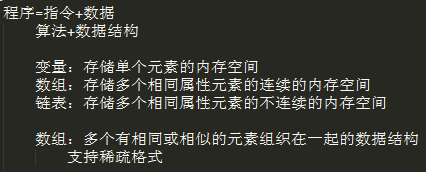
数组名
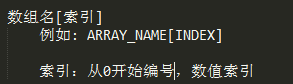
数组定义

数组引用

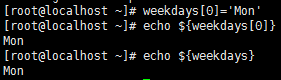

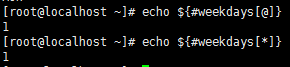

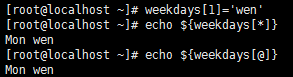
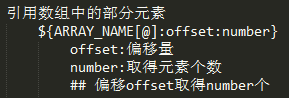

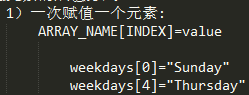
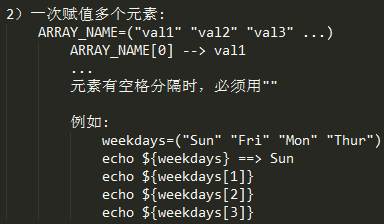
数组元素的赋值方式
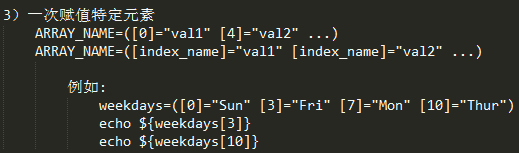
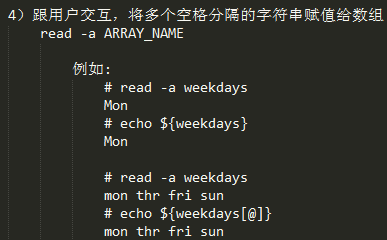
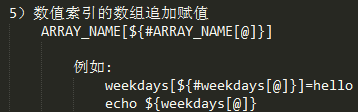
销毁数组
|
1
|
unset ARRAY_NAME[INDEX] |
练习:生成10个随机数保存于数组中,取出最大值和最小值
练习:生成10个随机数保存于数组中,求下标为偶数的所有随机数之和
练习:写一个脚本 定义一个数组,数组中的元素是/var/log目录下所有以.log结尾的文件名;要统计其下标为偶数的文件中的行数之和
练习:生成10个随机数,对其排序
|
1
2
3
4
5
6
7
8
9
10
11
12
13
14
15
16
17
18
19
20
21
22
23
24
25
26
27
|
示例一:生成10个随机数保存于数组中,取出最大值和最小值
#!/bin/bash#declare -a randdeclare -i max=declare -i min=for i in {0..9}; do
rand[$i]=$RANDOM
echo ${rand[$i]}
if [ $i -eq 0 ]; then
max=${rand[$i]}
min=$max
fi
if [ $max -lt ${rand[$i]} ]; then
max=${rand[$i]}
fi
if [ $min -gt ${rand[$i]} ]; then
min=${rand[$i]}
fi
doneecho "max: $max"
echo "min: $min"
|
|
1
2
3
4
5
6
7
8
9
10
11
12
13
14
15
|
示例一:生成10个随机数保存于数组中,求下标为偶数的所有随机数之和#!/bin/bash#declare -a rand
declare -i sum=0
for i in {0..9}; do
rand[$i]=$RANDOM
echo ${rand[$i]}
if [ $[$i%2] -eq 0 ]; then
let sum+=${rand[$i]}
fi
done echo "sum: $sum"
|
|
1
2
3
4
5
6
7
8
9
10
11
12
13
14
15
16
|
练习:写一个脚本定义一个数组,数组中的元素是/var/log目录下所有以.log结尾的文件名;要统计其下标为偶数的文件中的行数之和
#!/bin/bash#declare -a file_namefile_name=(/var/log/*.log) ## ARRAY_NAME=( "val1" "val2" "val3" ...) 仅在val中有空格才有必要写引号
declare -i sum=0
for i in $(seq 0 ${#file_name[@]}); do
let i-=1
if [ $[$i%2] -eq 0 ]; then
sum=$[sum+$(wc -l < ${file_name[$i]})]
fi
doneecho $sum |
|
1
2
3
4
5
6
7
8
9
10
11
|
练习:生成10个随机数,对其排序
#!/bin/bash#declare -a randdeclare -i i=0
while [ $i -le 9 ]; do
rand[$i]=$RANDOM
let i++
doneecho "${rand[@]}" | xargs -n 1 | sort -n -r | xargs
|
字符切片
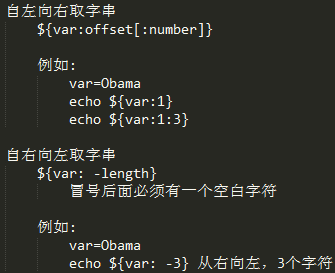
基于模式取子串
自左向右 #*STRING ##*STRING
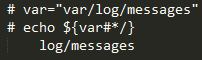
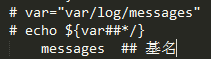
自右向左 %STRING* %%STRING*
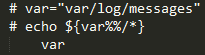
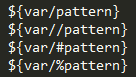
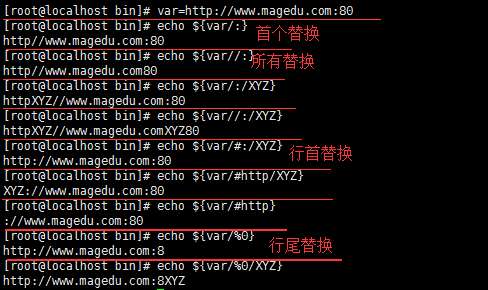
查找替换<[行首、尾]字符>
替换为字符,自左向右

替换为空
使用示例
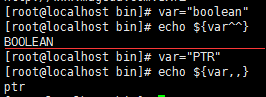
字符大小写转换 相当于 tr 'a-z' 'A-Z'

使用示例
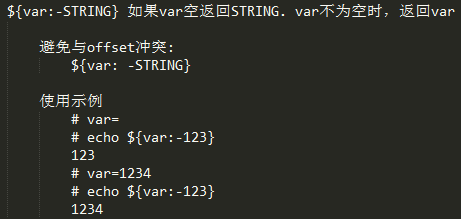
变量默认值
不存在,赋值
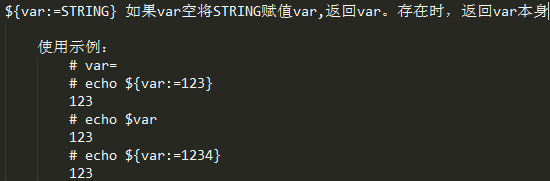
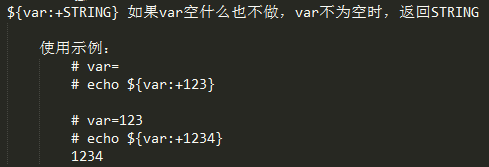
存在时,赋值
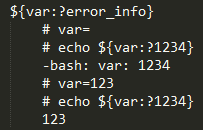
不存在报错,存在返回var
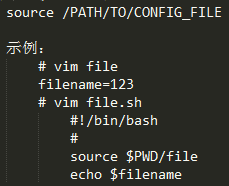
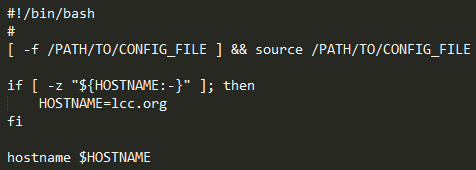
为脚本提供配置
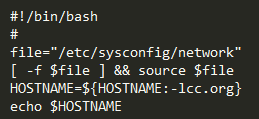
使用示例:为设定主机名
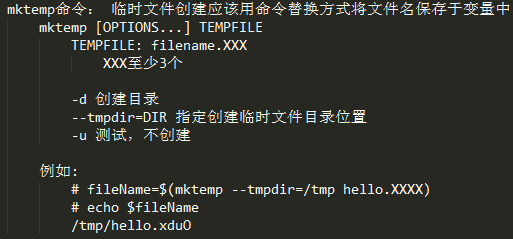
mkstemp命令
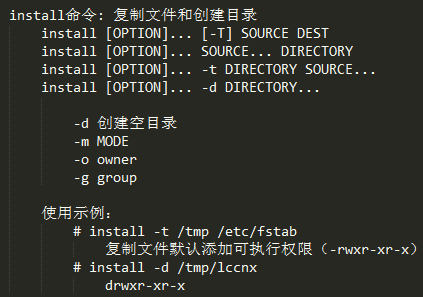
install命令
练习: 写一个脚本
1) 提示用户输入一个可执行命令的名称
2) 获取此命令所依赖到的所有库文件列表
3) 复制命令至某目标目录(例如/mnt/sysroot)下的对应路径下,
/bin/bash --> /mnt/sysroot/bin/bash
/usr/bin/passwd --> /mnt/sysroot/bin/passwd
4)复制此命令依赖到的所有库文件至目标目录下的对应路径下
/lib/ld-linux-x86_64.so.2 --> /mnt/sysroot/lib/ld-linux-x86_64.so.2
进一步地:
每次复制完成一个命令不退出,而是提示用户键入新的要复制的命令,并重复完成上述功能,直到用户输入quit即退出
|
1
2
3
4
5
6
7
8
9
10
11
12
13
14
15
16
17
18
19
20
21
22
23
24
25
26
27
28
29
30
31
32
33
34
35
36
37
38
39
|
#!/bin/bash# Version: 0.0.15
# Author: Lcc.org# Description: ...DIR="/mnt/sysroot"
[ -d $DIR ] || install -d $DIRfunction cpCmd {
cmd_path=$(which --skip-alias $1)
local cmdir=$(echo $cmd_path | sed 's,/$,,' | sed -r '[email protected](.*/)([^/]+)@\[email protected]')
[ -d $DIR$cmdir ] || install -d $DIR$cmdir
[ -f $DIR$cmd_path ] && echo -e "\033[32m$DIR$cmd_path\033[0m is exist" || cp $cmd_path $DIR$cmd_path
}function cp_lib {
for i in $(ldd $cmd_path | grep -o --color=auto "/.*[[:space:]]" | tr -d ' '); do
[ -d $DIR$libdir ] || install -d $DIR$libdir
[ -f $DIR$i ] && echo -e "\033[32m$DIR$i\033[0m is exist" || cp $i $DIR$i
done
}read -t 10 -p 'Enter a binary program name: ' fuke
while [ "$fuke" != "quit" ]; do
if [ "$fuke" == "quit" -o -z "$fuke" ]; then
continue
elif ! which $fuke &> /dev/null; then
continue
fi
##复制命令 cpCmd $fuke
##复制库文件 cp_lib
##显示复制完成 echo -e "\033[32mcopy finished.....\033[0m"
read -t 10 -p 'Enter again a binary program name: ' fuke
done |
本文转自 lccnx 51CTO博客,原文链接:http://blog.51cto.com/sonlich/1964938,如需转载请自行联系原作者