You may encounter different errors related to SSL in Exchange Server as Explained in my previous post that How to resolve SSL Trust Errors When Connecting to Exchange Server.
In this post, we will discuss the most common error “The Certificate is Invalid for Exchange Server Usage” in Exchange server 2010. The error message pops up when Certificate installed is invalid.

The reason behind the occurrence of this error is that the certificate installed is not verified to trusted authority. That implies that the certificate that is installed there is issued by a private authority.
Possible Solution to resolve the error
To resolve the error you must have to install the root certificate for certificate authority. In case of private certificate authority one can obtain the root certificate from web enrollment page
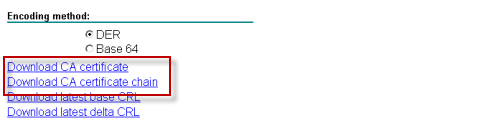
To download, Browse the Webpage and click on Download a CA Certificate

Click to download either the CA Certificate (if the certificate was issued by a root CA) or the Certificate Chain (if the certificate was issued by an intermediary CA).
Now open Microsoft’s Exchange Management Console and add the certificate snap-in from there to it.
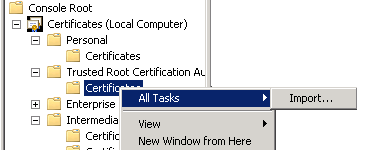
Navigate to the path Console Root >> Certificates >> Trusted Root Certificate Authorities – Choose the Import option by right clicking on the All Task.
Browse the certificate that you have just downloaded. Now place the Certificate in the Trusted Root Certification Authorities store.
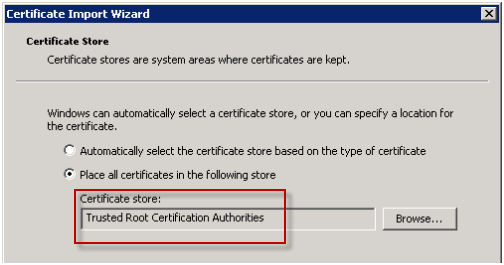
At last complete the wizard and refresh EMC. The Certificate should be valid now.

In case if your SSL certificate is Expired, Remove the Expired SSL certificate from the Exchange Server and install the new one as described above
Conclusion: –
The method explained in the blog to resolve the error ”The Certificate is Invalid for Exchange Server Usage” will help you a lot in resolving the issue. In case if you are not able to proceed from somewhere, Please comment, We will try our best to solve your query.