本文主要通过构建一个简单的页面布局来认识Apache Tiles3.x(由于Tiles2.x和Tiles3.x存在较大差异)。
1.准备工作
1.1安装Apache Tiles3.x依赖的Jar
|
1
2
3
4
5
6
7
8
9
10
11
12
13
14
15
|
<dependency>
<groupId>org.apache.tiles</groupId>
<artifactId>tiles-extras</artifactId>
<version>3.0.5</version>
</dependency>
<dependency>
<groupId>org.apache.tiles</groupId>
<artifactId>tiles-servlet</artifactId>
<version>3.0.5</version>
</dependency>
<dependency>
<groupId>org.apache.tiles</groupId>
<artifactId>tiles-jsp</artifactId>
<version>3.0.5</version>
</dependency>
|
注意:这里使用了Apache3.x完整包依赖。
1.2调试环境
安装jetty-maven-plugin来热部署web应用
|
1
2
3
4
5
6
7
8
9
10
11
12
13
14
15
16
17
|
<build>
<finalName>tiles</finalName>
<plugins>
<plugin>
<groupId>org.mortbay.jetty</groupId>
<artifactId>jetty-maven-plugin</artifactId>
<version>7.1.6.v20100715</version>
<configuration>
<scanIntervalSeconds>1</scanIntervalSeconds>
<reload>automatic</reload>
<webAppConfig>
<contextPath>/tiles</contextPath>
</webAppConfig>
</configuration>
</plugin>
</plugins>
</build>
|
注意:运行mvn jetty:run -Djetty.port=9999 命名,访问http://localhost:9999/tiles 需要额外在Maven的settings.xml文件的插件组中添加插件组标识。
|
1
2
3
4
5
6
7
|
<pluginGroups>
<!-- pluginGroup
| Specifies a further group identifier to use for plugin lookup.
<pluginGroup>com.your.plugins</pluginGroup>
-->
<pluginGroup>org.mortbay.jetty</pluginGroup>
</pluginGroups>
|
1.3配置web.xml
在web.xml中添加Tiles监听器
|
1
2
3
|
<listener>
<listener-class>org.apache.tiles.extras.complete.CompleteAutoloadTilesListener</listener-class>
</listener>
|
关于Tiles的监听器可以自定义实现,参见:http://tiles.apache.org/framework/config-reference.html
2.分析界面组成,构建布局文件
假设本案例中的页面构成如图:
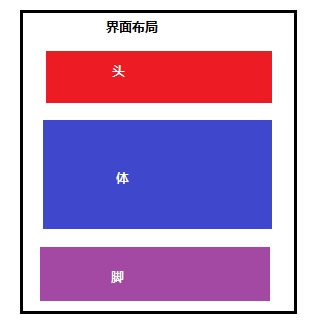
分析界面布局,找不通用部分,特殊部分。 在webapp下创建layout文件夹放在布局文件,snippet文件夹放置公共部分。
通过分析,将布局切割为header,body,footer,并且将HTML页面中的meta,script公共部分抽取出来。
-
/snippet/meta.jsp
|
1
2
3
|
<%@ page language="java" contentType="text/html; charset=UTF-8" pageEncoding="UTF-8"%>
<meta http-equiv="Content-Type" content="text/html; charset=UTF-8">
|
-
/snippet/script.jsp
|
1
2
3
4
5
6
7
8
9
10
11
12
13
14
15
16
17
|
<%@ page language="java" contentType="text/html; charset=UTF-8" pageEncoding="UTF-8"%>
<style>
div { width: 480px;
height: 80px;
background: silver;
}#body { background: lime;
}</style>
<script type="text/javascript">
document.writeln("这句话是由JavaScript写入页面的。");
</script>
|
-
/snippet/header.jsp
|
1
2
3
4
5
|
<%@ page language="java" contentType="text/html; charset=UTF-8" pageEncoding="UTF-8"%>
<h3>
这是头部</h3>
|
-
/snippet/footer.jsp
|
1
2
3
|
<%@ page language="java" contentType="text/html; charset=UTF-8" pageEncoding="UTF-8"%>
<h3>这是页脚</h3>
|
-
/snippet/index_body.jsp
|
1
2
3
4
5
|
<%@ page language="java" contentType="text/html; charset=UTF-8" pageEncoding="UTF-8"%>
<pre>
这是页面的主体部分
</pre>
|
通过上面的公共部分和主体,构建一个布局文件如下:
-
/layout/index_layout.jsp
|
1
2
3
4
5
6
7
8
9
10
11
12
13
14
15
16
17
18
19
20
21
22
23
|
<%@ page language="java" contentType="text/html; charset=UTF-8" pageEncoding="UTF-8"%>
<%@ taglib uri="http://java.sun.com/jsp/jstl/core" prefix="c"%><%@ taglib uri="http://tiles.apache.org/tags-tiles" prefix="tiles"%><!DOCTYPE html><html>
<head>
<tiles:insertAttribute name="meta" />
<title><tiles:insertAttribute name="title" /></title>
<tiles:insertAttribute name="script" />
</head>
<body>
<div id="header">
<tiles:insertAttribute name="header" />
</div>
<div id="body">
<tiles:insertAttribute name="body" />
</div>
<div id="footer">
<tiles:insertAttribute name="footer" />
</div>
</body>
</html>
|
3.Tiles的复合布局定义
Tiles是通过在xml文件中配置definition进行页面公共部分的重用,页面布局的组合。
-
/WEB-INF/tiles-defs.xml 定义好公共部分之后,通过配置definition来组合页面布局。
|
1
2
3
4
5
6
7
8
9
10
11
12
13
14
|
<?xml version="1.0" encoding="UTF-8" ?>
<!DOCTYPE tiles-definitions PUBLIC "-//Apache Software Foundation//DTD Tiles Configuration 3.0//EN" "http://tiles.apache.org/dtds/tiles-config_3_0.dtd"><!-- Definitions for Tiles documentation --><tiles-definitions>
<definition name="tiles.base.definition">
<put-attribute name="meta" value="/snippet/meta.jsp" />
<put-attribute name="script" value="/snippet/script.jsp" />
<put-attribute name="header" value="/snippet/header.jsp" />
<put-attribute name="footer" value="/snippet/footer.jsp" />
</definition>
</tiles-definitions>
|
上面的definition可以说是抽象的,仅仅作为基本的定义抽取了界面中最通用的部分,而且并未指定具体的模版文件(布局文件)。下面通过继承tiles.base.definition来定一个tiles.index.definition其布局模版为/layout/index_layout.jsp。
|
1
2
3
4
|
<definition name="tiles.index.definition" extends="tiles.base.definition"
template="/layout/index_layout.jsp">
<put-attribute name="body" value="/snippet/index_body.jsp" />
</definition>
|
上面定义tiles.index.definition,新增了body,其值为/snippet/index_body.jsp页面。
4.使用复合布局
到这里已经将页面的布局进行了分割,组合。现在应用definition来构建一个请求响应页面。
-
/example/index.jsp
|
1
2
3
4
5
6
|
<%@ page language="java" contentType="text/html; charset=UTF-8" pageEncoding="UTF-8"%>
<%@ taglib uri="http://tiles.apache.org/tags-tiles" prefix="tiles"%><tiles:insertDefinition name="tiles.index.definition">
<tiles:putAttribute name="title" value="这是一个有Apache Tiles构建的页面布局." />
</tiles:insertDefinition>
|
5.启动服务器,访问/example/index.jsp
页面展示效果:
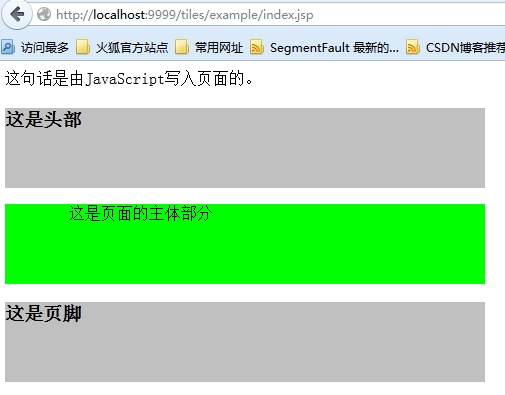
接下来看看页面的源代码:
|
1
2
3
4
5
6
7
8
9
10
11
12
13
14
15
16
17
18
19
20
21
22
23
24
25
26
27
28
29
30
31
32
33
34
35
36
37
38
39
40
41
42
|
<!DOCTYPE html><html>
<head>
<meta http-equiv="Content-Type" content="text/html; charset=UTF-8">
<title>这是一个有Apache Tiles构建的页面布局.</title>
<style>
div { width: 480px;
height: 80px;
background: silver;
}#body { background: lime;
}</style>
<script type="text/javascript">
document.writeln("这句话是由JavaScript写入页面的。");
</script>
</head>
<body>
<div id="header">
<h3>
这是头部</h3>
</div>
<div id="body">
<pre>
这是页面的主体部分
</pre>
</div>
<div id="footer">
<h3>这是页脚</h3>
</div>
</body>
</html>
|
该例子中布局index_layout.jsp中body是可变的,title对一个不同的页面有不同的标题设置。在tiles-defx.xml的tiles.index.definition继承了tiles.base.definition,并且添加了其body页面,接着在插入tiles.index.definition的index.jsp页面添加了title。这样做达到的效果是整个站点的header,footer,meta,script抽取到了一个definition,然后通过继承的方式进行扩展,丰富不同的布局的页面组成元素,在具体的响应页面来定义专属该页面的内容。从而达到对页面的布局的控制,公共部分的复用的效果。
6.总结
本文仅仅是一个简单的示例,然而大部分内容被抽取公共部分占去,这样的结果并非意外,对于页面布局的划分,组合,重用才是使用Tiles之前最为繁重和复杂的工作,这些工作能够做的合理,优雅,配置definition自然就轻松多了。
本文转自 secondriver 51CTO博客,原文链接:http://blog.51cto.com/aiilive/1596059,如需转载请自行联系原作者