IsoAlgo2.0 Preview
1. Use Qt for GUI and Visualization
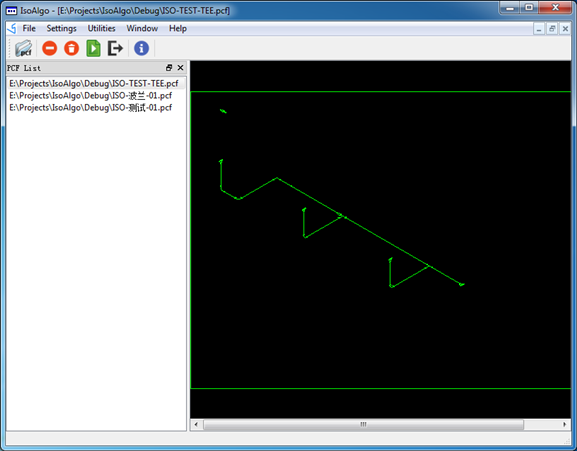
Use Qt to replace the Tcl/Tk for IsoAlgo GUI. Qt not only provides intuitive GUI, but also can visualize the IsoAlgo result directly. This is much more convenient to check the result isometric drawing than to open DXF every time(i.e. You can use the IsoAlgo to check the result directly without AutoCAD). It also very helpful for me to debug.
You can use mouse to zoom the canvas.
2. Refactoring code for reading the PCF
Refactor the PCF reader code for read all the piping components data, the previous versions maybe lost some unrecognized component data. This would generate more precise material list data even do not generate the isometric drawing.
3. Introduce NULL object pattern for Non-Category Item
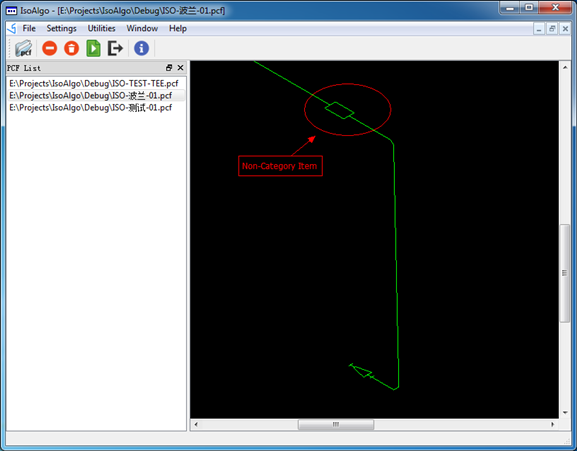
If the SKEY of the component have not been defined in the symbol template library, this component is a non-category component, and its symbol will use a block instead.
If you found these kind of symbol in the isometric drawing, please check the SKEY of the component in the symbol template library by export all the symbols in the library.
IsoAlgo 2.0 will release soon!
Any feedback is welcome, please send your suggestions to [email protected] or [email protected] .