1 创建VerticalAndhorizontalMenu.html文件
|
1
2
3
4
5
6
7
8
9
10
11
12
13
14
15
16
17
18
19
20
21
22
23
24
25
26
27
28
29
30
31
32
33
34
35
36
37
38
39
40
41
42
43
44
45
46
47
48
49
50
51
52
53
54
55
56
57
58
59
60
61
62
|
<!DOCTYPE html><html>
<head lang="en">
<meta charset="UTF-8">
<link href="VerticalAndhorizontalMenu.css" rel="stylesheet">
<script src="jquery-1.11.2.min.js" type="text/javascript"></script>
<script type="text/javascript" src="VerticalAndhorizontalMenu.js"></script>
<title>垂直或水平菜单</title>
</head>
<body>
<!--垂直菜单--><ul>
<li class="vmain">
<a href="#"> 垂直菜单1</a>
<ul>
<li><a href="#">子菜单1</a> </li>
<li><a href="#">子菜单2</a> </li>
</ul>
</li>
<li class="vmain">
<a href="#"> 垂直菜单2</a>
<ul>
<li><a href="#">子菜单1</a> </li>
<li><a href="#">子菜单2</a> </li>
</ul>
</li>
<li class="vmain">
<a href="#"> 垂直菜单3</a>
<ul>
<li><a href="#">子菜单1</a> </li>
<li><a href="#">子菜单2</a> </li>
</ul>
</li>
</ul>
<!--水平菜单--><br>
<br>
<ul>
<li class="hmain">
<a href="#"> 垂直菜单1</a>
<ul>
<li><a href="#">子菜单1</a> </li>
<li><a href="#">子菜单2</a> </li>
</ul>
</li>
<li class="hmain">
<a href="#"> 垂直菜单2</a>
<ul>
<li><a href="#">子菜单1</a> </li>
<li><a href="#">子菜单2</a> </li>
</ul>
</li>
<li class="hmain">
<a href="#"> 垂直菜单3</a>
<ul>
<li><a href="#">子菜单1</a> </li>
<li><a href="#">子菜单2</a> </li>
</ul>
</li>
</ul>
</body>
</html>
|
2 创建VerticalAndhorizontalMenu.css文件
|
1
2
3
4
5
6
7
8
9
10
11
12
13
14
15
16
17
18
19
20
21
22
23
24
25
26
27
28
29
30
31
32
33
34
35
36
37
38
39
40
41
42
43
44
45
46
47
48
49
50
|
ul,li{ list-style: none;
}ul{ padding: 0;
margin: 0;
}.vmain{ width: 150px;
background-image: url("images/toptitle.gif");
background-repeat: no-repeat;
margin-bottom: 2px;
}.hmain{ width: 150px;
background-image: url("images/toptitle.gif");
background-repeat: no-repeat;
margin-right: 2px;
float: left;
}a{ text-decoration: none;
padding-top: 3px;
padding-bottom: 3px;
padding-left: 20px;
display: block;
width: 130px;
}.vmain a,.hmain a{ color: #ffffff;
background-image: url("images/collapsed.gif");
background-repeat: no-repeat;
background-position: 3px center;
}.vmain li a,.hmain li a{ color: #000000;
background-image: none;
background-color: #eeeeee;
border-bottom: 1px solid #dddddd;
}.vmain li a:hover,.hmain li a:hover{ background-image: url("images/linkarrow.gif");
background-repeat: no-repeat;
background-position: right center;
background-color: #006666;
color: #fff;
}.vmain ul,.hmain ul{ display: none;
} |
3 创建VerticalAndhorizontalMenu.js文件
|
1
2
3
4
5
6
7
8
9
10
11
12
13
14
15
16
17
18
19
20
21
22
23
24
25
26
27
28
29
30
31
32
33
34
35
36
37
38
39
40
41
42
43
44
45
46
|
$(function(){
$(".vmain>a").click(function(){
var ulNode=$(this).next("ul");
/*方法一*/
if(ulNode.css("display")=="none"){
ulNode.css("display","block");
/*
或:
ulNode.show("normal");//数字(毫秒),fast,slow、normal和fast
或:
ulNode.slideDown();
*/
}
else{
ulNode.css("display","none");
/*
或:
ulNode.hide("normal");
或:
ulNode.slideUp();
*/
}
/*
或方法二:
ulNode.toggle("normal");//数字(毫秒),fast,slow、normal和fast
或方法三:
ulNode.slideToggle();
*/
});
$(".hmain").hover(function(){
$(this).children("ul").slideDown("normal");
changeIcon($(this).children("a"));
},function(){
$(this).children("ul").slideUp("normal");
changeIcon($(this).children("a"));
});
});function changeIcon(mainNode){
if(mainNode){
if(mainNode.css("background-image").indexOf("collapsed.gif")>=0){
mainNode.css("background-image","url('images/expanded.gif')");
}else{
mainNode.css("background-image","url('images/collapsed.gif')");
}
}
} |
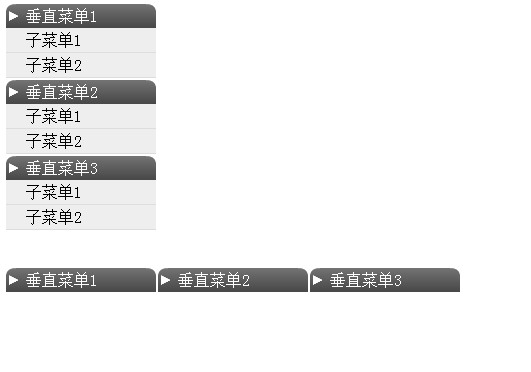
4、运行效果如下
本文转自stock0991 51CTO博客,原文链接:http://blog.51cto.com/qing0991/1637758,如需转载请自行联系原作者