首先,所有的源代码都可以在github上找到: https : //github.com/activelylazy/coverage-example 。 我将显示关键片段,但显然有很多细节被忽略了(希望如此)不相关。
示例应用
该示例应用程序不是打破传统,而是一个简单的,即使有点人为的问候世界:
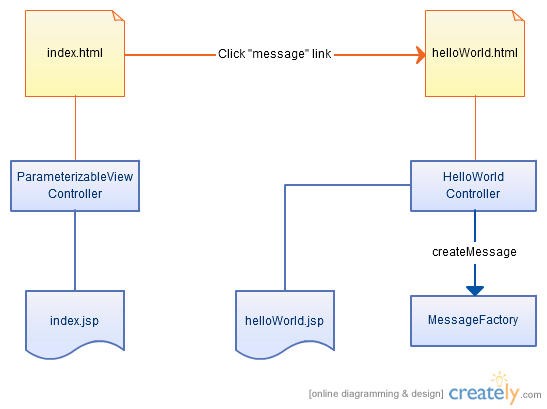
怎么运行的
起始页面是指向hello world页面的简单链接:
<h1>Example app</h1>
<p>See the <a id="messageLink" href="helloWorld.html">message</a></p>
Hello World页面仅显示以下消息:
<h1>Example app</h1>
<p id="message"><c:out value="${message}"/></p>
hello world控制器渲染视图,并传递消息:
public class HelloWorldController extends ParameterizableViewController {
    // Our message factory
    private MessageFactory messageFactory;
    @Override
    protected ModelAndView handleRequestInternal(HttpServletRequest request,
        HttpServletResponse response) throws Exception {
        // Get the success view
        ModelAndView mav = super.handleRequestInternal(request, response);
        // Add our message
        mav.addObject("message",messageFactory.createMessage());
        return mav;
    }
    @Autowired
    public void setMessageFactory(MessageFactory messageFactory) {
        this.messageFactory = messageFactory;
    }
}
最后,MessageFactory仅返回硬编码的消息:
public String createMessage() {
    return "Hello world";
}
单元测试
我们定义了一个简单的单元测试,以验证MessageFactory的行为是否符合预期:
public class MessageFactoryTest {
    // The message factory
    private MessageFactory messageFactory;
    @Test
    public void testCreateMessage() {
        assertEquals("Hello world",messageFactory.createMessage());
    }
    @Autowired
    public void setMessageFactory(MessageFactory messageFactory) {
        this.messageFactory = messageFactory;
    }
}
建立
一个基本的maven pom文件足以构建此文件并运行单元测试。 至此,我们有了一个正在运行的应用程序,并对我们可以构建和运行的核心功能(例如它)进行了单元测试。
<project>
    <modelVersion>4.0.0</modelVersion>
    <groupId>com.example</groupId>
    <artifactId>helloworld</artifactId>
    <packaging>war</packaging>
    <version>1.0-SNAPSHOT</version>
    <name>helloworld Maven Webapp</name>
    <build>
        <finalName>helloworld</finalName>
    </build>
    <dependencies>
        ...omitted...
    </dependencies>
</project>
代码覆盖率
现在,我们集成Emma,以便获得一些代码覆盖率报告。 首先,我们定义一个新的Maven配置文件,这使我们可以控制是否在任何给定的版本上使用emma。
<profile>
    <id>with-emma</id>
    <build>
        <plugins>
            <plugin>
                <groupId>org.codehaus.mojo</groupId>
                <artifactId>emma-maven-plugin</artifactId>
                <inherited>true</inherited>
                <executions>
                    <execution>
                        <id>instrument</id>
                        <phase>process-test-classes</phase>
                        <goals>
                            <goal>instrument</goal>
                        </goals>
                    </execution>
                </executions>
            </plugin>
        </plugins>
    </build>
</profile>
这只是在Maven“过程测试类”阶段调用“仪器”目标。 即,一旦我们编译了类文件,请使用emma对其进行检测。 我们可以通过使用新的配置文件调用Maven来运行它:
mvn clean install -Pwith-emma
构建完成后,我们可以运行Emma生成代码覆盖率报告:
在Windows上:
java -cp %USERPROFILE%/.m2/repository/emma/emma/2.0.5312/emma-2.0.5312.jar emma report -r xml,html -in coverage.ec -in target/coverage.em
在Linux上:
java -cp ~/.m2/repository/emma/emma/2.0.5312/emma-2.0.5312.jar emma report -r xml,html -in coverage.ec -in target/coverage.em
现在,我们可以在coverage / index.html中查看HTML覆盖率报告。 在这一点上,它表明我们有50%的测试覆盖率(按类)。 MessageFactory已完全覆盖,但是HelloWorldController根本没有任何测试。
整合测试
为了测试我们的控制器和JSP,我们将使用WebDriver创建一个简单的集成测试。 这是一个恰巧启动浏览器的JUnit测试。
public class HelloWorldIntegrationTest {
    // The webdriver
    private static WebDriver driver;
    @BeforeClass
    public static void initWebDriver() {
        driver = new FirefoxDriver();
    }
    @AfterClass
    public static void stopSeleniumClent() {
        try {
            driver.close();
            driver.quit();
        } catch( Throwable t ) {
            // Catch error & log, not critical for tests
            System.err.println("Error stopping driver: "+t.getMessage());
            t.printStackTrace(System.err);
        }
    }
    @Test
    public void testHelloWorld() {
        // Start from the homepage
        driver.get("http://localhost:9080/helloworld/");
        HomePage homePage = new HomePage(driver);
        HelloWorldPage helloWorldPage = homePage.clickMessageLink();
        assertEquals("Hello world",helloWorldPage.getMessage());
    }
}
第4-18行只是在测试之前启动Web驱动程序,并在测试完成后将其关闭(关闭浏览器窗口)。
在第22行,我们使用硬编码的URL导航到主页。
在第23行,我们初始化主页的Web Driver 页面对象 。 这封装了页面工作方式的所有细节,从而使测试可以与页面进行功能上的交互,而无需担心机制(使用哪些元素等)。
在第24行,我们使用主页对象单击“消息”链接; 这将导航到hello world页面。
在第25行,我们确认Hello World页面上显示的消息是我们期望的。
注意:我正在使用页面对象将测试规范 (做什么)与测试实现 (如何做)分开。 有关为什么这很重要的更多信息,请参见防止测试变脆 。
主页
主页对象非常简单:
public HelloWorldPage clickMessageLink() {
    driver.findElement(By.id("messageLink")).click();
    return new HelloWorldPage(driver);
}
HelloWorldPage
hello world页面同样简单:
public String getMessage() {
    return driver.findElement(By.id("message")).getText();
}
运行集成测试
要在我们的Maven构建过程中运行集成测试,我们需要进行一些更改。 首先,我们需要从单元测试阶段中排除集成测试:
<plugin>
    <groupId>org.apache.maven.plugins</groupId>
    <artifactId>maven-surefire-plugin</artifactId>
    ...
    <configuration>
        ...
        <excludes>
            <exclude>**/*IntegrationTest.java</exclude>
            <exclude>**/common/*</exclude>
        </excludes>
    </configuration>
</plugin>
然后,我们定义一个新的配置文件,因此我们可以选择运行集成测试:
<profile>
    <id>with-integration-tests</id>
    <build>
        <plugins>
            <plugin>
                <groupId>org.mortbay.jetty</groupId>
                <artifactId>maven-jetty-plugin</artifactId>
                <version>6.1.22</version>
                <configuration>
                    <scanIntervalSeconds>5</scanIntervalSeconds>
                    <stopPort>9966</stopPort>
                    <stopKey>foo</stopKey>
                    <connectors>
                        <connector implementation="org.mortbay.jetty.nio.SelectChannelConnector">
                            <port>9080</port>
                            <maxIdleTime>60000</maxIdleTime>
                        </connector>
                    </connectors>
                </configuration>
                <executions>
                    <execution>
                        <id>start-jetty</id>
                        <phase>pre-integration-test</phase>
                        <goals>
                            <goal>run</goal>
                        </goals>
                        <configuration>
                            <daemon>true</daemon>
                        </configuration>
                    </execution>
                    <execution>
                        <id>stop-jetty</id>
                        <phase>post-integration-test</phase>
                        <goals>
                            <goal>stop</goal>
                        </goals>
                    </execution>
                </executions>
            </plugin>
            <plugin>
                <groupId>org.apache.maven.plugins</groupId>
                <artifactId>maven-surefire-plugin</artifactId>
                <version>2.5</version>
                <inherited>true</inherited>
                <executions>
                    <execution>
                        <id>integration-tests</id>
                        <phase>integration-test</phase>
                        <goals>
                            <goal>test</goal>
                        </goals>
                        <configuration>
                            <excludes>
                                <exclude>**/common/*</exclude>
                            </excludes>
                            <includes>
                                <include>**/*IntegrationTest.java</include>
                            </includes>
                        </configuration>
                    </execution>
                </executions>
            </plugin>
        </plugins>
    </build>
</profile>
<id> with-integration-tests </ id>
<内部版本>
<插件>
<插件>
<groupId> org.mortbay.jetty </ groupId>
<artifactId> maven-jetty-plugin </ artifactId>
<version> 6.1.22 </ version>
<配置>
<scanIntervalSeconds> 5 </ scanIntervalSeconds>
<stopPort> 9966 </ stopPort>
<stopKey> foo </ stopKey>
<连接器>
<连接器实现=” org.mortbay.jetty.nio.SelectChannelConnector”>
<port> $ {test.server.port} </ port>
<maxIdleTime> 60000 </ maxIdleTime>
</ connector>
</ connectors>
</ configuration>
<执行>
<执行>
<id>开始码头</ id>
<phase>集成前测试</ phase>
<目标>
<goal>运行</ goal>
</ goals>
<配置>
<daemon> true </ daemon>
</ configuration>
</ execution>
<执行>
<id>停止码头</ id>
<phase>集成后测试</ phase>
<目标>
<goal>停止</ goal>
</ goals>
</ execution>
</ executions>
</ plugin>
<插件>
<groupId> org.apache.maven.plugins </ groupId>
<artifactId> maven-surefire-plugin </ artifactId>
<version> 2.5 </ version>
<inherited> true </ inherited>
<执行>
<执行>
<id>集成测试</ id>
<phase>集成测试</ phase>
<目标>
<goal>测试</ goal>
</ goals>
<配置>
<排除>
<exclude> ** / common / * </ exclude>
</ excludes>
<包括>
<include> ** / * IntegrationTest.java </ include>
</ includes>
</ configuration>
</ execution>
</ executions>
</ plugin>
</ plugins>
</ build>
</ profile>
这可能看起来很复杂,但实际上我们只是在配置码头来运行我们的集成测试。 然后配置如何自行运行集成测试。
在9-19行中,配置码头-要继续运行的港口以及如何停止码头。
21-30行配置了码头以在Maven构建的“集成前测试”阶段运行。
31-37行配置了要在Maven构建的“集成后测试”阶段停止的码头。
在第40-62行中,我们再次使用maven-surefire-plugin,这次是在构建的“集成测试”阶段运行,仅运行我们的集成测试类。
我们可以使用以下命令运行此构建:
mvn clean install -Pwith-emma -Pwith-integration-tests
这将构建一切,运行单元测试,构建战争,启动码头进行战争,运行我们的集成测试(运行其余部分时,您会看到一个Firefox窗口弹出),然后关闭码头。 因为战争是通过检测类构建的,所以在我们运行集成测试时,Emma还会跟踪代码覆盖率。
现在,我们可以构建应用程序,运行单元测试和集成测试,收集组合的代码覆盖率报告。 如果我们重新运行emma报告并检查代码覆盖率,我们现在将看到我们具有100%的测试覆盖率-因为控制器也已通过测试覆盖。
问题
有哪些未解决的问题,可以做哪些进一步的扩展?
- 该构建会生成一个已检测到的WAR –这意味着您需要运行第二个构建(没有emma)才能获得可用于生产的构建。
- 集成测试对Jetty配置为启动的端口进行硬编码。 意味着测试不能直接在Eclipse中运行。 可以传入此端口,默认为8080,这样集成测试就可以通过maven构建在Eclipse中运行。
- 在构建服务器上运行时,您可能不希望Firefox随机弹出(如果甚至安装了X); 因此,运行xvfb是一个好主意。 可以将maven设置为在集成测试之前和之后启动和停止xvfb。
参考: 单元和集成测试的代码覆盖范围以及Actively Lazy博客的JCG合作伙伴 Dave提供的信息
翻译自: https://www.javacodegeeks.com/2011/10/code-coverage-with-unit-integration.html