1.在linux系统下载安装jdk和tomcat
2.配置tomcat参数
[[email protected] ~]# vim /usr/local/tomcat-7.0.64Front/bin/catalina.sh
JAVA_OPTS="$JAVA_OPTS
-Dcom.sun.management.jmxremote --远程登陆
-Dcom.sun.management.jmxremote.port=9004 -开放端口
-Dcom.sun.management.jmxremote.authenticate=true --用户密码认证
-Dcom.sun.management.jmxremote.ssl=false --不启用ssl
-Dcom.sun.management.jmxremote.access.file=/usr/local/jdk1.7.0_80/jre/lib/management/
jmxremote.access --访问权限
-Dcom.sun.management.jmxremote.password.file=/usr/local/jdk1.7.0_80/jre/lib/management/
jmxremote.password --访问密码
"
[[email protected] ~]# cd /usr/local/jdk1.7.0_80/jre/lib/management/
[[email protected] management]# cp -a jmxremote.password.template jmxremote.password
[[email protected] management]# vim jmxremote.password
tingyun system --用户名和密码
[[email protected] management]# vim jmxremote.access
#monitorRole readonly --注释
#controlRole readwrite \
# create javax.management.monitor.*,javax.management.timer.* \
# unregister
tingyun readwrite --用户授权(readonly 只读 readwrite 读写)
[[email protected] management]# chmod 600 jmxremote.password jmxremote.access
[[email protected] management]# /usr/local/tomcat-7.0.64Front/bin/shutdown.sh
[[email protected] management]# /usr/local/tomcat-7.0.64Front/bin/startup.sh
[[email protected] management]# netstat -antulp | grep 9004
tcp 0 0 :::9004 :::* LISTEN 3093/java
[[email protected] management]#
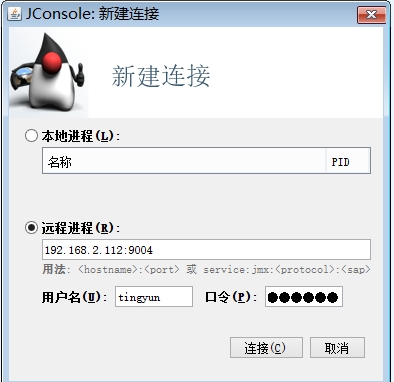
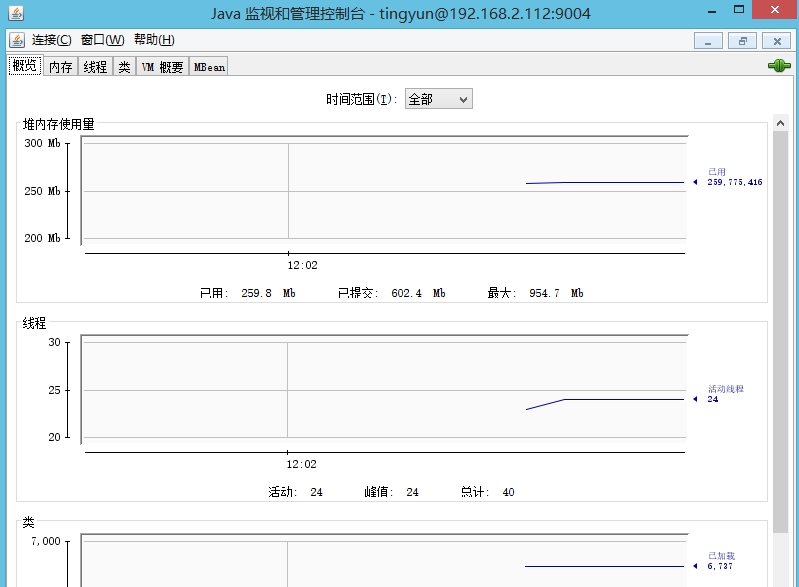
3.jconsole连接服务器