这篇文章主要介绍了Android中替换WebView加载网页失败时的页面
我们用webView去请求一个网页链接的时候,如果请求网页失败或无网络的情况下,它会返回给我们这样一个页面,如下图所示:

上面这个页面就是系统自带的页面,你觉得是不是很丑?反正小编本人觉得非常丑,很难看,于是乎小编就在想能不能自定义一个页面,当数据请求失败时让系统来加载我们自定义好的页面?上网查了很多资料,都没有关于这个问题的解决方法(反正我是没有找到),经过小编的不断琢磨,今天终于实现了这个功能。以下就是本人自定义实现的数据加载失败时的页面:
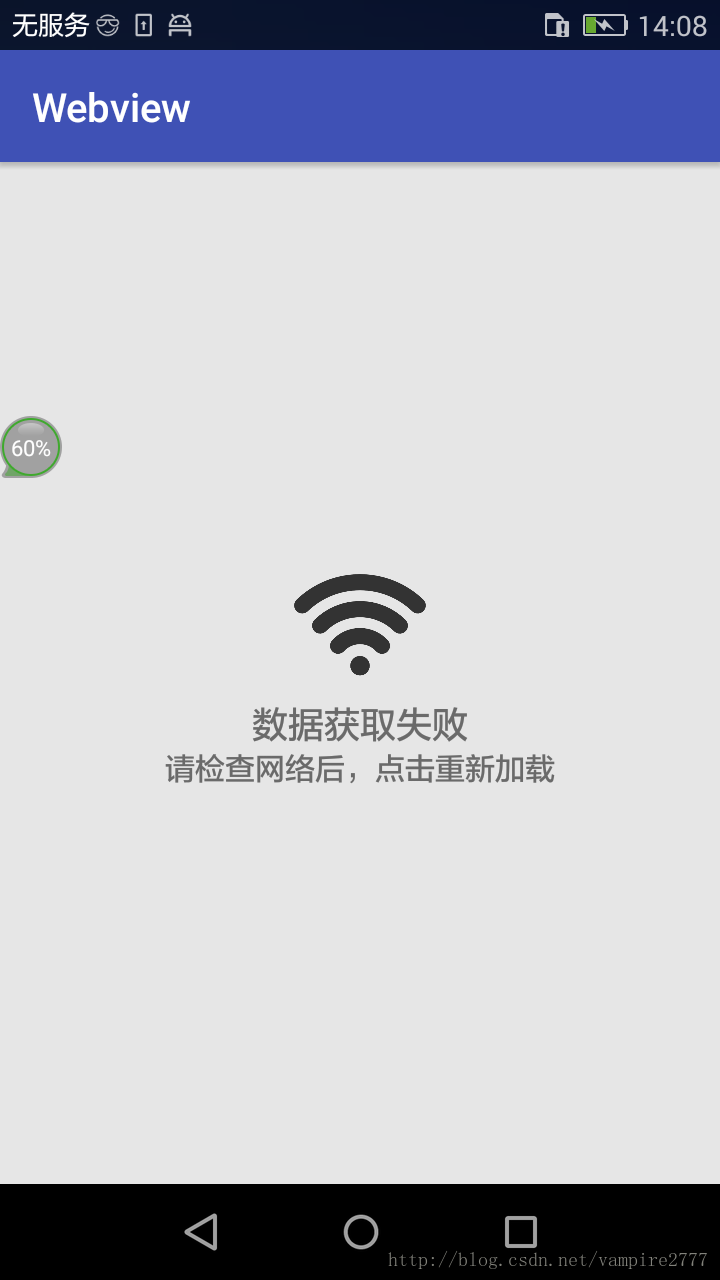
这样看起来是不是觉得很高大尚。这和我们真正拿到数据接口做出来的效果完全一样。对于用户来说这样的体验也是很完美的。
**全部代码:
一、主代码:**
MainActivity.Java
|
1
2
3
4
5
6
7
8
9
10
11
12
13
14
15
16
17
18
19
20
21
22
23
24
25
26
27
28
29
30
31
32
33
34
35
36
37
38
39
40
41
42
43
44
45
46
47
48
49
50
51
52
53
54
55
56
57
58
59
60
61
62
63
64
65
66
67
68
69
70
71
72
73
74
75
76
77
78
79
|
package
com.example.webview;
import
android.support.v4.view.ViewPager;
import
android.support.v7.app.AppCompatActivity;
import
android.os.Bundle;
import
android.view.View;
import
android.webkit.WebSettings;
import
android.webkit.WebView;
import
android.webkit.WebViewClient;
import
android.widget.LinearLayout;
import
android.widget.RelativeLayout;
public
class
MainActivity extends
AppCompatActivity {
private
WebView webview;
private
WebSettings mWebSettings;
private
View mErrorView;
@Override
protected
void
onCreate(Bundle savedInstanceState) {
super.onCreate(savedInstanceState);
setContentView(R.layout.activity_main);
webview
= (WebView) findViewById(R.id.main_webview);
setUpView();
}
private
void
setUpView() {
//加载需要显示的网页
//设置WebView属性,能够执行Javascript脚本
webview.getSettings().setJavaScriptEnabled(true);
mWebSettings
= webview.getSettings();
mWebSettings.setJavaScriptEnabled(true);
//允许加载javascript
mWebSettings.setSupportZoom(true);
//允许缩放
mWebSettings.setBuiltInZoomControls(true);
//原网页基础上缩放
mWebSettings.setUseWideViewPort(true);
//任意比例缩放
webview.setWebViewClient(webClient);
//设置Web视图
}
/***
*
设置Web视图的方法
*/
WebViewClient
webClient =
new
WebViewClient(){//处理网页加载失败时
public
void
onReceivedError(WebView view, int
errorCode, String description, String failingUrl) {
showErrorPage();//显示错误页面
};
};
boolean
mIsErrorPage;
protected
void
showErrorPage() {
LinearLayout
webParentView = (LinearLayout)webview.getParent();
initErrorPage();//初始化自定义页面
while
(webParentView.getChildCount() > 1)
{
webParentView.removeViewAt(0);
}
@SuppressWarnings("deprecation")
LinearLayout.LayoutParams
lp =
new
LinearLayout.LayoutParams(ViewPager.LayoutParams.FILL_PARENT, ViewPager.LayoutParams.FILL_PARENT);
webParentView.addView(mErrorView,
0,
lp);
mIsErrorPage
= true;
}
/****
*
把系统自身请求失败时的网页隐藏
*/
protected
void
hideErrorPage() {
LinearLayout
webParentView = (LinearLayout)webview.getParent();
mIsErrorPage
= false;
while
(webParentView.getChildCount() > 1)
{
webParentView.removeViewAt(0);
}
}
/***
*
显示加载失败时自定义的网页
*/
protected
void
initErrorPage() {
if
(mErrorView == null)
{
mErrorView
= View.inflate(this,
R.layout.activity_error, null);
RelativeLayout
layout = (RelativeLayout)mErrorView.findViewById(R.id.online_error_btn_retry);
layout.setOnClickListener(new
View.OnClickListener() {
public
void
onClick(View v) {
webview.reload();
}
});
mErrorView.setOnClickListener(null);
}
}
}
|
二、XML布局代码:
1.activity_main.xml
|
1
2
3
4
5
6
7
8
9
10
11
12
13
|
<?xml
version=
"1.0"
encoding="utf-8"?>
<LinearLayout
xmlns:android="http://schemas.android.com/apk/res/android"
android:layout_width="match_parent"
android:layout_height="match_parent"
android:orientation="vertical"
tools:context="com.example.webview.MainActivity">
<WebView
android:id="@+id/main_webview"
android:layout_width="match_parent"
android:layout_height="match_parent">
</WebView>
</LinearLayout>
|
2.activity_error.xml
|
1
2
3
4
5
6
7
8
9
10
11
12
13
14
15
16
17
18
19
20
21
22
23
24
25
26
27
28
29
30
31
32
33
34
35
36
37
38
|
<?xml
version=
"1.0"
encoding="utf-8"?>
<LinearLayout
xmlns:android="http://schemas.android.com/apk/res/android"
android:orientation="vertical"
android:layout_width="match_parent"
android:layout_height="match_parent">
<RelativeLayout
android:id="@+id/online_error_btn_retry"
android:layout_width="match_parent"
android:layout_height="match_parent"
android:background="#E6E6E6"
android:clickable="true"
android:gravity="center"
>
<LinearLayout
android:layout_width="match_parent"
android:layout_height="match_parent"
android:gravity="center"
android:orientation="vertical"
>
<ImageView
android:layout_width="70dp"
android:layout_height="70dp"
android:src="@drawable/wifi"
android:id="@+id/imageView2"
/>
<TextView
android:layout_width="wrap_content"
android:layout_height="wrap_content"
android:textSize="18dp"
android:text="数据获取失败"
></TextView>
<TextView
android:layout_width="wrap_content"
android:layout_height="wrap_content"
android:textSize="15dp"
android:text="请检查网络后,点击重新加载"
/>
</LinearLayout>
</RelativeLayout>
</LinearLayout>
|
以上所述是小编给大家介绍的Android中替换WebView加载网页失败时的页面,希望对大家有所帮助,如果大家有任何疑问请给我留言,小编会及时回复大家的。在此也非常感谢大家对脚本之家网站的支持!
原文链接:http://blog.csdn.net/vampire2777/article/details/54645835