温馨提示:
前一篇博文己经介绍过了corosync+pacemaker基本用法,这篇将重点介绍基于corosync+pacemaker的web高可用
---本文大纲
-
资源分配及拓扑图
-
实现过程
-
测试
==================
一、资源分配及拓扑图
1、资源分配
| 系统 | 主机名 | 角色 | ip地址 | 关系 |
| Centos 6.5x86_64 | essun.maridb1.org | 数据库+NFS | 192.168.1.110 |
为两个web节点存储数据与站点 |
| Centos 6.5x86_64 | essun.web1.org | web | 192.168.1.109 | apache+php 站点位于1.110 |
| Centos 6.5x86_64 | essun.web2.org | web | 192.168.1.108 | apache+php 站点位于1.110 |
2、拓扑图
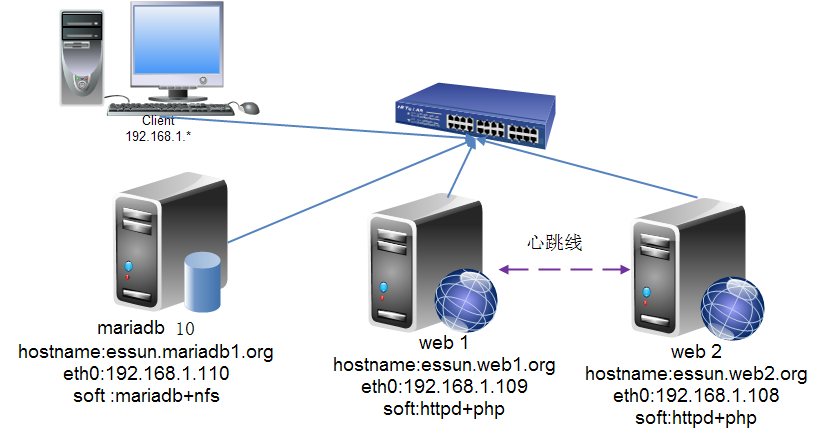
二、实现过程
注:
主机名(与uname -n相同,节点之间可以解析主机名)
时间同步
无密码登录
1、node1配置过程
-
己安装的包组
|
1
2
|
#yum groupinstall -y "Development tools" "Server Platform Development"# yum install -y crmsh-1.2.6-4.el6.x86_64.rpm pssh-2.3.1-2.el6.x86_64.rpm |
|
1
2
3
4
5
6
|
HTTP/1.1 200 OK
Date: Wed, 30 Apr 2014 06:05:04 GMTServer: Apache/2.4.9 (Unix)
X-Powered-By: PHP/5.4.26
Content-Type: text/html
|
-
连接数据库测试
|
1
2
3
4
5
6
7
8
|
<?php$link = mysql_connect('192.168.1.110','root','mysql');
if ($link)
echo "Success...";
else
echo "Failure...";
mysql_close();
?>
|
|
1
2
|
[[email protected] web]# curl http://192.168.1.108
Success... |
-
安装corosync、pacemaker
|
1
|
#yum install corosync pacemaker |
以上步骤出需要在节点web2上执行。
-
修改corosync的配置文件(/etc/corosync/corosync),增加service区域
|
1
2
3
4
5
6
|
[[email protected] download]# cd /etc/corosync/
[[email protected] corosync]# ls
corosync.conf.example service.dcorosync.conf.example.udpu uidgid.d[[email protected] corosync]# cp corosync.conf.example corosync.conf
[[email protected] corosync]# vim corosync.conf
|
-
配置结果
|
1
2
3
4
5
6
7
8
9
10
11
12
13
14
15
16
17
18
19
20
21
22
23
24
25
26
27
28
29
30
31
32
33
34
35
36
37
38
|
# Please read the corosync.conf.5 manual pagecompatibility: whitetanktotem { version: 2
secauth: on
threads: 0
interface {
ringnumber: 0
bindnetaddr: 192.168.1.1
mcastaddr: 226.94.1.1
mcastport: 5405
ttl: 1
}
}logging { fileline: off
to_stderr: no
to_logfile: yes
to_syslog: no
logfile: /var/log/cluster/corosync.log
debug: off
timestamp: on
logger_subsys {
subsys: AMF
debug: off
}
}service { ver:0
name:pacemaker
}aisexec { user :root
group:root
}amf { mode: disabled
} |
-
生成**
|
1
2
3
4
5
6
7
8
9
|
[[email protected] corosync]# mv /dev/random /dev/xrandom
[[email protected] corosync]# mv /dev/urandom /dev/random
[[email protected] corosync]# corosync-******
Corosync Cluster Engine Authentication key generator.Gathering 1024 bits for key from /dev/random.
Press keys on your keyboard to generate entropy.Writing corosync key to /etc/corosync/authkey.
[[email protected] corosync]# mv /dev/random /dev/urandom
[[email protected] corosync]# mv /dev/xrandom /dev/random
|
-
查看一下生成后的文件属性(authkey的属性必须的600否则corosync无法启动)
|
1
2
3
4
|
[[email protected] corosync]# ll
total 24-r-------- 1 root root 128 Apr 30 09:25 authkey-rw-r--r-- 1 root root 480 Apr 30 09:21 corosync.conf |
-
将配置好的文件复制到节点web2上
|
1
2
3
4
5
6
7
|
[[email protected] corosync]# scp authkey corosync.conf essun.web2.org:/etc/corosync/
The authenticity of host 'essun.web2.org (192.168.1.109)' can't be established.
RSA key fingerprint is b8:9d:cb:7b:4d:ad:c2:fb:a4:00:23:b0:f2:6b:3f:ad.Are you sure you want to continue connecting (yes/no)? yes
Warning: Permanently added 'essun.web2.org' (RSA) to the list of known hosts.
authkey 100% 128 0.1KB/s 00:00
corosync.conf 100% 480 0.5KB/s 00:00
|
-
启动服务
|
1
2
3
4
|
[email protected] web]# service pacemaker start
Starting Pacemaker Cluster Manager [ OK ][[email protected] web]# service corosync start
Starting Corosync Cluster Engine (corosync): [ OK ] |
-
查看在线节点
|
1
2
3
4
5
6
7
8
9
10
|
[[email protected] web]# crm
crm(live)# status
Last updated: Wed Apr 30 15:16:37 2014Last change: Wed Apr 30 14:21:31 2014 via crmd on essun.web1.orgStack: classic openais (with plugin)Current DC: essun.web2.org - partition with quorumVersion: 1.1.10-14.el6_5.3-368c7262 Nodes configured, 2 expected votes0 Resources configuredOnline: [ essun.web1.org essun.web2.org ] |
2、编译mariadb(此文中有详细的介绍)
-
安装nfs
|
1
|
#yum install -y nfs* |
-
指定共享目录
|
1
2
3
4
5
6
7
8
9
10
11
12
13
14
15
16
|
#mkdir -p /web/share#vim /etc/exports/web/share *(insecure,rw,async,no_root_squash)# exportfs -ravexporting *:/web/share# service nfs restartShutting down NFS daemon: [ OK ]Shutting down NFS mountd: [ OK ]Shutting down NFS quotas: [ OK ]Shutting down NFS services: [ OK ]Shutting down RPC idmapd: [ OK ]Starting NFS services: [ OK ]Starting NFS quotas: [ OK ]Starting NFS mountd: [ OK ]Starting NFS daemon: [ OK ]Starting RPC idmapd: [ OK ] |
-
安装Discuz
|
1
2
3
|
# unzip Discuz_X3.1_SC_UTF8.zip# mv readme/ upload/ utility/ /web/share/# chmod -R 777 upload/ |
-
挂载到web1上
|
1
|
[[email protected] download]# mount -t nfs 192.168.1.110:/web/share /www/web/
|
-
使用网页访问安装Discuz
-
第一步
-

-
-
第二步
-

-
-
第三步
-

-
-
第四步
-

-
-
第五步
-

-
-
第六步
-

这样在web1上可以访问了,在web2上只要挂载nfs(1.110:/web/share),在站点目录就可以访问了
3、实现 web高可用
-
禁用stonith及忽略投票功能
|
1
2
3
4
5
6
7
8
9
10
11
12
13
|
crm(live)configure# property stonith-enabled=false
crm(live)configure# property no-quorum-policy=ignore
crm(live)configure# verify
crm(live)configure# commit
crm(live)configure# show
node essun.web1.orgnode essun.web2.orgproperty $id="cib-bootstrap-options" \
dc-version="1.1.10-14.el6_5.3-368c726" \
cluster-infrastructure="classic openais (with plugin)" \
expected-quorum-votes="2" \
stonith-enabled="false" \
no-quorum-policy="ignore"
|
-
定义vip
|
1
2
3
|
crm(live)configure# primitive webip ocf:heartbeat:IPaddr params ip=192.168.1.100
crm(live)configure# verify
crm(live)configure# commit
|
-
挂载文件系统
|
1
2
3
|
crm(live)configure# primitive webnfs ocf:heartbeat:Filesystem params device="192.168.1.110://web/share" directory="/www/web" fstype="nfs" op monitor interval=60s timeout=60s op start timeout=60s op stop timeout=60s
crm(live)configure# verify
crm(live)configure# commit
|
-
定义web、php-fpm服务
|
1
2
3
4
5
6
7
8
9
10
11
12
13
14
15
16
17
18
19
20
21
22
23
24
|
crm(live)configure# primitive webserver lsb:httpd24
crm(live)configure# verify
crm(live)configure# commit
crm(live)configure# primitive webphp lsb:php-fpm
crm(live)configure# verify
crm(live)configure# commit
crm(live)configure# show
node essun.web1.orgnode essun.web2.orgprimitive webip ocf:heartbeat:IPaddr \ params ip="192.168.1.100"
primitive webnfs ocf:heartbeat:Filesystem \ params device="192.168.1.110://web/share" directory="/www/web" fstype="nfs" \
op monitor interval="60s" timeout="60s" \
op start timeout="60s" interval="0" \
op stop timeout="60s" interval="0"
primitive webphp lsb:php-fpmprimitive webserver lsb:httpd24property $id="cib-bootstrap-options" \
dc-version="1.1.10-14.el6_5.3-368c726" \
cluster-infrastructure="classic openais (with plugin)" \
expected-quorum-votes="2" \
stonith-enabled="false" \
no-quorum-policy="ignore"
|
-
将多个资源整合在一起(此处也可以使用排列约束)
|
1
2
3
4
5
6
7
8
9
10
11
12
13
14
15
16
17
18
19
20
21
|
crm(live)configure# group webservice webip webnfs webserver webphpcrm(live)configure# verify
crm(live)configure# commit
crm(live)configure# show
node essun.web1.orgnode essun.web2.orgprimitive webip ocf:heartbeat:IPaddr \ params ip="192.168.1.100"
primitive webnfs ocf:heartbeat:Filesystem \ params device="192.168.1.110:/web/share" directory="/www/web" fstype="nfs" \
op monitor interval="60s" timeout="60s" \
op start timeout="60s" interval="0" \
op stop timeout="60s" interval="0"
primitive webphp lsb:php-fpmprimitive webserver lsb:httpd24group webservice webip webnfs webserver webphpproperty $id="cib-bootstrap-options" \
dc-version="1.1.10-14.el6_5.3-368c726" \
cluster-infrastructure="classic openais (with plugin)" \
expected-quorum-votes="2" \
stonith-enabled="false" \
no-quorum-policy="ignore"
|
注:
集群内节点资源都不要开机自动启动。
-
在web1测试一下
|
1
2
3
4
5
6
7
8
9
10
11
12
13
14
15
|
crm(live)# status
Last updated: Wed Apr 30 16:32:55 2014Last change: Wed Apr 30 16:32:47 2014 via cibadmin on essun.web1.orgStack: classic openais (with plugin)Current DC: essun.web2.org - partition with quorumVersion: 1.1.10-14.el6_5.3-368c7262 Nodes configured, 2 expected votes4 Resources configuredOnline: [ essun.web1.org essun.web2.org ] Resource Group: webservice
webip (ocf::heartbeat:IPaddr): Started essun.web1.org
webnfs (ocf::heartbeat:Filesystem): Started essun.web1.org
webserver (lsb:httpd24): Started essun.web1.org
webphp (lsb:php-fpm): Started essun.web1.org
crm(live)#
|
三、测试
-
访问192.168.1.100/upload

-
模拟节点web1故障,看看所有的资源是不是能够转移
|
1
2
3
4
5
6
7
8
9
10
11
12
13
14
15
16
17
|
crm(live)node# standby essun.web1.org
crm(live)node# cd ..
crm(live)# status
Last updated: Wed Apr 30 16:38:07 2014Last change: Wed Apr 30 16:38:02 2014 via crm_attribute on essun.web1.orgStack: classic openais (with plugin)Current DC: essun.web2.org - partition with quorumVersion: 1.1.10-14.el6_5.3-368c7262 Nodes configured, 2 expected votes4 Resources configuredNode essun.web1.org: standbyOnline: [ essun.web2.org ] Resource Group: webservice
webip (ocf::heartbeat:IPaddr): Started essun.web2.org
webnfs (ocf::heartbeat:Filesystem): Started essun.web2.org
webserver (lsb:httpd24): Started essun.web2.org
webphp (lsb:php-fpm): Started essun.web2.org
|
-
结果完全无影响

本文转自 jinlinger 51CTO博客,原文链接:http://blog.51cto.com/essun/1405124,如需转载请自行联系原作者