故障现象:
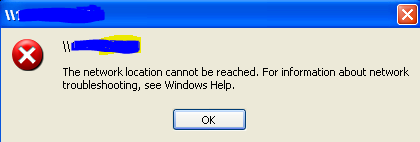
访问文件服务器,提示The network location cannot be reached。
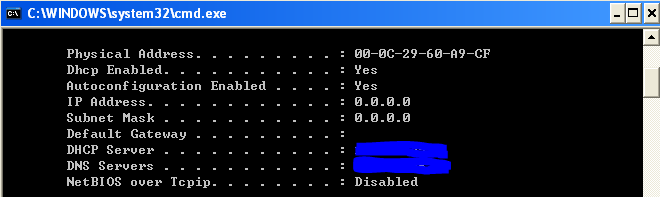
用IPCONFIG /ALL发现NetBIOS over Tcpip ... Disabled(还原故障,所以没有设置IP地址)
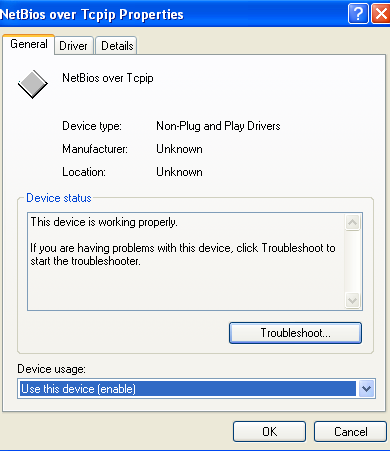
但是在设备管理器中却没有禁用NetBIOS over Tcpip 。(显示隐藏设备,“非即插即用驱动程序”)
解决办法:
删除网卡驱动,重启电脑,重新安装网卡驱动,故障解决。
曾经尝试过的方法,但未能解决问题:http://support.microsoft.com/kb/946937
1. Run Registry Editor (regedit.exe), and check the following registry key:
[HKEY_LOCAL_MACHINE\SYSTEM\CurrentControlSet\Services\NetBT\Parameters]
2. Please find if the "TransportBindName" value exists. If either of them does not exist, create it. If either one is incorrect, change the data. The values should be like this:
Name: TransportBindName
Type: REGSZ
Value: \Device\
Type: REGSZ
Value: \Device\
3. Under the same registry key, if you find the "SMBDeviceEnabled" value exists and is 0, it means Direct Hosting is disabled. You may change it to 1 to turn on it unless there are requirements that this should be disabled.
Name: SMBDeviceEnabled
Type: REG_DWORD
Value: 1
Type: REG_DWORD
Value: 1
转载于:https://blog.51cto.com/huzy02/741872