sendmail安全(加密和认证)
邮件系统的安全性
(SMTP使用25号端口,POP3使用110号端口,IMAP使用143号端口)
基本的smtp协议没有验证用户身份的能力。虽然信封上的寄件人地址已经隐含了发信者的身份,然而,由于信封地址实在太容易假造,所以不能当成身份凭据。 为了判断客户端是否有权使用转发服务(relay),服务器端必须确认客户端(寄件人)是否当真是对方所自称的那个人。在不能以寄件人地址为×××书的前 提下,smtp势必需要其他补充机制,才能验证客户端的身份。
smtps
1. 465端口 (smtps) (使用SSL加密的邮件系统,其SMTPS使用465号端口,POP3S使用995号端口,IMAPS使用993号端口)
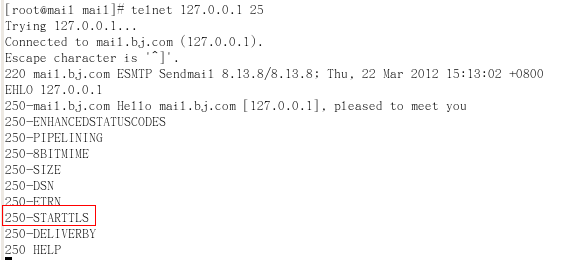
2. smtp+ssl (starttls) 实际上在25端口加密.STARTTLS是对纯文本通信协议的扩展。它将纯文本连接升级为加密连接(TLS或SSL),而不是使用一个单独的加密通信端口。
# sendmail -d0.1 -bv 输出详细信息 显示版本,支持哪些加密认证
认证 sasl 简单认证安全层 点到点的机制。
--减少垃圾邮件的***,避免任何一个用户都可以向外发信
应用:
搭建sendmail服务器,以及dns服务器和接收服务器:
安装sendmail相关软件:
sendmail 0:关闭 1:关闭 2:启用 3:启用 4:启用 5:启用 6:关闭
[[email protected] ~]# service sendmail status
sendmail (pid 3715) 正在运行...
[[email protected] ~]# netstat -tupln |grep sendmail
tcp 0 0 127.0.0.1:25 0.0.0.0:* LISTEN 3715/sendmail: ace
[[email protected] ~]# rpm -qa |grep sendmail
sendmail-8.13.8-2.el5 已经安装
[[email protected] ~]# rpm -qa |grep m4
m4-1.4.5-3.el5.1 已经安装
[[email protected] ~]# mount /dev/cdrom /mnt/cdrom
mount: block device /dev/cdrom is write-protected, mounting read-only
[[email protected] ~]# cd /mnt/cdrom/Server
[[email protected] Server]# ll sendmail*
-r--r--r-- 278 root root 646627 2007-01-18 sendmail-8.13.8-2.el5.i386.rpm
-r--r--r-- 278 root root 318825 2007-01-18 sendmail-cf-8.13.8-2.el5.i386.rpm
-r--r--r-- 327 root root 131258 2007-01-18 sendmail-devel-8.13.8-2.el5.i386.rpm
-r--r--r-- 278 root root 668921 2007-01-18 sendmail-doc-8.13.8-2.el5.i386.rpm
[[email protected] Server]# rpm -ivh sendmail-cf-8.13.8-2.el5.i386.rpm
三个文件需要修改:
[[email protected] Server]# cd /etc/mail

[[email protected] mail]# service sendmail restart
[[email protected] mail]# vim access 中继文件
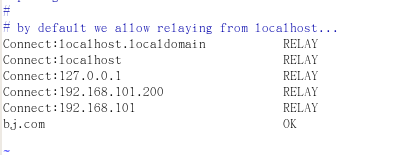
[[email protected] mail]# vim local-host-names 域名比对,表示本地域名

安装DNS
[[email protected] Server]# rpm -ivh bind-9.3.6-4.P1.el5.i386.rpm
[[email protected] Server]# rpm -ivh bind-chroot-9.3.6-4.P1.el5.i386.rpm
[[email protected] Server]# rpm -ivh caching-nameserver-9.3.6-4.P1.el5.i386.rpm
[[email protected] Server]# cd /var/named/chroot/etc
[[email protected] etc]# cp -p named.caching-nameserver.conf named.conf 拷贝模
板文件
[[email protected] etc]# vim named.conf
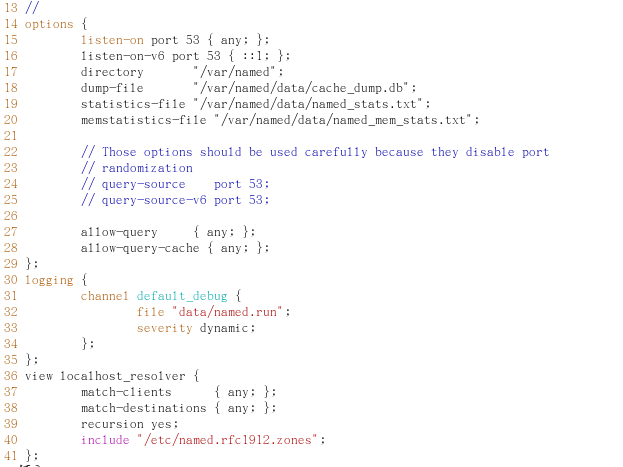
[[email protected] etc]# vim named.rfc1912.zones
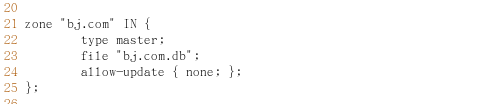
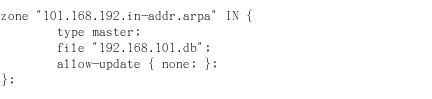
[[email protected] etc]# cd /var/named/chroot/var/named
[[email protected] named]# vim bj.com.db
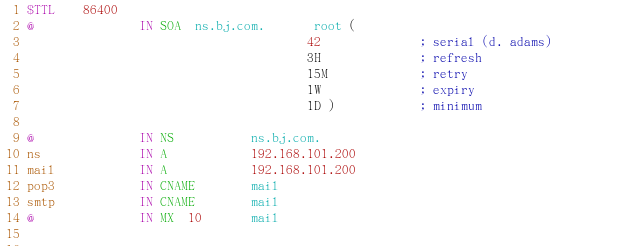
[[email protected] named]# vim 192.168.101.db
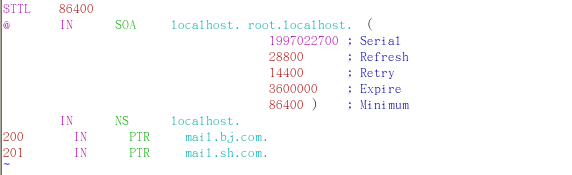
[[email protected] named]# service named start


[[email protected] named]# vim /etc/hosts 修改原来hosts文件里留的信息

[[email protected] named]# init 6 重启系统
安装接收服务器:
This system is not registered with RHN.
RHN support will be disabled.
dovecot.i386 1.0.7-7.el5 rhel-server
[[email protected] ~]# yum install -y dovecot.i386
[[email protected] ~]# service dovecot start
STARTTLS 步骤:
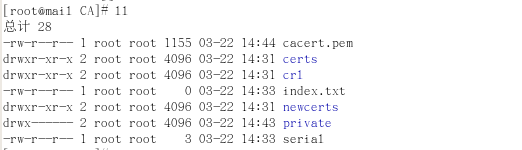
建立CA
[[email protected] ~]# cd /etc/pki
[[email protected] pki]# vim tls/openssl.cnf


[[email protected] pki]# cd CA/
[[email protected] CA]# mkdir crl certs newcerts 创建相关的目录
[[email protected] CA]# touch index.txt serial
[[email protected] CA]# echo "01" >serial 设置一个***
[[email protected] CA]# openssl genrsa 1024 >private/cakey.pem 创建钥匙
[[email protected] CA]# chmod 600 private/* 设置权限 只要管理员可以访问
[[email protected] CA]# openssl req -new -key private/cakey.pem -x509 -out cacert.pem -days 3650 产生证书
-----
Country Name (2 letter code) [GB]:CN
State or Province Name (full name) [Berkshire]:BEIJING
Locality Name (eg, city) [Newbury]:BEIJING
Organization Name (eg, company) [My Company Ltd]:SECCENTER
Organizational Unit Name (eg, section) []:TEC
Common Name (eg, your name or your server's hostname) []:rootca.net.net
发送的加密:为sendmail颁发证书
[[email protected] CA]# cd /etc/mail
[[email protected] mail]# mkdir certs 创建一个目录
[[email protected] mail]# cd certs
[[email protected] certs]# openssl genrsa 1024 >sendmail.key 产生钥匙
[[email protected] certs]# openssl req -new -key sendmail.key -out sendmail.csr 请求文件
-----
Country Name (2 letter code) [GB]:CN
State or Province Name (full name) [Berkshire]:HENAN
Locality Name (eg, city) [Newbury]:ZHENGZHOU
Organization Name (eg, company) [My Company Ltd]:ZZDX
Organizational Unit Name (eg, section) []:TEC
Common Name (eg, your name or your server's hostname) []:mail.bj.com
Email Address []:
[[email protected] certs]# openssl ca -in sendmail.csr -out sendmail.cert 颁发证书
[[email protected] certs]# cp /etc/pki/CA/cacert.pem ./ 把机构的证书和服务器的证书放在一起
[[email protected] certs]# chmod 600 *
[[email protected] certs]# cd /etc/mail
[[email protected] mail]# vim sendmail.mc

134行打开

[[email protected] mail]# telnet 127.0.0.1 25 通过telnet查看 STARTTLS已经启动
接收的加密:为接收服务器创建证书
[[email protected] mail]# mkdir -pv /etc/dovecot/certs 创建多级子目录
[[email protected] mail]# cd /etc/dovecot/certs
[[email protected] certs]# openssl genrsa 1024 >dovecot.key
[[email protected] certs]# openssl req -new -key dovecot.key -out dovecot.csr
-----
Country Name (2 letter code) [GB]:CN
State or Province Name (full name) [Berkshire]:HENAN
Locality Name (eg, city) [Newbury]:ZHENGZHOU
Organization Name (eg, company) [My Company Ltd]:ZZDX
Organizational Unit Name (eg, section) []:TEC
Common Name (eg, your name or your server's hostname) []:pop3.bj.com
Email Address []:
[[email protected] certs]# openssl ca -in dovecot.csr -out dovecot.cert
[[email protected] certs]# chmod 600 *
[[email protected] certs]# vim /etc/dovecot.conf


[[email protected] certs]# service dovecot restart
[[email protected] certs]# netstat -tupln |grep dovecot
tcp 0 0 :::993 :::* LISTEN 6438/dovecot
tcp 0 0 :::110 :::* LISTEN 6438/dovecot
tcp 0 0 :::143 :::* LISTEN 6438/dovecot
测试:
发送加密:
[[email protected] Server]# tail -f /var/log/maillog
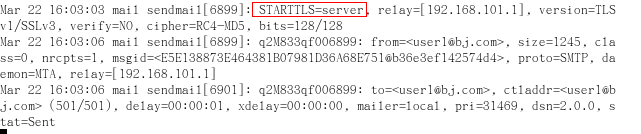
接收加密:(需要安装抓包工具)
[[email protected] ~]# yum list all |grep wir
This system is not registered with RHN.
RHN support will be disabled.
wireless-tools.i386 1:28-2.el5 installed
wireless-tools-devel.i386 1:28-2.el5 rhel-server
wireshark.i386 1.0.8-1.el5_3.1 rhel-server
wireshark-gnome.i386 1.0.8-1.el5_3.1 rhel-server
[[email protected] ~]# yum install wireshark.i386
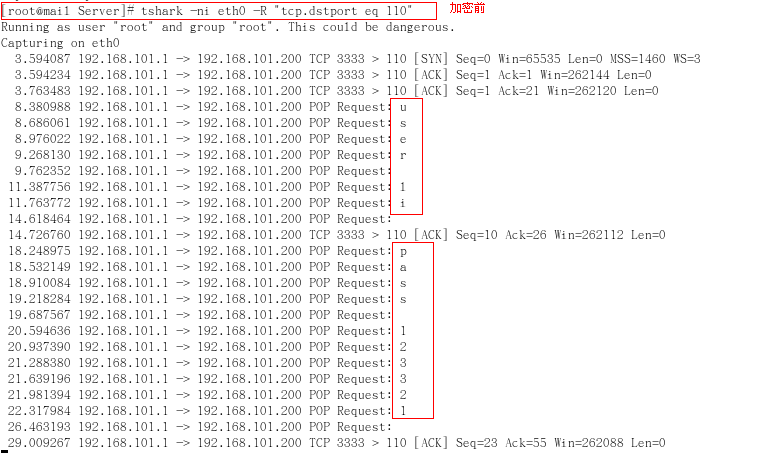
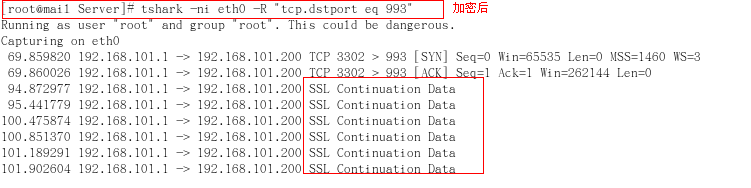
认证步骤:
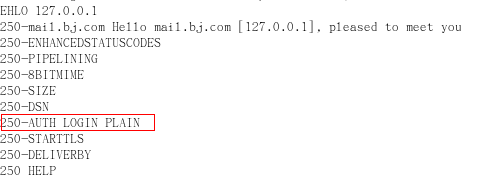
服务名称saslauthd,默认是没有启用的
要测试是否启用了认证
[[email protected] mail]# cd /mnt/cdrom/Server
[[email protected] Server]# rpm -qa |grep sasl
cyrus-sasl-lib-2.1.22-5.el5
cyrus-sasl-2.1.22-5.el5 主包
cyrus-sasl-devel-2.1.22-5.el5
cyrus-sasl-plain-2.1.22-5.el5 包含验证方法
[[email protected] Server]# chkconfig --list |grep sasl
saslauthd 0:关闭 1:关闭 2:关闭 3:关闭 4:关闭 5:关闭 6:关闭
验证的服务器程序
[[email protected] Server]# service saslauthd start
启动 saslauthd: [确定]
[[email protected] Server]# chkconfig saslauthd on
[[email protected] Server]# vim /usr/lib/sasl2/Sendmail.conf
在里面可以写出检测的方法
比如添加mech_list:LOGIN PLAIN 不写也行,系统默认值
[[email protected] Server]# vim /etc/mail/sendmail.mc



[[email protected] Server]# service sendmail restart
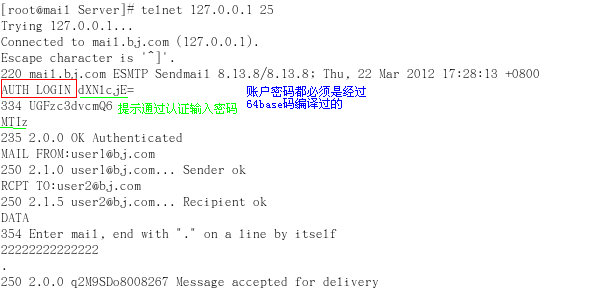
测试:
编码账号:
[[email protected] Server]# echo -n "user1" |openssl base64
dXNlcjE=
[[email protected] Server]# echo -n "123" |openssl base64
MTIz
[[email protected] Server]# telnet 127.0.0.1 25

转载于:https://blog.51cto.com/lulu1101/814303