本文简单介绍Spring Data框架提供的spring_data_redis模块,所提供的强大功能。虽然,spring_data_redis不具体负责与redis通信,但提供了丰富的外围功能。
主要包含以下内容
-
搭建测试环境
-
序列工具
-
认识RedisConnectionFactory&RedisTemplate
1.搭建测试环境
1.1 pom.xml
|
1
2
3
4
5
6
7
8
9
10
11
12
13
14
15
16
17
18
19
20
21
22
23
24
25
26
27
28
29
30
31
32
33
34
35
36
37
38
39
40
41
|
<?xml version="1.0" encoding="UTF-8"?>
<project xmlns="http://maven.apache.org/POM/4.0.0"
xmlns:xsi="http://www.w3.org/2001/XMLSchema-instance"
xsi:schemaLocation="http://maven.apache.org/POM/4.0.0 http://maven.apache.org/xsd/maven-4.0.0.xsd">
<modelVersion>4.0.0</modelVersion>
<parent>
<!-- Your own application should inherit from spring-boot-starter-parent -->
<groupId>org.springframework.boot</groupId>
<artifactId>spring-boot-starter-parent</artifactId>
<version>1.3.5.RELEASE</version>
</parent>
<groupId>com.hellodb.springdata</groupId>
<artifactId>redisdemo</artifactId>
<version>1.0-SNAPSHOT</version>
<dependencies>
<dependency>
<groupId>org.springframework.data</groupId>
<artifactId>spring-data-redis</artifactId>
</dependency>
<!-- 客户端 -->
<dependency>
<groupId>redis.clients</groupId>
<artifactId>jedis</artifactId>
</dependency>
<dependency>
<groupId>biz.paluch.redis</groupId>
<artifactId>lettuce</artifactId>
<version>3.2.Final</version>
</dependency>
<!--序列化工具 -->
<dependency>
<groupId>com.fasterxml.jackson.core</groupId>
<artifactId>jackson-databind</artifactId>
</dependency>
<dependency>
<groupId>org.springframework.boot</groupId>
<artifactId>spring-boot-starter-test</artifactId>
<scope>test</scope>
</dependency>
</dependencies>
</project>
|
1.2配置XML
jedis-context.xml
|
1
2
3
4
5
6
7
8
9
10
11
12
13
14
|
<?xml version="1.0" encoding="UTF-8"?>
<beans xmlns="http://www.springframework.org/schema/beans"
xmlns:xsi="http://www.w3.org/2001/XMLSchema-instance"
xmlns:p="http://www.springframework.org/schema/p"
xsi:schemaLocation="http://www.springframework.org/schema/beans http://www.springframework.org/schema/beans/spring-beans.xsd">
<!-- Jedis ConnectionFactory -->
<bean id="jedisConnectionFactory" class="org.springframework.data.redis.connection.jedis.JedisConnectionFactory"
p:port="6379" p:hostName="192.168.163.146"/>
<bean id="redisTemplate" class="org.springframework.data.redis.core.RedisTemplate">
<property name="connectionFactory" ref="jedisConnectionFactory"></property>
</bean>
</beans>
|
lettuce-context.xml
|
1
2
3
4
5
6
7
8
9
10
11
12
13
14
|
<?xml version="1.0" encoding="UTF-8"?>
<beans xmlns="http://www.springframework.org/schema/beans"
xmlns:xsi="http://www.w3.org/2001/XMLSchema-instance"
xmlns:p="http://www.springframework.org/schema/p"
xsi:schemaLocation="http://www.springframework.org/schema/beans http://www.springframework.org/schema/beans/spring-beans.xsd">
<!-- Jedis ConnectionFactory -->
<bean id="lettuceConnectionFactory" class="org.springframework.data.redis.connection.lettuce.LettuceConnectionFactory"
p:port="6379" p:hostName="192.168.163.146"/>
<bean id="redisTemplate" class="org.springframework.data.redis.core.RedisTemplate">
<property name="connectionFactory" ref="lettuceConnectionFactory"></property>
</bean>
</beans>
|
实际环境中,只需要选择一个客户端即可。当然,各个客户端的使用场景有所区别,这儿就不深入讨论了。
JedisRedisTemplateTest.java :使用jedis客户端
|
1
2
3
4
5
6
7
8
9
10
11
12
13
14
15
16
17
|
@RunWith(SpringJUnit4ClassRunner.class)
@ContextConfiguration("classpath:jedis-context.xml")
public class JedisRedisTemplateTest {
@Resource
RedisTemplate redisTemplate;
@Test
public void testOpsForValue() {
String redisKey1 = "jedis_redis_key_1";
String originValue = "redis by jedis!";
Jackson2JsonRedisSerializer<String> serializer = new Jackson2JsonRedisSerializer(String.class);
redisTemplate.setKeySerializer(serializer);
redisTemplate.setValueSerializer(serializer);
redisTemplate.opsForValue().set(redisKey1, originValue);
redisStoredValue = redisTemplate.opsForValue().get(redisKey1);
assertEquals(redisStoredValue, originValue);
}
} |
LettuceRedisTemplateTest.java :使用lettuce客户端
|
1
2
3
4
5
6
7
8
9
10
11
12
13
14
15
16
17
|
@RunWith(SpringJUnit4ClassRunner.class)
@ContextConfiguration("classpath:lettuce-context.xml")
public class LettuceRedisTemplateTest{
@Resource
RedisTemplate redisTemplate;
@Test
public void testOpsForValue() {
String redisKey1 = "lettuce_redis_key_1";
String originValue = "redis by lettuce!";
Jackson2JsonRedisSerializer<String> serializer = new Jackson2JsonRedisSerializer(String.class);
redisTemplate.setKeySerializer(serializer);
redisTemplate.setValueSerializer(serializer);
redisTemplate.opsForValue().set(redisKey1, originValue);
redisStoredValue = redisTemplate.opsForValue().get(redisKey1);
assertEquals(redisStoredValue, originValue);
}
} |
对比两个测试用例, 测试用例方法,基本一致,很清晰的感受到spring data redis框架带来的扩展性。修改底层redis客户端实现技术,而不会影响到上层现有方法(如redisTemplate方法)
运行2个用例结果
|
1
2
3
4
5
6
7
|
127.0.0.1:6379> keys *1) "\"lettuce_redis_key_1\""
2) "\"jedis_redis_key_1\""
127.0.0.1:6379> get "\"lettuce_redis_key_1\""
"\"redis by lettuce!\""127.0.0.1:6379> get "\"jedis_redis_key_1\""
"\"redis by jedis!\"" |
现在环境搭建完毕。
2.序列工具
从框架的角度来看,Redis中存储的数据只是字节数。虽然Redis本身支持各种类型,但大多数情况下,这些指的是数据存储的方式,而不是它所代表的格式。由用户决定信息是否转换为字符串或任何其他对象。用户(自定义)类型和原始数据(反之亦然)之间的转换通过RedisSerializer接口(包org.springframework.data.redis.serializer)在Spring Data Redis中处理,顾名思义,它负责处理序列化过程。Spring data redis提供了多个序列化工具。
2.1 RedisSerializer API
|
1
2
3
4
5
6
7
8
9
10
11
12
13
|
//对象到字节数组(二进制数据)的基本接口序列化和反序列化public interface RedisSerializer<T> {
/**
*将给定对象序列化为二进制数据
*/
byte[] serialize(T t) throws SerializationException;
/**
* 从给定的二进制数据反序列化对象。
*/
T deserialize(byte[] bytes) throws SerializationException;
} |
2.2 内置序列化实现
org.springframework.data.redis.serializer.GenericJackson2JsonRedisSerializer
org.springframework.data.redis.serializer.GenericToStringSerializer
org.springframework.data.redis.serializer.Jackson2JsonRedisSerializer
org.springframework.data.redis.serializer.JacksonJsonRedisSerializer
org.springframework.data.redis.serializer.JdkSerializationRedisSerializer
org.springframework.data.redis.serializer.OxmSerializer
org.springframework.data.redis.serializer.StringRedisSerializer
2.3 RedisSerializer使用场景
在RedisTemplate,RedisMessageListenerContainer,DefaultStringRedisConnection使用。
比如RedisTemplate。
|
1
2
3
4
5
6
7
8
9
10
11
12
13
14
15
16
17
18
19
20
21
22
23
24
25
26
27
28
29
30
31
32
33
34
35
36
37
38
39
40
41
42
43
44
45
46
47
48
49
50
51
52
53
54
55
56
57
58
59
60
61
62
63
64
65
66
67
68
69
70
71
72
73
74
75
76
77
78
79
80
81
82
|
public class RedisTemplate<K, V> extends RedisAccessor implements RedisOperations<K, V> {
.../ *** @return是否应使用默认的序列化程序。 如果没有,任何序列化不明确集将会
*保持为空,值将不会被序列化或反序列化。* /public boolean isEnableDefaultSerializer(){
return enableDefaultSerializer;
}/ *** @param enableDefaultSerializer是否应使用默认的序列化程序。 如果没有,任何serializer不
*展示集将保持为空,值将不会被序列化或反序列化。* /public void setEnableDefaultSerializer(boolean enableDefaultSerializer){
this.enableDefaultSerializer = enableDefaultSerializer;
}/ ***返回此模板使用的默认序列化程序。*:* @return模板默认序列化
* /public RedisSerializer <?> getDefaultSerializer(){
return defaultSerializer;
}/ ***设置要用于此模板的默认序列化程序。 所有序列化(期望* @link #setStringSerializer(RedisSerializer))初始化为此值,除非显式设置。 默认为
* @link JdkSerializationRedisSerializer。
*:* @param serializer默认序列化程序使用
* /public void setDefaultSerializer(RedisSerializer <?> serializer){
this.defaultSerializer = serializer;
}/ ***设置此模板使用的**序列化程序。 默认为@link #getDefaultSerializer()。
*:* @param serializer此模板使用的**序列化程序。
* /public void setKeySerializer(RedisSerializer <?> serializer){
this.keySerializer = serializer;
}/ ***返回此模板使用的**序列化程序。*:* @返回此模板使用的**序列化程序。* /public RedisSerializer <?> getKeySerializer(){
return keySerializer;
}/ ***设置此模板使用的值序列化程序。 默认为@link #getDefaultSerializer()。
*:* @param serializer此模板使用的值序列化程序。
* /public void setValueSerializer(RedisSerializer <?> serializer){
this.valueSerializer = serializer;
}/ ***返回此模板使用的值序列化程序。*:* @返回此模板使用的值序列化程序。* /public RedisSerializer <?> getValueSerializer(){
return valueSerializer;
}...} |
2.4 测试
上面的JedisRedisTemplateTest 使用的序列化工具Jackson2JsonRedisSerializer。
|
1
2
3
4
|
127.0.0.1:6379> keys *1) "\"jedis_redis_key_1\""
127.0.0.1:6379> get "\"jedis_redis_key_1\""
"\"redis by jedis!\"" |
改用StringRedisSerializer,操作redis后效果
|
1
2
3
4
5
6
|
127.0.0.1:6379> flushdbOK127.0.0.1:6379> keys *1) "jedis_redis_key_1"
127.0.0.1:6379> get jedis_redis_key_1"redis by jedis!" |
3.认识RedisConnectionFactory&RedisTemplate
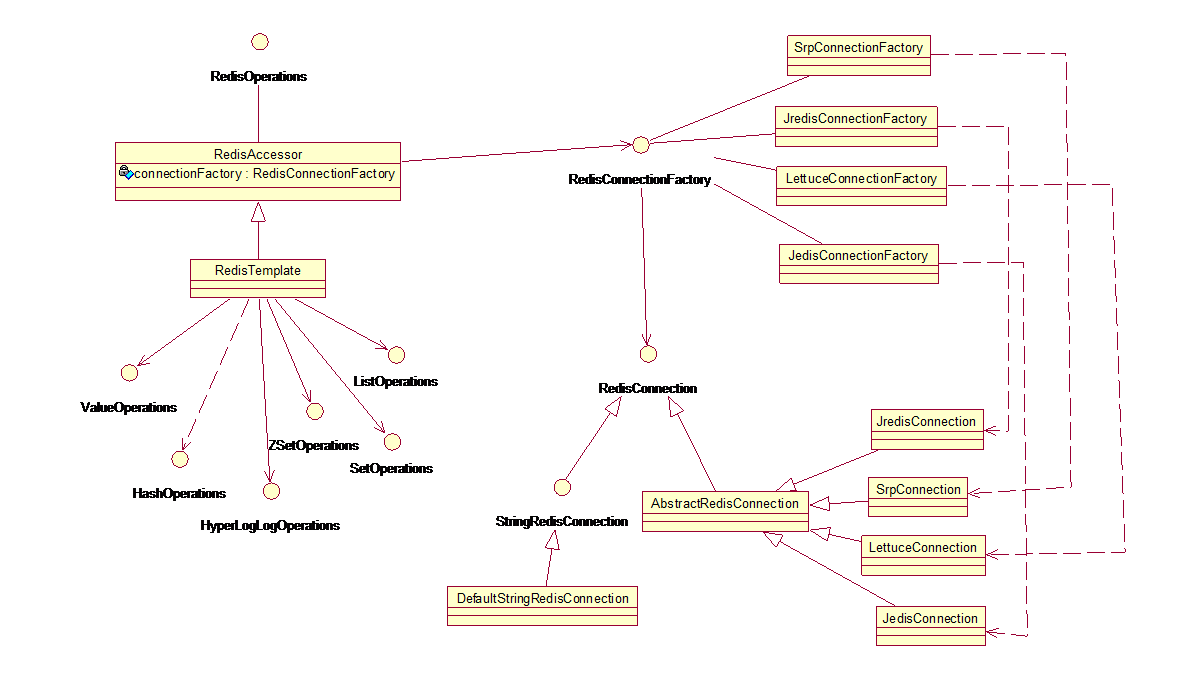
通过这个结构,可以实现客户端工具的无缝切换。
RedisConnection |
与Redis服务器的连接。 作为各种Redis客户端库(或驱动程序)的通用抽象。 |
|
| RedisConnectionFactory |
线程安全的Redis连接工厂。 | |
| RedisTemplate |
帮助类,简化了Redis数据访问模板代码。 | |
RedisTemplate模板提供了操作视图(根据Redis命令引用进行分组),它提供丰富的,一般化的接口,用于对某种类型或某个键(通过KeyBound接口)进行处理,如下所述
操作视图:Operational views
|
Interface |
Description |
|
Key Type Operations | |
|
ValueOperations |
Redis string (or value) operations |
|
ListOperations |
Redis list operations |
|
SetOperations |
Redis set operations |
|
ZSetOperations |
Redis zset (or sorted set) operations |
|
HashOperations |
Redis hash operations |
|
HyperLogLogOperations |
Redis HyperLogLog operations like (pfadd, pfcount,…) |
|
Key Bound Operations | |
|
BoundValueOperations |
Redis string (or value) key bound operations |
|
BoundListOperations |
Redis list key bound operations |
|
BoundSetOperations |
Redis set key bound operations |
|
BoundZSetOperations |
Redis zset (or sorted set) key bound operations |
|
BoundHashOperations |
Redis hash key bound operations |
本文转自 randy_shandong 51CTO博客,原文链接:http://blog.51cto.com/dba10g/1889115,如需转载请自行联系原作者