上次介绍了如何使用ansible安装lnmp(地址是http://dl528888.blog.51cto.com/2382721/1440775),现在介绍如何使用ansible安装apache。
下面是安装apache的信息:
|
1
2
3
4
5
6
7
8
9
10
|
apr_version: 1.5.0apr_util_version: 1.5.3libiconv_version: 1.14apache_version: 2.4.7apache_web_dir: /data/webroot/apache
apache_log: /data/webroot/apache/logs
apache_vhost: /data/webroot/apache/vhost
apache_port: 80apache_user: wwwserveradmin: [email protected] |
可以看到apache的版本是2.4.7
备注:此playbook仅能对centos或者redhat的6.x版本进行安装。
下面是安装apache的playbook结构
|
1
2
3
4
5
6
7
8
9
10
11
12
13
14
15
16
17
18
19
20
21
22
23
24
25
26
27
28
29
30
31
32
33
|
apache_delete├── files├── handlers├── meta│ └── main.yml├── tasks│ ├── delete.yml│ └── main.yml├── templates└── vars └── main.yml
apache_install├── files│ ├── httpd-2.4.7.tar.gz
│ └── libiconv.tar.gz
├── handlers├── meta│ └── main.yml├── tasks│ ├── copy.yml│ ├── delete.yml│ ├── install.yml
│ └── main.yml├── templates│ ├── httpd│ ├── httpd.conf│ ├── index.html│ ├── index.php│ └── vhost.conf└── vars └── main.yml
12 directories, 17 files |
playbook安装apache的是:
|
1
2
3
4
5
6
7
8
9
|
09:09:35 # cat apache_install.yml
---- hosts: "`host`"
remote_user: "`user`"
gather_facts: True
roles:
- common
- pcre_install
- apache_install
|
playbook删除apache的是:
|
1
2
3
4
5
6
7
|
09:09:56 # cat apache_delete.yml
---- hosts: "`host`"
remote_user: "`user`"
gather_facts: True
roles:
- apache_delete
|
1、安装apache
|
1
2
3
4
5
6
7
8
9
10
11
12
13
14
15
16
17
18
19
20
21
22
23
24
25
26
27
28
29
30
31
32
33
34
35
36
37
38
39
40
41
42
43
44
45
46
47
48
49
50
51
52
53
54
55
56
57
58
59
60
61
62
63
64
65
66
67
68
69
70
71
72
73
74
75
76
77
78
79
80
81
82
|
09:05:59 # time ansible-playbook apache_install.yml --extra-vars "host=192.168.240.13 user=root" --private-key=/root/test.pem
PLAY [192.168.240.13] ********************************************************* GATHERING FACTS *************************************************************** ok: [192.168.240.13]TASK: [common | Install initializtion require software] *********************** changed: [192.168.240.13]TASK: [pcre_install | Copy Pcre Software To Redhat Client] ******************** changed: [192.168.240.13]TASK: [pcre_install | Uncompression Pcre Software In Redhat Client] *********** changed: [192.168.240.13]TASK: [pcre_install | Delete Pcre Software In Redhat Client] ****************** changed: [192.168.240.13]TASK: [apache_install | Copy Apache Software To Redhat Client] **************** changed: [192.168.240.13] => (item=httpd-2.4.7.tar.gz)
changed: [192.168.240.13] => (item=libiconv.tar.gz)
TASK: [apache_install | Create Apache User In Redhat Client] ****************** changed: [192.168.240.13]TASK: [apache_install | Uncompression Apache Software To Redhat Client] ******* changed: [192.168.240.13]TASK: [apache_install | Copy Apache Config To Redhat Client] ****************** changed: [192.168.240.13]TASK: [apache_install | Copy Apache Vhost Config To Redhat Client] ************ changed: [192.168.240.13]TASK: [apache_install | Copy Apache Start Service Script To Redhat Client] *** changed: [192.168.240.13]TASK: [apache_install | Create Lib Install Dir] ******************************* ok: [192.168.240.13]TASK: [apache_install | Check Apache Iconv In Redhat Client] ****************** changed: [192.168.240.13]TASK: [apache_install | Install Apache Iconv In Redhat Client] **************** changed: [192.168.240.13]TASK: [apache_install | Check Lib In Config In Redhat Client] ***************** failed: [192.168.240.13] => {"changed": true, "cmd": "grep -c /usr/local/lib/ /etc/ld.so.conf ", "delta": "0:00:00.005372", "end": "2014-07-27 21:07:58.416717", "item": "", "rc": 1, "start": "2014-07-27 21:07:58.411345"}
stdout: 0...ignoringTASK: [apache_install | Install Apache Iconv In Redhat Client] **************** changed: [192.168.240.13]TASK: [apache_install | Create Apache Dir] ************************************ changed: [192.168.240.13] => (item=/data/webroot/apache)
changed: [192.168.240.13] => (item=/data/webroot/apache/logs)
changed: [192.168.240.13] => (item=/data/webroot/apache/vhost)
TASK: [apache_install | Install Check Script In Redhat Client] **************** changed: [192.168.240.13]TASK: [apache_install | Create Index Html To Redhat Client] ******************* changed: [192.168.240.13]TASK: [apache_install | Start Apache Service In Redhat Client] **************** changed: [192.168.240.13]TASK: [apache_install | Add Boot Start Apache Service In Redhat Client] ******* changed: [192.168.240.13]TASK: [apache_install | Delete Apache compression Software In Redhat Client] *** changed: [192.168.240.13]PLAY RECAP ******************************************************************** 192.168.240.13 : ok=22 changed=20 unreachable=0 failed=0 real 0m47.364suser 0m3.823ssys 0m0.402s |
可以看到47秒就安装完成(默认的common模块是安装基础的yum依赖库,这个我一般初始化安装完成,所以这个地方没有浪费时间,建议大家也都在系统默认安装完成后,初始化依赖库)
2、安装后测试
|
1
2
3
4
5
6
7
8
9
10
11
12
13
14
15
16
17
18
19
20
21
22
23
24
25
26
27
28
29
30
31
32
33
34
35
36
37
38
39
40
41
42
43
44
|
[[email protected] tmp]# ps -ef|grep httpd
root 8375 1 0 21:08 ? 00:00:00 /usr/local/httpd-2.4.7/bin/httpd -k start
www 8377 8375 0 21:08 ? 00:00:00 /usr/local/httpd-2.4.7/bin/httpd -k start
www 8378 8375 0 21:08 ? 00:00:00 /usr/local/httpd-2.4.7/bin/httpd -k start
www 8379 8375 0 21:08 ? 00:00:00 /usr/local/httpd-2.4.7/bin/httpd -k start
www 8380 8375 0 21:08 ? 00:00:00 /usr/local/httpd-2.4.7/bin/httpd -k start
root 8569 6666 0 21:11 pts/1 00:00:00 grep httpd
[[email protected] tmp]# ll /usr/local/
total 56drwxr-xr-x. 2 root root 4096 Sep 23 2011 bindrwxr-xr-x. 2 root root 4096 Sep 23 2011 etcdrwxr-xr-x. 2 root root 4096 Sep 23 2011 gamesdrwxr-xr-x 15 root root 4096 Jul 1 05:18 httpd-2.4.7drwxr-xr-x. 2 root root 4096 Sep 23 2011 includedrwxr-xr-x. 2 root root 4096 Jul 27 21:07 libdrwxr-xr-x. 2 root root 4096 Sep 23 2011 lib64drwxr-xr-x. 2 root root 4096 Sep 23 2011 libexecdrwxr-xr-x 6 root root 4096 Jun 23 05:38 pcre-8.33drwxr-xr-x 10 root root 4096 Jul 22 23:33 proftpd-1.3.4ddrwxr-xr-x. 2 root root 4096 Sep 23 2011 sbindrwxr-xr-x. 5 root root 4096 May 12 2013 sharedrwxr-xr-x. 3 root root 4096 May 12 2013 srcdrwxr-xr-x 6 root root 4096 Jul 24 05:41 vpsmate[[email protected] tmp]# curl 10.10.240.20
Apache 2.4.7 in 10.10.240.20 is success!
[[email protected] tmp]# curl 10.10.240.20/index.php
<!DOCTYPE HTML PUBLIC "-//IETF//DTD HTML 2.0//EN">
<html><head>
<title>503 Service Unavailable</title>
</head><body>
<h1>Service Unavailable</h1>
<p>The server is temporarily unable to service yourrequest due to maintenance downtime or capacityproblems. Please try again later.</p>
</body></html>
[[email protected] tmp]# curl -I 10.10.240.20
HTTP/1.1 200 OK
Date: Mon, 28 Jul 2014 01:13:13 GMTServer: Tengine/1.5.2
Last-Modified: Mon, 28 Jul 2014 01:08:01 GMTETag: "2a-4ff368df22a0b"
Accept-Ranges: bytesContent-Length: 42Content-Type: text/html
|
如果打开php界面的原因是没有安装php,安装的话都成功了并运行正常。
3、删除apache
|
1
2
3
4
5
6
7
8
9
10
11
12
13
14
15
16
17
18
19
20
21
22
23
24
25
26
27
28
29
|
09:16:38 # time ansible-playbook apache_delete.yml --extra-vars "host=192.168.240.13 user=root" --private-key=/root/test.pem
PLAY [192.168.240.13] ********************************************************* GATHERING FACTS *************************************************************** ok: [192.168.240.13]TASK: [apache_delete | Stop Httpd Service In RedHat Client] ******************* changed: [192.168.240.13]TASK: [apache_delete | Delete Boot Start In RedHat Client] ******************** changed: [192.168.240.13]TASK: [apache_delete | Delete Apache Dir In RedHat Client] ******************** changed: [192.168.240.13]TASK: [apache_delete | Delete Apache Service Script In RedHat Client] ********* changed: [192.168.240.13]TASK: [apache_delete | Delete Apache User] ************************************ changed: [192.168.240.13]PLAY RECAP ******************************************************************** 192.168.240.13 : ok=6 changed=5 unreachable=0 failed=0 real 0m19.803suser 0m0.665ssys 0m0.104s |
4、删除后测试
|
1
2
3
4
5
6
7
8
9
10
11
12
13
14
15
16
17
18
19
20
21
|
[[email protected] tmp]# ps -ef|grep http
root 11353 6666 0 21:17 pts/1 00:00:00 grep http
[[email protected] tmp]# ll /usr/local/
total 52drwxr-xr-x. 2 root root 4096 Sep 23 2011 bindrwxr-xr-x. 2 root root 4096 Sep 23 2011 etcdrwxr-xr-x. 2 root root 4096 Sep 23 2011 gamesdrwxr-xr-x. 2 root root 4096 Sep 23 2011 includedrwxr-xr-x. 2 root root 4096 Jul 27 21:16 libdrwxr-xr-x. 2 root root 4096 Sep 23 2011 lib64drwxr-xr-x. 2 root root 4096 Sep 23 2011 libexecdrwxr-xr-x 6 root root 4096 Jun 23 05:38 pcre-8.33drwxr-xr-x 10 root root 4096 Jul 22 23:33 proftpd-1.3.4ddrwxr-xr-x. 2 root root 4096 Sep 23 2011 sbindrwxr-xr-x. 5 root root 4096 May 12 2013 sharedrwxr-xr-x. 3 root root 4096 May 12 2013 srcdrwxr-xr-x 6 root root 4096 Jul 24 05:41 vpsmate[[email protected] tmp]# id www
id: www: No such user
[[email protected] tmp]# curl 10.10.240.20 -I
curl: (7) couldn't connect to host |
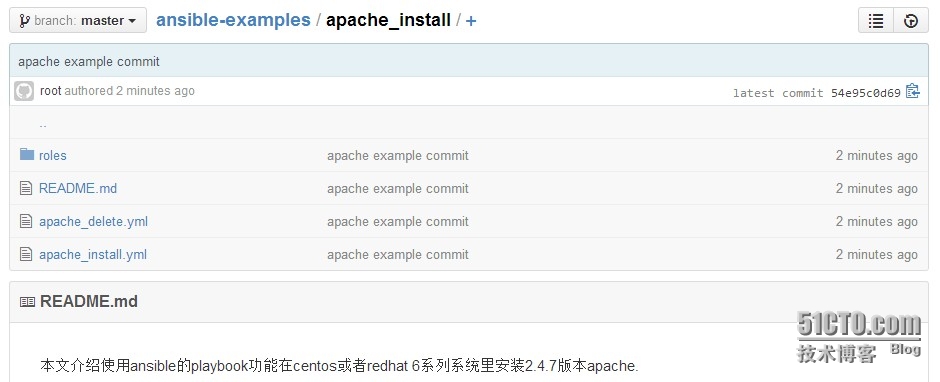
如果大家想使用我的例子,可以从github里下载(地址是https://github.com/dl528888/ansible-examples/tree/master/apache_install),然后放到/etc/ansible目录里,下面是内容
本文转自 reinxu 51CTO博客,原文链接:http://blog.51cto.com/dl528888/1531104,如需转载请自行联系原作者