LVS实现负载均衡
三台主机模拟
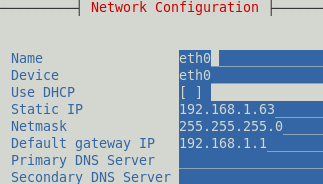
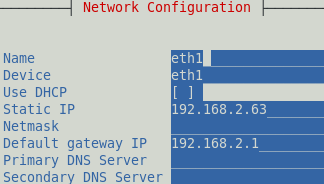
sishen_63(分发器): eth0(Bridge):192.168.1.63 eth1(vmnet4):192.168.2.63
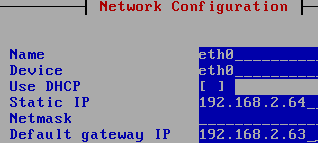
sishen_64(RealServer1): eth0(vmnet4):192.168.2.64
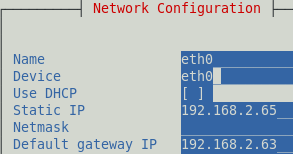
sishen_65(RealServer2): eth0(vmnet4):192.168.2.65
首先配置分发器(sishen_63):
确保实验环境:
[[email protected] ~]# getenforce
Disabled
[[email protected] ~]# iptables -F
[[email protected] ~]# service iptables save
iptables: Saving firewall rules to /etc/sysconfig/iptables:[ OK ]
确保机器有两张网卡,三台机器的网卡配置要一样!
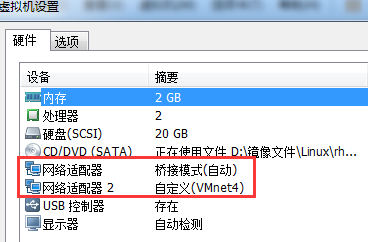
使用setup配置eth0
同理配置eth1
重启网络服务后查看IP:
[[email protected]_63 ~]# service network restart

在分发器上打开路由转发功能:
[[email protected]_63 ~]# vim /etc/sysctl.conf
6 # Controls IP packet forwarding
7 net.ipv4.ip_forward = 1 原值 为0改为1即可
保存退出后,使用sysctl –p让配置生效
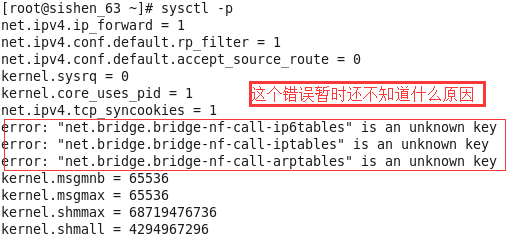
安装LVS管理工具:
[[email protected]_63 Packages]# rpm -ivh ipvsadm-1.26-2.el6.x86_64.rpm
warning: ipvsadm-1.26-2.el6.x86_64.rpm: Header V3 RSA/SHA256 Signature, key ID fd431d51: NOKEY
Preparing... ########################################### [100%]
1:ipvsadm ########################################### [100%]
[[email protected]_63 Packages]# pwd
/mnt/cdrom/Packages
或者直接yum安装
在分发器(sishen_63)上添加规则
[[email protected]_63 ~]# ipvsadm -A -t 192.168.1.63:80 -s rr
[[email protected]_63 ~]# ipvsadm -a -t 192.168.1.63:80 -r 192.168.2.64 -m
[[email protected]_63 ~]# ipvsadm -a -t 192.168.1.63:80 -r 192.168.2.65 –m
解释:
-A 添加
-t 表示TCP的服务 VIP: PORT
-s 指定调度算法 rr 表示round-robin轮询
-a 添加real server的地址
-r 指定real server 的IP地址
-m 表示masquerade 即NAT方式的LVS
查看规则:
[[email protected]_63 ~]# ipvsadm -L -n
IP Virtual Server version 1.2.1 (size=4096)
Prot LocalAddress:Port Scheduler Flags
-> RemoteAddress:Port Forward Weight ActiveConn InActConn
TCP 192.168.1.63:80 rr
-> 192.168.2.64:80 Masq 1 0 0
-> 192.168.2.65:80 Masq 1 0 0
[[email protected]_63 ~]# /etc/init.d/ipvsadm save
[[email protected]_63 ~]# cat /etc/sysconfig/ipvsadm
-A -t 192.168.1.63:80 -s rr
-a -t 192.168.1.63:80 -r 192.168.2.64:80 -m -w 1
-a -t 192.168.1.63:80 -r 192.168.2.65:80 -m -w 1
在RealServer1、2上的配置
首先配置网络
在RealServer1(sishen_64)上:
安装并开启web服务
[[email protected]_64 ~]# yum install -y httpd
[[email protected]_64 ~]# echo "192.168.2.64" > /var/www/html/index.html
[[email protected]_64 ~]# service httpd start
[[email protected]_64 ~]# yum install -y elinks
查看页面是否正常
[[email protected]_64 ~]# elinks 192.168.2.64 --dump
192.168.2.64
在RealServer2(sishen_65)上:
安装并开启web服务
[[email protected]_65 ~]# yum install -y httpd
[[email protected]_65 ~]# yum install -y elinks
[[email protected]_65 ~]# echo "192.168.2.65" > /var/www/html/index.html
[[email protected]_65 ~]# service httpd restart
查看测试页面是否正常
[[email protected]_65 ~]# elinks 192.168.2.65 --dump
192.168.2.65
测试RealServer是否可以连通
[[email protected]_63 ~]# elinks 192.168.2.64 --dump
192.168.2.64
[[email protected]_63 ~]# elinks 192.168.2.65 --dump
192.168.2.65
测试VIP在分发器(sishen_63)上:
[[email protected]_63 ~]# elinks 192.168.1.63 --dump
192.168.2.64
[[email protected]_63 ~]# elinks 192.168.1.63 --dump
192.168.2.65
注意看页面内容变化!到此整个过程结束!
初学者搭建,比较菜,欢迎各路大神指正^_^!