http://www.centoscn.com/p_w_picpath-text/config/2014/1201/4215.html
一、RPM包的分类
RPM有五种基本的操作功能:安装、卸载、升级、查询和验证。
linux软件包分为两大类:
(1)二进制类包,包括rpm安装包(一般分为i386和x86等几种)
(2)源码类包,源码包和开发包应该归位此类(.src.rpm)。
有时候为了方便源码包的安装,和我们自己订制软件包的需求,我们会把一些源码包按照我们的需求来做成rpm包,当有了源码包就可以直接编译得到二进制安装 包和其他任意包。spec file是制作rpm包最核心的部分,rpm包的制作就是根据spec file来实现的。在制作自定义rpm包的时候最好不要使用管理员进行,因为管理员权限过大,如果一个命令写错了,结果可能是灾难性的,而制件一个rpm 包普通用户完全可以实现
二、修改宏及自定义车间位置
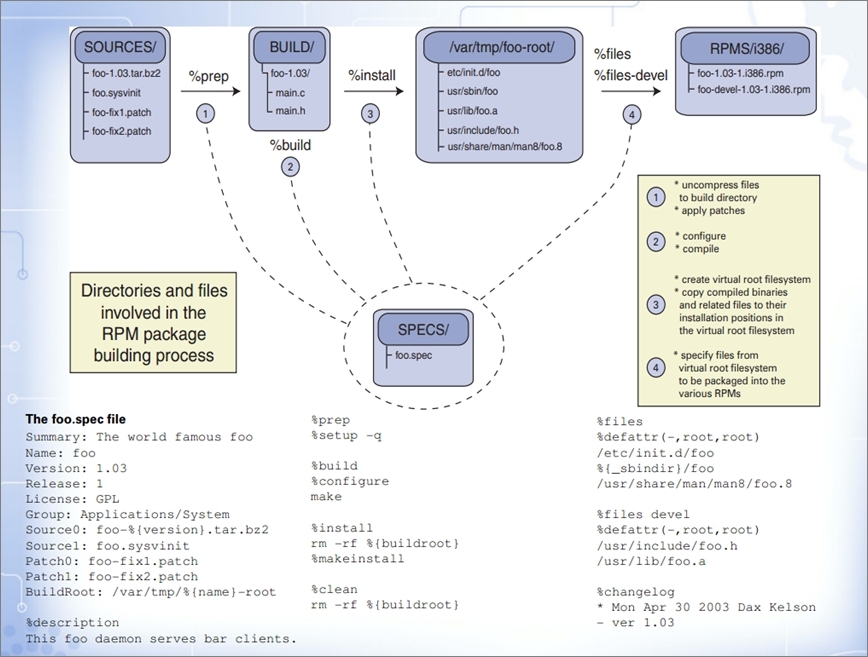
在redhat下,rpm包的默认制作路径在/usr/src/redhat下,这其中包含了6个目录(要求全部大写)
Directory Usage
BUILD 源代码解压以后放的位置,只需提供BUILD目录,具体里面放什么,不用我们管,所以真正的制作车间是BUILD目录
RPMS 制作完成后的rpm包存放目录,为特定平台指定子目录(i386,i686,ppc)
SOURCES 收集的源文件,源材料,补丁文件等存放位置
SPECS 存放spec文件,作为制作rpm包的领岗文件,以 rpm名.spec
SRPMS src格式的rpm包位置 ,既然是src格式的包,就没有平台的概念了
BuiltRoot 假根,使用install临时安装到这个目录,把这个目录当作根来用的,所以在这个目录下的目录文件,才是真正的目录文件。当打包完成后,在清理阶段,这个目录将被删除
但centos并没有该目录,因此,我们不得不自定义工作车间,即使在redhat下有该目录,一般也是自定义到普通用户的家目录下的
rpmbuild --showrc 显示所有的宏,以下划线开头,一个下划线:定义环境的使用情况,二个下划线:通常定义的是命令,为什么要定义宏,因为不同的系统,命令的存放位置可能不同,所以通过宏的定义找到命令的真正存放位置
查看默认工作车间,所以只要改变了这个宏,我们就可以自定义工作车间了
rpmbuild --showrc | grep topdir
-14: _builddir %{_topdir}/BUILD
-14: _buildrootdir %{_topdir}/BUILDROOT
-14: _desktopdir   %{_datadir}/applications
-14: _rpmdir   %{_topdir}/RPMS
-14: _sourcedir    %{_topdir}/SOURCES
-14: _specdir  %{_topdir}/SPECS
-14: _srcrpmdir    %{_topdir}/SRPMS
-14: _topdir   %{getenv:HOME}/rpmbuild
三、rpm包制作原理图
四、制作rpm包
下面让以nginx为例,做rpm包制作:
1、安装需要的工具:
[[email protected] ~]# yum -y install rpm-build rpmdevtools
2、增加普通用户并修改工作车间目录
# useradd jack
# su - jack
$ vim ~/.rpmmacros
%_topdir        /home/jack/rpmbuild
# mkdir -pv ~/rpmbuild/{BUILD,RPMS,SOURCES,SPECS,SRPMS}
# rpmbuild --showrc | grep _topdir    #会发现,工作车间已然改变:_topdir    /home/jack/rpmbuild
3、收集源码文件
(1)文件列表
[[email protected] SOURCES]$ pwd
/home/jack/rpmbuild/SOURCES
[[email protected] SOURCES]$ ls
init.nginx  nginx-1.8.0.tar.gz  nginx.conf
(2)nginx-1.8.0.tar.gz 源码包
cd /home/jack/rpmbuild/SOURCES
wget http://nginx.org/download/nginx-1.8.0.tar.gz
(3)init.nginx 脚本文件
#!/bin/sh
#
# nginx - this script starts and stops the nginx daemon
#
# chkconfig:   - 85 15
# description:  Nginx is an HTTP(S) server, HTTP(S) reverse \
#               proxy and IMAP/POP3 proxy server
# processname: nginx
## config:      /etc/nginx/nginx.conf
# config:      /usr/local/nginx/conf/nginx.conf
# config:      /etc/sysconfig/nginx
## pidfile:     /var/run/nginx/nginx.pid
# pidfile:     /usr/local/nginx/logs/nginx.pid
# Source function library.
. /etc/rc.d/init.d/functions
# Source networking configuration.
. /etc/sysconfig/network
# Check that networking is up.
[ "$NETWORKING" = "no" ] && exit 0
nginx="/usr/local/nginx/sbin/nginx"
prog=$(basename $nginx)
#NGINX_CONF_FILE="/etc/nginx/nginx.conf"
NGINX_CONF_FILE="/usr/local/nginx/conf/nginx.conf"
[ -f /etc/sysconfig/nginx ] && . /etc/sysconfig/nginx
lockfile=/var/lock/subsys/nginx
make_dirs() {
   # make required directories
   user=`nginx -V 2>&1 | grep "configure arguments:" | sed 's/[^*]*--user=\([^ ]*\).*/\1/g' -`
   options=`$nginx -V 2>&1 | grep 'configure arguments:'`
   for opt in $options; do
       if [ `echo $opt | grep '.*-temp-path'` ]; then
           value=`echo $opt | cut -d "=" -f 2`
           if [ ! -d "$value" ]; then
               # echo "creating" $value
               mkdir -p $value && chown -R $user $value
           fi
       fi
   done
}
start() {
    [ -x $nginx ] || exit 5
    [ -f $NGINX_CONF_FILE ] || exit 6
    make_dirs
    echo -n $"Starting $prog: "
    daemon $nginx -c $NGINX_CONF_FILE
    retval=$?
    echo
    [ $retval -eq 0 ] && touch $lockfile
    return $retval
}
stop() {
    echo -n $"Stopping $prog: "
    killproc $prog -QUIT
    retval=$?
    echo
    [ $retval -eq 0 ] && rm -f $lockfile
    return $retval
}
restart() {
    configtest || return $?
    stop
    sleep 1
    start
}
reload() {
    configtest || return $?
    echo -n $"Reloading $prog: "
    killproc $nginx -HUP
    RETVAL=$?
    echo
}
force_reload() {
    restart
}
configtest() {
  $nginx -t -c $NGINX_CONF_FILE
}
rh_status() {
    status $prog
}
rh_status_q() {
    rh_status >/dev/null 2>&1
}
case "$1" in
    start)
        rh_status_q && exit 0
        $1
        ;;
    stop)
        rh_status_q || exit 0
        $1
        ;;
    restart|configtest)
        $1
        ;;
    reload)
        rh_status_q || exit 7
        $1
        ;;
    force-reload)
        force_reload
        ;;
    status)
        rh_status
        ;;
    condrestart|try-restart)
        rh_status_q || exit 0
            ;;
    *)
        echo $"Usage: $0 {start|stop|status|restart|condrestart|try-restart|reload|force-reload|configtest}"
        exit 2
esac
4、在 SPECS 目录下创建 nginx.spec
[[email protected] SPECS]$ pwd
/home/jack/rpmbuild/SPECS

rpmdev-newspec -o nginx.spec
Skeleton specfile (minimal) has been created to "nginx-1.6.3.spec".
cat nginx.spec
Name:           nginx
Version:        1.8.0
Release:        1%{?dist}
Summary:        nginx-1.8.0.tar.gz to nginx-1.8.0.rpm

Group:          applications/Archiving
License:        GPLv2
URL:            http://www.co-mall.com
Packager:     kaibinyuan <[email protected]>
Vendor:     co-mall
Source0:        %{name}-%{version}.tar.gz
Source1:    nginx.conf
Source2:    init.nginx
BuildRoot:     %_topdir/BUILDROOT

BuildRequires: gcc,gcc-c++,openssl,openssl-devel,pcre-devel,pcre
Requires:      openssl,openssl-devel,pcre-devel,pcre

%description
Custom a rpm by yourself!Build nginx-1.8.0.tar.gz to nginx-1.8.0.rpm


%prep
%setup -q


%build
./configure \
--prefix=/usr/local/nginx \
--user=nginx \
--group=nginx \
--with-http_ssl_module \
--with-http_stub_status_module \
--with-http_gzip_static_module \
--with-http_ssl_module
make %{?_smp_mflags}


%install
rm -rf %{buildroot}
make install DESTDIR=%{buildroot}
%{__install} -p -D -m 0755 %{SOURCE2} %{buildroot}/etc/rc.d/init.d/nginx
%{__install} -p -D %{SOURCE1} %{buildroot}/usr/local/nginx/conf/nginx.conf

%pre
if [ $1 == 1 ];then
    /usr/sbin/useradd -r nginx -s /sbin/nologin 2> /dev/null
fi

%post
if [ $1 == 1 ];then
    /sbin/chkconfig --add %{name}
        /sbin/chkconfig %{name} on
    cat >> /etc/sysctl.conf << EOF
net.ipv4.tcp_max_syn_backlog = 65536
net.core.netdev_max_backlog =  32768
net.core.somaxconn = 32768

net.core.wmem_default = 8388608
net.core.rmem_default = 8388608
net.core.rmem_max = 16777216
net.core.wmem_max = 16777216

net.ipv4.tcp_timestamps = 0
net.ipv4.tcp_synack_retries = 2
net.ipv4.tcp_syn_retries = 2

net.ipv4.tcp_tw_recycle = 1
net.ipv4.tcp_tw_reuse = 1

net.ipv4.tcp_mem = 94500000 915000000927000000
net.ipv4.tcp_max_orphans = 3276800
EOF
sysctl -p 2>&1 /dev/null
fi

%preun
if [ $1 == 0 ];then
        /usr/sbin/userdel -r nginx 2> /dev/null
        /etc/init.d/nginx stop > /dev/null 2>&1
    /bin/rm -rf /usr/local/nginx > /dev/null 2>&1
fi
%clean
rm -rf %{buildroot}


%files
%defattr(-,root,root,0755)
/usr/local/nginx/
%attr(0755,root,root) /etc/rc.d/init.d/nginx
%config(noreplace) /usr/local/nginx/conf/nginx.conf

%changelog
5、制作rpm包
rpmbuild -bp nginx.spec 制作到%prep段
rpmbuild -bc nginx.spec 制作到%build段
rpmbuild -bi nginx.spec 执行 spec 文件的 "%install" 阶段 (在执行了 %prep 和 %build 阶段之后)。这通常等价于执行了一次 "make install"
rpmbuild -bb nginx.spec 制作二进制包
rpmbuild -ba nginx.spec 表示既制作二进制包又制作src格式包
查看rpm包信息
[[email protected] x86_64]# rpm -qa | grep nginx
nginx-1.8.0-1.el6.x86_64
[[email protected] x86_64]# rpm -qi nginx-1.8.0-1.el6.x86_64
Name        : nginx                        Relocations: (not relocatable)
Version     : 1.8.0                             Vendor: co-mall
Release     : 1.el6                         Build Date: 2015年01月08日 星期四 10时35分19秒
Install Date: 2015年01月08日 星期四 10时35分54秒      Build Host: kaibin.test2
Group       : applications/Archiving        Source RPM: nginx-1.8.0-1.el6.src.rpm
Size        : 815349                           License: GPLv2
Signature   : (none)
Packager    : kaibinyuan <[email protected]>
URL         : http://www.co-mall.com
Summary     : nginx-1.8.0.tar.gz to nginx-1.8.0.rpm
Description :
Custom a rpm by yourself!Build nginx-1.8.0.tar.gz to nginx-1.8.0.rpm
参考文献:http://www.centoscn.com/p_w_picpath-text/config/2014/1201/4215.html
转载于:https://blog.51cto.com/kaibinyuan/1636981