代码如下:
布局代码:
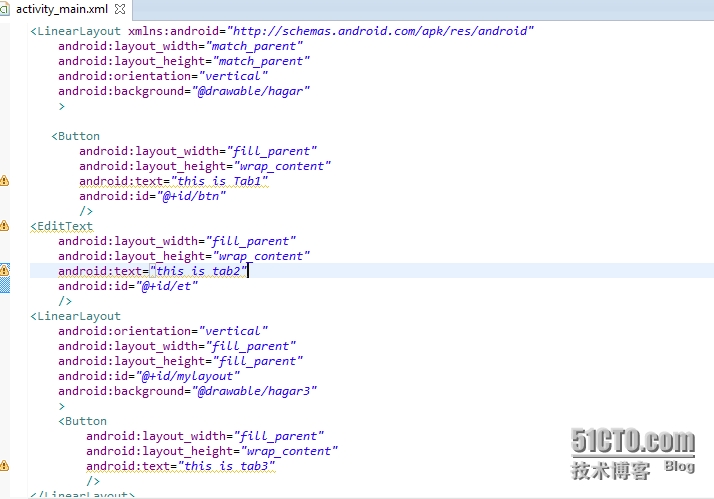
package com.example.tabhost;
import android.app.TabActivity;
import android.os.Bundle;
import android.view.LayoutInflater;
import android.view.Menu;
import android.widget.TabHost;
import android.widget.TabHost.OnTabChangeListener;
import android.widget.TabHost.TabSpec;
import android.widget.Toast;
public class MainActivity extends TabActivity implements OnTabChangeListener {
private TabSpec ts1,ts2,ts3;//实例化3个分页
private TabHost tableHost;
@Override
protected void onCreate(Bundle savedInstanceState) {
super.onCreate(savedInstanceState);
tableHost=this.getTabHost();//实例化一个TableHost
//利用LayoutInflater将布局与分页菜单一起显示
LayoutInflater.from(this).inflate(R.layout.activity_main, tableHost.getTabContentView());
ts1=tableHost.newTabSpec("tabOne");//实例化一个分页
ts1.setIndicator("Tab1");//设置此分页显示的标题
ts1.setContent(R.id.btn);//设置此分页的资源id
ts2=tableHost.newTabSpec("tabTwo");
//设置此分页显示的标题和图标
ts2.setIndicator("Tab2",getResources().getDrawable(R.drawable.hagar3));
ts2.setContent(R.id.et);
ts3=tableHost.newTabSpec("TabThree");
ts3.setIndicator("tab3");
ts3.setContent(R.id.mylayout);//设置此分页的布局id
tableHost.addTab(ts1);//菜单中添加ts1分页
tableHost.addTab(ts2);
tableHost.addTab(ts3);
tableHost.setOnTabChangedListener(this);
}
public void onTabChanged(String tabId)
{
if(tabId.equals("tabOne"))
{
Toast.makeText(this, "分页1", Toast.LENGTH_LONG).show();
}
if(tabId.equals("tabTwo"))
{
Toast.makeText(this, "分页2", Toast.LENGTH_LONG).show();
}
if(tabId.equals("tabThree"))
{
Toast.makeText(this, "分页3", Toast.LENGTH_LONG).show();
}
}
}
转载于:https://blog.51cto.com/7832308/1429583