前言:
一定有你懒于启动脚本或者没有启动脚本,但是又需要常驻后台的进程需要管理,那么supervisor一定不会失望,如果你使用过supervisord,我想你不会跟我争论nohup & 什么的也行的。
你可以通过yum直接安装或者使用pip安装,下面使用pip安装
环境:
centos6.5
python2.7.5
首先安装必要的包:
|
1
2
3
|
yum install python-setuptools
easy_install pippip install supervisor
|
如果安装成功就可以进行下一步了。
|
1
2
3
4
5
6
7
8
9
10
11
12
13
14
15
|
###生成必要的配置文件echo_supervisord_conf > supervisord.conf###将配置文件统一放在/etc下,我想centos用户没有异议吧cp supervisord.conf /etc/supervisord.conf
###为了不将所有新增配置信息全写在一个配置文件里,我们新建一个文件夹,每个配置信息新增一个配置文件,相互隔离mkdir /etc/supervisord.d/
修改配置文件vi /etc/supervisord.conf
加入以下配置信息[include]files = /etc/supervisord.d/*.conf
|
接下来创建一个启动脚本呗
|
1
2
3
4
5
6
7
8
9
10
11
12
13
14
15
16
17
18
19
20
21
22
23
24
25
26
27
28
29
30
31
32
33
34
35
36
37
38
39
40
41
42
43
44
45
46
47
48
49
50
51
52
53
54
55
56
57
58
59
60
61
62
63
|
#!/bin/sh## /etc/init.d/supervisord## Supervisor is a client/server system that# allows its users to monitor and control a# number of processes on UNIX-like operating# systems.## chkconfig: - 64 36# description: Supervisor Server# processname: supervisord# Source init functions. /etc/rc.d/init.d/functions
prog="supervisord"
prefix="/usr/local"
exec_prefix="${prefix}"
prog_bin="${exec_prefix}/bin/supervisord"
PIDFILE="/var/run/$prog.pid"
start(){ echo -n $"Starting $prog: "
###注意下面这一行一定得有-c /etc/supervisord.conf 不然修改了配置文件根本不生效!
daemon $prog_bin -c /etc/supervisord.conf --pidfile $PIDFILE
[ -f $PIDFILE ] && success $"$prog startup" || failure $"$prog startup"
echo
}stop(){ echo -n $"Shutting down $prog: "
[ -f $PIDFILE ] && killproc $prog || success $"$prog shutdown"
echo
}case "$1" in
start)
start
;;
stop)
stop
;;
status)
status $prog
;;
restart)
stop
start
;;
*)
echo "Usage: $0 {start|stop|restart|status}"
;;
esac |
|
1
2
3
4
5
|
###然后加入启动项呗chmod +x /etc/init.d/supervisord
chkconfig --add supervisordchkconfig supervisord onservice supervisord start |
如果想通过web查看管理的进程,加入以下代码,监听9001,用户user,密码123
|
1
2
3
4
|
[inet_http_server] port=9001username=user password=123 |
在重启之前随便创建一个挂在后台的命令
|
1
|
vi /etc/supervisord.d/tail.conf
|
|
1
2
3
4
5
6
7
|
[program:tail1] command=tail -f /etc/supervisord.conf ;常驻后台的命令
autostart=true ;是否随supervisor启动
autorestart=true ;是否在挂了之后重启,意外关闭后会重启,比如kill掉!
startretries=3 ;启动尝试次数stderr_logfile=/tmp/tail1.err.log ;标准输出的位置
stdout_logfile=/tmp/tail1.out.log ;标准错误输出的位置
|
更多详细的配置,请参考http://supervisord.org/
然后重启瞧瞧
|
1
|
/etc/init.d/supervisord restart
|
|
1
2
3
4
|
##查看一下是否监听lsof -i:9001
COMMAND PID USER FD TYPE DEVICE SIZE/OFF NODE NAME
superviso 7782 root 4u IPv4 74522612 0t0 TCP *:etlservicemgr (LISTEN) |
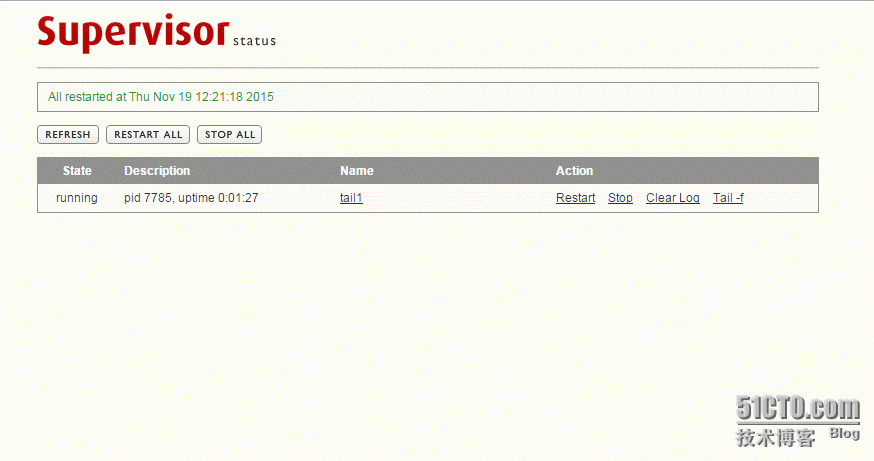
好的,然后访问服务器ip:9001

本文转自 youerning 51CTO博客,原文链接:http://blog.51cto.com/youerning/1714627