部署环境准备
Gitlab需要以下系统与软件环境:
Ruby (MRI) 2.1
Git 1.7.10+
Redis 2.4+
MySQL
由于系统的git,ruby环境一般版本比较低,因此需考虑升级。
1.升级git。
删除原系统的git:
|
1
|
#rpm -e perl-Git-1.7.1-3.el6_4.1.noarch git-1.7.1-3.el6_4.1.x86_64 |
源码包编译安装git:
|
1
2
3
4
5
|
#tar -zxvf git-2.6.3.tar.gz#cd git-2.6.3#autoconf#./configure#make && make install |
2.升级ruby。
删除原系统的ruby:
|
1
|
#rpm -e ruby-1.8.7.374-4.el6_6.x86_64 ruby-libs-1.8.7.374-4.el6_6.x86_64 |
源码包编译安装ruby:
|
1
2
3
4
|
#tar -zxvf ruby-2.1.7.tar.gz#cd ruby-2.1.7#./configure#make && make install |
3.安装,启动redis:
|
1
2
3
4
5
6
7
8
9
|
#tar zxvf redis-3.0.5.tar.gz#cd redis-3.0.5#make install#mkdir -p /opt/apps/redis/bin#mkdir -p /opt/apps/redis/var#mkdir -p/opt/apps/redis/data#mkdir -p /opt/conf/redis#cp redis.conf /opt/conf/redis#cp /opt/src/redis-3.0.5/src/redis-* /opt/apps/redis/bin |
修改配置文件,如下:
|
1
2
3
4
5
6
7
8
9
10
11
12
13
14
15
16
17
18
19
20
21
22
23
24
25
26
27
28
29
30
31
32
33
34
35
36
37
38
39
40
41
42
43
44
45
46
47
48
49
50
|
#grep -v ^# /opt/conf/redis/redis.conf | grep -v ^$daemonize yes
pidfile /opt/apps/redis/var/redis.pid
port 6379tcp-backlog 511bind 192.168.1.236unixsocket /opt/apps/redis/var/redis.sock
unixsocketperm 777timeout 0tcp-keepalive 0loglevel noticelogfile "/opt/logs/redis/redis.log"
databases 16stop-writes-on-bgsave-error yes
rdbcompression yes
rdbchecksum yes
dbfilename dump.rdbdir /opt/apps/redis/var
slave-serve-stale-data yes
slave-read-only yes
repl-diskless-sync no
repl-diskless-sync-delay 5
repl-disable-tcp-nodelay noslave-priority 100appendonly noappendfilename "appendonly.aof"
appendfsync everysecno-appendfsync-on-rewrite noauto-aof-rewrite-percentage 100auto-aof-rewrite-min-size 64mbaof-load-truncated yes
lua-time-limit 5000
slowlog-log-slower-than 10000slowlog-max-len 128latency-monitor-threshold 0notify-keyspace-events ""
hash-max-ziplist-entries 512
hash-max-ziplist-value 64
list-max-ziplist-entries 512list-max-ziplist-value 64set-max-intset-entries 512
zset-max-ziplist-entries 128zset-max-ziplist-value 64hll-sparse-max-bytes 3000activerehashing yes
client-output-buffer-limit normal 0 0 0client-output-buffer-limit slave 256mb 64mb 60client-output-buffer-limit pubsub 32mb 8mb 60hz 10aof-rewrite-incremental-fsync yes
|
启动redis:
|
1
|
/opt/apps/redis/bin/redis-server /opt/conf/redis/redis.conf
|
4.安装,配置mysql(不详解)
登录mysql,创建gitlab用户与库:
|
1
2
3
4
|
sql>create user 'gitlab'@'localhost' identified by '123456';
sql>create database gitlabhq_production;sql>grant all privileges on gitlabhq_production.* to'gitlab'@'%';
sql>flush privileges; |
5.安装bundler:
修改gem源:(速度更快)
|
1
2
3
|
gem sources --remove https://rubygems.org/
gem sources -a https://ruby.taobao.org/
gem install bundler --no-ri --no-rdoc
|
安装与配置gitlab
安装相关依赖包:
|
1
|
#yum -y install readline readline-develncurses-devel gdbm-devel glibc-devel tcl-devel openssl-devel curl-develexpat-devel db4-devel byacc sqlite-devel libyaml libyaml-devel libffilibffi-devel libxml2 libxml2-devel libxslt libxslt-devel libicu libicu-develsystem-config-firewall-tui redis sudo wget crontabs logwatch logrotateperl-Time-HiRes git cmake libcom_err-devel libcom_err-devel mysql-devel libicu-devel.x86_64 patch |
创建git用户:
|
1
2
|
#adduser --system --shell /bin/bash --comment 'Gitlab' --create-home --home-dir /home/git/ git#chmod 775 /home/git |
上传gitlab项目源码包至/home/git,解压:
|
1
2
3
|
#su - git$tar -zxvf gitlabhq-7.12.2.tar.gz
$mv gitlabhq-7.12.2 gitlab
|
安装gitlab所需的组件:
|
1
2
|
$cd gitlab
$bundle install --deployment --without development test postgres awsKerberos
|
创建gitlab配置文件,并修改如下配置:
|
1
2
3
4
5
6
7
8
|
$cp config/gitlab.yml.example config/gitlab.yml
$vi config/gitlabyml
gitlab:host: 192.168.1.236port: 443https: true
backup: path: "/opt/backups/gitlab"
|
数据库连接配置:
|
1
2
3
4
5
6
7
8
9
10
11
12
13
|
$cp config/database.yml.mysql config/database.yml
$vi config/database.yml
production: adapter: mysql2
encoding: utf8
collation: utf8_general_ci
reconnect: false
database:gitlabhq_production
pool: 10
username: gitlab
password: "123456"
host: localhost
socket: /tmp/mysql.sock
|
redis连接配置:
|
1
2
3
|
$cp config/resque.yml.example config/resque.yml
$vi config/resque.yml
production: unix:/opt/apps/redis/var/redis.sock
|
其他文件:
|
1
2
3
|
$cp config/unicorn.rb.example config/unicorn.rb
$cp config/initializers/rack_attack.rb.example config/initializers/rack_attack.rb
$cp config/initializers/smtp_settings.rb.sample config/initializers/smtp_settings.rb
|
配置相关文件权限:
|
1
2
3
4
5
6
7
8
|
$chmod -R u+rwX,go-w log/
$chmod -R u+rwX tmp/
$chmod -R u+rwX tmp/pids/
$chmod -R u+rwX tmp/sockets/
$mkdir public/uploads
$chmod -R u+rwX public/uploads
$chmod -R u+rwX builds/
$chmod -R u+rwX shared/artifacts/
|
安装gitlab相关组件
安装Gitlab-shell:
|
1
2
3
4
5
6
7
8
9
10
11
12
13
14
15
16
|
$bundle exec rake gitlab:shell:install REDIS_URL=unix:/var/run/redis/redis.sock RAILS_ENV=production
$cd /home/git/gitlab-shell
$vi config.yml
---user: gitgitlab_url: https://192.168.1.236/
http_settings: self_signed_cert:true
repos_path:"/home/git/repositories/"
auth_file:"/home/git/.ssh/authorized_keys"
redis: bin: "/opt/apps/redis//bin/redis-cli"
namespace: resque:gitlab
socket: "/opt/apps/redis/var/redis.sock"
log_level:INFOaudit_usernames:false
|
创建gitlab-satellites:
|
1
|
$mkdir -p /home/git/gitlab-satellites
|
初始化gitlab
初始化gitlab,创建mysql库表与仓库目录:
|
1
|
$bundle exec rake gitlab:setup RAILS_ENV=production
|
若运行没有报错,则会生成初始root用户如下:
login.........root
password......5iveL!fe
安装gitlab网页样式:
|
1
|
$bundle exec rake assets:precompile RAILS_ENV=production RAILS_RELATIVE_URL_ROOT=/gitlab
|
配置系统服务
配置gitlab系统服务:(root用户下)
|
1
2
3
4
|
#cd /home/git/gitlab #cp lib/support/init.d/gitlab /etc/init.d/ #chmod +x /etc/init.d/gitlab#chkconfig --add gitlab |
配置lograte:
|
1
|
cp lib/support/logrotate/gitlab /etc/logrotate.d/gitlab
|
安装nginx web服务
安装nginx:
|
1
2
3
4
5
|
#yum -y install yum -y install pcre*#tar -zxvfnginx-1.8.0.tar.gz#cd nginx-1.8.0#./configure--prefix=/opt/apps/nginx --conf-path=/opt/conf/nginx/nginx.conf--error-log-path=/opt/logs/nginx/error.log--http-log-path=/opt/logs/nginx/access.log --with-http_stub_status_module--with-http_gzip_static_module --with-http_flv_module --with-http_ssl_module--with-http_realip_module--http-client-body-temp-path=/opt/apps/nginx/client_body_temp--http-fastcgi-temp-path=/opt/apps/nginx/fastcgi_temp--http-proxy-temp-path=/opt/apps/nginx/proxy_temp--http-uwsgi-temp-path=/opt/apps/nginx/uwsgi_temp--http-scgi-temp-path=/opt/apps/nginx/scgi_temp#make&& make install |
配置gitlab web服务(https模式),修改如下配置:
|
1
2
3
4
5
|
#vi /opt/conf/nginx/nginx.confincludevhost/*.conf;#cp /home/git/gitlab/lib/support/nginx/gitlab-ssl/opt/conf/nginx/vhost/gitlab.conf#vi /opt/conf/nginx/vhost/gitlab.conf(修改相关端口的servername)server_name 192.168.1.236; |
开启服务与测试
开启nginx和gitlab服务:
|
1
2
|
#/opt/apps/nginx/sbin/nginx -c /opt/conf/nginx/nginx.conf#service gitlab start |
使用命令检测gitlab的项目:
|
1
2
3
|
#su - git$cd gitlab
$bundle exec rake gitlab:check RAILS_ENV=production
|
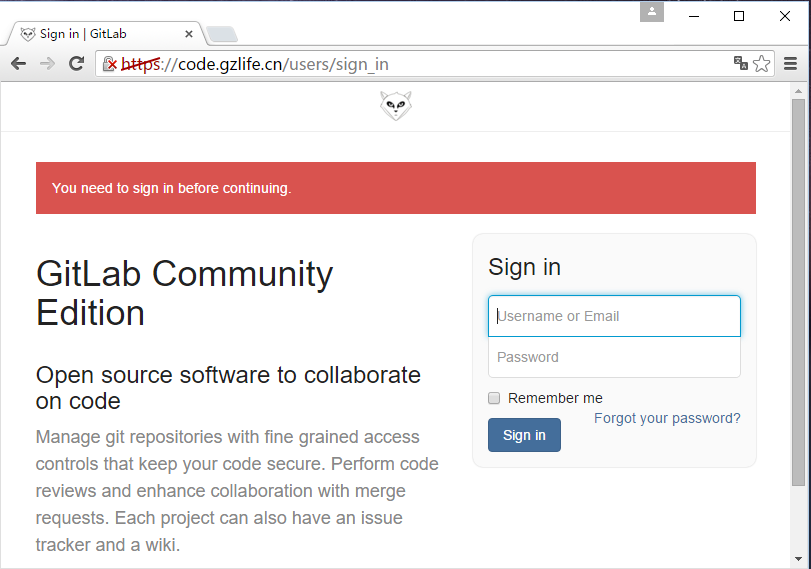
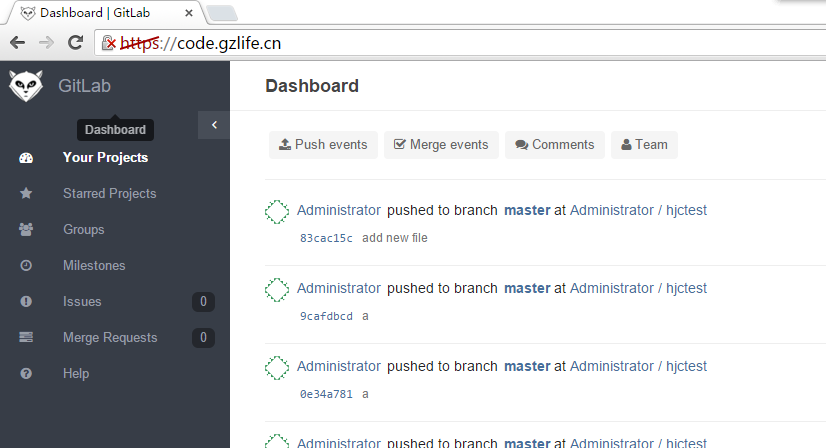
检测通过后就可以用浏览器访问gitlab了:
Gitlab的备份与恢复
备份:bundle exec rakegitlab:backup:create RAILS_ENV=production
恢复:bundle exec rakegitlab:backup:restore RAILS_ENV=production
以上是gitlab自带的备份工具命令,可备份mysql库表,gitlab仓库,ssh验证文件等一系列gitlab所需的文件。
这里提供备份脚本给大家参考:
|
1
2
3
4
5
6
7
8
9
10
11
12
13
14
15
16
17
18
19
20
21
22
23
24
25
26
27
28
|
#!/bin/bash# Author: chenminghui# Email: [email protected]# Date: 2015-12-09###set ENV###GITLAB_HOME=/home/git/gitlab
BAK_DIR=/opt/backups/gitlab
RAILS_ENV=production backup_gitlab (){su - git -c "cd${GITLAB_HOME} && bundle exec rake gitlab:backup:createRAILS_ENV=${RAILS_ENV}"
sleep 3
RETVAL=$?if [ $RETVAL == 0 ];then
echo "The GitLab backupedsuccess.."
else echo "Backuk failure!!"
fi} backup_gitlab #Delete backup files beforesysdate-30 days.find ${BAK_DIR} -type f-mtime +30 -exec rm -rf {} \;
##restore command if youneed..##bundle exec rakegitlab:backup:restore RAILS_ENV=production BACKUP=timestamp_of_backup |