(一)简述
公司通过新进了一批服务器,通过VMware的Vsphere企业级的虚拟化解决方案创建了一批虚拟机,只供内网访问,所有的虚拟机无法上外网,所以造成了原先的yum源通过外网的方式安装软件包而无法安装,所以为了日常的软件包的安装,只能在内网创建新的yum源来进行安装。
环境介绍:
| 名称 | IP地址 | 功能 |
| yum源服务端 | 172.22.11.108 | yum源的服务端 |
| yum客户端(使用者) | 172.22.11.103 | yum源的使用者 |
(二)yum源服务端的配置
-
首先查看一下服务端的yum的相关信息
|
1
2
3
4
5
6
|
[[email protected] cdrom]# rpm -qa|grep yum
yum-plugin-security-1.1.30-14.el6.noarchyum-plugin-fastestmirror-1.1.30-14.el6.noarchyum-metadata-parser-1.1.2-16.el6.x86_64yum-3.2.29-40.el6.centos.noarchyum-utils-1.1.30-14.el6.noarch |
2,安装createrepo,repo下的xml生成工具
|
1
|
[[email protected] cdrom]# yum install -y createrepo
|
3,制作yum源
3.1,随意创建一个文件夹作为yum的仓库名称,用来存放RPM包
|
1
|
[[email protected] cdrom]# mkdir /yumrepo
|
3.2,挂载光盘并把光盘里边RPM包都拷到/yumrepo文件夹里
|
1
2
3
4
5
6
7
8
|
[[email protected] cdrom]# mount /dev/cdrom /mnt
mount: block device /dev/sr0 is write-protected, mounting read-only
[[email protected] cdrom]# cp -r /mnt/
CentOS_BuildTag GPL RELEASE-NOTES-en-US.html RPM-GPG-KEY-CentOS-Security-6.discinfo images/ repodata/ RPM-GPG-KEY-CentOS-Testing-6EFI/ isolinux/ RPM-GPG-KEY-CentOS-6 TRANS.TBLEULA Packages/ RPM-GPG-KEY-CentOS-Debug-6 .treeinfo[[email protected] cdrom]# cp -r /mnt/Packages/* /yumrepo/
|
3.3把**也拷贝到/yumrepo文件夹里
|
1
|
[[email protected] cdrom]# cp /etc/pki/rpm-gpg/RPM-GPG-KEY-CentOS-6 /yumrepo/
|
4,执行命令生成repodata ,创建主目录文件索引。-v参数后边跟你的RPM包的文件夹。
|
1
2
3
4
5
6
7
8
9
10
11
12
13
14
15
16
17
18
|
[[email protected] cdrom]#createrepo -v /yumrepo
Worker 0: reading kernel-devel-2.6.32-431.el6.x86_64.rpmWorker 0: reading samyak-gujarati-fonts-1.2.1-9.el6.noarch.rpmWorker 0: reading srptools-0.0.4-15.el6.x86_64.rpmWorker 0: reading kdenetwork-4.3.4-11.el6_0.1.x86_64.rpmWorkers FinishedGathering worker resultsSaving Primary metadataSaving file lists metadata
Saving other metadataGenerating sqlite DBsStarting other db creation: Wed Nov 1 18:53:22 2017Ending other db creation: Wed Nov 1 18:53:23 2017Starting filelists db creation: Wed Nov 1 18:53:23 2017Ending filelists db creation: Wed Nov 1 18:53:28 2017Starting primary db creation: Wed Nov 1 18:53:28 2017Ending primary db creation: Wed Nov 1 18:53:31 2017Sqlite DBs complete |
5,制作本地yum源文件,要以.repo为结尾的。配置好目前还不能用,要用httpd来代理出来
|
1
2
3
4
5
6
|
[[email protected] yumrepo]# vim /etc/yum.repos.d/localyum.repo
[base]name=localyumbaseurl=http://172.22.11.108
gpgcheck=0gpgkey=file:///yumrepo/RPM-GPG-KEY-CentOS-6
|
6,基于http的yum源相关配置
6.1,安装apache软件
|
1
2
3
4
5
6
7
8
9
10
11
12
13
14
15
16
17
18
19
20
21
22
23
24
25
26
27
28
29
|
[[email protected] yumrepo]# yum install httpd -y
Loaded plugins: fastestmirror, securityLoading mirror speeds from cached hostfileSetting up Install ProcessResolving Dependencies--> Running transaction check---> Package httpd.x86_64 0:2.2.15-29.el6.centos will be installed--> Finished Dependency ResolutionDependencies Resolved========================================================================================================================== Package Arch Version Repository Size
==========================================================================================================================Installing: httpd x86_64 2.2.15-29.el6.centos base 821 k
Transaction Summary==========================================================================================================================Install 1 Package(s)Total download size: 821 kInstalled size: 2.9 MDownloading Packages:Running rpm_check_debugRunning Transaction TestTransaction Test SucceededRunning Transaction Installing : httpd-2.2.15-29.el6.centos.x86_64 1/1 Verifying : httpd-2.2.15-29.el6.centos.x86_64 1/1 Installed: httpd.x86_64 0:2.2.15-29.el6.centos
Complete! |
6.2,修改httpd.conf配置文件的DocumentRoot 和<Directory "/yumrepo">两个配置
|
1
2
3
4
5
6
7
8
9
10
11
12
13
14
15
16
17
18
19
20
21
22
23
24
25
26
27
28
29
30
31
32
33
34
35
36
|
[[email protected] yumrepo]# vim /etc/httpd/conf/httpd.conf
# DocumentRoot: The directory out of which you will serve your# documents. By default, all requests are taken from this directory, but# symbolic links and aliases may be used to point to other locations.#DocumentRoot "/yumrepo"
<Directory "/yumrepo">
# Possible values for the Options directive are "None", "All",# or any combination of:# Indexes Includes FollowSymLinks SymLinksifOwnerMatch ExecCGI MultiViews## Note that "MultiViews" must be named *explicitly* --- "Options All"# doesn't give it to you.## The Options directive is both complicated and important. Please see# http://httpd.apache.org/docs/2.2/mod/core.html#options# for more information.# Options Indexes FollowSymLinks
## AllowOverride controls what directives may be placed in .htaccess files.# It can be "All", "None", or any combination of the keywords:# Options FileInfo AuthConfig Limit# AllowOverride None
## Controls who can get stuff from this server.# Order allow,deny
Allow from all
</Directory>
|
6.3,删除欢迎页面welcome.conf,并给/yumrepo赴权限
|
1
2
|
[[email protected] yumrepo]# rm /etc/httpd/conf.d/welcome.conf
rm: remove regular file `/etc/httpd/conf.d/welcome.conf'? y
|
6.4,关闭selinux并重启下httpd服务
|
1
2
3
4
5
|
[[email protected] conf]# /etc/init.d/httpd restart
Stopping httpd: [ OK ]Starting httpd: httpd: Could not reliably determine the server's fully qualified domain name, using 172.22.11.108 for ServerName
[ OK ]
[[email protected] conf]# echo 0 > /selinux/enforce #########不添加这个条件可能出现403禁止访问 [ OK ]
|
访问界面如下即可:
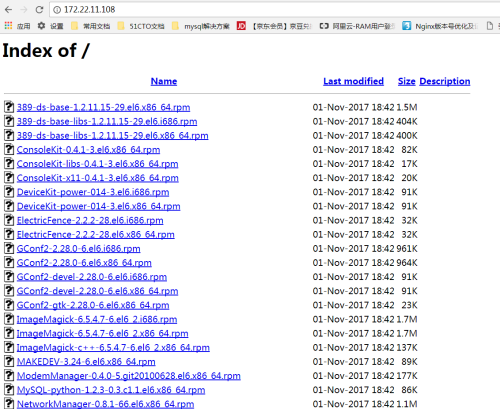
7,如果yum包需要更新的话,可以直接在阿里云或163上进行更新,并执行如下命令
|
1
2
3
4
|
[[email protected] conf]# wget -np -t 1 -nH –cut-dirs=1 -r -c -L –exclude-directories=repodata –accept=rpm,zip,gz,xml http://mirrors.163.com/centos/6.5/os/x86_64/Packages/ -P /yumrepo ###下载最新的rpm包
[[email protected] conf]# createrepo --update /yumrepo ####更新yum源
###客户端只需要yum clean all 和yum makecache 即可就能直接使用了 |
(三)yum客户端配置
1,在yum客户端172.22.11.104上将默认 的yum源关闭,并设置epel.repo将enables 为0
|
1
2
3
4
5
6
7
8
9
|
[[email protected] yum.repos.d]# vim epel.repo
[epel]name=Extra Packages for Enterprise Linux 6 - $basearch
#baseurl=http://download.fedoraproject.org/pub/epel/6/$basearchmirrorlist=https://mirrors.fedoraproject.org/metalink?repo=epel-6&arch=$basearch
failovermethod=priorityenabled=0gpgcheck=1gpgkey=file:///etc/pki/rpm-gpg/RPM-GPG-KEY-EPEL-6
|
2,创建自己的localyum.repo文件
|
1
2
3
4
5
6
|
[[email protected] yum.repos.d]# vim localyum.repo
[base]name=localyumbaseurl=http://172.22.11.108
gpgcheck=0gpgkey=file:///etc/pki/rpm-gpg/RPM-GPG-KEY-CentOS-6
|
3,清除和加载rpm包
|
1
2
3
4
5
6
7
8
9
10
11
12
|
[[email protected] yum.repos.d]# yum clean all
Loaded plugins: fastestmirror, securityCleaning repos: baseCleaning up EverythingCleaning up list of fastest mirrors[[email protected] yum.repos.d]# yum makecache
Loaded plugins: fastestmirror, securityDetermining fastest mirrorsbase | 2.9 kB 00:00 base/filelists_db | 4.1 MB 00:00
base/primary_db | 3.3 MB 00:00
base/other_db | 1.8 MB 00:00
|
4,客户端执行完成,就可以直接使用yum install命令了。
本文转自 lqbyz 51CTO博客,原文链接:http://blog.51cto.com/liqingbiao/1978066