我在以前的文章中介绍过如何安装Silverlight插件,参见MS CRM 2011 为64位Outlook安装Silverlight。今天我们来创建一个简单的Silverlight程序,该程序显示出CRM中所有的active contacts。
1. 创建一个Silverlight Application
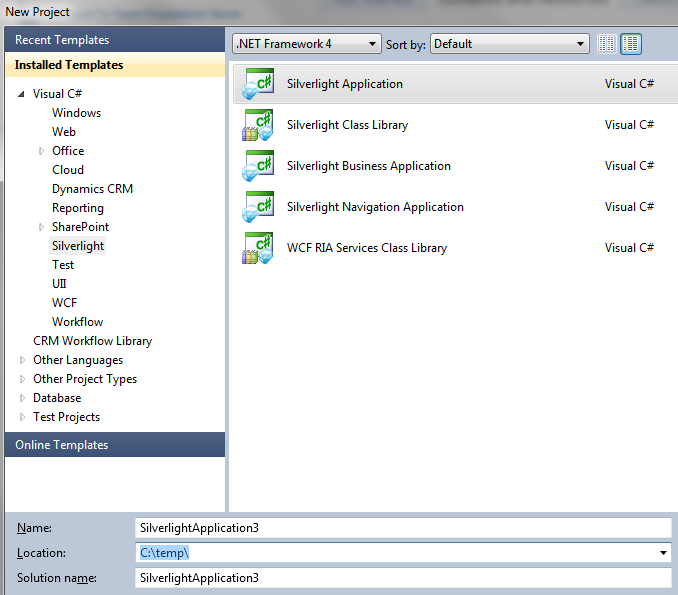

2. 生成 WCF Data Services Client Data Service Classes
CRM –> Settings –> Customizations –> Developer Resources .
Download Organization Data Service 的 CSDL

保存CSDL文件
3. 在Silverlight Application中添加 Service Reference
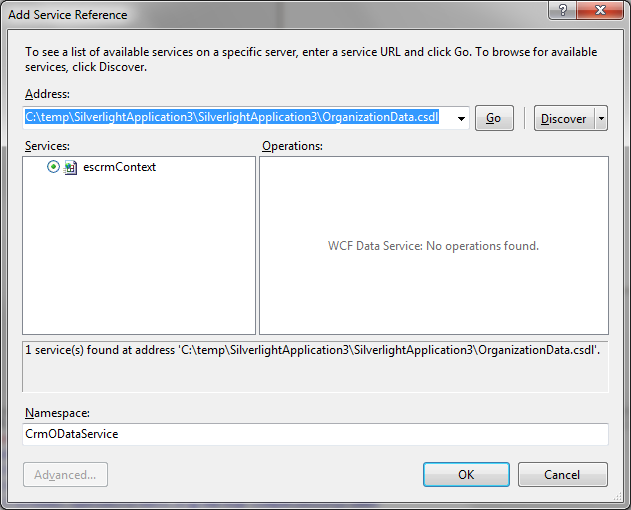
顺便提一下,如果在CRM customization中,某entity的name与该entity的某个field name相同,或者entity name 与某Relationship name相同的话,添加引用都会引起编译错误,所以在定制CRM的时候要注意,避免entity name与field name或者relationship name相同。
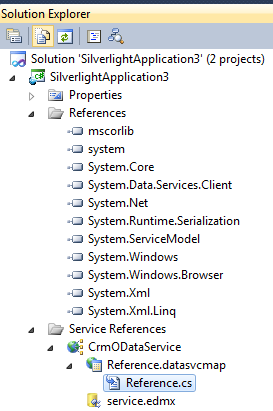
4. 在Silverlight Application 项目中添加 Reference System.Xml.Linq
5. 添加一个新类 DataServiceContextExtensions.cs
注意修改你的namespace和类名escrmContext,namespace应与Reference.cs的namepsace相同,escrmContext也应与Reference.cs中的DataServiceContext相同。
using System;
using System.Linq;
using System.Data.Services.Client;
using System.Reflection;
using System.Collections.Generic;
using System.ComponentModel;
using System.Collections.ObjectModel;
using System.Xml.Linq;

namespace SilverlightApplication3.CrmODataService
{
    partial class escrmContext
    {
        #region Methods
        partial void OnContextCreated()
        {
            this.ReadingEntity += this.OnReadingEntity;
            this.WritingEntity += this.OnWritingEntity;
        }
        #endregion

        #region Event Handlers
        private void OnReadingEntity(object sender, ReadingWritingEntityEventArgs e)
        {
            ODataEntity entity = e.Entity as ODataEntity;
            if (null == entity)
            {
                return;
            }

            entity.ClearChangedProperties();
        }

        private void OnWritingEntity(object sender, ReadingWritingEntityEventArgs e)
        {
            ODataEntity entity = e.Entity as ODataEntity;
            if (null == entity)
            {
                return;
            }

            entity.RemoveUnchangedProperties(e.Data);
            entity.ClearChangedProperties();
        }
        #endregion
    }

    public abstract class ODataEntity
    {
        private readonly Collection<string> ChangedProperties = new Collection<string>();

        public ODataEntity()
        {
            EventInfo info = this.GetType().GetEvent("PropertyChanged");
            if (null != info)
            {
                PropertyChangedEventHandler method = new PropertyChangedEventHandler(this.OnEntityPropertyChanged);

                //Ensure that the method is not attached and reattach it
                info.RemoveEventHandler(this, method);
                info.AddEventHandler(this, method);
            }
        }

        #region Methods
        public void ClearChangedProperties()
        {
            this.ChangedProperties.Clear();
        }

        internal void RemoveUnchangedProperties(XElement element)
        {
            const string AtomNamespace = "http://www.w3.org/2005/Atom";
            const string DataServicesNamespace = "http://schemas.microsoft.com/ado/2007/08/dataservices";
            const string DataServicesMetadataNamespace = DataServicesNamespace + "/metadata";

            if (null == element)
            {
                throw new ArgumentNullException("element");
            }

            List<XElement> properties = (from c in element.Elements(XName.Get("content", AtomNamespace)
                                                   ).Elements(XName.Get("properties", DataServicesMetadataNamespace)).Elements()
                                         select c).ToList();

            foreach (XElement property in properties)
            {
                if (!this.ChangedProperties.Contains(property.Name.LocalName))
                {
                    property.Remove();
                }
            }
        }

        private void OnEntityPropertyChanged(object sender, System.ComponentModel.PropertyChangedEventArgs e)
        {
            if (!this.ChangedProperties.Contains(e.PropertyName))
            {
                this.ChangedProperties.Add(e.PropertyName);
            }
        }
        #endregion
    }
}
6. 将Reference.cs中的“: global::System.ComponentModel.INotifyPropertyChanged”替换为“: ODataEntity, global::System.ComponentModel.INotifyPropertyChanged”
7. 在Silverlight Application项目中添加Utilities Folder,并添加新类ServerUtility.cs
using System;
using System.Windows.Browser;

namespace SilverlightApplication3.Utilities
{
    public static class ServerUtility
    {
        /// <summary>
        /// Returns the ServerUrl from Microsoft Dynamics CRM
        /// </summary>
        /// <returns>String representing the ServerUrl or String.Empty if not found.</returns>
        public static String GetServerUrl()
        {
            String serverUrl = String.Empty;

            //Try to get the ServerUrl from the Xrm.Page object
            serverUrl = GetServerUrlFromContext();

            return serverUrl;
        }

        /// <summary>
        /// Attempts to retrieve the ServerUrl from the Xrm.Page object
        /// </summary>
        /// <returns></returns>
        private static String GetServerUrlFromContext()
        {
            try
            {
                // If the Silverlight is in a form, this will get the server url
                ScriptObject xrm = (ScriptObject)HtmlPage.Window.GetProperty("Xrm");
                ScriptObject page = (ScriptObject)xrm.GetProperty("Page");
                ScriptObject pageContext = (ScriptObject)page.GetProperty("context");

                String serverUrl = (String)pageContext.Invoke("getServerUrl");

                //The trailing forward slash character from CRM Online needs to be removed.
                if (serverUrl.EndsWith("/"))
                {
                    serverUrl = serverUrl.Substring(0, serverUrl.Length - 1);
                }

                return serverUrl;
            }
            catch
            {
                return String.Empty;
            }
        }
    }
}
8. 删除Silverlight Application Web项目中的.aspx文件
9. 删除Silverlight Application Web项目中的Silverlight.js文件
10. 打开Silverlight Application Web项目中的.html文件, 修改style silverlightControlHost
#silverlightControlHost
{
height: 100%;
width: 100%;
text-align: center;
}
删除对 Silverlight.js的引用 <script type="text/javascript" src="Silverlight.js"></script>
添加引用<script src="ClientGlobalContext.js.aspx" type="text/javascript"></script>
如果你上传到CRM中的web resource 的名为 new_/testpage.html,那么你的引用就为
<script src="../ClientGlobalContext.js.aspx" type="text/javascript"></script>
假如你要上传的html web resource为new_testpage.html,xap web resource 为 new_testsilverlight.xap,将object tag修改为
<param name="source" value="new_testsilverlight.xap"/>
11. 至此项目的创建工作就基本完成了
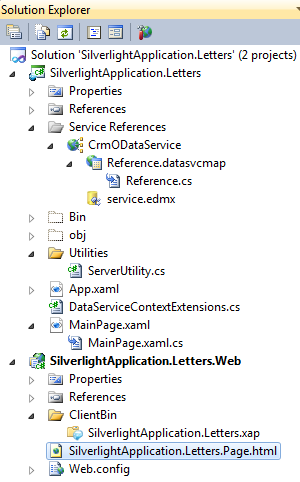
12. 下面来完成在DataGrid中显示所有的active contacts
MainPage.xaml代码如下:
<UserControl xmlns:sdk="http://schemas.microsoft.com/winfx/2006/xaml/presentation/sdk"  x:Class="SilverlightApplication3.MainPage"
    xmlns="http://schemas.microsoft.com/winfx/2006/xaml/presentation"
    xmlns:x="http://schemas.microsoft.com/winfx/2006/xaml"
    xmlns:d="http://schemas.microsoft.com/expression/blend/2008"
    xmlns:mc="http://schemas.openxmlformats.org/markup-compatibility/2006"
    xmlns:local="clr-namespace:SilverlightApplication3"
    mc:Ignorable="d"
    d:DesignHeight="300" d:DesignWidth="400">

    <UserControl.Resources>
        <local:YesNoValueConverter x:Key="myYesNoValueConverter"/>
        <local:GenderCodeConverter x:Key="myGenderCodeConverter"/>
    </UserControl.Resources>

    <Grid x:Name="LayoutRoot" Background="White">
        <StackPanel x:Name="MessagePanel" VerticalAlignment="Top" />
        <sdk:DataGrid x:Name="myDataGrid" AutoGenerateColumns="False" IsReadOnly="True" >
            <sdk:DataGrid.Columns>
                <sdk:DataGridTextColumn x:Name="FirstNameColumn" Header="First Name" Binding="{Binding FirstName, Mode=OneTime}" />
                <sdk:DataGridTextColumn x:Name="LastNameColumn" Header="Last Name" Binding="{Binding LastName, Mode=OneTime}" />
                <sdk:DataGridTextColumn x:Name="DoNotEmailColumn" Header="Do Not Email" Binding="{Binding DoNotEMail, Mode=OneTime, Converter={StaticResource myYesNoValueConverter}}"  />
                <sdk:DataGridTextColumn x:Name="ExchangeRateColumn" Header="Exchange Rate" Binding="{Binding ExchangeRate, Mode=OneTime, StringFormat=\{0:n2\}}"  />
                <sdk:DataGridTextColumn x:Name="BirthDateColumn" Header="Birth Date" Binding="{Binding BirthDate, Mode=OneTime, StringFormat=\{0:MM/dd/yyyy\}}"  />
                <sdk:DataGridTextColumn x:Name="GenderCodeColumn" Header="Gender" Binding="{Binding Path=GenderCode.Value, Mode=OneTime, Converter={StaticResource myGenderCodeConverter}}"  />
                <sdk:DataGridTextColumn x:Name="ParentColumn" Header="Parent Customer" Binding="{Binding Path=ParentCustomerId.Name, Mode=OneTime}" />
            </sdk:DataGrid.Columns>
        </sdk:DataGrid>
    </Grid>
</UserControl>
MainPage.xaml.cs代码如下:
using System;
using System.Data.Services.Client;
using System.Linq;
using System.Threading;
using System.Windows.Controls;
using SilverlightApplication2.CrmODataService;
using SilverlightApplication2.Utilities;
using System.Windows.Data;

namespace SilverlightApplication3
{
    public partial class MainPage : UserControl
    {
        private SynchronizationContext _syncContext;
        private escrmContext _context;
        private String _serverUrl;

        public MainPage()
        {
            InitializeComponent();

            //Keeps a reference to the UI thread
            _syncContext = SynchronizationContext.Current;

            //Get the ServerUrl (ServerUrl is formatted differently OnPremise than OnLine)
            _serverUrl = ServerUtility.GetServerUrl();

            if (!String.IsNullOrEmpty(_serverUrl))
            {

                //Setup Context
                _context = new escrmContext(new Uri(String.Format("{0}/xrmservices/2011/organizationdata.svc/",
                        _serverUrl), UriKind.Absolute));

                //This is important because if the entity has new
                //attributes added the code will fail.
                _context.IgnoreMissingProperties = true;

                SearchContacts();
            }
            else
            {
                //No ServerUrl was found. Display message.
                MessagePanel.Children.Add(new TextBlock()
                {
                    Text =
                        "Unable to access server url. Launch this Silverlight " +
                        "Web Resource from a CRM Form OR host it in a valid " +
                        "HTML Web Resource with a " +
                        "<script src='ClientGlobalContext.js.aspx' " +
                        "type='text/javascript'></script>"
                });
            }
        }

        private void SearchContacts()
        {
            DataServiceQuery<Contact> query = (DataServiceQuery<Contact>)_context.ContactSet.Where(x => x.StateCode.Value.Value == 0);
            query.BeginExecute(OnContactSearchComplete, query);
        }

        private void OnContactSearchComplete(IAsyncResult result)
        {
            try
            {
                //Get the original query back from the result.
                DataServiceQuery<Contact> query = result.AsyncState as DataServiceQuery<Contact>;

                this.myDataGrid.ItemsSource = new DataServiceCollection<Contact>(query.EndExecute(result));
            }
            catch (SystemException se)
            {
                _syncContext.Send(new SendOrPostCallback(showErrorDetails), se);
            }
        }

        private void showErrorDetails(object ex)
        {
            //Assure the control is visible
            MessagePanel.Visibility = System.Windows.Visibility.Visible;

            Exception exception = (Exception)ex;
            String type = exception.GetType().ToString();

            MessagePanel.Children.Add(new TextBlock()
            {
                Text =
                    String.Format("{0} Message: {1}", type, exception.Message)
            });

            MessagePanel.Children.Add(new TextBlock()
            {
                Text =
                    String.Format("Stack: {0}", exception.StackTrace)
            });

            if (exception.InnerException != null)
            {
                String exceptType = exception.InnerException.GetType().ToString();
                MessagePanel.Children.Add(new TextBlock()
                {
                    Text =
                        String.Format("InnerException: {0} : {1}", exceptType,
                        exception.InnerException.Message)
                });
            }
        }
    }

    public class YesNoValueConverter : IValueConverter
    {
        public object Convert(object value, Type targetType, object parameter, System.Globalization.CultureInfo culture)
        {
            bool isYes = bool.Parse(value.ToString());
            if (isYes)
                return "Yes";
            else
                return "No";
        }
        public object ConvertBack(object value, Type targetType, object parameter, System.Globalization.CultureInfo culture)
        {
            string boolText = value.ToString().ToLower();
            if (boolText == "yes")
                return true;
            else if (boolText == "no")
                return false;
            else
                throw new InvalidOperationException("Please enter 'yes' or 'no'.");
        }
    }

    public class GenderCodeConverter : IValueConverter
    {
        public object Convert(object value, Type targetType, object parameter, System.Globalization.CultureInfo culture)
        {
            if (value == null)
                return "";
            int gendercode = int.Parse(value.ToString());
            if (gendercode == 1)
                return "Male";
            else if (gendercode == 2)
                return "Female";
            else if (gendercode == 3)
                return "Unknown";
            else
                return "null";
        }

        public object ConvertBack(object value, Type targetType, object parameter, System.Globalization.CultureInfo culture)
        {
            return null;

        }
    }
}
在上面的代码中,在DataGrid中分别显示了不同种类的field,包括Single Line Text, Two Options, decimal, OptionSet, DateTime,以及lookup。对 Two Options和OptionSet使用了Converter,当然其实对于获取GenderCode的Label应该去读取Metadata;对decimal和DateTime使用了StringFormat。
最后看一下效果截图:

总结:本文演示了如何为CRM创建一个Silverlight程序,并且如何将contact 的不同种类的field bind到DataGrid中。
本文转自JF Zhu博客园博客,原文链接:http://www.cnblogs.com/jfzhu/archive/2013/03/05/2943711.html ,如需转载请自行联系原作者