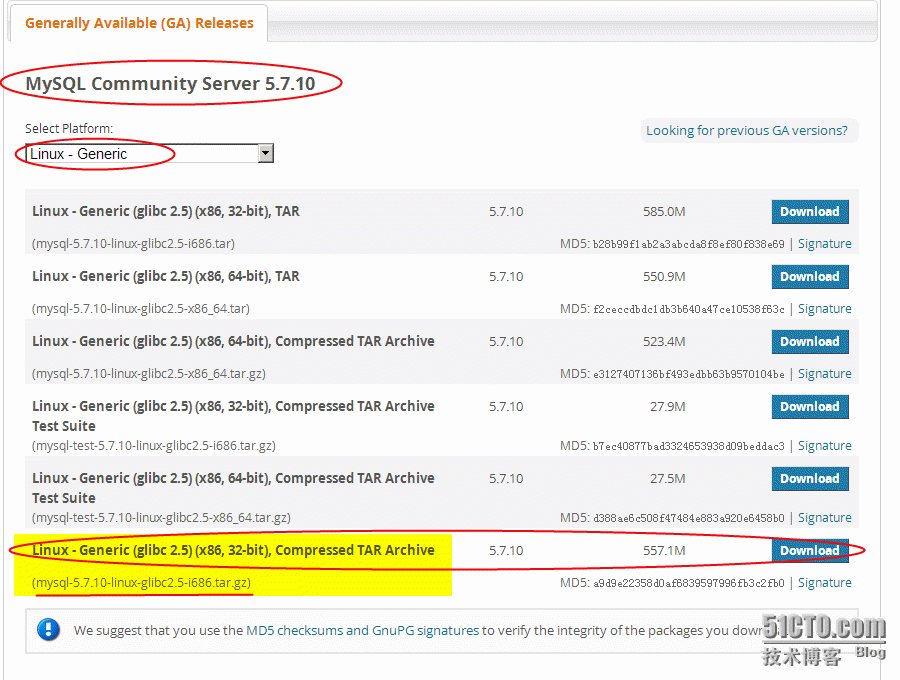
mysql-5.7.10-linux-glibc2.5-i686.tar.gz是目前最新版,二进制发布包,适合各种32为版本的发型版Linux,由于只有一个包,解压后配配就行,很方便,比较符合我的风格。
环境:centos6.6 x86
1、下载 http://dev.mysql.com/downloads/mysql/
http://dev.mysql.com/get/Downloads/MySQL-5.7/mysql-5.7.10-linux-glibc2.5-i686.tar.gz
迅雷下载后ftp传到Linux下面/usr/local/soft/
2、解压缩到/usr/local/下面,mysql的主目录命名为mysql
[[email protected] local]# cd /usr/local/soft/
[[email protected] soft]# tar zvxf mysql-5.7.10-linux-glibc2.5-i686.tar.gz -C /usr/local
[[email protected] soft]# cd ..
[[email protected] local]# mv mysql-5.7.10-linux-glibc2.5-i686/ mysql
3、在mysql下面创建data数据库文件目录
[[email protected] local]# mkdir mysql/data
4、创建mysql的用户组和用户,并对mysql目录设置用户组和用户
[[email protected] local]# groupadd mysql
[[email protected] local]# useradd mysql -g mysql
[[email protected] local]# cd mysql
[[email protected] mysql]# pwd
/usr/local/mysql
[[email protected] mysql]# chown -R mysql .
[[email protected] mysql]# chgrp -R mysql .
5、初始化mysql并启动mysql服务
[[email protected] mysql]# cd /usr/local/mysql/bin
[[email protected] bin]# yum install libaio
./mysql_install_db --user=mysql --basedir=/usr/local/mysql/ --datadir=/usr/local/mysql/data已加载插件:fastestmirror, refresh-packagekit, security
设置安装进程
Loading mirror speeds from cached hostfile
* base: mirrors.opencas.cn
* extras: mirrors.btte.net
* updates: mirrors.btte.net
包 libaio-0.3.107-10.el6.i686 已安装并且是最新版本
无须任何处理
[[email protected] bin]# ./mysql_install_db --user=mysql --basedir=/usr/local/mysql/ --datadir=/usr/local/mysql/data
2016-01-09 12:00:28 [WARNING] mysql_install_db is deprecated. Please consider switching to mysqld --initialize
2016-01-09 12:00:33 [WARNING] The bootstrap log isn't empty:
2016-01-09 12:00:33 [WARNING] 2016-01-09T04:00:29.262989Z 0 [Warning] --bootstrap is deprecated. Please consider using --initialize instead
2016-01-09T04:00:29.264643Z 0 [Warning] Changed limits: max_open_files: 1024 (requested 5000)
2016-01-09T04:00:29.264653Z 0 [Warning] Changed limits: table_open_cache: 431 (requested 2000)
[[email protected] bin]# cd /usr/local/mysql/support-files
[[email protected] support-files]# ./mysql.server start
Starting MySQL. SUCCESS!
6、登录mysql,此版本最新版不许空密码登录,实际上有个初始化密码保存在/root/.mysql_secret这个文件里面,用这个密码第一次登录后,再修改密码。因此先cat查看下初始化密码(随机的,每次安装看到的密码都不一样):
[[email protected] ~]# cat /root/.mysql_secret
# Password set for user '[email protected]' at 2016-01-09 12:00:28
:5ul#H6dmcwX
利用初始化密码:5ul#H6dmcwX开始登录mysql:
[[email protected] ~]# cd /usr/local/mysql/bin
[[email protected] bin]# ./mysql -uroot -p:5ul#H6dmcwX
mysql: [Warning] Using a password on the command line interface can be insecure.
Welcome to the MySQL monitor. Commands end with ; or \g.
Your MySQL connection id is 5
Server version: 5.7.10
Copyright (c) 2000, 2015, Oracle and/or its affiliates. All rights reserved.
Oracle is a registered trademark of Oracle Corporation and/or its
affiliates. Other names may be trademarks of their respective
owners.
Type 'help;' or '\h' for help. Type '\c' to clear the current input statement.
mysql>
显示登录成功,可以执行mysql命令操作了!
7、改mysql的root密码,新密码在此为'leizm'
mysql> set password=password('leizm');
Query OK, 0 rows affected, 1 warning (0.00 sec)
8、设定远程登录mysql。在Linux下为了安全,默认是不允许mysql本机以外的机器访问mysql数据库服务,因此需要重新授权root。方便远程访问。
mysql> use mysql;
Reading table information for completion of table and column names
You can turn off this feature to get a quicker startup with -A
Database changed
mysql> select Host,User from user;
+-----------+-----------+
| Host | User |
+-----------+-----------+
| % | root |
| localhost | mysql.sys |
| localhost | root |
+-----------+-----------+
3 rows in set (0.00 sec)
mysql> GRANT ALL PRIVILEGES ON *.* TO [email protected]'%' identified by 'leizm';
Query OK, 0 rows affected, 1 warning (0.00 sec)
mysql> flush privileges;
Query OK, 0 rows affected (0.00 sec)
授权语句最后的‘leizm’是mysql数据库root用户的新密码。
9、非必要的步骤,如果远程连不上,估计是防火墙的问题,关闭试试:
[[email protected] mysql]# service iptables stop
setenforce 0iptables:将链设置为政策 ACCEPT:filter [确定]
iptables:清除防火墙规则: [确定]
iptables:正在卸载模块: [确定]
[[email protected] mysql]# setenforce 0
setenforce: SELinux is disabled
用SQLyog远程登录访问测试下:
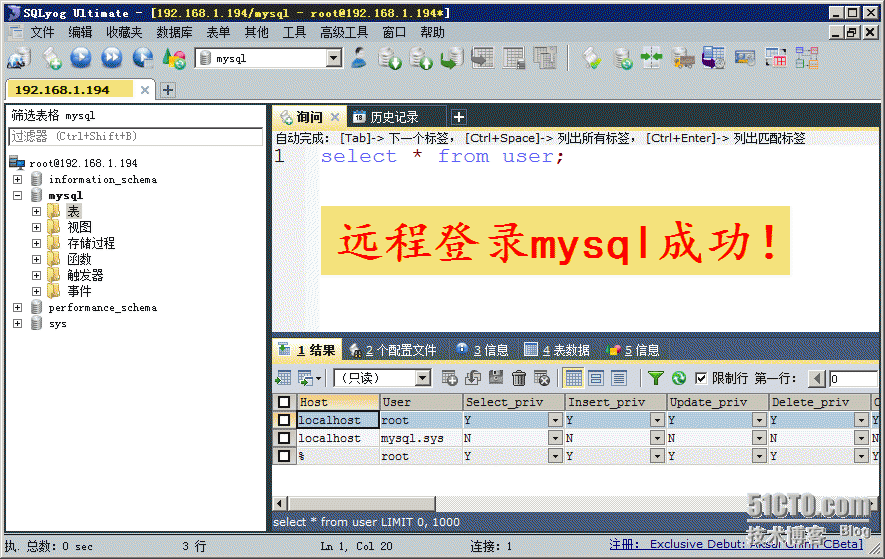
安装配置成功!
参考文档:
http://dev.mysql.com/doc/refman/5.7/en/linux-installation-yum-repo.html
源码方式安装可参看【CentOS7安装MYSQL5.7.7】
rpm方式安装参看:
http://wenku.baidu.com/view/a1aaacb75f0e7cd18525365e.html
yum方式安装参看:
http://www.thinksaas.cn/group/topic/394802/
其他的
http://jingyan.baidu.com/article/e5c39bf5aa60f639d7603316.html
http://forrest-lv.iteye.com/blog/2260703
本文出自 “熔 岩” 博客,谢绝转载!
转载于:https://blog.51cto.com/lucifer119/1733642