1、本地主机

关闭虚拟机

①进入VirtualBox的安装目录

Oracle VM VirtualBox里虚拟机(Windows server 2012)C盘扩容

②运行VBoxManage list hdds命令

Oracle VM VirtualBox里虚拟机(Windows server 2012)C盘扩容

③扩容磁盘容量

VBoxManage modifyhd UUID --resize 大小
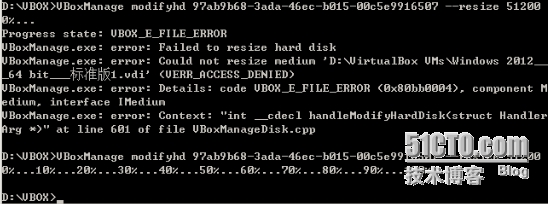
Oracle VM VirtualBox里虚拟机(Windows server 2012)C盘扩容

2、查看扩容

Oracle VM VirtualBox里虚拟机(Windows server 2012)C盘扩容

3、虚拟机

①扩容前

Oracle VM VirtualBox里虚拟机(Windows server 2012)C盘扩容

②使用分区助手服务器版进行扩容

Oracle VM VirtualBox里虚拟机(Windows server 2012)C盘扩容Oracle VM VirtualBox里虚拟机(Windows server 2012)C盘扩容

Oracle VM VirtualBox里虚拟机(Windows server 2012)C盘扩容

③扩容后

Oracle VM VirtualBox里虚拟机(Windows server 2012)C盘扩容


来源:参考网络资料。

转载于:https://blog.51cto.com/vipnoon/1631455

相关文章:

  • 2022-12-23
  • 2021-04-02
  • 2021-10-18
  • 2021-10-07
  • 2021-05-09
  • 2022-12-23
  • 2021-11-25
  • 2022-12-23
猜你喜欢
  • 2021-04-19
  • 2021-07-08
  • 2022-12-23
  • 2022-12-23
  • 2022-01-30
  • 2022-01-08
  • 2022-12-23
相关资源
相似解决方案