jQuery 库拥有完整的 Ajax 兼容套件。其中的函数和方法允许我们在不刷新浏览器的情况下从服务器加载数据。
jQuery 采用了三层封装:最底层的封装方法为:$.ajax(),而通过这层封装了第二层有三种方法:.load()、$.get()和$.post(),最高层是$.getScript()和$.getJSON()方法。
| 函数 | 描述 |
|---|---|
| jQuery.ajax() | 执行异步 HTTP (Ajax) 请求。 |
| .ajaxComplete() | 当 Ajax 请求完成时注册要调用的处理程序。这是一个 Ajax 事件。 |
| .ajaxError() | 当 Ajax 请求完成且出现错误时注册要调用的处理程序。这是一个 Ajax 事件。 |
| .ajaxSend() | 在 Ajax 请求发送之前显示一条消息。 |
| jQuery.ajaxSetup() | 设置将来的 Ajax 请求的默认值。 |
| .ajaxStart() | 当首个 Ajax 请求完成开始时注册要调用的处理程序。这是一个 Ajax 事件。 |
| .ajaxStop() | 当所有 Ajax 请求完成时注册要调用的处理程序。这是一个 Ajax 事件。 |
| .ajaxSuccess() | 当 Ajax 请求成功完成时显示一条消息。 |
| jQuery.get() | 使用 HTTP GET 请求从服务器加载数据。 |
| jQuery.getJSON() | 使用 HTTP GET 请求从服务器加载 JSON 编码数据。 |
| jQuery.getScript() | 使用 HTTP GET 请求从服务器加载 JavaScript 文件,然后执行该文件。 |
| .load() | 从服务器加载数据,然后把返回到 HTML 放入匹配元素。 |
| jQuery.param() | 创建数组或对象的序列化表示,适合在 URL 查询字符串或 Ajax 请求中使用。 |
| jQuery.post() | 使用 HTTP POST 请求从服务器加载数据。 |
| .serialize() | 将表单内容序列化为字符串。 |
| .serializeArray() | 序列化表单元素,返回 JSON 数据结构数据。 |
1、load()方法
load()方法通过 AJAX 请求从服务器加载数据,并把返回的数据放置到指定的元素中。.load()方法是局部方法,需要一个包含元素的jQuery对象作为前缀。
语法格式:
load(url,data,function(response,status,xhr))
参数说明:
url:必须,请求html文件的url 地址,参数类型为String
data:可选,发送的key/value 数据,参数类型为Object
function(response,status,xhr):可选,成功或失败的回调函数,参数类型为函数Function。
response - 包含来自请求的结果数据;status - 包含请求的状态("success", "notmodified", "error", "timeout" 或 "parsererror");xhr - 包含 XMLHttpRequest 对象。
备注:XMLHttpRequest对象属于JavaScript 范畴,可以调用一些属性如下:
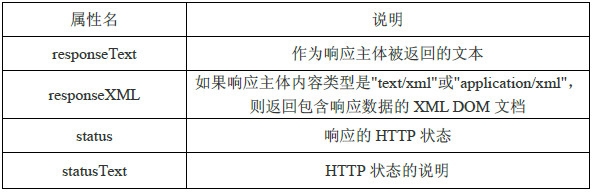
xhr对象的status属性的值,如果成功返回数据则为:success,否则为:error。xhr对象的statusText属性值如下:
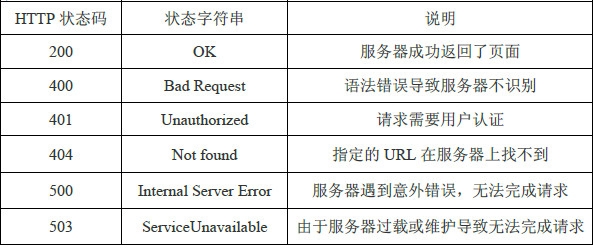
样例:
--让Ajax异步载入一段HTML内容,若不选择data参数,采用get方式提交,否则为post方式提交
|
1
2
3
4
5
6
7
8
9
10
11
12
13
14
15
16
17
18
19
20
21
22
23
|
<!DOCTYPE html><html><head lang="en">
<meta charset="UTF-8">
<title>Ajax学习</title>
<script type="text/javascript" src="jquery-1.11.1.min.js"></script>
<script type="text/javascript">
$(function(){
$('input').click(function(){
$('#box1').load('test1.html .title',{username:'qing'});
$('#box2').load('test2.html');
});
});
</script>
</head><body> <input type="button" value="Ajax加载数据" />
<div id="box1"></div>
<hr color="red">
<div id="box2"></div>
</body></html> |
test1.html文件:
|
1
2
3
4
5
6
7
8
9
10
11
|
<!DOCTYPE html><html><head lang="en">
<meta charset="UTF-8">
<title></title>
</head><body> <span class="title">新疆大学</span>
<span class="url">www.xju.edu.cn</span>
</body></html> |
test2.html文件:
|
1
2
|
<span class="title">新疆大学</span>
<span class="url">www.xju.edu.cn</span>
|
输出结果:
--让Ajax异步载入服务器文件
Ajax1.htm文件:
|
1
2
3
4
5
6
7
8
9
10
11
12
13
14
15
16
17
18
19
20
21
22
|
<!DOCTYPE html PUBLIC "-//W3C//DTD XHTML 1.0 Transitional//EN" "http://www.w3.org/TR/xhtml1/DTD/xhtml1-transitional.dtd">
<html xmlns="http://www.w3.org/1999/xhtml">
<head> <title>Ajax学习</title>
<script type="text/javascript" src="jquery-1.11.1.min.js"></script>
<script type="text/javascript">
$(function () {
$('input').click(function () {
$('#box1').load('http://localhost:5567/WebForm1.aspx?id=123', { username: 'qing' }, function (response, status, xhr) {
alert('返回的值为:' + response + ',状态为:' + status + ',状态是:' + xhr);
//console.dir(xhr);
//console.log("xhr:", xhr);
});
});
});
</script>
</head><body> <input type="button" value="Ajax加载数据" />
<div id="box1"></div>
</body></html> |
WebForm1.aspx文件:
|
1
2
3
4
5
6
7
8
9
10
11
12
13
14
|
<%@ Page Language="C#" AutoEventWireup="true" CodeBehind="WebForm1.aspx.cs" Inherits="WebApplication1.WebForm1" %>
<!DOCTYPE html PUBLIC "-//W3C//DTD XHTML 1.0 Transitional//EN" "http://www.w3.org/TR/xhtml1/DTD/xhtml1-transitional.dtd">
<html xmlns="http://www.w3.org/1999/xhtml">
<head runat="server">
<title></title>
</head><body> <form id="form1" runat="server">
<div>
<asp:Label ID="lblMessage" runat="server" Text="Label"></asp:Label>
</div>
</form>
</body></html> |
WebForm1.aspx.cs文件:
|
1
2
3
4
5
6
7
8
9
10
11
12
13
14
15
16
|
using System;using System.Collections.Generic;using System.Linq;using System.Web;using System.Web.UI;using System.Web.UI.WebControls;namespace WebApplication1{ public partial class WebForm1 : System.Web.UI.Page
{
protected void Page_Load(object sender, EventArgs e)
{
lblMessage.Text = "Hello,Ajax!" + Request["id"].ToString();
}
}
} |
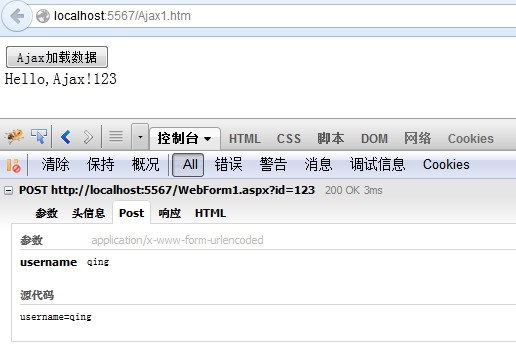
输出结果如下:
2、$.get()和$.post()
$.get()和$.post()是全局方法,无须指定某个元素。对于用途而言,.load()适合做静态文件的异步获取,而对于需要传递参数到服务器页面的,$.get()和$.post()更加合适。
$.get()方法通过远程 HTTP GET 请求载入信息。这是一个简单的 GET 请求功能以取代复杂 $.ajax 。请求成功时可调用回调函数。如果需要在出错时执行函数,请使用 $.ajax。
$.get()方法和$.post()有四个参数,前面三个参数和.load()一样,多了一个第四参数dataType,即服务器返回的内容格式:包括xml、html、script、json、jsonp 和text。第一个参数为必选参数,后面三个为可选参数。
该函数是简写的 Ajax 函数,等价于:
$.ajax({
url: url,
data: data,
success: success,
dataType: dataType
});
$.ajax({
type: 'POST',
url: url,
data: data,
success: success,
dataType: dataType
});
--通过直接在url问号紧跟传参
|
1
2
3
4
5
6
7
8
9
10
11
12
13
14
15
16
17
18
19
20
21
22
|
<!DOCTYPE html PUBLIC "-//W3C//DTD XHTML 1.0 Transitional//EN" "http://www.w3.org/TR/xhtml1/DTD/xhtml1-transitional.dtd">
<html xmlns="http://www.w3.org/1999/xhtml">
<head> <title>Ajax学习</title>
<script type="text/javascript" src="jquery-1.11.1.min.js"></script>
<script type="text/javascript">
$(function () {
$('input').click(function () {
$.get('http://localhost:5567/WebForm1.aspx?id=123&UserName=qing&pass=123456', function (response, status, xhr) {
if (status == "success") {
$("#box1").html(response);
}
});
});
});
</script>
</head><body> <input type="button" value="Ajax加载数据" />
<div id="box1"></div>
</body></html> |
WebForm1.aspx.cs文件:
|
1
2
3
4
5
6
7
8
9
10
11
12
13
14
15
16
|
using System;using System.Collections.Generic;using System.Linq;using System.Web;using System.Web.UI;using System.Web.UI.WebControls;namespace WebApplication1{ public partial class WebForm1 : System.Web.UI.Page
{
protected void Page_Load(object sender, EventArgs e)
{
lblMessage.Text = "Hello,Ajax! id:" + Request["id"].ToString() + ",UserName:" + Request["id"].ToString() + ",pass:" + Request["pass"].ToString();
}
}
} |
注意:第四参数dataType是指定异步返回的类型。一般情况下DataType参数是智能判断,并不需要我们主动设置,如果主动设置,则会强行按照指定类型格式返回。若本身是纯文本,如果强行按照xml或者json数据格式返回的话,那么就无法获取数据。
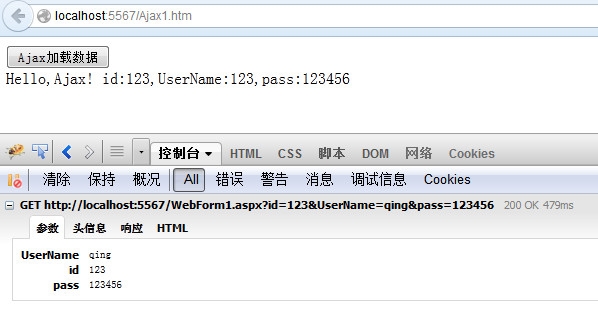
结果:
等效于:
--通过第二个参数data,对象形式的键值对传参
|
1
2
3
4
5
6
7
8
9
10
11
|
<script type="text/javascript">
$(function () {
$('input').click(function () {
$.get('http://localhost:5567/WebForm1.aspx', {id:123, UserName: 'qing', pass: 123456 }, function (response, status, xhr) {
if (status == "success") {
$("#box1").html(response);
}
});
});
});
</script> |
$.post()方法的使用和$.get()基本上一致,基本都是背后的不同,在用户使用上体现不出。具体区别如下:
1.GET 请求是通过URL 提交的,而POST 请求则是HTTP 消息实体提交的;
2.GET 提交有大小限制(2KB),而POST 方式不受限制;
3.GET 方式会被缓存下来,可能有安全性问题,而POST 没有这个问题;
--和上面结果相同样例:
|
1
2
3
4
5
6
7
8
9
10
11
|
<script type="text/javascript">
$(function () {
$('input').click(function () {
$.post('http://localhost:5567/WebForm1.aspx?id=123', {UserName: 'qing', pass: 123456 }, function (response, status, xhr) {
if (status == "success") {
$("#box1").html(response);
}
});
});
});
</script> |
3、$.getScript()和$.getJSON()
$.getScript() 方法通过 HTTP GET 请求载入并执行 JavaScript 文件。
语法格式:
$.getScript(url,success(response,status))
$.getScript(url,success(response,status))
参数说明:
url:将要请求的 URL 字符串。
success(response,status):可选。规定请求成功后执行的回调函数。额外的参数:response - 包含来自请求的结果数据;status - 包含请求的状态("success", "notmodified", "error", "timeout" 或 "parsererror")
该函数是简写的 Ajax 函数,等价于:
$.ajax({
url: url,
dataType: "script",
success: success
});
$.ajax({
url: url,
data: data,
success: callback,
dataType: json
});
--样例:
|
1
2
3
|
$('input').click(function () {
$.getScript('test.js');
}); |
|
1
2
3
4
5
|
$('input').click(function () {
$.getJSON('test.json',function (response, status, xhr) {
alert(response[0].url);});}); |
4、$.ajax()方法
$.ajax()是所有ajax 方法中最底层的方法,所有其他方法都是基于$.ajax()方法的封装。这个方法只有一个参数,传递一个各个功能键值对的对象。
--样例
|
1
2
3
4
5
6
7
8
9
10
11
12
13
14
|
<script type="text/javascript">
$(function () {
$('input').click(function () {
$.ajax({
type: 'GET',
url: 'WebForm1.aspx',
data: { id: '123', UserName: 'qing', pass: 123456 },
success: function (response, status, xhr) {
$('#box1').html(response);
}
});
});
});
</script> |
本文转自stock0991 51CTO博客,原文链接:http://blog.51cto.com/qing0991/1426559,如需转载请自行联系原作者