淘宝Tfs文件系统安装
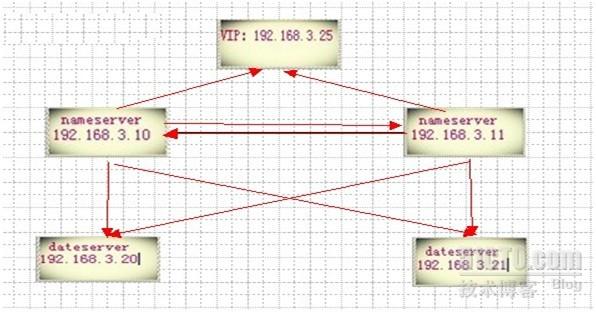
一、NS DS
上都安装执行的:
官网地址:http://code.taobao.org/p/tfs/wiki/deploy/
(下载安装):
1、需要确保安装了automake autoconfig 和 libtool,
使用auotmake --version查看,一般情况下已安装
Yum –y install automake autoconfig libtool
2、TFS依赖于底层开发包tbnet,需要下载tbsys和tbnet源代码(svn checkout http://code.taobao.org/svn/tb-common-utils/trunk/
tb-common-utils)
yum –y install libtool mysql-devel readline readline-devel
[[email protected] home]# ls
cd tb-common-utils tb-common-utils.zip tfs-1.4.tar.gz
[[email protected] home]# unzip tb-common-utils.zip
[[email protected] home]# cd tb-common-utils
[[email protected] tb-common-utils]# vi /etc/profile
# /etc/profile
export TBLIB_ROOT="/usr/local/tfs_lib"
(ps:建议将这行命令直接写入~/.bash_profile,然后执行“. ~/.bash_profile”)。 进入tb-common-utils文件夹, 执行build.sh进行安装.
[[email protected] tb-common-utils]# chmod a+x build.sh
[[email protected] tb-common-utils]# ./build.sh
安装在 /usr/local/tfs_lib 目录下了
[[email protected] home]# tar zxvf tfs-1.4.tar.gz -C /usr/src/
[[email protected] home]# cd /usr/src/tfs-1.4/
[[email protected] tfs-1.4]# ./build.sh init
[[email protected] tfs-1.4]# ./configure --prefix=/usr/local/tfs
[[email protected] tfs-1.4]# make
[[email protected] tfs-1.4]# make install
二、DS
上操作:
1.
安装ext4格式工具:
yum –y install e4fsprogs e4fsprogs-devel
2.
建立数据目录:
[[email protected] home]# mkdir -p /home/disk1
[[email protected] home]# mkdir -p /home/disk2
v[[email protected] home]# mkdir -p /home/disk3
3.
格式硬盘:
[[email protected] home]# mkfs.ext4 /dev/sdb
[[email protected] home]# mkfs.ext4 /dev/sdc
[[email protected] home]# mkfs.ext4 /dev/sdd
4.挂载硬盘
[[email protected] home]# mount /dev/sdb /home/disk1
[[email protected] home]# mount /dev/sdc /home/disk2
[[email protected] home]# mount /dev/sdd /home/disk3
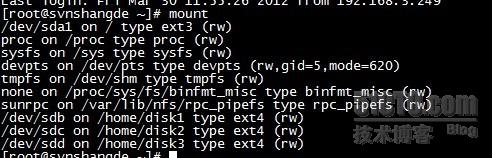
6.查看挂载分区:
[[email protected] home]# mount
[[email protected] home]# df

7、配置文件:(附件):
(3.10 _3.11ns.conf)(3.20_3.21 ds.conf)(3.20_3.21ads.conf)
8、存储区预分配:(ds上)
[[email protected] scripts]# ./stfs format 1,2,3
成功则返回:SUCCESSFULLY 信息
三、启动:(ns ds ):
[[email protected] scripts]# ./tfs start_ns
(3.10 3.11上)
[[email protected] scripts]# ./tfs start_ds 1,2,3 (3.20 3.21上)
四、查看:
(1)[[email protected] scripts]# ./tfs check_ns
(3.10 3.11上)
nameserver is running pid: 31150
(2)[[email protected] scripts]# ./tfs check_ds
(3.20 3.21上)
dataserver [ 1 2 3 ] is running
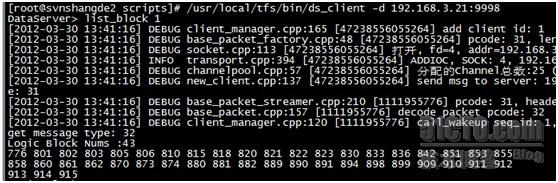
(3)查看block块:
(4)[[email protected] bin]# ./ssm -s 192.168.3.10:8108 (随便一台连接ns)
show >
可以看到有8个可写块:一台上就有24个可写快:

(5)查看ds实际用掉容量:

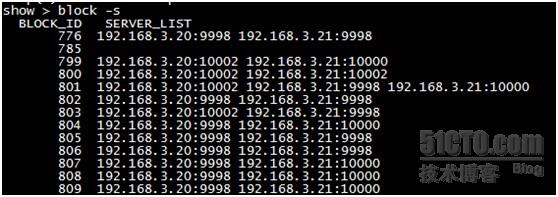
(6)查看block信息:
( 7 )连接 ns 及上传 aa.txt 文件:
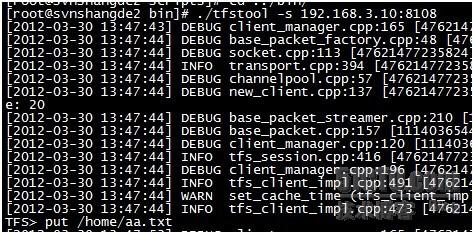
(8)返回如下信息:成功!
