微信小程序 swiper组件
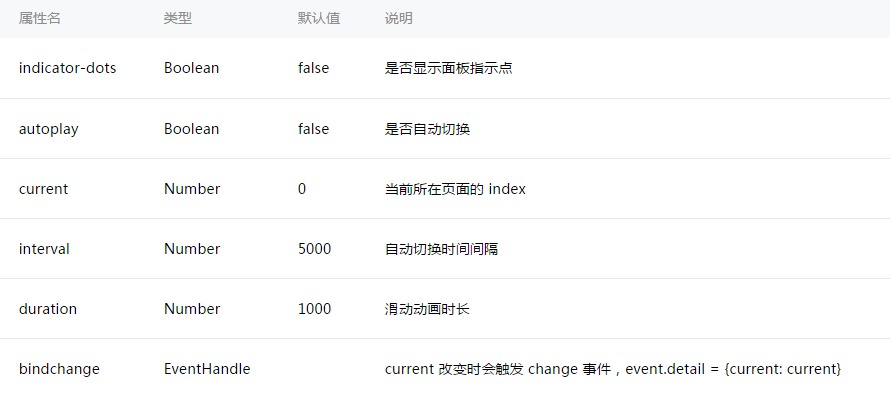
常用属性:
效果图:
wxml
|
1
2
3
4
5
6
7
8
9
10
11
12
|
<swiper indicator-dots="{{indicatorDots}}" autoplay="{{autoplay}}" interval="{{interval}}" duration="{{duration}} " bindchange="bindchangeTag"> <block wx:for="{{imgUrls}}"> <swiper-item> <image src="{{item}}" class="slide-image"/> </swiper-item> </block></swiper><button bindtap="changeIndicatorDots"> 是否显示面板指示点 </button><button bindtap="changeAutoplay"> 是否自动切换 </button><slider bindchange="intervalChange" show-value min="1000" max="2000"/> 自动切换时间间隔<slider bindchange="durationChange" show-value min="1800" max="10000"/> 滑动动画时长 |
|
1
2
3
4
5
6
7
8
9
10
11
12
13
14
15
16
17
18
19
20
21
22
23
24
25
26
27
28
29
30
31
32
33
34
35
36
37
38
39
40
41
42
43
44
45
46
47
48
49
50
51
52
53
54
55
56
57
|
Page({ data: {
imgUrls: [
],
indicatorDots: false,
autoplay: false,
interval: 1000,
duration: 1800
},
//是否显示面板指示点
changeIndicatorDots: function(e) {
this.setData({
indicatorDots: !this.data.indicatorDots
})
},
//是否自动切换
changeAutoplay: function(e) {
this.setData({
autoplay: !this.data.autoplay
})
},
//自动切换时间间隔
intervalChange: function(e) {
this.setData({
// e.detail.value获取slider的值
interval: e.detail.value
})
},
//滑动动画时长
durationChange: function(e) {
this.setData({
duration: e.detail.value
})
},
//当页面改变是会触发
bindchangeTag:function(e){
console.log("bindchangeTag...")
},
onLoad:function(options){
// 页面初始化 options为页面跳转所带来的参数
},
onReady:function(){
// 页面渲染完成
},
onShow:function(){
// 页面显示
},
onHide:function(){
// 页面隐藏
},
onUnload:function(){
// 页面关闭
}
}) |