一、远程主机添加nagios用户
|
1
|
[[email protected] ~]# useradd -s /sbin/nologin nagios
|
二、安装nagios-plugins插件
|
1
2
|
[[email protected] nagios-plugins-2.1.1]# ./configure --prefix=/usr/local/nagios --with-nagios-user=nagios --with-nagios-group=nagios
[[email protected] nagios-plugins-2.1.1]# make && make install
|
三、查看生成的目录文件
|
1
2
|
[[email protected] nagios-plugins-2.1.1]# ls /usr/local/nagios/
include libexec share |
四、安装nrpe
|
1
2
3
4
5
|
[[email protected] nrpe-2.15]# ./configure
[[email protected] nrpe-2.15]# make all
[[email protected] nrpe-2.15]# make install-daemon
[[email protected] nrpe-2.15]# make install-daemon-config
[[email protected] nrpe-2.15]# make install-plugin
|
五、安装nrpe守护进程的服务xinetd
|
1
2
|
[[email protected] nrpe-2.15]# make install-xinetd
/usr/bin/install -c -m 644 sample-config/nrpe.xinetd /etc/xinetd.d/nrpe
|
六、打开/etc/xinetd.d/nrpe文件,修改添加服务端IP
|
1
|
only_from = 127.0.0.1 localhost 192.168.1.21
|
七、添加nrpe守护进程端口号
|
1
2
|
[[email protected] nrpe-2.15]# vim /etc/services
nrpe 5666/tcp #nrpe
|
八、安装xinetd软件包,并重启xinetd服务
|
1
2
3
4
|
[[email protected] nrpe-2.15]# yum -y install xinetd
[[email protected] nrpe-2.15]# /etc/init.d/xinetd restart
Stopping xinetd: [FAILED]Starting xinetd: [ OK ] |
九、查看监听端口和nrpe进程有没有起来
|
1
2
|
[[email protected] nrpe-2.15]# netstat -ntlp |grep 5666
tcp 0 0 :::5666 :::* LISTEN 73351/xinetd
|
|
1
2
|
[[email protected] nrpe-2.15]# netstat -at | grep nrpe
tcp 0 0 *:nrpe *:* LISTEN |
十、在远程主机运行check_nrpe测试有没有安装或配置成功
|
1
2
3
4
5
6
|
[[email protected] nrpe-2.15]# /usr/local/nagios/libexec/check_nrpe -H 127.0.0.1
NRPE v2.15[[email protected] nrpe-2.15]# /usr/local/nagios/libexec/check_nrpe -H 127.0.0.1 -c check_users
USERS OK - 5 users currently logged in |users=5;5;10;0
[[email protected] nrpe-2.15]# /usr/local/nagios/libexec/check_nrpe -H 127.0.0.1 -c check_load
OK - load average: 0.00, 0.00, 0.00|load1=0.000;15.000;30.000;0; load5=0.000;10.000;25.000;0; load15=0.000;5.000;20.000;0; |
|
1
2
3
4
|
[[email protected] nrpe-2.15]# /usr/local/nagios/libexec/check_nrpe -H localhost
NRPE v2.15[[email protected] nrpe-2.15]# /usr/local/nagios/libexec/check_nrpe -H localhost -c check_users
USERS OK - 5 users currently logged in |users=5;5;10;0
|
十一、以下是在服务端测试
|
1
2
3
4
|
[[email protected] ~]# /usr/local/nagios/libexec/check_nrpe -H 192.168.1.250
NRPE v2.15[[email protected] ~]# /usr/local/nagios/libexec/check_nrpe -H 192.168.1.250 -c check_users
USERS OK - 5 users currently logged in |users=5;5;10;0
|
十二、服务端添加hosts.cfg和services.cfg两个文件,作为远程主机的监控配置文件
|
1
2
3
4
5
|
[[email protected] ~]# vim /etc/nagios/nagios.cfg
cfg_file=/etc/nagios/objects/hosts.cfg
cfg_file=/etc/nagios/objects/services.cfg
[[email protected] ~]# touch /etc/nagios/objects/hosts.cfg
[[email protected] ~]# touch /etc/nagios/objects/services.cfg
|
十三、配置services.cfg文件
|
1
2
3
4
5
6
7
8
9
10
11
12
13
14
15
16
17
18
19
20
21
22
23
24
25
26
27
28
29
30
|
define service{ use generic-service
host_name tecmint
service_description CPU Load
check_command check_nrpe!check_load
}
define service{ use generic-service
host_name tecmint
service_description Total Processes
check_command check_nrpe!check_total_procs
}
define service{ use generic-service
host_name tecmint
service_description Current Users
check_command check_nrpe!check_users
}
define service{ use generic-service
host_name tecmint
service_description SSH Monitoring
check_command check_nrpe!check_ssh
}
define service{ use generic-service
host_name tecmint
service_description FTP Monitoring
check_command check_nrpe!check_ftp
}
|
十四、配置hosts.cfg文件
|
1
2
3
4
5
6
7
8
9
10
11
12
13
14
15
16
17
18
19
20
21
|
## Default Linux Host Template ##define host{name linux-box ; Name of this templateuse generic-host ; Inherit default valuescheck_period 24x7check_interval 5retry_interval 1max_check_attempts 10check_command check-host-alivenotification_period 24x7notification_interval 30notification_options d,rcontact_groups adminsregister 0 ; DONT REGISTER THIS - ITS A TEMPLATE}## Defaultdefine host{use linux-box ; Inherit default values from a templatehost_name tecmint ; The name we're giving to this serveralias CentOS 6.5 ; A longer name for the server
address 192.168.1.250 ; IP address of Remote Linux host |
十五、检查配置并重启nagios
|
1
2
3
4
|
[[email protected] ~]# /usr/local/nagios/bin/nagios -v /etc/nagios/nagios.cfg
Total Warnings: 0Total Errors: 0[[email protected] ~]# service nagios restart
|
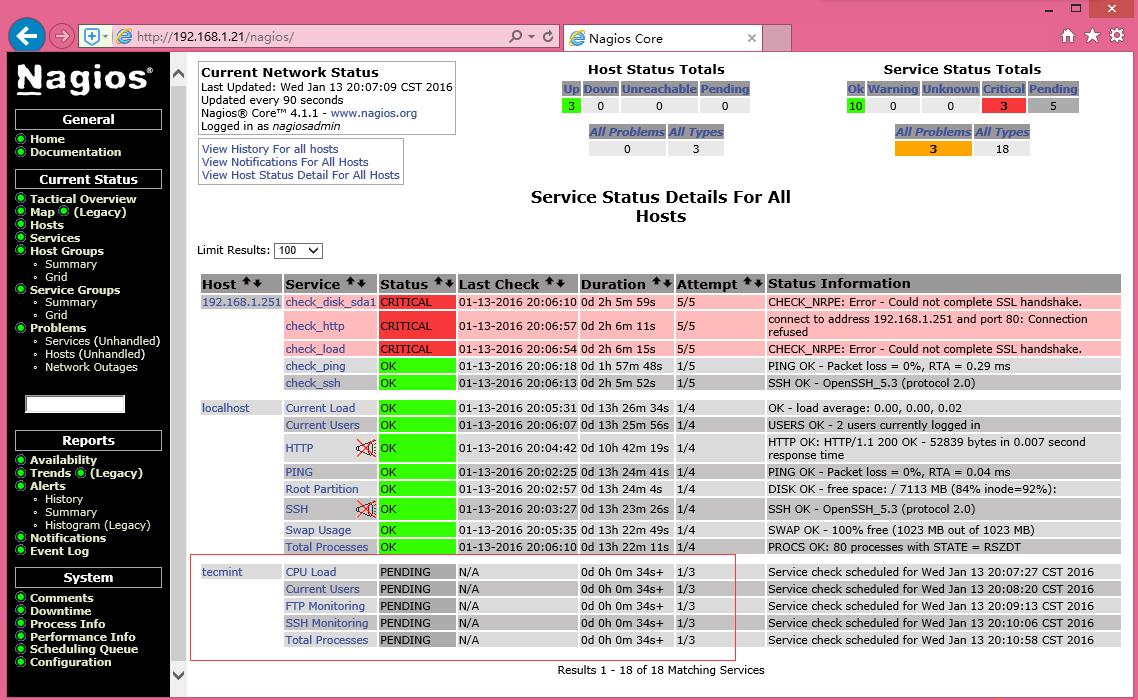
十六、在web页面上查看结果
本文转自 HMLinux 51CTO博客,原文链接:http://blog.51cto.com/7424593/1734791