sed
Stream EDitor 文本流编辑器, 行编辑器
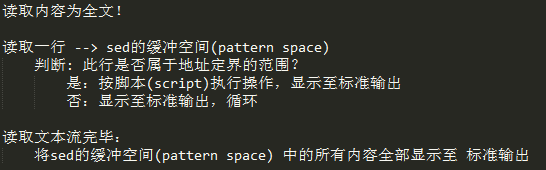
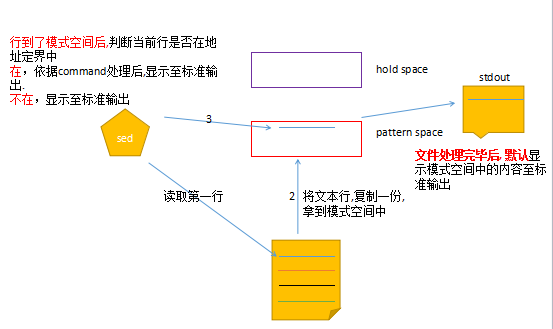
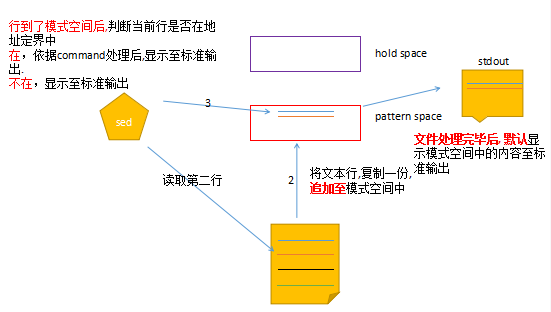
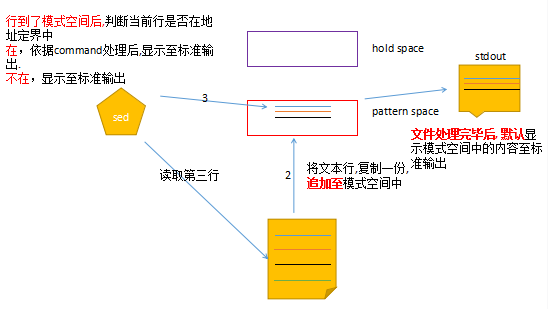
sed工作方式
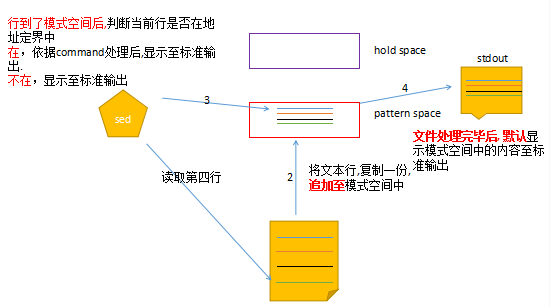
sed基本使用
格式一:
|
1
2
3
4
5
6
7
8
|
sed [OPTION ...] [SCRIPT] [FILE...]多个文件处理: 处理完一个,继续处理第二个。sed script file1 --> sed script file2使用方法基本同vim命令1)vim % --> sed 不用指明
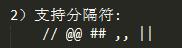
2)vim @@ ## // --> sed || ,, @@ //
|
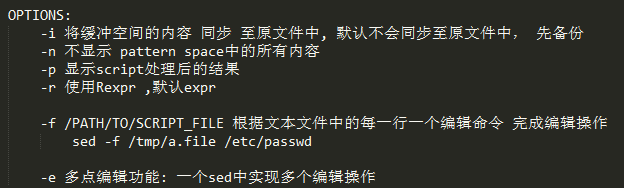
格式二:
|
1
|
sed '地址定界command' FILE ...
|
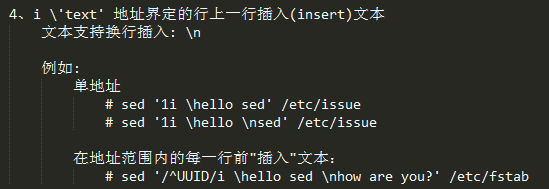
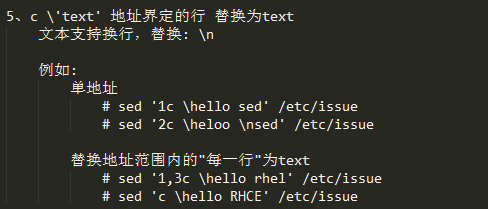
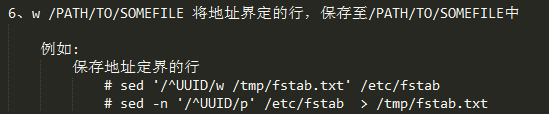
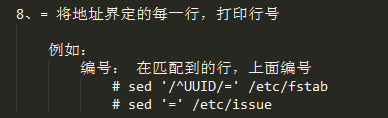
1)地址定界
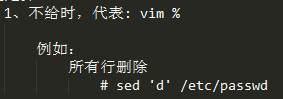
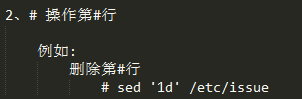
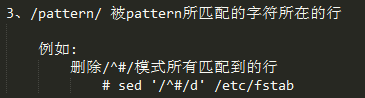
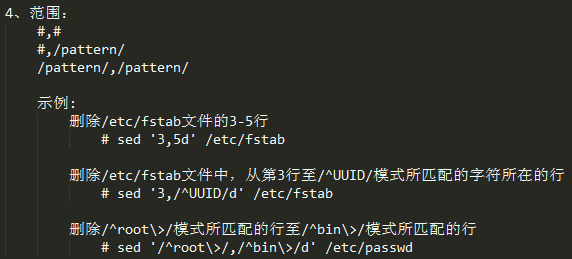
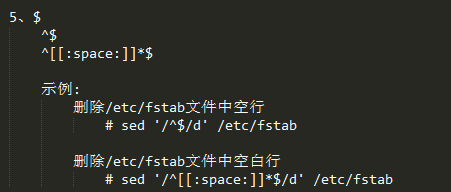
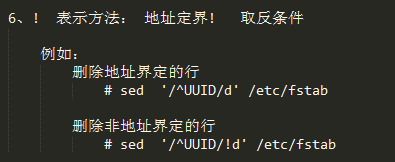
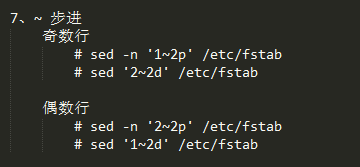
2)command
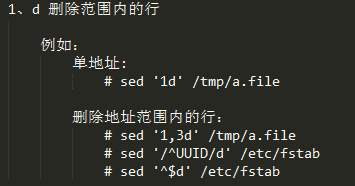
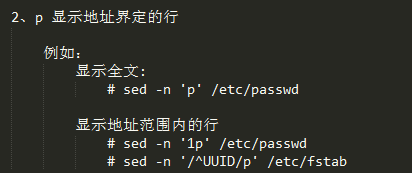
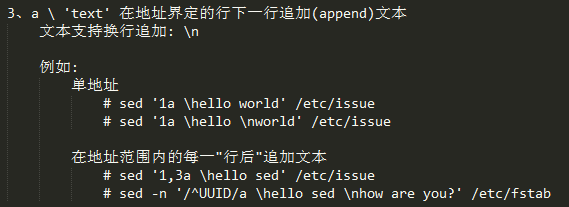

|
1
2
3
4
|
例如:将文件中的内容插入至指定文件中# sed '/^UUID/r /etc/issue' /etc/fstab
# sed '1,3r /etc/centos-release' /etc/issue
|
|
1
2
3
4
|
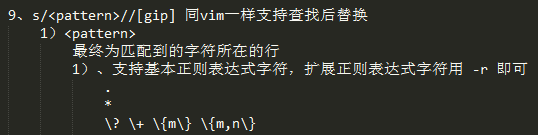
例如:取一个文件的基名、目录名基名: echo "/etc/sysconfig/useradd/" | sed 's,/$,,' | sed -r 's|(.*/)([^/]+)|\2|' 目录名: echo "/etc/sysconfig/useradd/" | sed 's,/$,,' | sed -r 's|(.*/)([^/]+)|\2|'
|
|
1
2
3
4
5
6
|
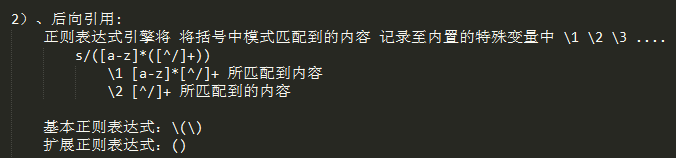
例如:# echo "how are you" | sed -r 's/(how)(.*)(you)/\3\2\1/'
# echo "how are you" | sed -r 's#(how)(.*)(you)#\3\2\1#'
# echo "how are you" | sed -r 's,(how)(.*)(you),\3\2\1,'
# echo "how are you" | sed -r 's|(how)(.*)(you)|\3\2\1|'
|

|
1
2
3
4
5
|
例如:[[email protected] bin]# head -n 1 < /etc/passwd | sed 's,root,ROOT,'
ROOT:x:0:0:root:/root:/bin/bash
[[email protected] bin]# head -n 1 < /etc/passwd | sed 's,root,ROOT,g'
ROOT:x:0:0:ROOT:/ROOT:/bin/bash
|

|
1
2
3
4
5
|
例如:[[email protected] bin]# head -n 1 < /etc/passwd | sed 's,rOOt,ROOT,i'
ROOT:x:0:0:root:/root:/bin/bash
[[email protected] bin]# head -n 1 < /etc/passwd | sed 's,rOOt,ROOT,gi'
ROOT:x:0:0:ROOT:/ROOT:/bin/bash
|

|
1
2
3
4
|
例如:[[email protected] bin]# cat < /etc/passwd | sed -n 's,rOOt,ROOT,ip'
ROOT:x:0:0:root:/root:/bin/bash
operator:x:11:0:operator:/ROOT:/sbin/nologin
|

|
1
2
|
# sed 's,,,w /PATH/TO/SOMEFILE' FILE# sed 's,,,' FILE > /PTH/TO/SOMEFILE |
练习1:删除/boot/grub/grub.conf文本中所有以空白开头的行行首的空白字符
练习2:删除/etc/fstab文件中所有以#开头,后面至少跟一个空白字符的行的行首的#和空白字符
练习3:echo 一个绝对路径给sed命令:取出其基名,取出目录名
练习1:删除/boot/grub/grub.conf文本中所有以空白开头的行行首的空白字符
|
1
2
3
4
5
6
|
CentOS 6: # cp /boot/grub/grub.conf /tmp/grub.conf
# sed -i 's,^[[:space:]]\+,,' /tmp/grub.conf
CentOS 7: # cp /etc/grub2.cfg /tmp/grub2.cfg
# sed -i 's,^[[:space:]]\+,,' /tmp/grub2.cfg
|
练习2:删除/etc/fstab文件中所有以#开头,后面至少跟一个空白字符的行的行首的#和空白字符
|
1
2
3
4
5
6
7
|
# cp /etc/fstab /tmp/a.file# sed -i -r 's|^#[[:space:]]+||' /tmp/a.file扩展:删除以#开头,后面没有跟空白字符的行的行首的#
# cp /etc/fstab /tmp/fstab
# echo "#hello sed" >> /tmp/fstab
# sed -i -r '[email protected]^#([^[:space:]].*)@\[email protected]' /etc/fstab
|
练习3:echo 一个绝对路径给sed命令:取出其基名,取出目录名
|
1
2
3
4
5
6
7
8
9
10
11
12
|
测试取出文件名中存在 useradd的绝对路径 # locate -b useradd
...
/usr/share/man/zh_CN/man8/useradd.8.gz
/usr/share/man/zh_TW/man8/useradd.8.gz
...
取出/usr/share/man/zh_TW/man8/useradd.8.gz的基名
# echo "/usr/share/man/zh_TW/man8/useradd.8.gz/" | sed 's,/$,,' | sed -r 's#(.*/)([^/]+$)#\2#'
取出/usr/share/man/zh_TW/man8/useradd.8.gz的目录名
# echo "/usr/share/man/zh_TW/man8/useradd.8.gz" | sed 's,/$,,' | sed -r 's#(.*/)([^/]+$)#\1#'
|
格式三:
|
1
|
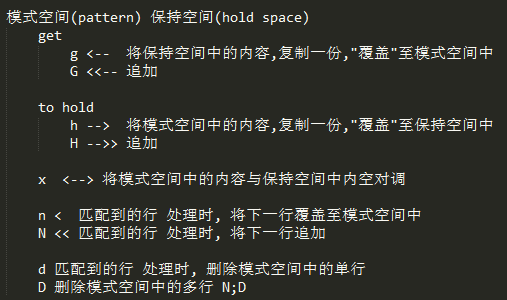
sed '地址定界command;地址定界command;地址定界command;...'
|
本文转自 lccnx 51CTO博客,原文链接:http://blog.51cto.com/sonlich/1964161,如需转载请自行联系原作者