打开页面div滚动条定位(别用锚点)
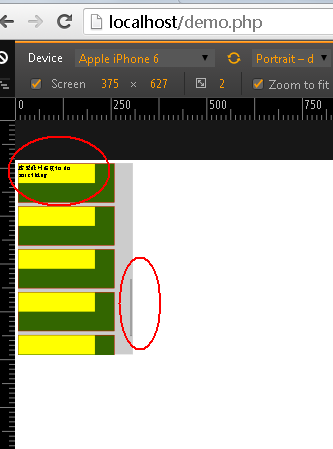
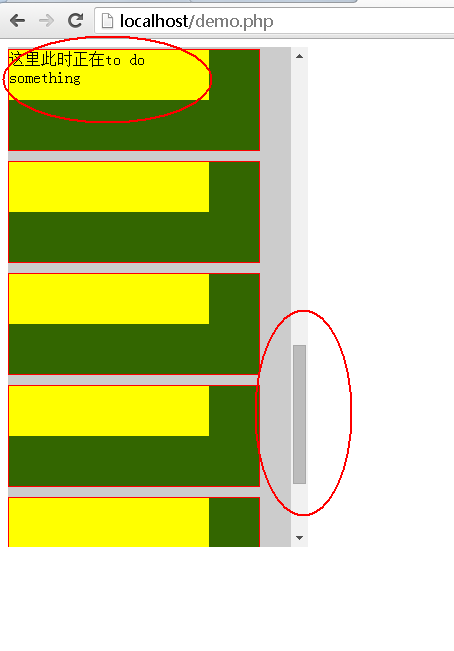
来啦!客官久等了!!!!! 上代码:
|
1
2
3
4
5
6
7
8
9
10
11
12
13
14
15
16
17
18
19
20
21
22
23
24
25
26
27
28
29
30
31
32
33
34
|
<!DOCTYPE html><html xmlns="http://www.w3.org/1999/xhtml">
<head><title>打开页面div滚动条定位</title><meta http-equiv="Content-Type" content="text/html; charset=utf-8" />
<script src="jquery-1.8.2.min.js"></script>
<script>$(document).ready(function(){
var goTop = $("#div-top").position().top;
$("#content").animate({scrollTop: goTop}, 0);
});</script></head><body><div id="content" style="width:300px;height:500px;background:#ccc;overflow:auto;">
<div style="border:1px solid #f00;width:250px;height:100px;margin-top:10px;background:#360"><div style="width:200px;height:50px;background:#ff0"></div></div>
<div style="border:1px solid #f00;width:250px;height:100px;margin-top:10px;background:#360"><div style="width:200px;height:50px;background:#ff0"></div></div>
<div style="border:1px solid #f00;width:250px;height:100px;margin-top:10px;background:#360"><div style="width:200px;height:50px;background:#ff0"></div></div>
<div style="border:1px solid #f00;width:250px;height:100px;margin-top:10px;background:#360"><div style="width:200px;height:50px;background:#ff0"></div></div>
<div style="border:1px solid #f00;width:250px;height:100px;margin-top:10px;background:#360"><div style="width:200px;height:50px;background:#ff0"></div></div>
<div style="border:1px solid #f00;width:250px;height:100px;margin-top:10px;background:#360"><div style="width:200px;height:50px;background:#ff0"></div></div>
<div style="border:1px solid #f00;width:250px;height:100px;margin-top:10px;background:#360"><div style="width:200px;height:50px;background:#ff0"></div></div>
<div style="border:1px solid #f00;width:250px;height:100px;margin-top:10px;background:#360"><div style="width:200px;height:50px;background:#ff0"></div></div>
<div style="border:1px solid #f00;width:250px;height:100px;margin-top:10px;background:#360"><div style="width:200px;height:50px;background:#ff0"></div></div>
<div style="border:1px solid #f00;width:250px;height:100px;margin-top:10px;background:#360" id="div-top"><div style="width:200px;height:50px;background:#ff0">这里此时正在to do something</div></div>
<div style="border:1px solid #f00;width:250px;height:100px;margin-top:10px;background:#360"><div style="width:200px;height:50px;background:#ff0"></div></div>
<div style="border:1px solid #f00;width:250px;height:100px;margin-top:10px;background:#360"><div style="width:200px;height:50px;background:#ff0"></div></div>
<div style="border:1px solid #f00;width:250px;height:100px;margin-top:10px;background:#360"><div style="width:200px;height:50px;background:#ff0"></div></div>
<div style="border:1px solid #f00;width:250px;height:100px;margin-top:10px;background:#360"><div style="width:200px;height:50px;background:#ff0"></div></div>
<div style="border:1px solid #f00;width:250px;height:100px;margin-top:10px;background:#360"><div style="width:200px;height:50px;background:#ff0"></div></div>
</div></body></html> |
营养成分:
animate() 方法执行 CSS 属性集的自定义动画。
position() 方法返回匹配元素相对于父元素的位置(偏移)。该方法返回的对象包含两个整型属性:top 和 left,以像素计
(The End)
本文转自许琴 51CTO博客,原文链接:http://blog.51cto.com/xuqin/1911771,如需转载请自行联系原作者