jQuery,让我们对dom的操作更加便捷。由于其易用性和可扩展性,jQuer也迅速风靡全球,各种插件也是目不暇接。
我相信很多人并不能直接远离jQuery去做前端,因为它太好用了,我们以前做的东西大多基于jQuery和它的插件。而且现在Angular2的组件生态还不是很完善,我们在编写Angular的时候也许会想要用到jQuery。本篇文章就简单介绍下在Angular2中使用jQuery
如果你不知道怎么搭建Angular2开发环境,请参考这篇文章:http://www.jb51.net/article/94934.htm
环境搭好只后先跑起来,然后我们进行下面步骤
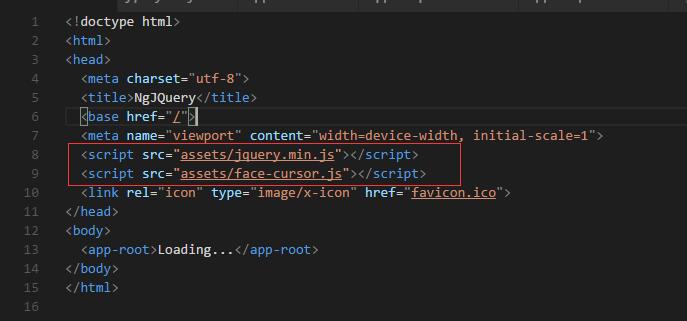
首先在index.html中引用jquery,就像我们以前做的那样

然后我们编写我们的app.component.ts
|
1
2
3
4
5
6
7
8
9
10
11
12
13
|
import
{ Component,OnInit} from '@angular/core';
declarevar$:any;
@Component({
selector:'app-root',
templateUrl:'./app.component.html',
styleUrls:
['./app.component.css']
})
export
class AppComponent implements OnInit{
ngOnInit()
{
$("#title").html("<p>this
is a string from jQuery html setting</p>");
}
}
|
首先需要使用declare生命我们的jQuery,使之成为一个可用的变量,然后,我们需要导入OnInit模块并实现,我们编写的jquery代码就在这里,问中展示了我们向id为title的标签替换内容,HTML页面是这样的
|
1
2
|
<divid="title"class="title">
</div>
|
然后,接下来的运行效果是这样的

这就意味着我们可以在Angular2中正常使用jQuery了
接下来做个简单的jQuery插件使用的例子,首先找一个我们要使用的jQuery插件
首先在index.html 中引用

然后在我们刚才的app.component.ts中的ngOnInit中写入以下初始化插件代码
|
1
2
3
4
5
|
ngOnInit()
{
$(".card").faceCursor({});
$("#title").html("<p>this
is a string from jQuery html setting</p>");
}
|
然后我们编写html
|
1
2
3
4
5
6
7
|
<divid="title"class="title">
</div>
<divclass="container">
<divclass="card">
<imgsrc="../assets/me.jpg"style="width:100%;"alt="me">
</div>
</div>
|
css
|
1
2
3
4
5
6
7
8
9
10
11
12
13
14
15
16
17
18
|
.card
{
background:#fff;
box-shadow:0.5em0
1.25em
#ccc;
border-radius:
.3em;
overflow:hidden;
max-width:20em;
height:450px;
margin:0auto;
display:block;
}
.title{
text-align:center;
}
.container
{
width:100%;
}
|
这些工作做了之后,我们运行下,就可以得到以下效果

备注:需要使用到jQuery的地方都要用declare声明以下,比如其他组件文件中。
以上就是本文的全部内容,希望对大家的学习有所帮助。
原文链接:http://www.cnblogs.com/seesharply/p/6260177.html